
Huawei Server
БесплатноНе проверенA Model Context Protocol server that provides secure, controlled access to Huawei Cloud services (ECS, OBS, GaussDB, etc.) for AI assistants, enabling cloud res

Описание
A Model Context Protocol server that provides secure, controlled access to Huawei Cloud services (ECS, OBS, GaussDB, etc.) for AI assistants, enabling cloud resource management through conversational workflows.
README
GitHub License CI PRs Welcome Last Commit Language
Huawei MCP Server is a Model Context Protocol server built on Huawei Cloud services, providing secure and controlled cloud access capabilities for large AI models. Through standardized MCP specifications, it enables AI assistants to operate Huawei Cloud resources within conversational workflows, supporting core services including ECS, OBS, GaussDB, and other widely-used cloud products.
Mcp-server catalog
Practical documents
Demo
Cline uses Huawei Cloud EIP MCP Server to create and delete EIP instances.
Running Guide
1. Dependency Installation
Install the Python environment in advance. Since Python 3.4 and 2.7.9, pip has been installed with Python as a standard component.
2. Environment variable settings
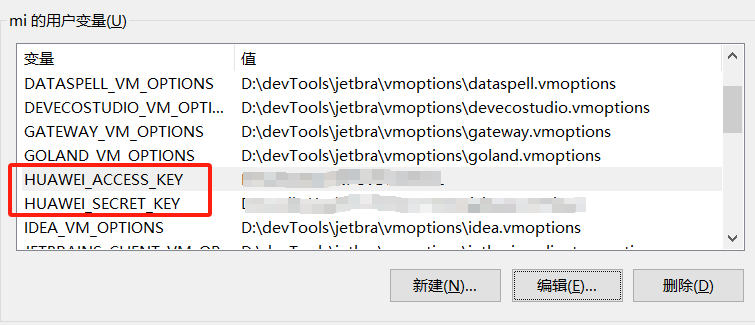
Prepare AK and SK and set them to environment variables
- ak environment variable name: HUAWEI_ACCESS_KEY
- sk environment variable name: HUAWEI_SECRET_KEY
3. Running method
Take running the mcp-server-ecs service as an example
Run with 'uv' (recommended)
# Enter the root path of the project
cd /path/to/you/mcp-server

# Start the service
uv run mcp-server-ecs
Execute uv run mcp-server-ecs -h to view the usage instructions, the configuration values of the config.yaml file in the sub-project can be overwritten by using the optional parameters in the command line
usage: mcp-server-ecs [-h] [-p PORT] [-t {http,sse,stdio}]

MCP Server

options:
  -h, --help            show this help message and exit
  -p, --port PORT       Port number
  -t, --transport {http,sse,stdio}
                        Transport of MCP Server
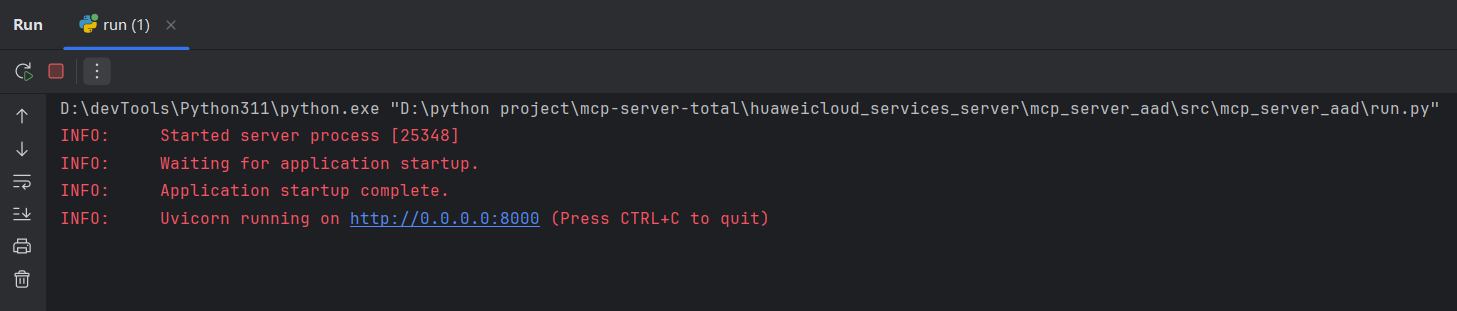
Run with python
# Enter the root path of the project
cd /path/to/you/mcp-server

# Install dependencies
pip install -e .

# Enter the specified service (mcp-server-ecs) path
cd huaweicloud_services_server/mcp_server_ecs/src/mcp_server_ecs

# Start the service
python run.py
MCP Marketplace Integration
- Cline
- Configure the mcp service to use http in cline. The json format is as follows
{
  "mcpServers": {
    "mcp_server_ecs": {
      "url": "http://localhost:8888/mcp",
      "disabled": false,
      "type": "streamableHttp",
      "autoApprove": []
    }
  }
}
Tools
| Group Name | Product Name | Product Short |
|---|---|---|
| KooGallery | Products and Orders | Product&Order |
| Networking | Elastic Load Balance | ELB |
| Virtual Private Cloud | VPC | |
| Elastic IP | EIP | |
| NAT Gateway | NAT | |
| VPC Endpoint | VPCEP | |
| Cloud Connect | CC | |
| Enterprise Router | ER | |
| Global Accelerator | GA | |
| Direct Connect | DC | |
| Virtual Private Network | VPN | |
| Migration | Server Migration Service | SMS |
| Object Storage Migration Service | OMS | |
| CloudDataMigration | CDM | |
| Containers | Cloud Container Engine | CCE |
| SoftWare Repository for Container | SWR | |
| Application Service Mesh | ASM | |
| Application Orchestration Service | AOS | |
| Cloud Container Instance | CCI | |
| AI | Optical Character Recognition | OCR |
| Face Recognition Service | FRS | |
| ModelArts | ModelArts | |
| Image | Image | |
| ImageSearch | ImageSearch | |
| Moderation | Moderation | |
| Speech Interaction Service | SIS | |
| Graph Engine Service | GES | |
| Question Answering Bot | CBS | |
| Autonomous Driving Cloud Service | Octopus | |
| CodeArts | Cloud Performance Test Service | CPTS |
| ServiceStage | ServiceStage | |
| CodeCheck | CodeCheck | |
| CodeArts Req | ProjectMan | |
| CodeHub | CodeHub | |
| CloudBuild | CloudBuild | |
| CloudTest | CloudTest | |
| CodeArts Deploy | CodeArtsDeploy | |
| CodeArts Check | CodeArtsCheck | |
| CodeArts Pipeline | CodeArtsPipeline | |
| CodeArts Build | CodeArtsBuild | |
| CodeArts Artifact | CodeArtsArtifact | |
| Cloud Application Engine | CAE | |
| Business Applications | ROMA | ROMA |
| Domain Name Service | DNS | |
| HUAWEI CLOUD Meeting | Meeting | |
| Workspace | Workspace | |
| Operation | Customer Operation Capabilities | BSSINTL |
| Internet of Things | IoT Device Access | IoTDA |
| Global SIM Link | GSL | |
| IoT Device Access Management | IoTDM | |
| Middleware | Distributed Cache Service | DCS |
| Distributed Message Service for Kafka | Kafka | |
| Cloud Service Engines | CSE | |
| Distributed Message Service for RocketMQ | RocketMQ | |
| Distributed Message Service for RabbitMQ | RabbitMQ | |
| API Gateway | APIG | |
| Application Performance Management | APM | |
| MacroVerse aPaaS | AppStage | AppStage |
| Analytics | MapReduce Service | MRS |
| Data Warehouse Service | DWS | |
| Data Lake Insight | DLI | |
| DataArts Studio | DataArtsStudio | |
| Cloud Search Service | CSS | |
| Date Ingestion Service | DIS | |
| Media Services | Media Processing Center | MPC |
| Live | Live | |
| Video On Demand | VOD | |
| Huawei Cloud Real-Time Communication | CloudRTC | |
| Management & Governance | Identity and Access Management | IAM |
| Cloud Eye | CES | |
| Log Tank Service | LTS | |
| Resource Management Service | RMS | |
| Cloud Trace Service | CTS | |
| Tag Management Service | TMS | |
| Enterprise Project Management Service | EPS | |
| Simple Message Notification | SMN | |
| Application Operations Management | AOM | |
| Organizations | Organizations | |
| Resource Access Manager | RAM | |
| Config | Config | |
| Resource Formation Service | RFS | |
| IAMAccessAnalyzer | IAMAccessAnalyzer | |
| IAM Identity Center | IdentityCenter | |
| IAM Identity Center Store | IdentityCenterStore | |
| IAM Identity Center SCIM | IdentityCenterSCIM | |
| IAM Identity Center OIDC | IdentityCenterOIDC | |
| Security Token Service | STS | |
| Cloud Operations Center | COC | |
| Resource Governance Center | RGC | |
| Developer Tools | APIExplorer | APIExplorer |
| Storage | Elastic Volume Service | EVS |
| Cloud Backup and Recovery | CBR | |
| SFSTurbo | SFSTurbo | |
| Object Storage Service | OBS | |
| Databases | Document Database Service | DDS |
| Relational Database Service | RDS | |
| TaurusDB | TaurusDB | |
| GaussDB | GaussDBforopenGauss | |
| GeminiDB | GeminiDB | |
| Data Replication Service | DRS | |
| Database and Application Migration UGO | UGO | |
| Distributed Database Middleware | DDM | |
| Data Admin Service (DAS) | DAS | |
| Compute | Elastic Cloud Server | ECS |
| Auto Scaling | AS | |
| FunctionGraph | FunctionGraph | |
| Image Management Service | IMS | |
| Bare Metal Server | BMS | |
| Dedicated Host | DeH | |
| Content Delivery & Edge Computing | Content Delivery NetWork | CDN |
| Security & Compliance | Host Security Service | HSS |
| Data Encryption Workshop KPS | KPS | |
| Cloud Secret Management Service | CSMS | |
| Data Encryption Workshop KMS | KMS | |
| Cloud Certificate Manager Service | CCM | |
| SSL Certificate Manager | SCM | |
| Anti-DDoS | Anti-DDoS | |
| Database Security Service | DBSS | |
| Web Application Firewall | WAF | |
| Data Security Center | DSC | |
| Cloud Firewall | CFW | |
| Cloud Bastion Host | CBH | |
| Edge Security | EdgeSec | |
| SecMaster | SecMaster | |
| Advanced Anti-DDoS | AAD |
Contributing
We welcome contributions from the open-source community! If you'd like to contribute to this project, please refer to the contributing guide.
Установка Huawei Server
У этого сервера нет опубликованного пакета — он собирается из исходников. Открой репозиторий и следуй инструкции в README.
▸ github.com/huaweicloud-samples/mcp-serverFAQ
Huawei Server MCP бесплатный?
Да, Huawei Server MCP бесплатный — установка в пару кликов через Unyly без оплаты.
Нужен ли API-ключ для Huawei Server?
Нет, Huawei Server работает без API-ключей и переменных окружения.
Huawei Server — hosted или self-hosted?
Self-hosted: сервер запускается локально на твоей машине командой из раздела установки.
Как установить Huawei Server в Claude Desktop, Claude Code или Cursor?
Открой Huawei Server на unyly.org, выбери вкладку своего клиента (Claude Desktop, Claude Code, Cursor) и нажми Install — конфиг сгенерируется автоматически, без правки JSON.
Похожие MCP
Fetch
Web content fetching and conversion for efficient LLM usage.
AWS KB Retrieval
Retrieval from AWS Knowledge Base using Bedrock Agent Runtime.
 автор: modelcontextprotocol
Spring AI MCP Server
Provides auto-configuration for setting up an MCP server in Spring Boot applications.
llm-analysis-assistant
A very streamlined mcp client that supports calling and monitoring stdio/sse/streamableHttp, and can also view request responses through the /logs page. It also
 автор: xuzexin-hz
Compare Huawei Server with
Не уверен что выбрать?
Найди свой стек за 60 секунд
Автор?
Embed-бейдж для README
Похожее
Все в категории ai