
Huetension
БесплатноНе проверенExtract palettes from images, generate harmonies, gradients, random palettes; Check WCAG and APCA contrast; Suggest nearest passing OkLCH lightness; Simulate co

Описание
Extract palettes from images, generate harmonies, gradients, random palettes; Check WCAG and APCA contrast; Suggest nearest passing OkLCH lightness; Simulate color-blindness; Convert and sort colors across formats (hex / RGB / HSL / OkLCH / …)
README
A color palette toolkit for designers, frontend devs, and photographers. One binary, three modes — CLI, MCP server, and Web UI — sharing a single pure-Go core.
Go Report Card Go Reference Latest release License: MIT Go Reference CI
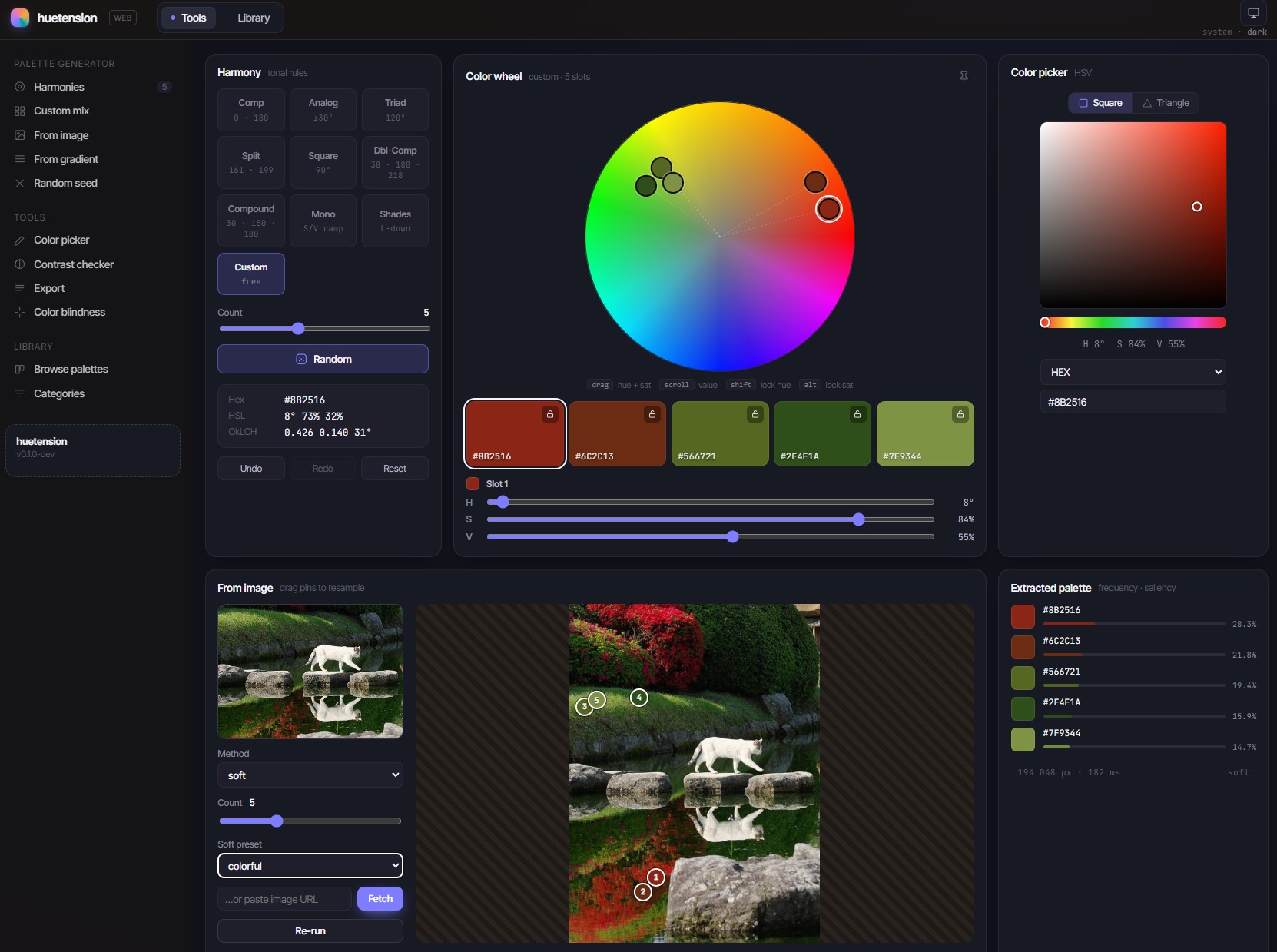
Table of Contents
- Features
- Three modes
- Install
- CLI quick reference
- MCP usage
- Web UI tour
- Configuration
- Library
- Development
- License
- Inspirations
- Acknowledgements
Features
🎨 Palette generation
- Extract from images — file path, http(s) URL,
data:URI, or stdin. Methods:soft(default, designer-friendly),softk,kmeans,okkmeans,mediancut,octree,popularity,wu,dbscan,wkmeans, with mood presets forsoft/softk. - Random palettes — deterministic when seeded, optionally driven by a harmony rule.
- Harmonies around a base color — complementary, analogous, triadic, split, tetradic, square, double-complementary, compound, monochromatic, shades.
- Gradients — two endpoints or N positioned stops, interpolated in OkLab / OkLCH / Lab / RGB / HSL with optional easing.
- Interactive color wheel (web UI) — drag handles to mix custom palettes, pin the card while editing.
🔍 Analysis
- Contrast scoring — WCAG 2.1 and APCA side-by-side. Foreground "analyse" mode (
--suggest) finds the nearest passing OkLCH lightness for a failing fg / bg pair. - Color-vision-deficiency simulation — protanopia, deuteranopia, tritanopia, achromatopsia. Live preview in the SPA.
- Image color-distribution strips by color space and distance metric (
analyze).
🛠️ Color utilities
- Convert between hex / RGB / HSL / HSV / HLS / Lab / LCH / OkLab / OkLCH / CSS named / 24-bit integer.
- Sort lists by luminance, lightness, OkLab L, hue, saturation, or frequency.
🎬 3D LUT
.cubeLUT — palette-driven, two grading methods: Smooth (RBF over OkLab) or Layered (K-NN over OkLCH).- LUT Texture PNG — the cube laid out as a 2D image, handy for OBS-style real-time color grading and other tools that accept a texture LUT.
- In-browser preview on your own image — the backend pipes the
.cubetext into ffmpeg'slut3dfilter, soffmpegmust be on the server'sPATH.
📚 Library
- Bundled curated catalogue ships in the binary.
- Save your own palettes to
library.jsonfrom the CLI, the REST API, or the MCPlibrary.savetool — they join theSavedcategory alongside the defaults.
📤 Export
- JSON, plain TXT, CSS custom properties, SCSS, LESS, Tailwind
theme.extend.colors, GIMP.gpl, GIMP.ggr(gradient), SVG, PNG, JPEG, Adobe.ase, Adobe.aco.
Three modes
CLI
huetension extract photo.jpg -k 6
huetension harmony complementary "#3498db"
huetension gradient "#ff0066" "#00bcd4" --steps 9
huetension contrast "#222" "#fff" --algo wcag21
ANSI swatches by default, JSON / CSS / SCSS / Tailwind / GIMP .gpl / PNG / .ase / .aco on demand.
MCP server
huetension mcp --transport stdio
15 default-enabled tools (color.convert, harmony.generate, image.extract, library.list, …) speaking the same JSON contract as the CLI. Drop into Claude Desktop, an editor, or any MCP client:
{
  "mcpServers": {
    "huetension": {
      "command": "huetension",
      "args": ["mcp", "--transport", "stdio"]
    }
  }
}
Web UI
huetension web # http://127.0.0.1:8080
The embedded Vue SPA — color wheel, harmonies, image extraction, contrast / blindness checks, library, palette-driven 3D LUTs. Same REST envelope as huetension --format json.
Install
go install
go install github.com/leporel/huetension/cmd/huetension@latest
Requires Go ≥ 1.26. The SPA assets are committed under web/dist/ and embedded into the binary, so this produces a fully functional Web UI without bun.
Pre-built archives
Pick the right archive from the latest release:
| OS | Arch | File |
|---|---|---|
| Linux | amd64 | huetension_<v>_linux_amd64.tar.gz |
| Linux | arm64 | huetension_<v>_linux_arm64.tar.gz |
| macOS | amd64 | huetension_<v>_darwin_amd64.tar.gz |
| macOS | arm64 | huetension_<v>_darwin_arm64.tar.gz |
| Windows | amd64 | huetension_<v>_windows_amd64.zip |
| Windows | arm64 | huetension_<v>_windows_arm64.zip |
Each archive ships the binary, LICENSE, README.md, and huetension.example.yaml. SHA-256 checksums are published next to the archives.
Docker
The release image is ghcr.io/leporel/huetension. Three common shapes:
Web UI + REST API —
docker run --rm -p 8080:8080 \
  ghcr.io/leporel/huetension:latest \
  web --address 0.0.0.0:8080
MCP over HTTP —
docker run --rm -p 7337:7337 \
  -v "$HOME/.config/huetension:/data:ro" \
  ghcr.io/leporel/huetension:latest \
  mcp --transport http --address 0.0.0.0:7337 \
      --auth-token "$TOKEN" --data-dir /data
Web + MCP on the same port (serve) —
docker run --rm -p 8080:8080 \
  -v "$HOME/.config/huetension:/data:ro" \
  ghcr.io/leporel/huetension:latest \
  serve --address 0.0.0.0:8080 \
        --auth-token "$TOKEN" --data-dir /data
The SPA is served at /, the REST API mounts under /api/v1, and the MCP HTTP transport mounts under /mcp. Add --mcp-transport http,sse to also expose SSE at /mcp/sse.
For MCP-over-stdio inside Docker (Claude Desktop and similar), see docs/mcp.md.
From source
git clone https://github.com/leporel/huetension
cd huetension/web && bun install --frozen-lockfile && bun run build
cd .. && go build ./cmd/huetension
Build order matters: the SPA assets are embedded, so bun run build must run before go build.
CLI quick reference
| Command | What it does |
|---|---|
extract <source> |
Pull a palette from an image (file / URL / data: / stdin). |
analyze <source> |
Image color-distribution strips by color space + distance metric. |
harmony <type> <color> |
Generate a harmony around a base color. |
gradient |
Two-endpoint or N-stop gradients with easing. |
contrast |
WCAG 2.1 / APCA contrast scores. |
blindness |
Simulate protanopia / deuteranopia / tritanopia / achromatopsia. |
convert / sort |
Color-list utilities; read stdin when no args. |
random |
Generate a random palette, optionally harmonised. |
css / tailwind |
Export-only conveniences. |
lut |
Palette-driven 3D LUT (.cube) — RBF or K-NN grading. |
library / library add |
Manage the on-disk palette catalogue. |
mcp / web / serve |
Long-running servers (see below). |
version / completion |
Print version, generate shell completions. |
Full reference in docs/cli.md. Every command supports --help.
MCP usage
huetension mcp runs the MCP server over stdio (default; for Claude Desktop / editors), http (recommended for remote use), or sse (legacy). The same mcp: section of config.yaml controls which tools are exposed, and is also honoured by huetension serve.
Tool catalogue, transport details, image-sandbox flags, and container configs live in docs/mcp.md.
Web UI tour
Tools page (the default route):
- Color wheel — drag handles to mix custom palettes; pin the card to keep it visible while scrolling.
- Harmonies / Random / Gradient — generate around a base color or a seed.
- From image — drag-drop or paste an image; choose extract method + size.
- Contrast checker — WCAG / APCA side-by-side.
- Color blindness — preview palettes under each CVD type.
- Export — JSON / CSS / SCSS / LESS / Tailwind / GIMP
.gpl/ PNG / SVG /.ase/.aco. Includes a palette-driven 3D LUT tab with in-browser grading preview.
Library page (/library):
- Browse the bundled curated catalogue and any palettes you've saved.
Configuration
config.yaml lives in the data directory — ~/.config/huetension/ on Linux/macOS, %APPDATA%\huetension\ on Windows. Override with --data-dir or HUETENSION_DATA_DIR.
# Blacklist — start from the default-enabled set, remove specific tools.
mcp:
  disable:
    - image.extract
    - library.save
# Whitelist — expose ONLY these tools; everything else is off.
mcp:
  enable:
    - color.convert
    - harmony.generate
    - contrast.check
Precedence: flag > HUETENSION_* env > config.yaml > built-in default.
Full reference in docs/config.md; annotated example at huetension.example.yaml.
Library
The data directory also holds library.json. Bundled palettes ship with the binary; saved palettes (via huetension library add, POST /api/v1/library, or the MCP library.save tool) are appended under the Saved category.
{
  "version": 1,
  "palettes": [
    {
      "id": "brand-minimal",
      "name": "Brand minimal",
      "source": "user",
      "categories": ["Saved"],
      "colors": [
        { "hex": "#111827", "name": "Ink" },
        { "hex": "#F9FAFB", "name": "Paper" },
        { "hex": "#2563EB", "name": "Accent" }
      ]
    }
  ]
}
Development
Repo layout:
cmd/huetension/— CLI entrypoint, command tree.internal/color,internal/palette,internal/harmony,internal/gradient,internal/contrast,internal/blindness,internal/extract,internal/exporter,internal/imageio,internal/cliutil,internal/lut— pure-Go core.internal/web/— REST API + embedded SPA.internal/mcp/— MCP server + tool registry.internal/serve/— combined SPA + REST + MCP listener.web/— Vue 3 SPA source; built bundle committed toweb/dist/.docs/— long-form documentation.
Common tasks:
go test ./... -short          # fast tests (skips heavy extract sidecar)
go test ./...                 # full suite
cd web && bun run dev         # SPA dev server with HMR
huetension web --dev http://localhost:5173    # Go API in front of Vite
Release process: docs/RELEASING.md.
Extract testdata guidance: internal/extract/testdata/README.md.
License
MIT — see LICENSE.
Inspirations
Built after exploring these projects:
- qTipTip/Pylette — a Python library for extracting color palettes from supplied images.
- lazymac2x/color-palette-api — harmonies, gradients, WCAG contrast, CSS/Tailwind. REST API.
Acknowledgements
- modelcontextprotocol/go-sdk — MCP transport machinery.
- lucasb-eyer/go-colorful — color space conversions and distance metrics.
- anthonynsimon/bild — image decoding and processing helpers.
- charm.land/lipgloss — terminal styling for the CLI's ANSI swatches.
- spf13/cobra + spf13/viper — CLI / configuration plumbing.
Установка Huetension
У этого сервера нет опубликованного пакета — он собирается из исходников. Открой репозиторий и следуй инструкции в README.
▸ github.com/leporel/huetensionFAQ
Huetension MCP бесплатный?
Да, Huetension MCP бесплатный — установка в пару кликов через Unyly без оплаты.
Нужен ли API-ключ для Huetension?
Нет, Huetension работает без API-ключей и переменных окружения.
Huetension — hosted или self-hosted?
Self-hosted: сервер запускается локально на твоей машине командой из раздела установки.
Как установить Huetension в Claude Desktop, Claude Code или Cursor?
Открой Huetension на unyly.org, выбери вкладку своего клиента (Claude Desktop, Claude Code, Cursor) и нажми Install — конфиг сгенерируется автоматически, без правки JSON.
Похожие MCP
GitHub
PRs, issues, code search, CI status
 автор: GitHub
Filesystem
Secure file operations with configurable access controls.
Memory
Knowledge graph-based persistent memory system.
Template MCP Server
A CLI tool to create a new Model Context Protocol server project with TypeScript support, dual transport options, and an extensible structure
 автор: mcpdotdirect
Compare Huetension with
Не уверен что выбрать?
Найди свой стек за 60 секунд
Автор?
Embed-бейдж для README
Похожее
Все в категории development