
IDAssistMCP
БесплатноНе проверенEnables LLM clients like Claude to interact with IDA Pro for binary analysis, decompilation, cross-references, patching, and more via 41 MCP tools, 8 resources,

Описание
Enables LLM clients like Claude to interact with IDA Pro for binary analysis, decompilation, cross-references, patching, and more via 41 MCP tools, 8 resources, and 7 guided prompts.
README
Standalone MCP (Model Context Protocol) server plugin for IDA Pro 9.x that exposes IDA's analysis capabilities to LLM clients like Claude Desktop.
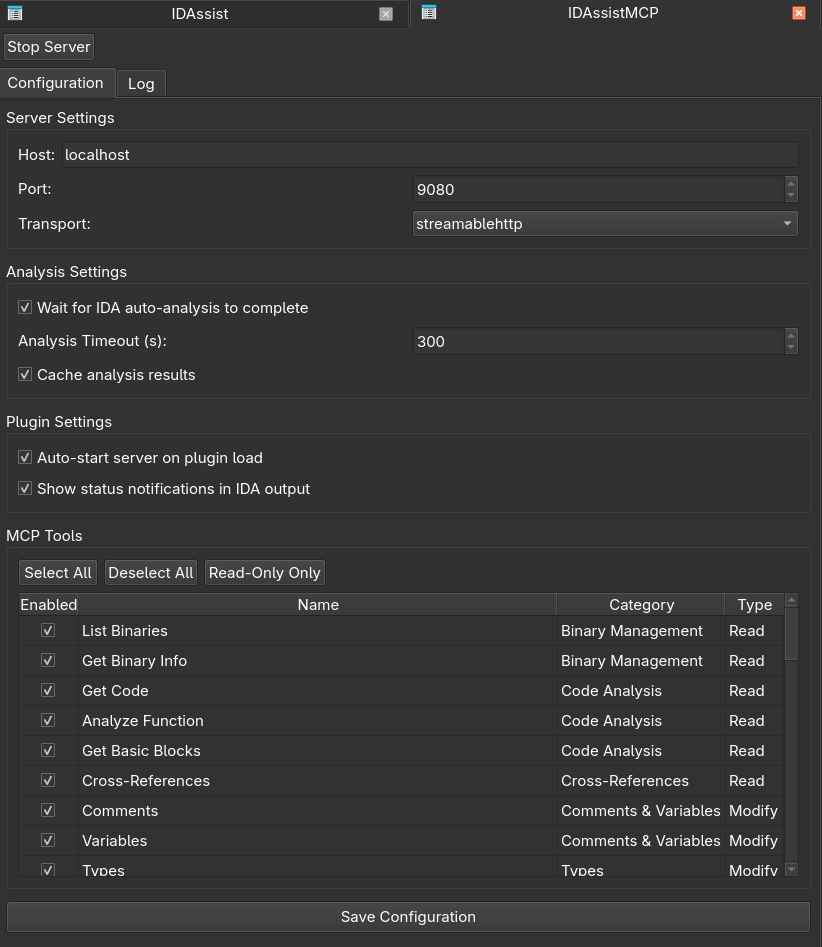
Features
- 41 MCP tools covering binary analysis, decompilation, cross-references, symbol management, type system, navigation, patching, export, and more
- 6 consolidated tools with
action/format/directionparameters for comments, variables, types, xrefs, bookmarks, and code - 8 MCP resources for browsable binary metadata (triage, functions, imports, exports, strings, info, segments, sections)
- 7 guided prompts for common reverse engineering workflows (function analysis, vulnerability identification, documentation, data flow tracing, function comparison, struct recovery, network protocol analysis)
- SSE and Streamable HTTP transports via Hypercorn ASGI server
- Thread-safe IDB modifications via
execute_on_main_thread()wrapper - LRU analysis cache for expensive operations like decompilation
- Async task manager for long-running operations
- Pydantic configuration with environment variable support (
IDASSISTMCP_prefix)
Installation
Prerequisites
- IDA Pro 9.x with Python 3.10+
- Hex-Rays decompiler (optional, for decompilation tools)
Option 1: IDA Plugin Manager (recommended)
hcli plugin install idassistmcp
This automatically installs the plugin and its Python dependencies.
Option 2: Manual install (from release tarball)
Download the latest release zip from GitHub Releases and extract it into your IDA plugins directory:
Linux / macOS:
unzip IDAssistMCP-*.zip -d ~/.idapro/plugins/
Windows:
Extract the zip into %APPDATA%\Hex-Rays\IDA Pro\plugins\.
Then install dependencies using IDA's bundled Python (not your system Python):
Linux / macOS:
<IDA_INSTALL_DIR>/python3/bin/pip3 install -r ~/.idapro/plugins/IDAssistMCP/requirements.txt
Windows:
"<IDA_INSTALL_DIR>\python3\python.exe" -m pip install -r "%APPDATA%\Hex-Rays\IDA Pro\plugins\IDAssistMCP\requirements.txt"
Replace
<IDA_INSTALL_DIR>with your IDA Pro installation path.Tip: You can also use the
IDAUSRenvironment variable to specify a custom plugins directory.
Usage
Starting the Server
- Open a binary in IDA Pro
- Press Ctrl+Shift+M or go to Edit > Plugins > IDAssistMCP
- The MCP server URL will be printed to IDA's output window
- Press Ctrl+Shift+M again to stop the server
Claude Desktop Configuration
Add to your Claude Desktop claude_desktop_config.json:
{
  "mcpServers": {
    "idassistmcp": {
      "url": "http://localhost:9080/mcp"
    }
  }
}
Environment Variables
Configure via environment variables with the IDASSISTMCP_ prefix:
| Variable | Default | Description |
|---|---|---|
IDASSISTMCP_SERVER__HOST |
localhost |
Server bind address |
IDASSISTMCP_SERVER__PORT |
9080 |
Server port |
IDASSISTMCP_SERVER__TRANSPORT |
streamablehttp |
Transport type (sse or streamablehttp) |
IDASSISTMCP_DEBUG |
false |
Enable debug mode |
IDASSISTMCP_LOG_LEVEL |
INFO |
Log level |
Tools Reference
Binary Management (2)
| Tool | Description |
|---|---|
list_binaries |
List the currently loaded binary |
get_binary_info |
Detailed binary metadata (arch, hashes, segments) |
Code Analysis (4)
| Tool | Description |
|---|---|
get_code |
Get function code — format: 'decompile' (pseudo-C) or 'disasm' (assembly) |
analyze_function |
Comprehensive analysis: metadata, CFG, callers/callees, decompilation |
get_basic_blocks |
CFG basic blocks with successors/predecessors |
get_function_stack_layout |
Stack frame layout (locals, args, saved regs) |
Cross-References (1 consolidated)
| Tool | Actions | Description |
|---|---|---|
xrefs |
direction: to/from/both, include_calls: bool |
Xrefs and optional callers/callees for an address |
Comments (1 consolidated)
| Tool | Actions | Description |
|---|---|---|
comments |
action: get, set, list, remove |
Manage comments (regular, repeatable, function) |
Variables (1 consolidated)
| Tool | Actions | Description |
|---|---|---|
variables |
action: list, rename |
List locals, or rename local/global variables with scope: auto, local, global |
Types (2 — 1 consolidated + 1 standalone)
| Tool | Actions / Description |
|---|---|
types |
action: list, set, create_struct, create_enum — manage IDB types |
get_classes |
List struct/class types from type library |
Function Discovery (5)
| Tool | Description |
|---|---|
get_functions |
All functions with filtering and pagination |
search_functions_by_name |
Search by name pattern and size filters |
get_function_by_name |
Exact name lookup |
get_function_by_address |
Address lookup |
get_function_statistics |
Aggregate statistics (counts, sizes, top-10) |
Symbol Management (2)
| Tool | Description |
|---|---|
rename_symbol |
Rename any symbol (function or data) |
batch_rename |
Batch rename multiple symbols |
Binary Info (5)
| Tool | Description |
|---|---|
get_imports |
Import table grouped by module |
get_exports |
Export table |
get_strings |
String table with pagination |
get_segments |
Memory segments with permissions |
get_entry_points |
All binary entry points |
Data Analysis (6)
| Tool | Description |
|---|---|
read_memory |
Read raw bytes at address |
get_data_at |
Get typed data at address |
search_bytes |
Binary byte pattern search |
search_strings |
String search with pagination |
create_data_var |
Define data variable at address (byte/word/dword/qword/float/ascii/C type) |
get_data_vars |
List defined data variables (non-code items) |
Patching (3)
| Tool | Description |
|---|---|
patch_bytes |
Patch raw bytes in IDB |
assemble_code |
Assemble instruction text at an address and optionally patch it |
export_program |
Export the patched binary or IDA database to disk |
Navigation (4)
| Tool | Description |
|---|---|
navigate_to |
Move IDA cursor to address |
bookmarks |
Consolidated bookmark management - actions: list, set, remove |
get_current_address |
Get address and context at cursor position |
get_current_function |
Get function info at cursor position |
Task Management (4)
| Tool | Description |
|---|---|
start_task |
Start async background task |
get_task_status |
Check task progress |
cancel_task |
Cancel running task |
list_tasks |
List all async tasks |
Project Structure
IDAssistMCP/
├── idassistmcp_plugin.py              # IDA plugin_t entry point
├── requirements.txt
├── README.md
└── src/
    └── idassist_mcp/
        ├── __init__.py
        ├── server.py                  # FastMCP server + transport
        ├── context.py                 # Single-binary IDA context
        ├── tools.py                   # 41 MCP tools (IDA API)
        ├── resources.py               # 8 MCP resources
        ├── prompts.py                 # 7 guided workflow prompts
        ├── config.py                  # Pydantic settings
        ├── cache.py                   # LRU analysis cache
        ├── tasks.py                   # Async task manager
        ├── logging.py                 # IDA logging wrapper
        ├── utils.py                   # IDA-specific utilities
        └── ui/
            └── tool_registry.py       # Tool catalog for UI
License
See LICENSE file for details.
Установка IDAssistMCP
У этого сервера нет опубликованного пакета — он собирается из исходников. Открой репозиторий и следуй инструкции в README.
▸ github.com/symgraph/IDAssistMCPFAQ
IDAssistMCP MCP бесплатный?
Да, IDAssistMCP MCP бесплатный — установка в пару кликов через Unyly без оплаты.
Нужен ли API-ключ для IDAssistMCP?
Нет, IDAssistMCP работает без API-ключей и переменных окружения.
IDAssistMCP — hosted или self-hosted?
Self-hosted: сервер запускается локально на твоей машине командой из раздела установки.
Как установить IDAssistMCP в Claude Desktop, Claude Code или Cursor?
Открой IDAssistMCP на unyly.org, выбери вкладку своего клиента (Claude Desktop, Claude Code, Cursor) и нажми Install — конфиг сгенерируется автоматически, без правки JSON.
Похожие MCP
Fetch
Web content fetching and conversion for efficient LLM usage.
AWS KB Retrieval
Retrieval from AWS Knowledge Base using Bedrock Agent Runtime.
 автор: modelcontextprotocol
Spring AI MCP Server
Provides auto-configuration for setting up an MCP server in Spring Boot applications.
llm-analysis-assistant
A very streamlined mcp client that supports calling and monitoring stdio/sse/streamableHttp, and can also view request responses through the /logs page. It also
 автор: xuzexin-hz
Compare IDAssistMCP with
Не уверен что выбрать?
Найди свой стек за 60 секунд
Автор?
Embed-бейдж для README
Похожее
Все в категории ai