
Iflow Mcp BigGo
БесплатноНе проверенA Model Context Protocol (MCP) server that provides product search, price history tracking, and specification search capabilities.

Описание
A Model Context Protocol (MCP) server that provides product search, price history tracking, and specification search capabilities.
README


Introduction
BigGo MCP Server utilizes APIs from BigGo, a professional price comparison website.
Features
Supports
stdioandSSEtransports
- Product Discovery: Search for products across multiple e-commerce platforms (Amazon, Aliexpress, Ebay, Taobao, Shopee ... etc.)
- Price History Tracking: Track product price history by supplying product url or related terms.
- Spec Comparison [Disabled on versions >= v0.1.28]: Compare and find products based on their specifications, from basic infos to more complex technical specs.
Installation
Prerequisites
- Python >= 3.10
- uvx package manager ( Included with uv )
- BigGo Certification (
client_idandclient_secret) for specification search.
How to obtain BigGo certification?
- Register a BigGo account if you don't have one.
- Go to BigGo Certification Page
- Click "Generate certification" button
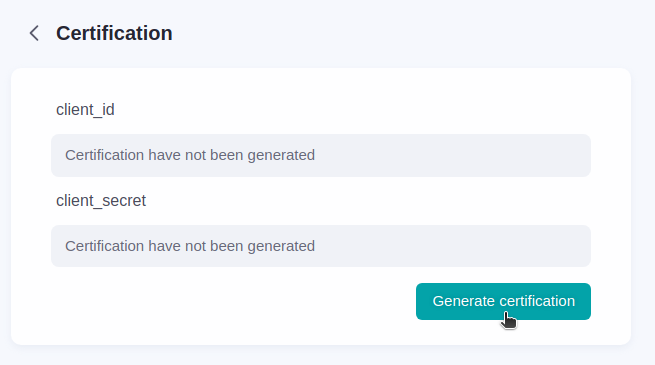
- Copy the
client_idandclient_secret - Use them in the MCP Server configuration (
BIGGO_MCP_SERVER_CLIENT_IDandBIGGO_MCP_SERVER_CLIENT_SECRET)
Installation Config
{
  "mcpServers": {
    "biggo-mcp-server": {
      "command": "uvx",
      "args": [ "BigGo-MCP-Server@latest"],
      "env": {
        "BIGGO_MCP_SERVER_CLIENT_ID": "CLIENT_ID",
        "BIGGO_MCP_SERVER_CLIENT_SECRET": "CLIENT_SECRET",
        "BIGGO_MCP_SERVER_REGION": "REGION"
      }
    }
  }
}
For specific version use
BigGo-MCP-Server@VERSION, ex:[email protected]
Environment Variables
| Variable | Description | Default | Choices |
|---|---|---|---|
BIGGO_MCP_SERVER_CLIENT_ID |
Client ID | None | Required for specification search |
BIGGO_MCP_SERVER_CLIENT_SECRET |
Client Secret | None | Required for specification search |
BIGGO_MCP_SERVER_REGION |
Region for product search | TW | US, TW, JP, HK, SG, MY, IN, PH, TH, VN, ID |
BIGGO_MCP_SERVER_SSE_PORT |
Port for SSE server | 9876 | Any available port number |
BIGGO_MCP_SERVER_SERVER_TYPE |
Server transport type | stdio | stdio, sse |
Default SSE URL: http://localhost:9876/sse
Available Tools
product_search: Product search with BigGo search apiprice_history_graph: Link that visualizes product price historyprice_history_with_history_id: Uses history IDs from product search resultsprice_history_with_url: Tracks price history using product URLsspec_indexes: Lists available Elasticsearch indexes for product specificationsspec_mapping: Shows Elasticsearch index mapping with example documentsspec_search: Query product specifications from Elasticsearchget_current_region: Get the current region
FAQ
How to trigger tool usage?
For Product Discovery related:
Look for Nike running shoes
For Price History Tracking related:
Show me the price history of this product: https://some-product-url
For Spec Comparison related:
Find me phones with 16GB RAM and 1TB storage
Please show me diving watches that can withstand the most water pressure
Build
See build.md for more details.
License
This project is licensed under the MIT License. See the LICENSE file for details.
Установка Iflow Mcp BigGo
У этого сервера нет опубликованного пакета — он собирается из исходников. Открой репозиторий и следуй инструкции в README.
▸ github.com/Funmula-Corp/BigGo-MCP-ServerFAQ
Iflow Mcp BigGo MCP бесплатный?
Да, Iflow Mcp BigGo MCP бесплатный — установка в пару кликов через Unyly без оплаты.
Нужен ли API-ключ для Iflow Mcp BigGo?
Нет, Iflow Mcp BigGo работает без API-ключей и переменных окружения.
Iflow Mcp BigGo — hosted или self-hosted?
Self-hosted: сервер запускается локально на твоей машине командой из раздела установки.
Как установить Iflow Mcp BigGo в Claude Desktop, Claude Code или Cursor?
Открой Iflow Mcp BigGo на unyly.org, выбери вкладку своего клиента (Claude Desktop, Claude Code, Cursor) и нажми Install — конфиг сгенерируется автоматически, без правки JSON.
Похожие MCP
GitHub
PRs, issues, code search, CI status
 автор: GitHub
Filesystem
Secure file operations with configurable access controls.
Memory
Knowledge graph-based persistent memory system.
Template MCP Server
A CLI tool to create a new Model Context Protocol server project with TypeScript support, dual transport options, and an extensible structure
 автор: mcpdotdirect
Compare Iflow Mcp BigGo with
Не уверен что выбрать?
Найди свой стек за 60 секунд
Автор?
Embed-бейдж для README
Похожее
Все в категории development