loading…
/ru
Весь каталог
1.
2.
3.
4.
5.
6.
7.
Image Edit RMCP
БесплатноНе проверенImage Edit RMCP is a powerful Model Context Protocol service that provides OpenAI-like image editing capabilities for text-based models. This Rust-based service

Описание
Image Edit RMCP is a powerful Model Context Protocol service that provides OpenAI-like image editing capabilities for text-based models. This Rust-based service enables traditional language models to "see" and process images through comprehensive visual understanding tools. The service offers multi
README
一、项目介绍
- 对标 OpenAI Web 的图像编辑功能:提供一个类似于 OpenAI 图像编辑功能的 MCP(Model Context Protocol)服务,支持多种图像处理操作
- 让纯文本模型也能"看见图片":通过图像识别和描述功能,使传统语言模型能够理解和处理图像内容
二、功能介绍
图像处理功能:
- 图像内容识别:使用 Qwen3-VL 模型分析图像内容并生成描述
- 图像裁剪:按百分比坐标裁剪图像
- 图像旋转:支持 90°左旋、90°右旋和 180°翻转
- 图像基础信息获取:获取图像尺寸、格式、大小等信息
- 图像 OCR:从图像中提取文字内容
- AI 图像生成:基于文本描述生成图像
- AI 图像编辑:基于文本指令编辑现有图像
简单图床:内置图像上传和存储功能,支持通过 URL 访问处理后的图像
秘钥生成:提供 API 密钥生成和管理界面
三、体验地址
- MCP 连接地址:
https://image.cd.actrue.cn/kB7XMqsX31s90JPV/mcp(httpstream) - 图床地址:
https://image.cd.actrue.cn/kB7XMqsX31s90JPV/upload - 秘钥生成地址:
https://image.cd.actrue.cn/secret
四、使用教程
CherryStudio 集成
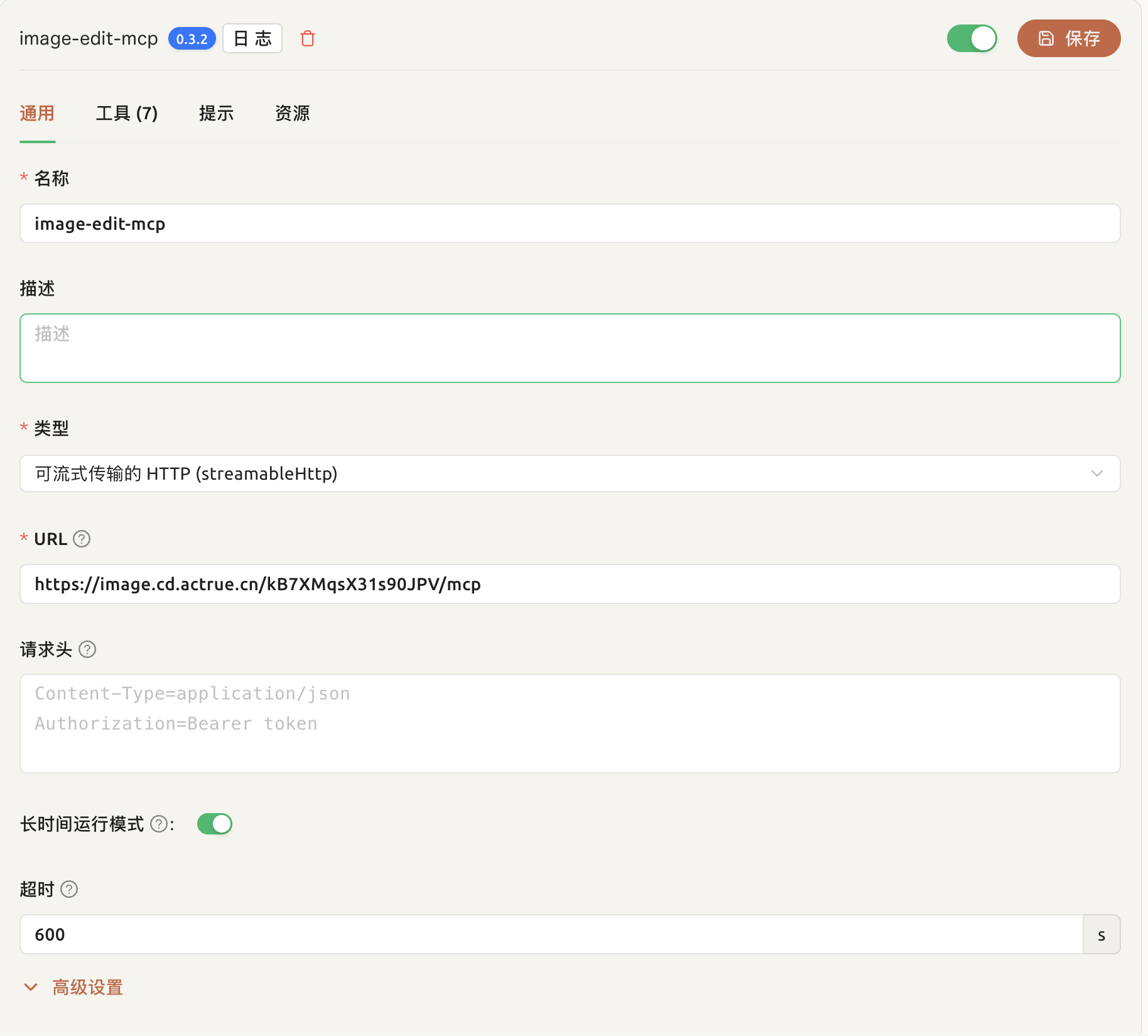
特别注意:需要开启长时间运行模式。AI 生成图像功能耗时较长,建议在使用时保持耐心。
最佳实践
- 将待处理的图片通过图床上传并且获得url
- 将待处理的图片url通过prompt传递给模型
图像内容识别
提示词:
https://muse-ai.oss-cn-hangzhou.aliyuncs.com/img/fd7409815bb94bddba84191e21a803a2.png
查看这张图片
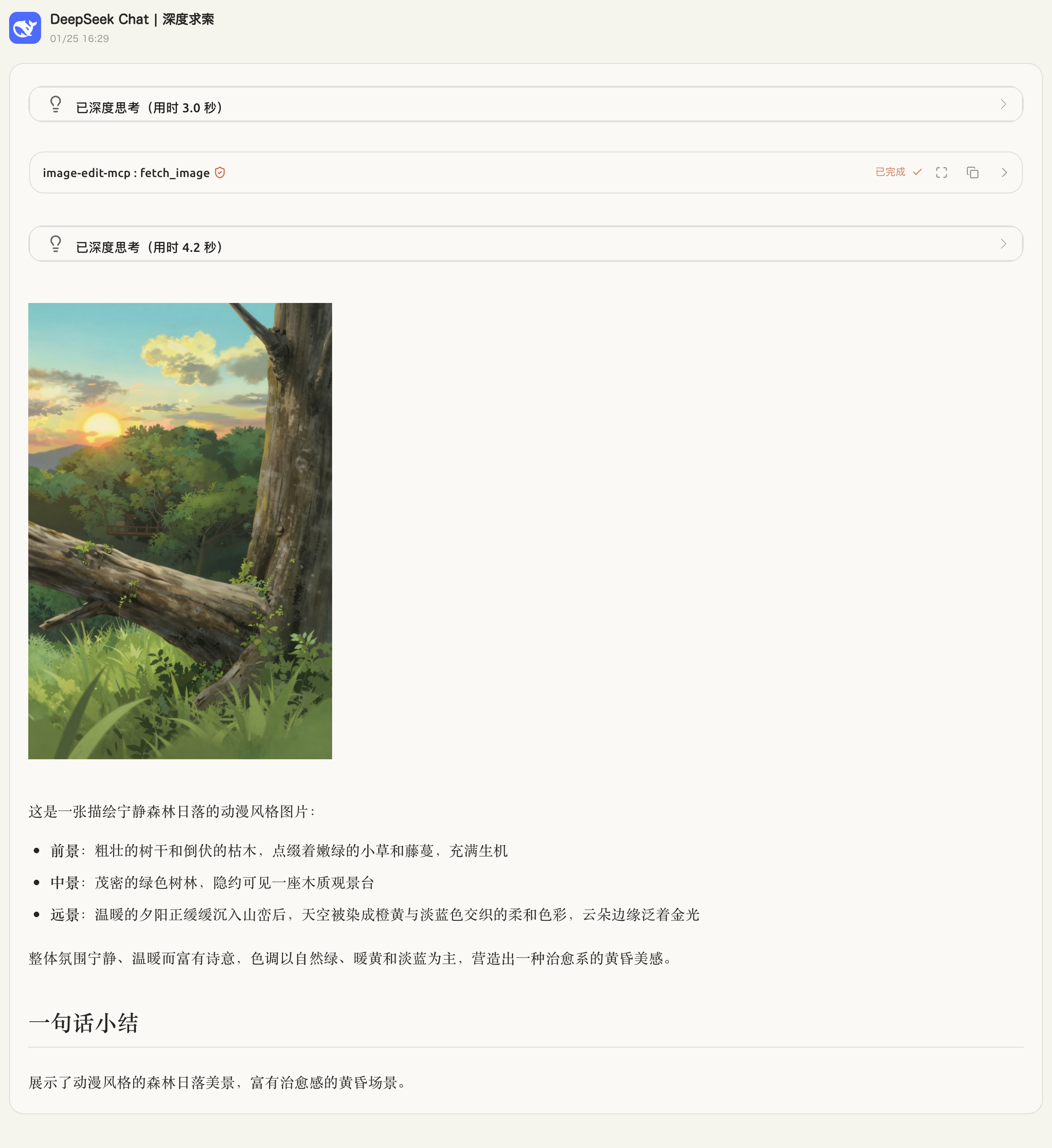
图像内容裁剪
提示词:
https://muse-ai.oss-cn-hangzhou.aliyuncs.com/img/fd7409815bb94bddba84191e21a803a2.png
裁剪出图中的太阳
裁剪完成后展示出原图和裁剪结果
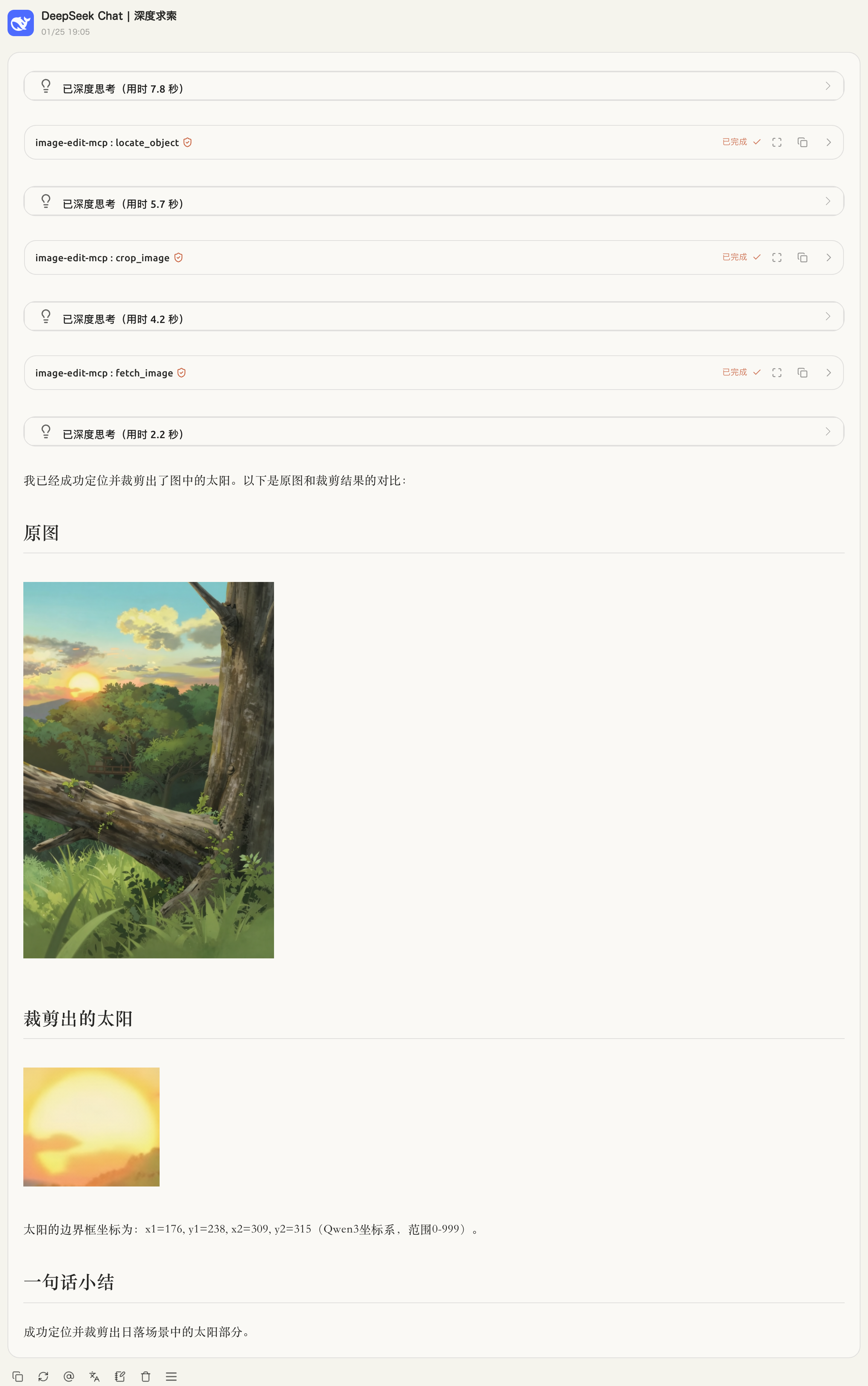
图像文字提取
提示词:
https://qianwen-res.oss-cn-beijing.aliyuncs.com/Qwen-Image/image2512/arena.png#center
识别图中文字
并且展示图片
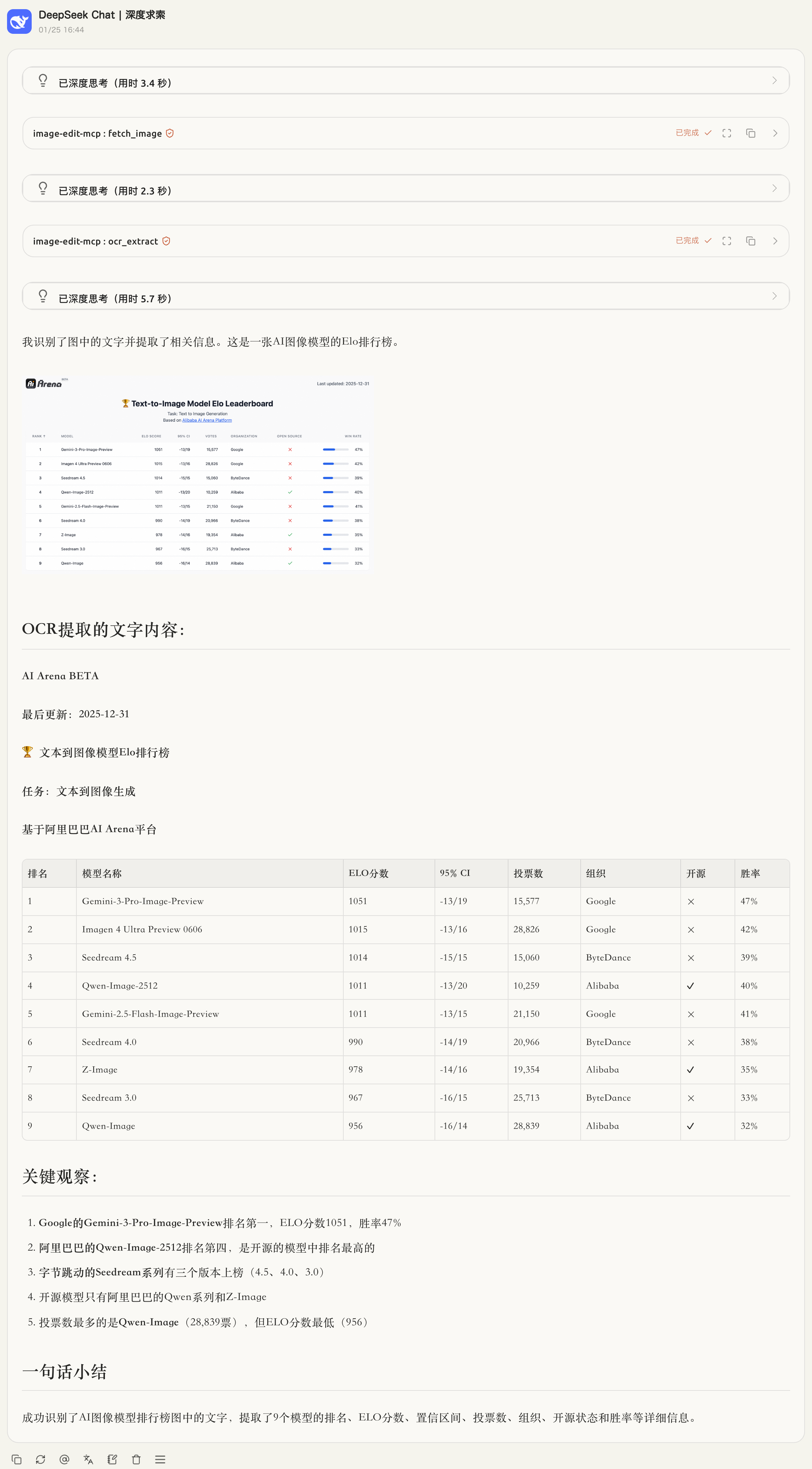
五、部署方式
环境要求
- Rust 1.76 或更高版本
- Docker(可选,用于容器化部署)
- ModelScope API 密钥(用于 AI 功能)
Cargo 部署(推荐)
1. Rust 安装
# 使用 rustup 安装 Rust
curl --proto '=https' --tlsv1.2 -sSf https://sh.rustup.rs | sh

# 或从系统包管理器安装
# macOS: brew install rust
# Ubuntu/Debian: sudo apt install rustc cargo
2. 配置环境变量
复制环境变量模板并配置您的 API 密钥:
cp .env.example .env
编辑 .env 文件:
# ModelScope API 密钥(必填)
MODELSCOPE_API_KEY=your_api_key_here

# 服务器端口
MCP_PORT=3000

# 安全密钥(用于图床上传)
SECRET_KEY=your_secret_key_here

# 缓存目录
CACHE_DIR=~/.cache/image-edit-rmcp

# 缓存 URL(用于生成公开访问链接)
CACHE_URL=http://localhost:3000
3. 项目启动
# 克隆项目(如果尚未克隆)
# git clone <repository-url>
# cd image-edit-rmcp

# 安装依赖并构建
cargo build --release

# 运行服务
cargo run --release
服务将在 http://localhost:3000 启动。
使用http://localhost:3000/{SECRET_KEY}/mcp 访问mcp服务
六、技术细节
工具介绍
1. fetch_image - 从 URL 获取图像
功能:从指定 URL 下载图像,分析图像内容,并生成描述。
输入参数:
url(string): 图像 URL(必需)focus(string, 可选): 需要特别关注的内容
输出:
- 图像 URL
- 图像名称
- MIME 类型
- 图像描述文本
2. rotate_image - 旋转图像
功能:按指定方向旋转图像。
输入参数:
url(string): 图像 URL(必需)direction(enum): 旋转方向,可选值:Right90: 顺时针旋转 90°Left90: 逆时针旋转 90°Flip180: 旋转 180°
输出:
- 旋转后的图像 URL(PNG 格式)
3. crop_image - 裁剪图像
功能:按百分比坐标裁剪图像。
输入参数:
url(string): 图像 URL(必需)left(float, 可选): 左侧百分比(0-100),默认 0top(float, 可选): 顶部百分比(0-100),默认 0right(float, 可选): 右侧百分比(0-100),默认 100bottom(float, 可选): 底部百分比(0-100),默认 100
输出:
- 裁剪后的图像 URL(PNG 格式)
4. get_image_info - 获取图像信息
功能:获取图像的基本信息。
输入参数:
url(string): 图像 URL(必需)
输出:
width: 图像宽度(像素)height: 图像高度(像素)total_pixels: 总像素数mime_type: MIME 类型size: 文件大小(字节)aspect_ratio: 宽高比(可选)
5. ocr_extract - OCR 文字提取
功能:从图像中提取文字内容。
输入参数:
image_url(string): 图像 URL(必需)
输出:
- 提取的文本内容
6. generate_image - AI 生成图像
功能:基于文本描述生成图像。
输入参数:
prompt(string): 图像描述(必需)negative_prompt(string, 可选): 不希望出现的内容aspect_ratio(string, 可选): 宽高比,可选值:1:1、16:9、9:16、4:3、3:4、3:2、2:3,默认1:1resolution(string, 可选): 分辨率,可选值:1k、2k、4k,默认1ksteps(u32, 可选): 采样步数
输出:
- 生成的图像 URL
7. edit_image - AI 编辑图像
功能:基于文本指令编辑现有图像。
输入参数:
image_url(string): 待编辑图像 URL(必需)prompt(string): 编辑指令(必需)size(string, 可选): 输出图像尺寸steps(u32, 可选): 采样步数
输出:
- 编辑后的图像 URL
工具的实现方式
技术栈
- 后端框架:Rust + Axum + RMCP
- 图像处理:
image库(支持 PNG、JPEG、GIF、BMP、WebP) - AI 集成:ModelScope API(Qwen3-VL、Z-Image-Turbo、Qwen-Image-Edit)
- 缓存系统:本地文件缓存,支持 HTTP 访问
- Web 界面:Axum 静态文件服务 + HTML 模板
核心实现原理
图像处理流程:
- 接收 HTTP URL 输入
- 下载图像到内存
- 使用
image库进行解码和处理(旋转、裁剪) - 编码为 PNG 格式输出
- 缓存处理结果到本地文件系统
AI 功能集成:
- 图像识别:调用 ModelScope Qwen3-VL 模型分析图像内容
- OCR 提取:使用 Qwen3-VL 模型提取图像中的文字
- 图像生成:使用 Z-Image-Turbo 模型基于文本生成图像
- 图像编辑:使用 Qwen-Image-Edit 模型基于指令编辑图像
缓存机制:
- 基于 URL 和参数计算哈希值
- 将处理结果存储到本地缓存目录
- 通过 HTTP 服务提供缓存文件的公开访问
- 支持元数据(图像信息、描述等)存储
MCP 协议集成:
- 实现 RMCP 协议的 ServerHandler
- 提供标准的工具调用接口
- 支持 httpstream 传输协议
依赖库
主要依赖(见 Cargo.toml):
rmcp: MCP 协议实现axum: Web 框架image: 图像处理reqwest: HTTP 客户端serde: JSON 序列化tokio: 异步运行时
Как установить
Выполни в терминале:
claude mcp add image-edit-rmcp -- npx 


