
Image To Base64
БесплатноНе проверенConverts local images or remote image URLs to Base64 format via the MCP protocol, enabling AI assistants to process images.

Описание
Converts local images or remote image URLs to Base64 format via the MCP protocol, enabling AI assistants to process images.
README
A Model Context Protocol (MCP) based image to Base64 server designed for Cursor to actually "see" and process images.
🌟 Features
- 🖼️ Image to Base64: Convert local images or remote image URLs to Base64 format
- 🌐 Remote URL Support: Automatically download and process web images
- 📋 Multi-format Support: Support PNG, JPEG, GIF, WebP, SVG and other image formats
- ⚡ High Performance: Use Sharp library for efficient image processing and optimization
- 🔗 MCP Protocol: Standardized AI tool interface for seamless integration with AI assistants
- 🎯 Auto Optimization: Intelligently convert to JPEG format to reduce file size
- 📦 NPX Support: Support running directly through npx without installation
📦 Installation and Usage
Using with Cursor
Add to your Cursor MCP configuration file:
{
  "mcpServers": {
    "image-to-base64": {
      "command": "npx",
      "args": ["@code-tinker/mcp-image-to-base64"]
    }
  }
}
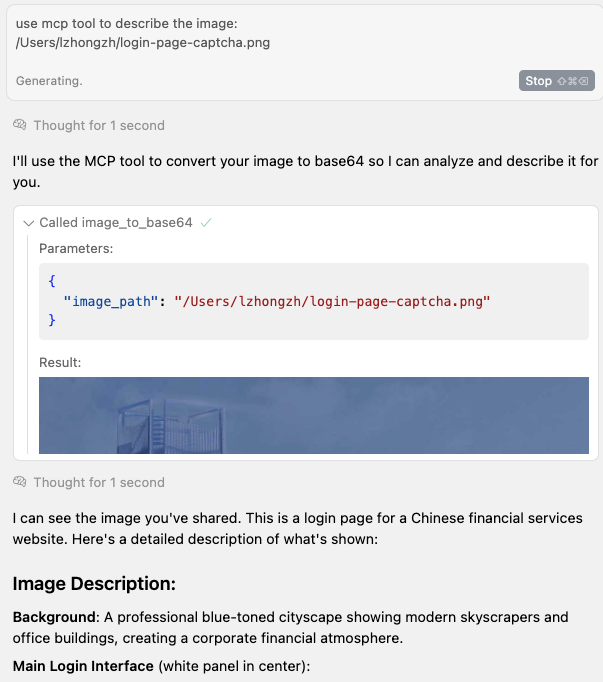
use case
Установка Image To Base64
У этого сервера нет опубликованного пакета — он собирается из исходников. Открой репозиторий и следуй инструкции в README.
▸ github.com/code-tinker/image2base64-mcpFAQ
Image To Base64 MCP бесплатный?
Да, Image To Base64 MCP бесплатный — установка в пару кликов через Unyly без оплаты.
Нужен ли API-ключ для Image To Base64?
Нет, Image To Base64 работает без API-ключей и переменных окружения.
Image To Base64 — hosted или self-hosted?
Self-hosted: сервер запускается локально на твоей машине командой из раздела установки.
Как установить Image To Base64 в Claude Desktop, Claude Code или Cursor?
Открой Image To Base64 на unyly.org, выбери вкладку своего клиента (Claude Desktop, Claude Code, Cursor) и нажми Install — конфиг сгенерируется автоматически, без правки JSON.
Похожие MCP
Omni Video
An MCP server that transforms LLM-enabled IDEs into professional video editors by pre-processing footage into text proxies, generating motion graphics via HTML/
 автор: buildwithtaza
ARA
Generate images, video and audio from any AI agent — one connector.
 автор: ARA
YouTube
Transcripts, channel stats, search
 автор: YouTube
EverArt
AI image generation using various models.
 автор: modelcontextprotocol
Compare Image To Base64 with
Не уверен что выбрать?
Найди свой стек за 60 секунд
Автор?
Embed-бейдж для README
Похожее
Все в категории media