
Image Worker
БесплатноНе проверенEffortlessly resize, convert, optimize, and transform images with a single MCP server—then upload them directly to S3, Cloudflare R2, or Google Cloud Storage. I

Описание
Effortlessly resize, convert, optimize, and transform images with a single MCP server—then upload them directly to S3, Cloudflare R2, or Google Cloud Storage. Ideal for AI workflows, automation scripts, and developers who want seamless image handling in one tool.
README
MseeP.ai Security Assessment Badge
@boomlinkai/image-worker-mcp
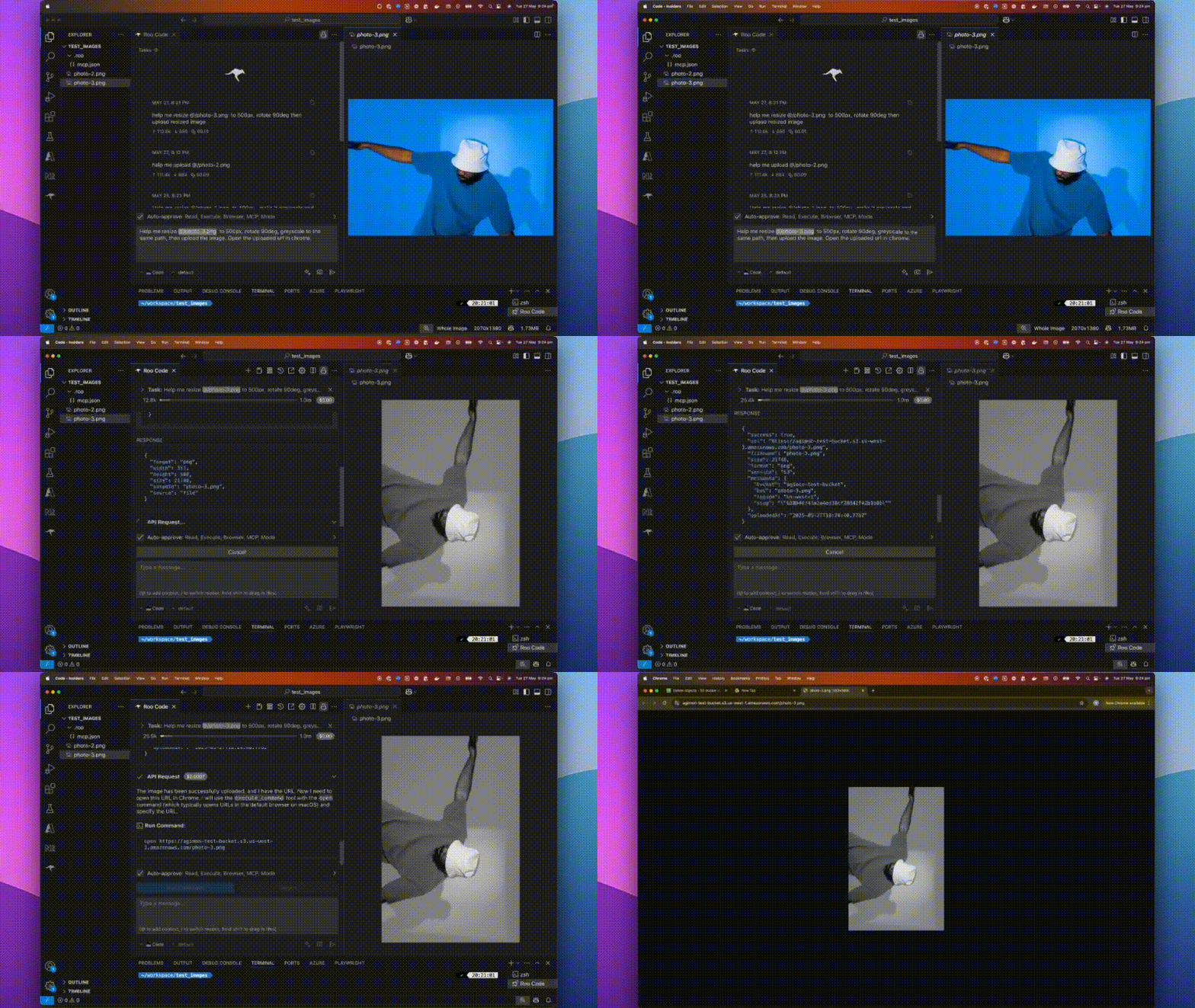
A fast, plug-and-play MCP server for image processing and cloud uploads, designed for AI assistants and automation workflows.
📝 What is @boomlinkai/image-worker-mcp?
A lightweight server implementing Model Context Protocol (MCP) for automated image manipulation and uploads. It makes image resizing, converting, optimizing, and uploading seamless for devs, AI tools, or automated pipelines.
✨ Features
- All-in-One Image Processing: Resize, convert, optimize, and transform images with the powerful sharp library.
- Effortless Cloud Uploads: Integrates with AWS S3, Cloudflare R2, Google Cloud Storage.
- AI & Workflow Ready: Built for MCP, integrates with any AI assistant or workflow runner.
- Flexible Input: Works with file paths, URLs, or base64 images.
- Automatable: Scriptable for batch tasks or as a backend service.
🚀 How to Install
Use npm (or yarn/pnpm):
npm install -g @boomlinkai/image-worker-mcp
# or
yarn global add @boomlinkai/image-worker-mcp
# or
pnpm add -g @boomlinkai/image-worker-mcp
Or use it instantly (no install):
npx @boomlinkai/image-worker-mcp
⚡ Quick Start
Start the MCP Server
npx @boomlinkai/image-worker-mcp
Example: AI Assistant Workflow
Resize an image:
{
  "tool_code": "use_mcp_tool",
  "tool_name": "resize_image",
  "server_name": "image-worker",
  "arguments": {
    "imageUrl": "https://example.com/original.jpg",
    "width": 800,
    "format": "webp",
    "outputPath": "./resized_image.webp"
  }
}
Upload an image:
{
  "tool_code": "use_mcp_tool",
  "tool_name": "upload_image",
  "server_name": "image-worker",
  "arguments": {
    "imagePath": "./resized_image.webp",
    "service": "s3",
    "filename": "my-optimized-image",
    "folder": "website-assets"
  }
}
🛠️ Usage & Configuration
The MCP server works via stdio, making it easy to plug into AI tools and code editors.
Platform Integrations
Click to expand platform setup guides (Cursor, Windsurf, VSCode, Zed, Claude, BoltAI, Roo Code)
Cursor
Add to ~/.cursor/mcp.json:
{
  "mcpServers": {
    "image-worker": {
      "command": "npx",
      "args": ["-y", "@boomlinkai/image-worker-mcp"]
    }
  }
}
🧰 Tools Reference
resize_image
Resize and transform images via:
imagePath,imageUrl, orbase64Image(input)width,height,fit,format,quality,rotate, etc.- Returns path or base64 of processed image
upload_image
Upload any image (by path/url/base64) to:
service:s3|cloudflare|gcloudfilename,folder,public, etc.- Set credentials as env vars
🔑 Environment Variables
Set these for your chosen cloud provider:
AWS S3
export AWS_ACCESS_KEY_ID=xxx
export AWS_SECRET_ACCESS_KEY=xxx
export S3_BUCKET=your-bucket
export S3_REGION=us-east-1
# Optional: S3_ENDPOINT=https://...
Cloudflare R2
export CLOUDFLARE_R2_ACCESS_KEY_ID=xxx
export CLOUDFLARE_R2_SECRET_ACCESS_KEY=xxx
export CLOUDFLARE_R2_BUCKET=your-bucket
export CLOUDFLARE_R2_ENDPOINT=https://...
Google Cloud Storage
export GCLOUD_PROJECT_ID=xxx
export GCLOUD_BUCKET=your-bucket
# Optionally: GCLOUD_CREDENTIALS_PATH=/path/to/key.json
Default upload service:
export UPLOAD_SERVICE=s3
⚠️ Never commit credentials to source control. Use environment variables or secret managers.
🏗️ Requirements
- Node.js 18.x or higher
- No system dependencies;
sharpis auto-installed
🐞 Troubleshooting / FAQ
- Install fails on ARM/Apple Silicon? Run
brew install vips(sharp dependency) or use Node 18+. - Credentials not working? Check env var spelling/casing.
- Image output is blank or corrupt? Confirm input image type and size.
🤝 Contributing
PRs and issues welcome! Please open an issue or submit a pull request.
👤 Author
Vuong Ngo – BoomLink.ai
🌐 Connect with Us
- Join our Discord for support, feedback, and community discussions
- Follow us on X.com for updates and news
- Connect on LinkedIn for company news and insights
📄 License
MIT
💖 Sponsored by BoomLink.ai
Установка Image Worker
У этого сервера нет опубликованного пакета — он собирается из исходников. Открой репозиторий и следуй инструкции в README.
▸ github.com/BoomLinkAi/image-worker-mcpFAQ
Image Worker MCP бесплатный?
Да, Image Worker MCP бесплатный — установка в пару кликов через Unyly без оплаты.
Нужен ли API-ключ для Image Worker?
Нет, Image Worker работает без API-ключей и переменных окружения.
Image Worker — hosted или self-hosted?
Self-hosted: сервер запускается локально на твоей машине командой из раздела установки.
Как установить Image Worker в Claude Desktop, Claude Code или Cursor?
Открой Image Worker на unyly.org, выбери вкладку своего клиента (Claude Desktop, Claude Code, Cursor) и нажми Install — конфиг сгенерируется автоматически, без правки JSON.
Похожие MCP
GitHub
PRs, issues, code search, CI status
 автор: GitHub
Filesystem
Secure file operations with configurable access controls.
Memory
Knowledge graph-based persistent memory system.
Template MCP Server
A CLI tool to create a new Model Context Protocol server project with TypeScript support, dual transport options, and an extensible structure
 автор: mcpdotdirect
Compare Image Worker with
Не уверен что выбрать?
Найди свой стек за 60 секунд
Автор?
Embed-бейдж для README
Похожее
Все в категории development