
INAV Server
БесплатноНе проверенEnables configuration, diagnostics, and troubleshooting of iNAV fixed-wing flight controllers over USB via Claude.

Описание
Enables configuration, diagnostics, and troubleshooting of iNAV fixed-wing flight controllers over USB via Claude.
README
iNAV MCP Server
CI License: MIT Python MCP PyPI
An MCP server that lets Claude configure, diagnose, and troubleshoot an iNAV flight controller over USB — built primarily for flying wings (elevon FPV wings like the TBS Chupito and Mojito), and also for conventional fixed-wing planes.
It talks to the FC through a single serial connection, using the iNAV CLI for configuration writes and a small built-in MSP codec for live/binary reads. Every write is dry-run by default, auto-backs-up first, refuses while the board is armed, and reads back to verify.
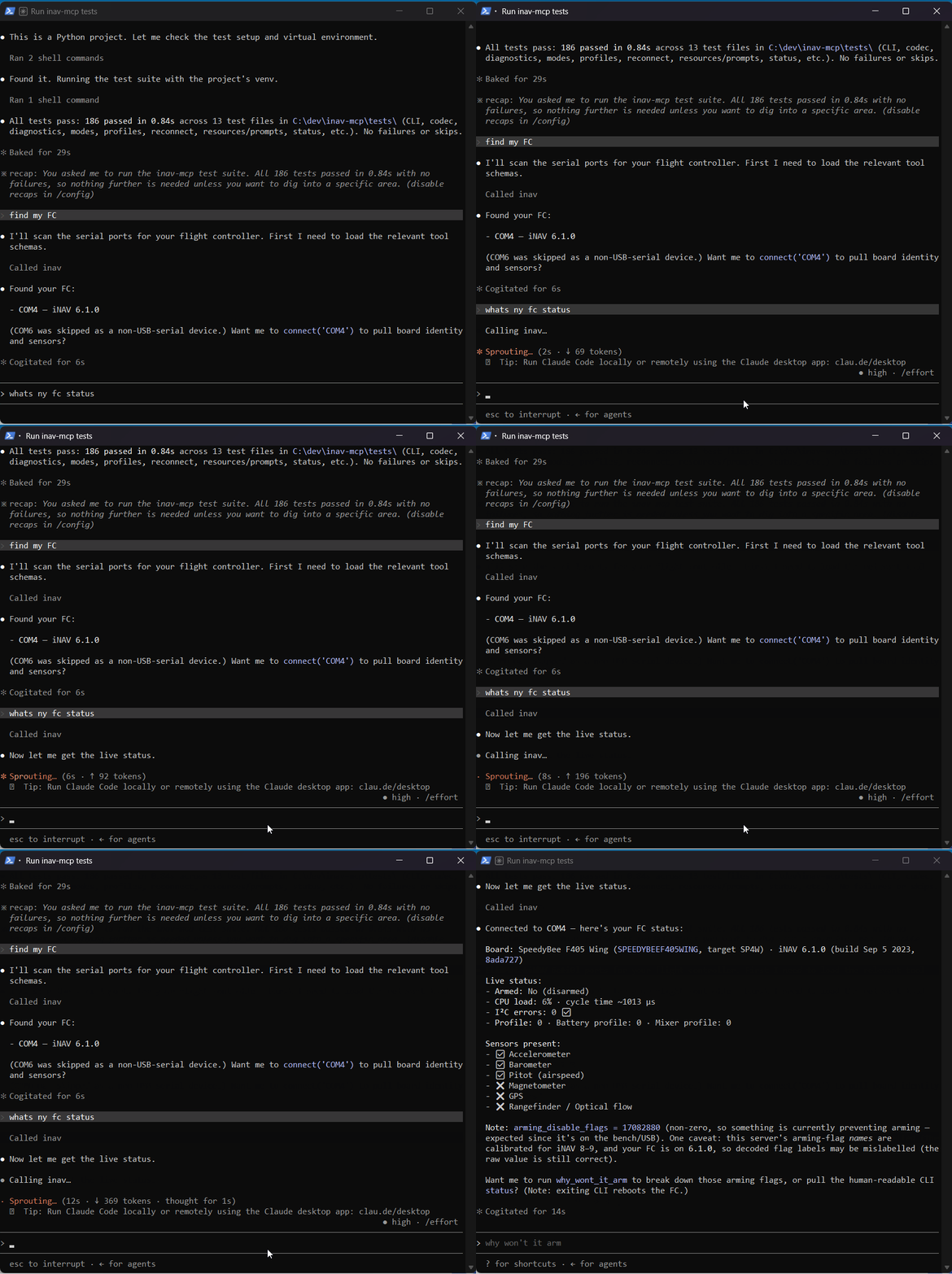
Recorded against a live iNAV 6.1.0 flight controller over USB.
⚠️ Safety: Always remove props from the aircraft before any motor test. This tool never switches the FC into MSP-RX mode and never arms the aircraft.
Requirements
- Python 3.10+
- An iNAV flight controller (developed against iNAV 8.x/9.x) connected over USB
- The serial port the FC enumerates as (e.g.
COM3on Windows,/dev/ttyACM0on Linux)
Install
From PyPI (once the first release is published):
pip install inav-mcp
From source (for development, or to run the latest unreleased code):
# from the repo root
python -m venv .venv
.venv/Scripts/python -m pip install -e .          # Windows
# source .venv/bin/activate && pip install -e .    # Linux/macOS
For development (tests):
.venv/Scripts/python -m pip install -e ".[dev]"
Try it without a flight controller
You don't need any hardware to confirm the project works — the test suite runs fully offline (no FC required):
.venv/Scripts/python -m pytest        # Windows
# .venv/bin/pytest                     # Linux/macOS
All 186 tests should pass. To actually use the server, though, you need a flight controller flashed with iNAV firmware (developed against iNAV 8.x/9.x) connected over USB — without one, the connection tools have nothing to talk to.
Register with Claude
Add the server to your Claude (Code or Desktop) MCP config
(~/.claude/settings.json or the Claude Desktop config). Replace the paths
below with wherever you cloned this repo — the command points at the Python
inside your .venv, and cwd is the repo root.
Windows:
{
  "mcpServers": {
    "inav": {
      "command": "C:\\path\\to\\inav-mcp\\.venv\\Scripts\\python.exe",
      "args": ["-m", "inav_mcp.server"],
      "cwd": "C:\\path\\to\\inav-mcp"
    }
  }
}
Linux / macOS:
{
  "mcpServers": {
    "inav": {
      "command": "/path/to/inav-mcp/.venv/bin/python",
      "args": ["-m", "inav_mcp.server"],
      "cwd": "/path/to/inav-mcp"
    }
  }
}
The server speaks MCP over stdio. You can also run it directly with the
installed entry point inav-mcp.
Typical workflows
The server ships prompts that walk Claude through the common jobs — just pick one:
new_fixed_wing_setup— gather hardware details →define_aircraft→ review → apply.troubleshoot_no_arm— decode arming-prevention flags → guided fixes.configure_modes— identify switches from live RC → suggest a layout → assign modes.
Or drive it conversationally, e.g.:
"Connect to my FC on COM3 and tell me why it won't arm."
"Set up a 4S flying wing on DSHOT600, then show me the commands before applying."
Tools (35)
Connection & identity
| Tool | What it does |
|---|---|
list_serial_ports() |
List available serial ports. |
find_fc(baud=115200, probe_all=False) |
Auto-detect which port has an FC by probing for MSP identity — no guessing the port. |
connect(port, baud=115200) |
Open the FC connection, return board identity. |
disconnect() |
Close the connection. |
board_info() |
FC variant, firmware version, target, API version, sensors. |
Hardware setup
| Tool | What it does |
|---|---|
define_aircraft(name, wing_type, esc_protocol, cells, …) |
Offline planner — stores a profile and generates the CLI config plan. |
get_aircraft_profile() |
The current declared profile + plan. |
apply_aircraft_setup(confirm=False) |
Apply the plan (gated: not armed, auto-backup, read-back verify). On iNAV, applying is inherently save+reboot. |
check_config() |
diff all + lint against the declared profile + ARM check. |
Flight modes & switches
| Tool | What it does |
|---|---|
suggest_mode_layout(skill_level, num_switches, has_gps=False) |
Recommend a fixed-wing switch/mode layout (offline). |
set_flight_mode(mode_name, aux_channel, range_low, range_high, confirm=False) |
Assign one mode to an aux range. |
assign_switch(switch_channel, switch_positions, mode_per_position, confirm=False) |
Map a whole 2/3/6-pos switch in one call. |
clear_flight_mode(mode_name, confirm=False) |
Remove a mode's switch assignments. |
Diagnostics
| Tool | What it does |
|---|---|
diagnose() |
Full sweep: arming, sensors, RC, battery, GPS → prioritized fixes. |
why_wont_it_arm() |
Decode arming-prevention flags into plain reasons + fixes. |
read_rc_channels() |
Live RC channel values — flip a switch, see which channel moves. |
read_sensors() |
Live attitude, per-sensor health, battery. |
get_status() |
MSP status + CLI status/tasks. |
list_flight_modes() |
All modes and their current switch assignments. |
check_failsafe() |
Read failsafe_* settings, explain the RC-loss procedure, flag risky setups (e.g. RTH without GPS). |
Bench tests & calibration
| Tool | What it does |
|---|---|
test_motor(motor, throttle_us=1100, duration_s=2.0, props_removed=False, confirm=False) |
Spin ONE motor briefly. Hard-gated: props_removed=True + confirm=True, refuses while armed, always auto-stops. (No test_servo — iNAV has no live servo override; verify surfaces with the TX sticks + read_rc_channels().) |
calibrate_accelerometer(confirm=False) |
Zero-level the accelerometer (board flat + still). Fixes most "not level" arming blocks. |
calibrate_magnetometer(confirm=False) |
Calibrate the compass (rotate the craft ~30s). |
Navigation & tuning
| Tool | What it does |
|---|---|
read_gps() |
Live GPS fix/sats/position + nav-readiness assessment (read-only). |
configure_gps(provider="UBLOX", sbas=None, confirm=False) |
Enable the GPS feature and set provider/SBAS. |
set_nav(rth_altitude_m=None, rth_climb_first=None, rth_allow_landing=None, loiter_radius_m=None, confirm=False) |
Set fixed-wing RTH altitude / climb-first / landing / loiter radius. |
read_tuning() |
Read fixed-wing PID gains, rates, and filter cutoffs. |
set_pid(axis, p=None, i=None, d=None, ff=None, confirm=False) |
Set fixed-wing P/I/D/FF gains for one axis. |
Config management
| Tool | What it does |
|---|---|
backup_config(label=None) |
Save diff all to a timestamped file under ./backups/. |
list_backups() |
List saved backups (path, time, size, label), newest first. |
restore_config(path, confirm=False) |
Replay a saved backup via CLI. |
set_failsafe(procedure=None, throttle_us=None, confirm=False) |
Set the RC-loss procedure / throttle (atomic write; FC validates the procedure token). |
cli(command, confirm_for_writes=False, props_removed=False) |
Raw CLI escape hatch (ONE command, one reboot). Writes need confirm_for_writes; a live motor test needs props_removed=True and is never saved. |
cli_batch(commands, confirm_for_writes=False) |
Run MANY CLI commands in one session → one reboot. Read-only batch exits without saving; a write batch backs up + saves once (rolls back if any command is rejected). Motor/save/exit commands refused. |
save_and_reboot(confirm=False) |
save to EEPROM and reboot (marks the connection stale). |
Resources
inav://modes-reference— iNAV mode glossary with fixed-wing relevance.inav://current-profile— the declared aircraft profile + generated plan.inav://last-backup— the most recentdiff allbackup.
Safety model
- Props-off gate —
test_motor()and any livemotorcommand viacli(...)requireprops_removed=True(the generic write-confirm cannot bypass it), refuse while the board is armed, and are never saved.test_motor()also clamps throttle/duration and always commands the motor back to stop. - Armed guard — all writes (and motor tests / calibrations) refuse if the FC reports armed.
- Auto-backup before every write; the backup path is returned.
- Dry-run by default — writes return the exact commands;
confirm=Trueapplies. - Read-back verify — after applying, settings are re-read and mismatches flagged.
save= reboot —save_and_rebootwarns and marks the connection stale.- No receiver-mode changes — the FC is never switched to MSP-RX.
Reboot model — why batching matters
On iNAV, leaving the CLI always reboots the FC — both save (persist to
EEPROM) and exit (discard changes) trigger a reboot, after which the USB VCP
re-enumerates and we reconnect (~6–8 s, surfaced as reboot_seconds). So every
CLI round-trip costs one reboot, including read-only ones (get, diff,
dump, version). There is no way to read over the CLI without that reboot —
the only lever is to do fewer CLI sessions.
What this server does to keep reboot churn down:
- Reads prefer MSP, which never reboots.
get_status,read_rc_channels,read_sensors,read_gps,list_flight_modes,why_wont_it_arm,diagnose, and the armed-guard all read structured data over MSP — zero reboots. Only data that's CLI-only (diff all,get failsafe, PID/rate/filtergets) pays a reboot. - Writes are atomic and batch internally. Each write tool
(
apply_aircraft_setup,set_flight_mode,assign_switch,set_pid,set_failsafe,restore_config, …) opens one CLI session: backup → apply all commands → save → reboot once. Multiple settings = one reboot. cli_batch()for ad-hoc runs. Instead of callingcli()in a loop (one reboot per command — the cadence that can knock a board into DFU), pass a list tocli_batch(): one session, one reboot. Read-only batchesexitwithout saving; write batches back up andsaveonce (rolling back if any command is rejected).- Resilient reconnect. After a reboot the reconnect waits a short settle, then polls with backoff; if the original COM port doesn't return it scans for a re-enumerated one, and if the board came back in DFU/bootloader mode it says so and tells you to power-cycle (USB unplug/replug) rather than hanging.
How it works
- Single serial handle shared between MSP and CLI modes (
connection.py), tracked by amodestate machine. Never two handles on one port. - CLI-first writes — the CLI is stable across firmware versions; MSP command
IDs can drift. A thin MSP v1/v2 codec (
msp.py) handles only the live binary reads (status, RC, attitude, analog, GPS, sensor health, mode ranges, box maps). - Box IDs are resolved at runtime via
MSP_BOXNAMES+MSP_BOXIDS— never hardcoded. - Arming flags are decoded from
knowledge/arming_flags.json, calibrated to iNAV 8.x/9.x bit positions. The table declares its calibrated major versions, andconnect()/board_info()/why_wont_it_arm()/diagnose()warn when the connected firmware is outside that range (bit positions shift between majors, so flag names may be mislabelled even though the raw flag value is correct).
Development
.venv/Scripts/python -m pytest # 186 tests, all offline (no FC needed)
The suite covers the MSP codec round-trips, CLI response parsing, the diagnostic rule engine, offline profile/command generation, mode-range read-modify-write logic (against a mock connection), and resource/prompt registration.
Project layout:
inav_mcp/
  server.py          # FastMCP app: all tools, resources, prompts
  connection.py      # single serial handle, MSP + CLI mode switching
  msp.py             # MSP v1/v2 codec + parsers
  cli.py             # CLI response parsing, write-command detection
  modes.py           # box maps, mode-range read/write, layout planner
  profiles.py        # AircraftProfile + offline CLI command generator
  troubleshoot.py    # diagnose() rule engine + arming-flag decode
  safety.py          # armed guard, backup paths
  state.py           # connection + profile singletons
  knowledge/         # arming_flags / modes_reference / esc_protocols / fc_targets (JSON)
tests/               # offline pytest suite
tools/               # gen_readme_tools.py — regenerates the tool reference below
examples/            # flying_wing_quickstart.md — end-to-end walkthrough
Release history is in CHANGELOG.md.
Full tool reference
Complete, signature-accurate list — regenerate after changing tools with
python -m tools.gen_readme_tools (a test fails if this drifts):
35 tools — auto-generated by tools/gen_readme_tools.py; do not edit by hand.
| Tool | Description |
|---|---|
apply_aircraft_setup(confirm=False) |
Apply the declared aircraft profile to the FC, then save and reboot. |
assign_switch(switch_channel, switch_positions, mode_per_position, confirm=False) |
Map a multi-position switch's detents to flight modes in one call. |
backup_config(label=None) |
Save the current FC config to a timestamped backup file. |
board_info() |
Read flight-controller identity over MSP. |
calibrate_accelerometer(confirm=False) |
Calibrate the accelerometer (zero-level). Fixes most 'not level' / 'accel not |
calibrate_magnetometer(confirm=False) |
Calibrate the compass (magnetometer). Only useful if a compass is installed. |
check_config() |
Compare the FC's actual configuration against the declared aircraft profile. |
check_failsafe() |
Read and explain the failsafe configuration (what happens on RC loss). |
clear_flight_mode(mode_name, confirm=False) |
Remove all switch assignments for a flight mode (disables its slots via CLI 'aux'). |
cli(command, confirm_for_writes=False, props_removed=False) |
Raw CLI escape hatch — run any iNAV CLI command directly. |
cli_batch(commands, confirm_for_writes=False) |
Run MANY CLI commands in ONE CLI session — a single reboot for the whole batch. |
configure_gps(provider='UBLOX', sbas=None, confirm=False) |
Enable the GPS feature and set the receiver provider / SBAS (atomic CLI write). |
connect(port, baud=115200) |
Open the serial connection to the FC and return board identity. |
define_aircraft(name, wing_type, esc_protocol, cells, fc_target=None, motor_kv=None, motor_poles=14, servo_count=None, notes=None) |
Define the aircraft hardware profile and generate a configuration plan. |
diagnose() |
Full diagnostic sweep — the flagship troubleshooter. |
disconnect() |
Close the serial connection to the FC. |
find_fc(baud=115200, probe_all=False) |
Auto-detect which serial port has a flight controller, so you don't guess. |
get_aircraft_profile() |
Return the currently declared aircraft profile. |
get_status() |
Read FC status via both MSP and CLI. |
list_backups() |
List saved config backups under ./backups/, newest first. No FC needed. |
list_flight_modes() |
List all available flight modes and their current switch assignments. |
list_serial_ports() |
List all available serial ports. |
read_gps() |
Live GPS status: fix type, satellites, position, speed, HDOP + nav-readiness. |
read_rc_channels() |
Read live RC channel values via MSP. |
read_sensors() |
Read live sensor values: attitude, per-sensor health, and analog (battery). |
read_tuning() |
Read fixed-wing PID gains, rates, and key filter cutoffs (via CLI). |
restore_config(path, confirm=False) |
Restore FC config by replaying a backup file's CLI commands, then save+reboot. |
save_and_reboot(confirm=False) |
Save the running config to EEPROM and reboot the FC. |
set_failsafe(procedure=None, throttle_us=None, delay_s=None, off_delay_s=None, confirm=False) |
Set the core failsafe behaviour (atomic CLI write: backup → apply → save+reboot). |
set_flight_mode(mode_name, aux_channel, range_low, range_high, confirm=False) |
Assign a flight mode to an aux channel range (read-modify-write via CLI 'aux'). |
set_nav(rth_altitude_m=None, rth_climb_first=None, rth_allow_landing=None, loiter_radius_m=None, confirm=False) |
Set core fixed-wing navigation / RTH parameters (atomic CLI write). |
set_pid(axis, p=None, i=None, d=None, ff=None, confirm=False) |
Set fixed-wing PID gains for ONE axis (atomic CLI write). |
suggest_mode_layout(skill_level='beginner', num_switches=2, has_gps=False) |
Recommend a fixed-wing flight-mode/switch layout. Pure knowledge — no FC needed. |
test_motor(motor, throttle_us=1100, duration_s=2.0, props_removed=False, confirm=False) |
Spin ONE motor briefly for a bench test (direction / wiring / response). |
why_wont_it_arm() |
Decode the FC's arming-prevention flags into plain English. |
License
MIT. This project ships its own MSP codec and does not import GPL libraries (uNAVlib / YAMSPy) at runtime, keeping it permissively licensed.
Установка INAV Server
У этого сервера нет опубликованного пакета — он собирается из исходников. Открой репозиторий и следуй инструкции в README.
▸ github.com/starlordz12/inav-mcpFAQ
INAV Server MCP бесплатный?
Да, INAV Server MCP бесплатный — установка в пару кликов через Unyly без оплаты.
Нужен ли API-ключ для INAV Server?
Нет, INAV Server работает без API-ключей и переменных окружения.
INAV Server — hosted или self-hosted?
Self-hosted: сервер запускается локально на твоей машине командой из раздела установки.
Как установить INAV Server в Claude Desktop, Claude Code или Cursor?
Открой INAV Server на unyly.org, выбери вкладку своего клиента (Claude Desktop, Claude Code, Cursor) и нажми Install — конфиг сгенерируется автоматически, без правки JSON.
Похожие MCP
Fetch
Web content fetching and conversion for efficient LLM usage.
AWS KB Retrieval
Retrieval from AWS Knowledge Base using Bedrock Agent Runtime.
 автор: modelcontextprotocol
Spring AI MCP Server
Provides auto-configuration for setting up an MCP server in Spring Boot applications.
llm-analysis-assistant
A very streamlined mcp client that supports calling and monitoring stdio/sse/streamableHttp, and can also view request responses through the /logs page. It also
 автор: xuzexin-hz
Compare INAV Server with
Не уверен что выбрать?
Найди свой стек за 60 секунд
Автор?
Embed-бейдж для README
Похожее
Все в категории ai