
Indagium
БесплатноНе проверенAndroid log viewer & logcat analyzer for Windows, macOS and Linux — crashes, ANRs, adb bugreports, DLT.

Описание
Android log viewer & logcat analyzer for Windows, macOS and Linux — crashes, ANRs, adb bugreports, DLT.
README
Android log viewer and logcat analyzer for Windows, macOS and Linux — investigate crashes, ANRs, adb bug reports, and supported DLT captures, built with Kotlin and Compose Multiplatform.


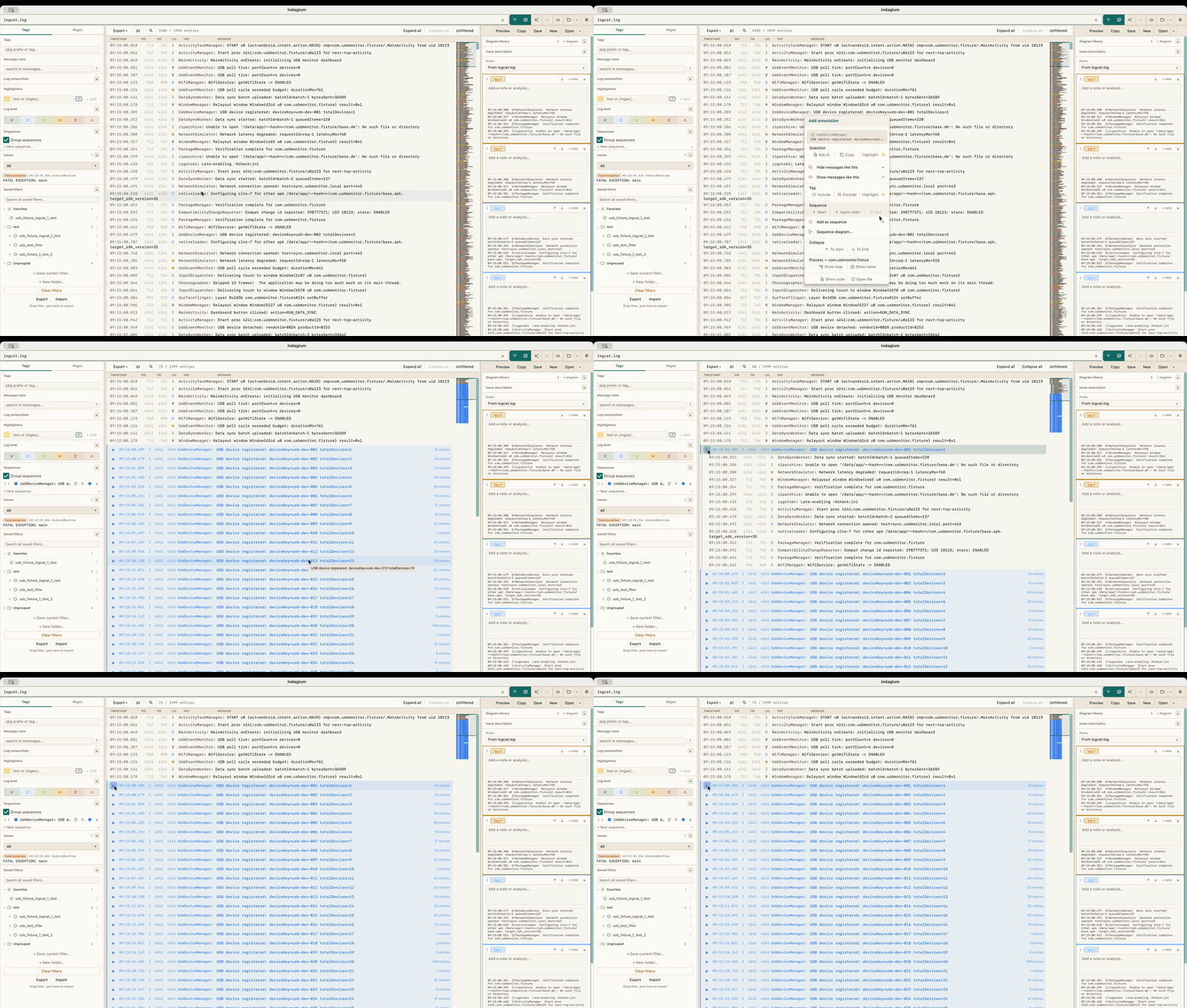
Features
Filtering and folding
- Multi-tab — open multiple log files side by side
- Log level filtering — toggle V / D / I / W / E / A individually
- Tag filters — include or exclude tags with exact match or regex; package-level grouping
- Message rules — filter lines by message content or PID/TID (substring or regex), optionally scoped to a tag or package
- Sequences — collapse recurring regions into colored, nestable groups using start/end patterns
- Manual collapse — fold to start, to end, or an explicit range when there's no pattern to match
- Highlighters — color-code lines by message pattern without filtering anything out
- Find bar — in-view search across the fully expanded log
- Filter presets — save, organize into folders, favorite, export and import filter configurations
Reading
- Crash, ANR and native-crash detection — stack traces fold automatically; custom issue rules add your own categories
- Minimap — compressed overview of the whole log in place of the scrollbar
- Thread map — color every thread in a process and see interleaved activity as a branch gutter
- Time deltas — per-row gaps, or offsets from a selected anchor row, to find stalls
- Compare view — two tabs side by side, each with its own filter or mirroring the other's
- Live tailing — watch a file as it's written, with your filter already applied
- Large-file support — multi-gigabyte logs, with an optional split-on-open for the biggest
- Bug reports — open
.zipand.7zAndroid bug reports directly and pick what to load
Producing output
- Annotations — annotate log selections with notes, images, and video frames; export as Markdown or Jira markup
- Sequence-diagram workspaces — turn a selected log range into an interactive, themed component-flow diagram; merge raw tags into named components, add mirrored actors, inspect evidence, save drafts, and attach an image or editable source to a note
- Export filtered log — write the current filtered set to TXT or CSV
- Merge and split — interleave several logs by timestamp, or split one huge file into parts
- Show in code — register your project's source folder(s) in Settings, then right-click a log line to view the exact method that emitted it (Kotlin/Java,
Log.*+ Timber, plus custom wrappers); also exposed to AI assistants via theresolve_log_sourceMCP tool
Extras
- In-app AI assistant — use LM Studio, OpenAI, Anthropic, Codex, Claude Code, or another compatible provider to investigate the active log tab with the same log, filter, source, and notes tools exposed through MCP; on-device voice dictation inserts editable text into the composer
- Video sync — attach a screen recording, anchor it to a log line, and scrub either from the other
- MCP control server — drive Indagium from any MCP client over a local URL (off by default)
- Themes — 20 built-in themes (light, dark, and paper variants)
- Autosave — session is fully restored on next launch
- Update checker — optional in-app check against GitHub Releases
Supported log formats
Indagium also opens Diagnostic Log and Trace (DLT) captures (.dlt), raw DLT streams, and
DLT Viewer text/CSV exports. Binary captures are decoded as framed records; non-verbose payloads
are retained as safe text/hex and are not interpreted through FIBEX/ARXML definitions. An oversized
DLT capture can be split like any other log — binary captures are split frame-aware (every part is
a valid standalone DLT stream), and DLT Viewer CSV parts repeat the header row. DLT protocol v2
streams are not supported and cannot be split. DLT tabs do not support live UTF-8 tailing.
threadtime, time, brief, bare — unrecognised lines are shown with tag RAW.
Documentation
| Document | What it covers |
|---|---|
| User guide | How to use every feature, keyboard shortcuts, and worked recipes |
| Architecture (SAAD) | System design, module boundaries, data flow, threading, persistence, security |
| MCP guide | Connecting an external MCP client |
| MCP methods | The automation tool reference |
| Analysis playbook | Prompt patterns for log analysis |
Installation
Download the latest release for your platform from the Releases page:
| Platform | File |
|---|---|
| Linux (x86-64) | .deb indagium_x.y.z-1_amd64.deb · AppImage Indagium-x.y.z-x86_64.AppImage · Flatpak Indagium-x.y.z-x86_64.flatpak |
| Linux (arm64) | .deb indagium_x.y.z-1_arm64.deb · AppImage Indagium-x.y.z-aarch64.AppImage · Flatpak Indagium-x.y.z-aarch64.flatpak |
| Windows | Indagium-x.y.z.msi |
| macOS (Apple Silicon) | Indagium-x.y.z.dmg |
macOS: "could not verify... free of malware"
The macOS build isn't signed with an Apple Developer ID or notarized, so Gatekeeper blocks it
once the .dmg has been downloaded through a browser (locally built copies aren't affected —
they never get the quarantine flag a browser download adds). To open it anyway, either:
- Terminal:
xattr -cr /Applications/Indagium.app, or - System Settings → Privacy & Security → scroll to the "Indagium was blocked" notice → Open Anyway
Linux
Choose one format that matches your architecture. The .deb is best for Debian-family systems;
AppImage runs without installing system files; the Flatpak bundle installs into your user account.
# Debian/Ubuntu and compatible distributions
sudo dpkg -i indagium_x.y.z-1_amd64.deb

# AppImage (replace x86_64 with aarch64 on ARM64)
chmod +x Indagium-x.y.z-x86_64.AppImage
./Indagium-x.y.z-x86_64.AppImage

# Flatpak bundle (replace x86_64 with aarch64 on ARM64)
flatpak remote-add --user --if-not-exists flathub https://dl.flathub.org/repo/flathub.flatpakrepo
flatpak install --user ./Indagium-x.y.z-x86_64.flatpak
flatpak run com.indagium.Indagium
All three Linux packages register Indagium as a candidate handler for
.log/.txt/.logcat/.trace/.out files, but do not make themselves the system default —
a package has no business silently rewriting another user's mimeapps.list. To open
.log/.txt files with Indagium by default, opt in yourself:
# Debian package
xdg-mime default indagium-Indagium.desktop text/plain text/x-log

# AppImage or Flatpak
xdg-mime default com.indagium.Indagium.desktop text/plain text/x-log
or right-click a file in your file manager → Open With → Indagium → set as default.
The Flatpak package allows access to your home directory for logs and source folders. Its sandbox cannot use host-installed Codex account or Claude Code account CLI profiles; select an API/network-backed provider there instead.
Flatpak: "No X11 DISPLAY variable was set"
Indagium's UI toolkit (Java/AWT) needs a real X11 or XWayland display; the Flatpak sandbox cannot
supply one on its own. On a remote/VNC/xrdp/x2go session (or any shell started outside your X
session), set DISPLAY on the host before launching — setting it via flatpak run --env=
does not work, since Flatpak picks the X11 socket to bind before the sandbox exists:
DISPLAY=:1.0 flatpak run com.indagium.Indagium
File picker troubleshooting
If opening or saving files hangs, fails to appear, or behaves incorrectly under your Linux desktop, open Settings → Appearance → File picker, choose Compatibility X11, and restart Indagium. For an immediate one-launch workaround without changing Settings, run:
JAVA_TOOL_OPTIONS='-Dsun.awt.disableGtkFileDialogs=true' /opt/Indagium/bin/Indagium
Automatic is the default: it uses Compatibility X11 only when /etc/os-release has an exact
ID of debian, arch, manjaro, or fedora; it uses Native GTK for Ubuntu and unknown
distributions. A launch-time -Dsun.awt.disableGtkFileDialogs=... property overrides this setting.
In-app AI assistant
Notes and AI are independent toggles on the main toolbar (next to Filter), each showing or hiding its own panel in the same resizable sidebar slot. With only one on, it fills the slot; with both on, it splits into Notes above AI at a draggable divider. The AI assistant is optional and runs only when you send a request. Its first provider is an OpenAI-compatible Chat Completions endpoint, so the default profile works with a local LM Studio server:
- In LM Studio, load a tool-capable model and start its local API server.
- Open a log tab in Indagium, turn on AI in the toolbar, and choose the loaded model from the dropdown (click it to browse discovered models, or type an id manually at the bottom of the list). If discovery is unavailable, manual entry still works.
- Ask a question or use a quick action such as Check error, Find root cause, Build timeline, or Investigate issue. You can also right-click a log line and choose Ask AI.
Each reply shows when the request was sent, how long the first response and the full answer took, and the reported token usage if the provider includes it. Tool-call activity for a request appears in a collapsible, independently scrollable Investigation section between your message and the final answer — expanded while it's running, collapsed once it finishes (click to reopen). Chat text is selectable/copyable, and Reset clears the current tab's conversation to start over.
The built-in LM Studio (local) profile uses http://127.0.0.1:1234/v1. Settings → AI
providers also offers explicit OpenAI API and Anthropic API profiles, alongside the
existing generic OpenAI-compatible option. API keys are memory-only for the current app launch;
they are not written to autosave, settings, notes, or exports and must be entered again after
restart.
Codex account and Claude Code account profiles use a locally installed CLI executable and
its existing signed-in account instead of an API key. Settings can detect a common installation
or let you browse to the executable. On macOS, Codex can use the codex binary bundled inside
ChatGPT; a desktop app bundle itself is not enough. Claude requires the Claude Code CLI. Each request gets a fresh empty temporary
workspace plus a private, short-lived managed MCP endpoint. That endpoint exposes the same
Indagium tools and confirmation rules as the LM Studio panel path, pins requests to the active log
tab, and is revoked when the run ends. The account agents do not receive source-folder or app
workspace access; log and source evidence is available only through Indagium tools.
Local voice dictation
The microphone button beside Send records the default microphone in memory, transcribes it
with a local Whisper model, and appends the result to the editable composer. The default language
choices are Automatic, Ukrainian, and English; Settings can add other Whisper languages.
The EN control beside the microphone switches local English translation on or off. Nothing is
sent and a request is never started until you edit or accept the text and press Send yourself.
On first use, Indagium asks before downloading the selected multilingual Whisper model: Base
(~142 MiB, faster) or Small (~465 MiB, more accurate for short non-English dictation). After that
one-time model download, recording and transcription work offline and independently of the
selected chat provider on macOS, Windows, and Linux. Settings → Voice input also offers an
opt-in native engine where available: strictly on-device Apple Speech on macOS or an installed
offline Windows Speech language pack on Windows. Native engines never fall back to cloud speech;
they currently transcribe in the spoken language, while Whisper also supports local English
translation. The downloaded Whisper model lives in the app-data voice-models folder; audio
recordings and transcripts are never written there or kept after the dictation attempt.
Data and action safety
Loopback endpoints (127.0.0.1, localhost, and equivalent local addresses) are treated as
local. A non-local provider (HTTP or HTTPS — some local-network LM Studio setups only ever serve
HTTP) is blocked until you acknowledge in Settings that the request can disclose log text,
selected context, source-code paths and snippets, and tool results to that provider. Use Test
connection in Settings → AI providers to check whether an endpoint is reachable before or after
saving; it only probes the endpoint and never saves or otherwise affects the profile.
The assistant can automatically read log/source context and apply filter, selection, folding, and annotation changes. Actions that affect files or tab lifecycle always pause for an Allow or Deny card: opening, splitting, closing, or merging tabs; starting/stopping tailing; exports; and saving/loading annotation files. The tool trace shows what it requested and returned. Clickable evidence cards are created only from actual tool results, never from line numbers or paths invented in the model's prose.
Each conversation is scoped to one log tab and exists only for the current launch. Switching tabs shows that tab's separate session; relaunching Indagium clears all AI sessions. Use Stop (or Escape while a run is active) to cancel the active request. Retry resends the last request in that tab after a provider error or cancellation.
A single request is capped at a configurable number of MCP analysis/operational calls (Settings → AI providers → Max MCP tool calls per request, default 100) so an investigation can't run forever. The budget is shared by every provider, including managed Codex and Claude Code sessions. Notes and annotation reads/writes are unlimited and do not consume it, so an agent can always inspect, revise, and save durable Notes output. The trace shows analysis/operational usage, Notes writes as unlimited, returned character count, and result truncation count; the model receives automatic budget guidance and a footer only when 5, 3, or 1 analysis/operational calls remain.
Troubleshooting
- "Choose or enter a model" — select a model returned by Find or type the exact model id exposed by your provider.
- Connection or stream error — confirm the endpoint is reachable, that LM Studio's server is
running, and that the endpoint includes its required API version path (the default ends in
/v1). Use Test connection in Settings → AI providers to check reachability directly. - No models returned — model discovery is optional; enter the model id manually.
- Codex or Claude Code cannot start — use Detect or Browse in the account profile to select its CLI executable, then sign in to that CLI. The account profile does not accept or store API keys.
- Remote provider blocked — save the profile after acknowledging the remote data disclosure in Settings (HTTP and HTTPS are both allowed once acknowledged).
- "MCP ... budget exhausted" — the analysis/operational allowance is spent. Notes and annotation operations remain available; raise Max MCP tool calls per request in Settings → AI providers if more log/source investigation is needed.
- An investigation waits — inspect the tool trace and choose Allow or Deny on its confirmation card. Use Stop if the action is no longer wanted.
The AI integration is separate from the built-in MCP server. MCP remains useful for external clients such as LM Studio, Codex, and Claude Code; see the MCP guide and the available methods and prompt guide.
Building from source
Requirements: JDK 21+
# Run
./gradlew desktopRun

# Test
./gradlew desktopTest

# Package (run on the target OS)
./gradlew packageDmg   # macOS
./gradlew packageDeb   # Linux
./gradlew packageAppImage # Linux AppImage (host architecture)
./gradlew packageFlatpak  # Linux Flatpak bundle (host architecture; needs flatpak-builder + Flathub runtime/SDK)
./gradlew packageMsi   # Windows
Releasing
Push a version tag to trigger the GitHub Actions build, which produces Linux .deb, AppImage, and
Flatpak bundles for x86-64 and arm64, plus Windows and macOS packages, and creates a GitHub Release automatically:
git tag v1.8.6 && git push --tags
The macOS build is unsigned (no Apple Developer certificate in CI) — see the Installation section above for the Gatekeeper workaround.
GitLab mirror
The repo is also mirrored to GitLab (gitlab.com/rarnaut-dev-group/openlog2 — the mirror kept its
pre-rename project name; only the name differs, the contents are the same), which runs .gitlab-ci.yml on GitLab's shared runners — a separate compute/storage pool from GitHub Actions, useful if GitHub's Actions quota is exhausted. The mirror is manual, not automatic: after pushing to origin, run:
./scripts/push-gitlab-mirror.sh
Pushing a v*.*.* tag there builds the Linux .deb automatically; Windows .msi and macOS .dmg are optional manual jobs in the resulting pipeline (triggered with the "play" button), since GitLab's Windows/macOS SaaS runners are pricier and only worth running by request.
License
Indagium is source-available under the PolyForm Perimeter License 1.0.0. It is free to use for commercial and non-commercial purposes.
You may not provide a product that competes with Indagium, including a free or paid substitute distributed under different branding. See the license for the complete terms.
The Indagium name, logo, icon, and branding are reserved; see NOTICE. Third-party component notices are listed in THIRD_PARTY_NOTICES.md.
Установка Indagium
У этого сервера нет опубликованного пакета — он собирается из исходников. Открой репозиторий и следуй инструкции в README.
▸ github.com/indagium/indagiumFAQ
Indagium MCP бесплатный?
Да, Indagium MCP бесплатный — установка в пару кликов через Unyly без оплаты.
Нужен ли API-ключ для Indagium?
Нет, Indagium работает без API-ключей и переменных окружения.
Indagium — hosted или self-hosted?
Self-hosted: сервер запускается локально на твоей машине командой из раздела установки.
Как установить Indagium в Claude Desktop, Claude Code или Cursor?
Открой Indagium на unyly.org, выбери вкладку своего клиента (Claude Desktop, Claude Code, Cursor) и нажми Install — конфиг сгенерируется автоматически, без правки JSON.
Похожие MCP
GitHub
PRs, issues, code search, CI status
 автор: GitHub
Filesystem
Secure file operations with configurable access controls.
Memory
Knowledge graph-based persistent memory system.
Template MCP Server
A CLI tool to create a new Model Context Protocol server project with TypeScript support, dual transport options, and an extensible structure
 автор: mcpdotdirect
Amap Maps Mcp Server
MCP server for using the AMap Maps API
 автор: duxiaohui
Supabase
Database, auth and storage
 автор: Supabase
Everything
Reference / test server with prompts, resources, and tools.
Git
Tools to read, search, and manipulate Git repositories.
Sequential Thinking
Dynamic and reflective problem-solving through thought sequences.
Time
Time and timezone conversion capabilities.
Compare Indagium with
Не уверен что выбрать?
Найди свой стек за 60 секунд
Автор?
Embed-бейдж для README
Похожее
Все в категории development