
IndiaQuant
БесплатноНе проверенIndiaQuant MCP is a real-time AI-powered market intelligence system that provides live stock data, trading signals, options analytics, sentiment analysis, and p

Описание
IndiaQuant MCP is a real-time AI-powered market intelligence system that provides live stock data, trading signals, options analytics, sentiment analysis, and portfolio simulation using free APIs.
README
Production-ready AI system for real-time stock analysis, trading signals, and portfolio simulation using FastAPI and MCP architecture.
⚡ Built with:
- FastAPI backend
- Real-time APIs (yfinance, NewsAPI)
- Options analytics + Black-Scholes Greeks
- Portfolio simulation (SQLite)
- AI-agent compatible MCP tools
👉 Designed as a modular system for real-world financial intelligence applications
IndiaQuant MCP is a real-time AI-powered market intelligence system built using the Model Context Protocol (MCP).
It provides live stock data, trading signals, options analytics, sentiment analysis, and portfolio simulation using 100% free APIs.
The system exposes these capabilities as MCP-compatible tools so an AI agent (like Claude Desktop) can query and analyze financial markets in real time.
Project Architecture
AI Agent (Claude / AI Assistant)
        │
        ▼
MCP Tool Server (FastAPI)
        │
        ├── Market Data Engine
        ├── Signal Generator
        ├── Options Analyzer
        ├── Greeks Calculator
        ├── Portfolio Manager
        ├── Sentiment Analyzer
        ├── Market Scanner
        └── Sector Heatmap
        │
        ▼
External APIs
   ├── Yahoo Finance (yfinance)
   ├── NewsAPI
   └── Alpha Vantage (optional)
The system is designed as a modular financial intelligence platform, where each component provides a specific capability.
Project Structure
indiaquant-mcp
│
├── app
│   ├── market_data
│   ├── signals
│   ├── options
│   ├── analytics
│   ├── portfolio
│   ├── decision          # decision layer v1 (normalize → fuse → validate)
│   └── mcp
│       ├── mcp_server.py    # FastAPI + OpenAPI
│       └── stdio_server.py  # native MCP stdio (Claude Desktop / Cursor)
│
├── docs
│   └── decision_layer_first_draft.md
│
├── tests
│   └── test_decision_engine.py
│
├── .github/workflows
│   └── ci.yml
│
├── screenshots
│   ├── live_price.png
│   ├── signal.png
│   ├── trade.png
│   └── heatmap.png
│
├── main.py
├── pytest.ini
├── CHANGELOG.md
├── requirements.txt
└── README.md
MCP Tools Implemented
The following MCP / HTTP tools are implemented.
| Tool | Description |
|---|---|
get_live_price |
Fetches live stock price and market data |
generate_signal |
Generates BUY/SELL/HOLD signal using technical indicators |
get_options_chain |
Retrieves options chain data |
calculate_greeks |
Computes Black-Scholes Greeks |
place_virtual_trade |
Simulates buy/sell trades |
get_portfolio_pnl |
Calculates portfolio profit and loss |
analyze_sentiment |
Performs sentiment analysis on financial news (NEWSAPI_KEY env) |
detect_unusual_activity |
Detects unusual options activity |
scan_market |
Scans market for oversold stocks |
get_sector_heatmap |
Displays sector performance heatmap |
fuse_market_decision |
Decision layer v1: fuses technical + sentiment + options into unified direction, edge score, and validation |
fuse_decision_manual |
Same fusion engine with caller-supplied normalized signals (tests / custom pipelines) |
schemas/decision_layer (GET) |
JSON Schema bundle for decision-layer Pydantic models (integrators / contract tests) |
All tools return live market data using free APIs where applicable. See docs/decision_layer_first_draft.md for schema, examples, and fusion rules; CHANGELOG.md summarizes decision-layer v1. Run tests: pytest (see pytest.ini). CI: .github/workflows/ci.yml.
Core Modules
Market Data Engine
Uses yfinance to fetch real-time market data.
Capabilities:
- Live stock prices
- Historical OHLC data
- Volume and price change analysis
- Supports NSE and global stocks
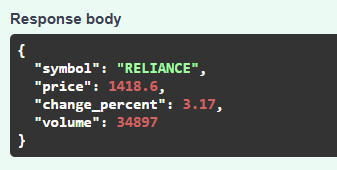
Example response:
{
"symbol": "RELIANCE",
"price": 1418.6,
"change_percent": 3.17,
"volume": 34897
}
AI Trade Signal Generator
Generates trading signals using technical indicators:
Indicators used:
- RSI
- MACD
- Bollinger Bands
Signal output: BUY / SELL / HOLD confidence score
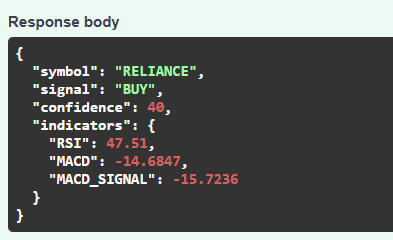
Example:
{
"symbol": "RELIANCE",
"signal": "BUY",
"confidence": 40
}
Options Chain Analyzer
Retrieves options data and performs analysis including:
- Open Interest tracking
- Max Pain calculation
- Options volume comparison
- Unusual activity detection
This helps identify potential institutional trading behavior.
Greeks Calculator
Implements the Black-Scholes model from scratch.
Greeks calculated:
- Delta
- Gamma
- Theta
- Vega
Example:
{
  "delta": 0.2265,
  "gamma": 0.026248,
  "theta": -0.06355,
  "vega": 0.172592
}
Portfolio Risk Manager
Simulates a virtual trading portfolio using SQLite.
Features:
- Place virtual buy/sell trades
- Track portfolio positions
- Real-time PnL calculation
- Trade history storage
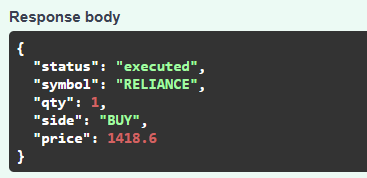
Example: POST /place_virtual_trade
{
"symbol": "RELIANCE",
"qty": 1,
"side": "BUY"
}
Sentiment Analysis
Uses NewsAPI to analyze market sentiment from financial news.
Process:
- Fetch recent headlines
- Score sentiment based on keywords
- Generate sentiment signal
Example output:
{
  "symbol": "RELIANCE",
  "sentiment_score": 2,
  "signal": "POSITIVE"
}
Market Scanner
Scans multiple stocks to find oversold opportunities.
Criteria: RSI < 30
Example response:
[
{
"symbol": "AAPL",
"RSI": 28.3,
"signal": "OVERSOLD"
}
]
Sector Heatmap
Analyzes sector performance by aggregating stock movements.
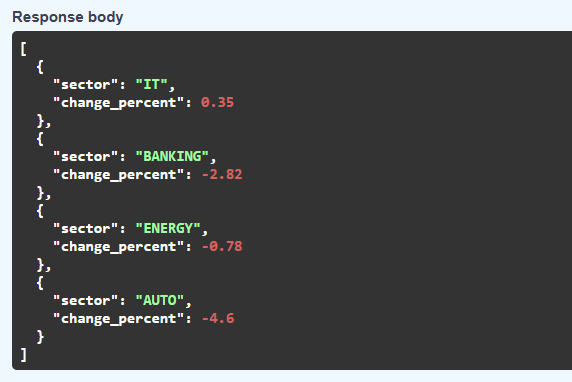
Example output:
[
{"sector": "IT", "change_percent": 0.35},
{"sector": "BANKING", "change_percent": -2.82},
{"sector": "ENERGY", "change_percent": -0.78},
{"sector": "AUTO", "change_percent": -4.6}
]
Technologies Used
Core stack:
- Python
- FastAPI
- SQLite
- yfinance
- pandas
- numpy
- NewsAPI
Libraries: fastapi uvicorn pandas numpy yfinance newsapi-python sqlite3
Installation
Clone repository
git clone https://github.com/sowjanya5751/indiaquant-mcp.git
cd indiaquant-mcp
Create virtual environment
Windows
python -m venv venv venv\Scripts\activate
Linux / Mac
python -m venv venv source venv/bin/activate
Install dependencies
pip install -r requirements.txt
Running the MCP Server
Option A — FastAPI (HTTP tools + OpenAPI)
Start the server:
cd indiaquant-mcp
pip install -r requirements.txt
uvicorn app.mcp.mcp_server:app --reload
Server will start at:
Option B — Native MCP (stdio, Claude Desktop / Cursor)
The repo also exposes an official MCP server over stdio using the Python mcp SDK (FastMCP), including fuse_market_decision and core market tools.
From the repo root:
PYTHONPATH=. python -m app.mcp.stdio_server
Example Claude Desktop (claude_desktop_config.json) fragment:
{
  "mcpServers": {
    "indiaquant": {
      "command": "python3",
      "args": ["-m", "app.mcp.stdio_server"],
      "cwd": "/absolute/path/to/indiaquant-mcp",
      "env": {
        "PYTHONPATH": ".",
        "NEWSAPI_KEY": "your-key-optional"
      }
    }
  }
}
API Endpoints
| Endpoint | Method | Description |
|---|---|---|
/get_live_price |
POST | Fetch live stock price |
/generate_signal |
POST | Generate trading signal |
/get_options_chain |
POST | Retrieve options data |
/calculate_greeks |
POST | Compute Black-Scholes Greeks |
/place_virtual_trade |
POST | Execute simulated trade |
/get_portfolio_pnl |
GET | Calculate portfolio PnL |
/analyze_sentiment |
POST | Analyze financial news sentiment |
/fuse_market_decision |
POST | Decision layer v1: fused direction + edge + validation |
/fuse_decision_manual |
POST | Fuse caller-supplied normalized signals |
/schemas/decision_layer |
GET | JSON Schema bundle for decision models |
/detect_unusual_activity |
POST | Detect unusual options activity |
/scan_market |
GET | Find oversold stocks |
/get_sector_heatmap |
GET | Sector performance overview |
API Documentation
Interactive API documentation is available at:
Swagger UI allows testing all MCP tools directly.
Design Decisions
FastAPI was chosen because:
- High performance async framework
- Automatic API documentation
- Ideal for MCP tool integration
SQLite was used because:
- Lightweight database
- Perfect for portfolio simulation
- Easy local deployment
yfinance provides:
- Free stock market data
- Historical price access
- Options chain support
Future Improvements
Possible extensions:
- Real-time WebSocket streaming
- Machine learning trading models
- Redis caching for faster data retrieval
- Cloud deployment (AWS / GCP)
- Advanced portfolio risk analytics
Assignment Requirements Fulfilled
✔ Real-time market data
✔ 10 MCP tools implemented
✔ Options analysis and Greeks calculation
✔ Sentiment analysis using NewsAPI
✔ Virtual trading portfolio
✔ Modular system architecture
✔ API-based MCP server compatible with AI agents
API Demo
Live Price
Trade Signal
Portfolio Trade
Sector Heatmap
Conclusion
IndiaQuant MCP demonstrates how AI agents can interact with financial markets through modular tools and real-time data pipelines.
The system combines quantitative analysis, market intelligence, and AI integration into a unified platform capable of supporting advanced trading insights.
Установка IndiaQuant
У этого сервера нет опубликованного пакета — он собирается из исходников. Открой репозиторий и следуй инструкции в README.
▸ github.com/sowjanya5751/indiaquant-mcpFAQ
IndiaQuant MCP бесплатный?
Да, IndiaQuant MCP бесплатный — установка в пару кликов через Unyly без оплаты.
Нужен ли API-ключ для IndiaQuant?
Нет, IndiaQuant работает без API-ключей и переменных окружения.
IndiaQuant — hosted или self-hosted?
Доступен hosted-вариант: Unyly запускает сервер в облаке, локальная установка не обязательна.
Как установить IndiaQuant в Claude Desktop, Claude Code или Cursor?
Открой IndiaQuant на unyly.org, выбери вкладку своего клиента (Claude Desktop, Claude Code, Cursor) и нажми Install — конфиг сгенерируется автоматически, без правки JSON.
Похожие MCP
Fetch
Web content fetching and conversion for efficient LLM usage.
AWS KB Retrieval
Retrieval from AWS Knowledge Base using Bedrock Agent Runtime.
 автор: modelcontextprotocol
Spring AI MCP Server
Provides auto-configuration for setting up an MCP server in Spring Boot applications.
llm-analysis-assistant
A very streamlined mcp client that supports calling and monitoring stdio/sse/streamableHttp, and can also view request responses through the /logs page. It also
 автор: xuzexin-hz
Compare IndiaQuant with
Не уверен что выбрать?
Найди свой стек за 60 секунд
Автор?
Embed-бейдж для README
Похожее
Все в категории ai