
Intent Engineering
БесплатноНе проверенAudit, scaffold, and triage agent intent specs against a 9-section template.

Описание
Audit, scaffold, and triage agent intent specs against a 9-section template.
README
intent-engineering is an MCP server that exposes three tools — audit_intent_spec, generate_intent_spec_scaffold, and assess_retrofit_level — letting any MCP-aware client (Claude Desktop, Cursor, Anti-Gravity) review, scaffold, and triage agent intent specs against a 9-section unified template synthesized from production-agent research.
Most agent failures aren't reasoning failures — they're intent failures. The spec is vague, the stop rules are missing, the outcome is an activity disguised as a state. This server makes that gap auditable from inside the harness the agent already runs in. The full reasoning, the rejected alternatives, and what would break in v0 live in docs/EXPLANATION.md.
Why this exists
Problem
Engineering teams treat AI agents like reliable coworkers, but agents fail silently when given underspecified intent. The cost is shipped features that solve the wrong problem — and the failure mode is invisible until production. PMs feel this pain twice: once writing the spec, and again when an agent confidently delivers something off-target. There's no shared protocol for "audit this spec before an agent runs on it."
Solution
A Model Context Protocol server that exposes three tools any MCP-aware client (Claude Desktop, Cursor, etc.) can call: audit_intent_spec audits a spec against a 25-item rubric, generate_intent_spec_scaffold scaffolds new specs by kind, assess_retrofit_level retrofits older docs. Published to npm as @swins/intent-engineering-mcp and to the official MCP registry as com.seanwinslow/intent-engineering via DNS-verified namespace.
Tradeoffs and Decisions
- TypeScript over Python: the MCP TS SDK has the deepest client coverage (Claude Desktop, Cursor) — at the cost of locking out the Python-native data science crowd.
- stdio transport over HTTP: zero-infra v0, but couples the server to a process-bound client. v1 will add SSE for cloud agents.
- DNS-verified namespace (
com.seanwinslow/*) over GitHub-handle namespace: locks the brand surface to a domain I control; required a separate Ed25519 keypair + apex TXT record, which is more upfront friction thanmcp-publisher login github.
What I Learned
The MCP protocol is essentially a contract for "I am a tool an LLM can call without me writing a wrapper." Once that landed, the server became a thin protocol adapter over an existing skill — and the OPTIONAL-fields pattern I'd developed on a separate knowledge-graph project translated directly. The most non-obvious win: the server scored 23/25 with zero anti-patterns when audited by its own tool. A tool that successfully eats its own dog food earns more credibility in 30 seconds of demo than 30 minutes of documentation.
Three tools
| Tool | Input | Output |
|---|---|---|
audit_intent_spec |
A spec (spec_text or file_path) |
Score out of 25, per-section findings, detected anti-patterns, top 3 recommendations |
generate_intent_spec_scaffold |
kind (blank / level-1-mvr / full-9-section), optional hints |
A paste-ready YAML scaffold + next-step actions |
assess_retrofit_level |
An existing prompt or SKILL.md | Recommended retrofit level (L1 / L2 / L3) with blast-radius + complexity + autonomy reasoning |
The 25-item validation checklist, 5 fatal anti-patterns, 4 autonomy levels, and 9-section template all come from the canonical intent-engineering skill. The MCP server is a thin protocol adapter, not a fork.
Quickstart
Requires Node 20+ and an MCP-aware client (Claude Desktop, Cursor, etc.).
git clone https://github.com/seanwinslow28/sw-mcp-intent-engineering.git
cd sw-mcp-intent-engineering
npm install
npm run build
Then add the server to your Claude Desktop config at ~/Library/Application Support/Claude/claude_desktop_config.json:
{
  "mcpServers": {
    "intent-engineering": {
      "command": "node",
      "args": ["<ABSOLUTE_PATH_TO_REPO>/build/index.js"]
    }
  }
}
Restart Claude Desktop. Open Settings → Developer to confirm the server shows as running:
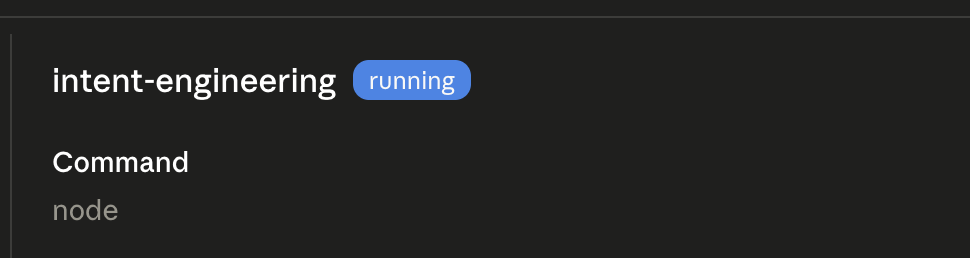
The three tools then appear in the tool list under intent-engineering in any new conversation.
Try it
Paste this into Claude Desktop after the server is connected:
Run
audit_intent_specon this spec:## Objective Make support tickets resolve faster. ## Outcomes - Tickets close in <2h - CSAT stays high ## Stop Rules (none)
You'll get back a score out of 25, a list of detected anti-patterns (this spec hits at least three), and three concrete recommendations to fix it. The full I/O contract lives in docs/v0-scope.md §4.
Dogfood result
The canonical intent-engineering SKILL.md, audited by its own MCP server, scores 23/25 with zero anti-patterns detected. Seven sections pass cleanly; two return warnings (outcome measurability and a health-metric behavioral-adjustment phrasing). The tool eats its own dog food and the dog food is mostly nutritious.
At scale: the same server audited all 118 first-party skills in my Claude Code Superuser Pack in under a second. 24% scored L1-mvr (the spec just needs an intent header), 36% scored L2-structured (needs Health Metrics + Decision Authority), and 40% scored L3-full (autonomous-loop or high-blast-radius skills that warrant a 9-section conversion). Zero parse errors across the batch. The full CSV is at examples/superuser-pack-retrofit-assessment.csv.
Limitations
The audit is opinionated about heading structure, but it now recognizes a conservative set of alias headings in addition to the canonical ones — ## Purpose / ## When to Use map to Objective, ## Success Criteria / ## Definition of Done to Desired Outcomes, ## Completion / ## Exit Criteria to Stop Rules, and so on (the full table lives in src/intent/parser.ts). When a section is recognized from a non-canonical heading the audit says so in its notes, so the score stays legible. Earlier, skills using different heading vocabularies scored 1/25 because none of their present sections were recognized; that false-negative is fixed. Two honest boundaries remain: headings that are not true intent equivalents (procedural ones like ## How to Apply, ## Instructions, ## Usage) are deliberately left unmapped rather than credited to the wrong section, and a spec that genuinely lacks the nine intent sections still scores low — the mapper recognizes equivalent intent, it does not invent it.
Other v0 boundaries worth naming up front:
- Read-only. No tool writes files.
assess_retrofit_levelrecommends; it does not retrofit. A v0.2apply_retrofitwould live behind explicit user confirmation. - Stdio transport only. No Streamable HTTP, no SSE, no remote hosting. Run it locally next to your client.
- No
promptsorresourcesprimitives. Three tools and that's it. Adding more before the surface is stable would be premature.
Project layout
sw-mcp-intent-engineering/
├── src/
│   ├── index.ts                    # MCP server boot + tool registration
│   └── intent/
│       ├── audit.ts                # audit_intent_spec logic
│       ├── scaffold.ts             # generate_intent_spec_scaffold logic
│       ├── retrofit.ts             # assess_retrofit_level logic
│       ├── checklist.ts            # 25-item validation checklist
│       ├── anti-patterns.ts        # 5 fatal anti-pattern detectors
│       ├── parser.ts               # YAML frontmatter + markdown heading parser
│       └── templates/              # YAML scaffolds (blank / level-1-mvr / full-9-section)
├── docs/
│   ├── v0-scope.md                 # binding scope-lock for v0
│   ├── EXPLANATION.md              # 4Q comprehension artifact (why MCP, what would break, what I learned)
│   └── claude-code-responses-and-tests/   # archived phase-verification outputs
├── package.json
├── tsconfig.json
├── server.json                     # registry metadata
├── CHANGELOG.md
├── README.md
└── LICENSE
src/index.ts is a thin protocol adapter. All tool logic lives in src/intent/*.
Build discipline
- SDK pinned at
@modelcontextprotocol/[email protected](stable v1.x line, not the v2 pre-alpha) - All logging goes to
console.error. AprepublishOnlygrep guard fails the build if anyconsole.logappears insrc/ - Tool implementations import the validation checklist, anti-pattern definitions, and template strings from local modules that mirror the skill. They do not paraphrase or reinvent skill content
- Scope changes require explicit approval in CHANGELOG.md before code is written
Further reading
- docs/EXPLANATION.md — the 4Q comprehension artifact (what this is, why this approach, what would break, what I learned)
- docs/v0-scope.md — binding v0 scope-lock and ship gate
- seanwinslow.com/transactions/intent-engineering-mcp — deep-dive write-up with Loom demo
License
MIT. See LICENSE.
Установить Intent Engineering в Claude Desktop, Claude Code, Cursor
unyly install intent-engineeringСтавит в Claude Desktop, Claude Code, Cursor и VS Code — сам разбирается с npx, uvx и сборкой из исходников.
Впервые? Поставь CLI: curl -fsSL https://unyly.org/install | sh
Или настроить вручную
Выполни в терминале:
claude mcp add intent-engineering -- npx -y @swins/intent-engineering-mcpFAQ
Intent Engineering MCP бесплатный?
Да, Intent Engineering MCP бесплатный — установка в пару кликов через Unyly без оплаты.
Нужен ли API-ключ для Intent Engineering?
Нет, Intent Engineering работает без API-ключей и переменных окружения.
Intent Engineering — hosted или self-hosted?
Self-hosted: сервер запускается локально на твоей машине командой из раздела установки.
Как установить Intent Engineering в Claude Desktop, Claude Code или Cursor?
Открой Intent Engineering на unyly.org, выбери вкладку своего клиента (Claude Desktop, Claude Code, Cursor) и нажми Install — конфиг сгенерируется автоматически, без правки JSON.
Похожие MCP
Fetch
Web content fetching and conversion for efficient LLM usage.
AWS KB Retrieval
Retrieval from AWS Knowledge Base using Bedrock Agent Runtime.
 автор: modelcontextprotocol
Spring AI MCP Server
Provides auto-configuration for setting up an MCP server in Spring Boot applications.
llm-analysis-assistant
A very streamlined mcp client that supports calling and monitoring stdio/sse/streamableHttp, and can also view request responses through the /logs page. It also
 автор: xuzexin-hz
Compare Intent Engineering with
Не уверен что выбрать?
Найди свой стек за 60 секунд
Автор?
Embed-бейдж для README
Похожее
Все в категории ai