
Invokeai
БесплатноНе проверенEnables AI coding agents to control a local InvokeAI creative engine, supporting text-to-image, image-to-image, masked inpaint, upscaling, and full queue, model

Описание
Enables AI coding agents to control a local InvokeAI creative engine, supporting text-to-image, image-to-image, masked inpaint, upscaling, and full queue, model, gallery, board, and workflow management.
README
A bridge between AI coding agents (Claude, Cursor, opencode) and your local InvokeAI creative engine - text-to-image, image-to-image, masked inpaint, and upscaling on your own GPU, plus full queue, model, gallery, board, and workflow management, with a polished dark webapp.
What this wraps
This repo wraps InvokeAI, the open-source professional Stable Diffusion /
Flux creative engine (Apache-2.0, 27k+ stars). InvokeAI runs as a local web
server (default http://127.0.0.1:9090) and is installed separately through
its launcher - it is never bundled here. See docs/WRAPPEE.md.
Preview
| Dashboard | Generate |
|---|---|
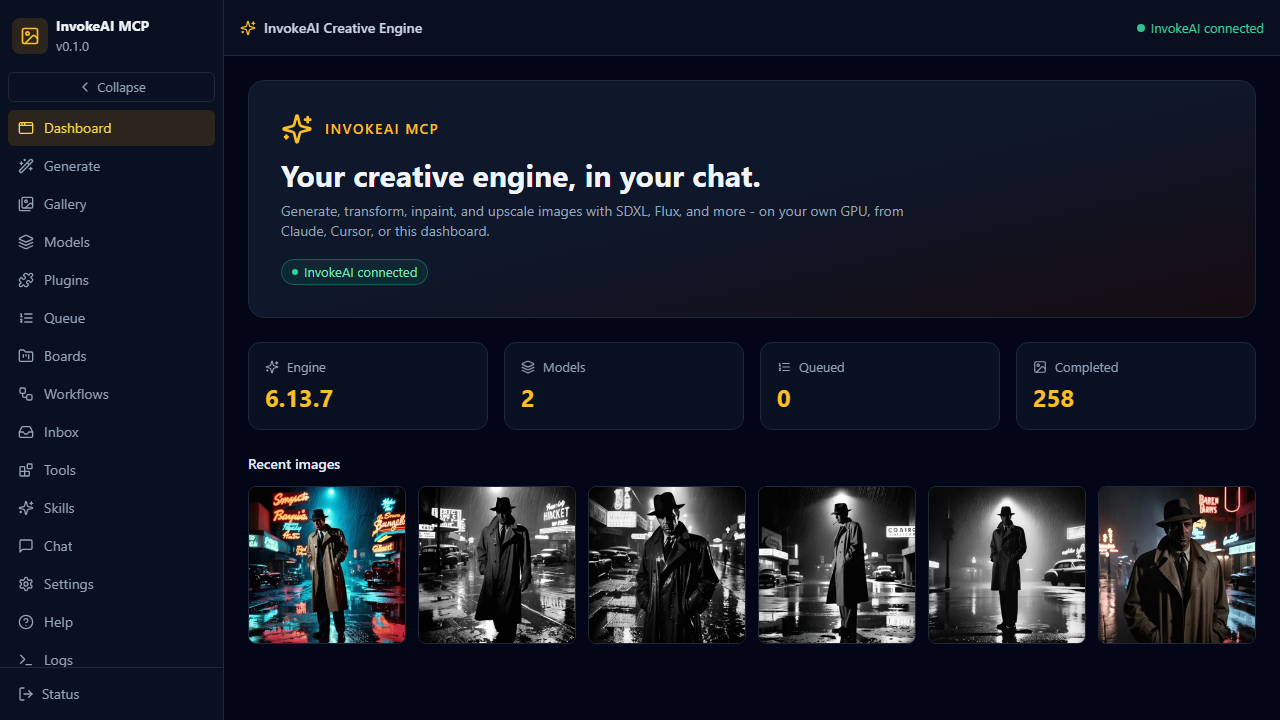 |
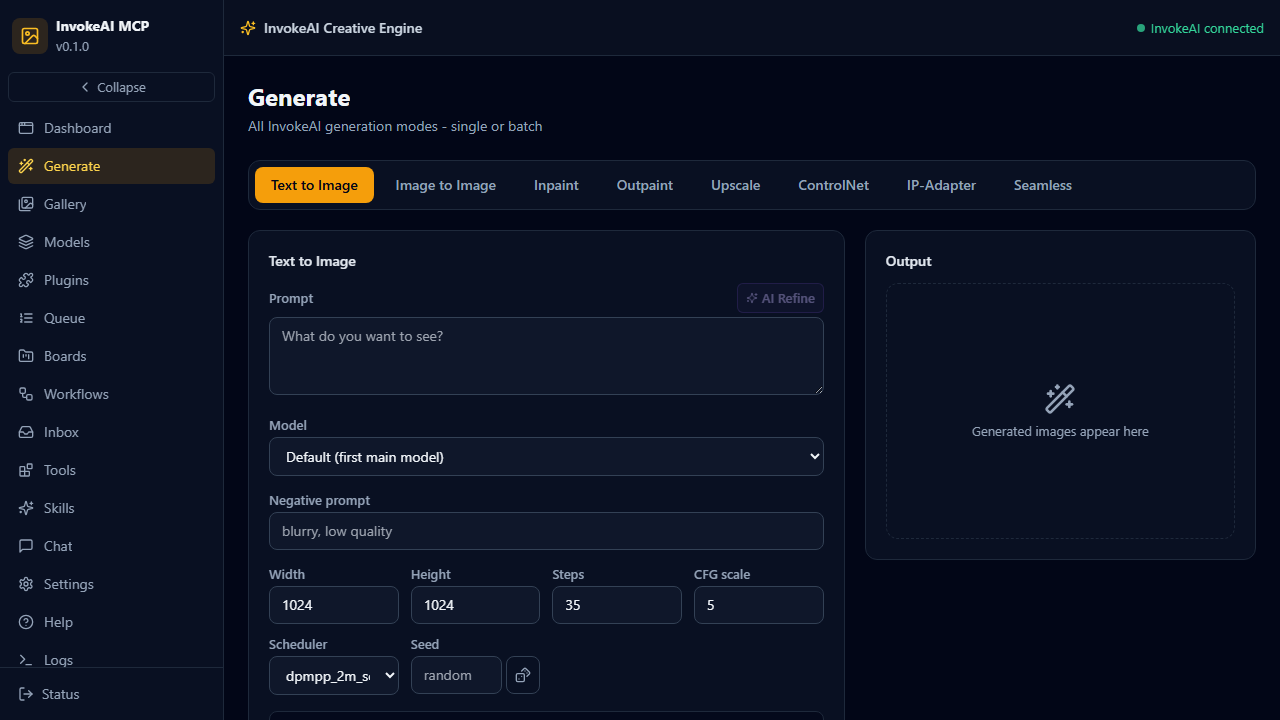 |
What You Can Do
How it runs: headless bridge - this MCP server talks to your running InvokeAI instance over its REST API. InvokeAI must be installed and running (launcher install, model download, first run). Nothing is bundled.
| Direction | Artifacts | Notes |
|---|---|---|
| Hands-in | prompts, negative prompts, images (img2img/inpaint), mask images, model sources | Text or uploaded images |
| Hands-out | generated PNGs, image URLs, local file paths, queue state | invokeai_queue result + gallery download |
- Generate SD1.5 / SDXL / Flux / SD3.5 / Qwen Image images on your RTX 4090
- 8 generation modes with horizontal tabs: txt2img, img2img, inpaint, outpaint, upscale, ControlNet, IP-Adapter, seamless tiling
- 60-style catalog + 24 material presets with select-all batch generation and live per-item progress
- AI prompt refiner (local LLM) that understands the selected style/material
- Plugin surface: install custom node packs from git, browse 250+ built-in engine nodes
- Transform existing images (img2img) and repair regions (masked inpaint)
- 4x RealESRGAN upscaling
- Install models from HuggingFace or Civitai without leaving the chat
- Full queue control: status, cancel, clear, resume, result polling
- Gallery search, boards, star/favorite organization; sort/filter by style, painter, franchise, board, starred; batch ops (star/unstar/delete/zip/move) with exact per-image attribution
- 76 curated styles + 23 franchise presets + 60 painters + 1321 A1111 community style pack entries - all batchable in any combination
- Workflow library management (save/load node workflows)
- Dark SOTA webapp: Generate, Gallery, Models, Queue, Boards, Workflows, Inbox, Tools, Skills, Chat (local LLM), Settings, Help, Logs
Supported models (engine catalog, 2026)
| Model | Family | VRAM (fp16) | License / gating | Notes |
|---|---|---|---|---|
| FLUX.1 Dev / Schnell | flux | 12-16 GB (fp8 ~7 GB) | Gated (token) / schnell Apache-2.0 | Schnell: 4-step, structural quality |
| FLUX.2 Dev / Klein 9B / 4B | flux2 | 18 GB / 9 GB / 4 GB | Gated (token) | Current flagship |
| SD 3.5 Large / Medium | sd-3 | 16 GB / 5 GB | License accept + token | Rivals FLUX.1-dev |
| SDXL + community (Juggernaut XL, RealVis) | sdxl | 8 GB | Mostly open | Default: Juggernaut XL v9 |
| CogView4-6B | cogview4 | 12 GB (fp8 ~7 GB) | Apache-2.0, no gating | Great text rendering, bilingual |
| Z-Image Turbo / Base | z-image | 12 GB (fp8 ~6 GB) | Permissive | Turbo is very fast |
| Qwen-Image 20B | qwen-image | ~40 GB (fp8 ~20 GB) | Apache-2.0, no gating | Best prompt adherence; too heavy for 24 GB with desktop apps |
| SD 1.5 / 2.x | sd-1 | 4 GB | Open | Legacy, fast iteration |
| Krea 2, Ideogram 4, Anima, ERNIE | external | varies | Closed / API | Engine supports; not self-hostable |
Graph builders ship for sd-1, sdxl, flux, cogview4 (verified against engine 6.13.7);
sd-3, qwen-image, z-image, flux2 wiring is mechanical follow-up on request.
Models install to N:\InvokeAI-models (configurable via models_dir in invokeai.yaml).
Quick Install
The fastest path is the MCPB bundle for Claude Desktop:
- Download
invokeai-mcp-0.1.0.mcpbfrom Releases - Open Claude Desktop and drag the file onto the window
- Complete onboarding (install InvokeAI, download a model) - see docs/ONBOARDING.md
Other methods (mcpb CLI, manual config, webapp dev stack) are in INSTALL.md.
Example Prompts
- "Generate a neon cyberpunk city at night, rain, cinematic lighting"
- "Use this image and make it a watercolor painting: [gallery image]"
- "What models do I have installed? Install SDXL base from HuggingFace"
- "Show me my recent images and download the last one to disk"
Documentation
| Doc | Contents |
|---|---|
| Installation | All install methods, prerequisites |
| Onboarding | First-timer InvokeAI setup, model downloads, pitfalls |
| Wrapped app | What InvokeAI is, official links, community |
| Architecture | System architecture, graph builders, ports |
| Configuration | Env vars, config options |
| Tool Reference | All available tools |
| Development | Contributing, local setup |
| Troubleshooting | Common issues |
Requirements
- InvokeAI installed and running (launcher install; models downloaded) - free, Apache-2.0
- GPU with 6-12 GB VRAM recommended (SD1.5: 4 GB, SDXL: 8 GB, Flux: 12 GB+)
- Engine install:
invokeai-webmanual install (uv venv+uv pip install invokeai) or the official launcher; the engine serves its full canvas GUI on 9090 - Claude Desktop (or any MCP client) for chat use; a browser for the webapp
- Python 3.12+ and uv for source installs; Node/Bun for the webapp
License
MIT
Установка Invokeai
У этого сервера нет опубликованного пакета — он собирается из исходников. Открой репозиторий и следуй инструкции в README.
▸ github.com/sandraschi/invokeai-mcpFAQ
Invokeai MCP бесплатный?
Да, Invokeai MCP бесплатный — установка в пару кликов через Unyly без оплаты.
Нужен ли API-ключ для Invokeai?
Нет, Invokeai работает без API-ключей и переменных окружения.
Invokeai — hosted или self-hosted?
Self-hosted: сервер запускается локально на твоей машине командой из раздела установки.
Как установить Invokeai в Claude Desktop, Claude Code или Cursor?
Открой Invokeai на unyly.org, выбери вкладку своего клиента (Claude Desktop, Claude Code, Cursor) и нажми Install — конфиг сгенерируется автоматически, без правки JSON.
Похожие MCP
ARA
Generate images, video and audio from any AI agent — one connector.
 автор: ARA
Omni Video
An MCP server that transforms LLM-enabled IDEs into professional video editors by pre-processing footage into text proxies, generating motion graphics via HTML/
 автор: buildwithtaza
YouTube
Transcripts, channel stats, search
 автор: YouTube
EverArt
AI image generation using various models.
 автор: modelcontextprotocol
gpu-bridge/mcp-server
GPU inference API for LLMs, image and video generation, TTS, Whisper, embeddings, reranking and OCR, paid per use via x402 or an API key.
 автор: gpu-bridge
merterbak/Grok-MCP
Access xAI's Grok API with agentic tool calling, image generation, vision and file support.
 автор: merterbak
SureScaleAI/openai-gpt-image-mcp
Image generation and editing with OpenAI's GPT image models.
 автор: SureScaleAI
YangLiangwei/PersonalizationMCP
Aggregate personal data from Steam, YouTube, Bilibili, Spotify, Reddit and other gaming, music, video and social platforms, with OAuth2 and token management.
 автор: YangLiangwei
AceDataCloud/MCPFlux
Flux image generation and editing from Black Forest Labs via the Ace Data Cloud API.
 автор: AceDataCloud
AceDataCloud/MCPNanoBanana
Nano Banana image generation and editing, including virtual try-on and product placement in realistic scenes.
автор: AceDataCloudCompare Invokeai with
Не уверен что выбрать?
Найди свой стек за 60 секунд
Автор?
Embed-бейдж для README
Похожее
Все в категории media