

Описание
MCP server for ioBroker
README

ioBroker (windows installer)
Automate your life!
To install on Linux, just run: npx @iobroker/install
To install on Windows: mkdir C:\iobroker && cd C:\iobroker && npx @iobroker/install or use installer
See ioBroker documentation for more information
ioBroker is an integration platform for the Internet of Things, focused on Building Automation, Smart Metering, Ambient Assisted Living, Process Automation, Visualization and Data Logging.
Concept
ioBroker is not just an application, it's more of a concept and a database schema. It offers a very easy way for systems to interoperate. ioBroker defines some common rules for a pair of databases used to exchange data and publish events between different systems.
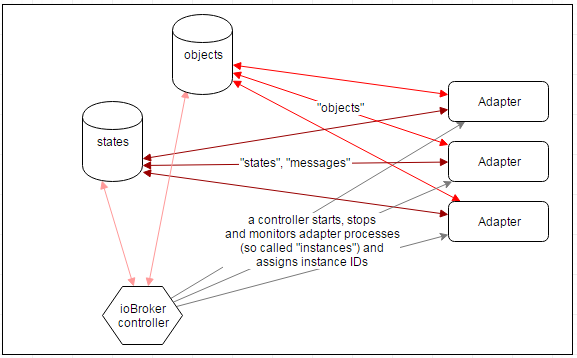
Databases
ioBroker uses "in memory" database to hold the data and saves it on disk with reasonable intervals. There are two types of storage:
- objects (meta/configuration information)
- states (values)
Objects and states can be stored in "in memory" or in Redis.
Redis is an in-memory key-value data store and also a message broker with a publish/subscribe pattern.
It's used to maintain and publish all states of connected systems.
Adapters
Systems are attached to ioBrokers databases via so-called adapters, technically processes running anywhere in the network and connecting all kinds of systems to ioBrokers databases. A connection to ioBrokers databases can be implemented in nearly any programming language on nearly any platform, and an adapter can run on any host that is able to reach the databases via ip networking.
See the actual list of adapters on iobroker.net
Security
ioBroker is designed to be accessed by trusted adapters inside trusted networks. This means that usually it is not a good idea to expose the ioBroker databases, adapters or any smart home devices directly to the internet or, in general, to an environment where untrusted clients can directly access these network services. Adapters that offer services supposed to be exposed to the internet should be handled with care. You should always activate HTTPS and use valid certificates for web, admin if open it for internet or for example, use it with additional security measures like VPN, VLAN and reverse proxies.
Getting Started
Operating System and Hardware
ioBroker.js-controller should run on any hardware and OS that runs Node.js (ARM, x86, Windows, Linux, OSX).
ioBroker spawns a new Node.js process for every adapter instance, so RAM becomes a limiting factor. A single adapter's memory fingerprint is roundabout 10 to 60 MB.
Installation and first steps
Command Reference
- Complete Parameters Reference - Comprehensive list of all available parameters for all ioBroker commands (install, fix, diag, node-update)
Community support
- Get help in the ioBroker Forums (english, german and russian languages)
Logos and pictures
All logos are protected by copyright and may not be used without permission.
Please request permission via [email protected]
License
This module is distributor under the MIT License (MIT). Please notice that other ioBroker adapters can have different licenses.
The MIT License (MIT)
Copyright (c) 2014-2025 bluefox [email protected], Copyright (c) 2014 hobbyquaker
Permission is hereby granted, free of charge, to any person obtaining a copy of this software and associated documentation files (the "Software"), to deal in the Software without restriction, including without limitation the rights to use, copy, modify, merge, publish, distribute, sublicense, and/or sell copies of the Software, and to permit persons to whom the Software is furnished to do so, subject to the following conditions:
The above copyright notice and this permission notice shall be included in all copies or substantial portions of the Software.
THE SOFTWARE IS PROVIDED "AS IS", WITHOUT WARRANTY OF ANY KIND, EXPRESS OR IMPLIED, INCLUDING BUT NOT LIMITED TO THE WARRANTIES OF MERCHANTABILITY, FITNESS FOR A PARTICULAR PURPOSE AND NONINFRINGEMENT. IN NO EVENT SHALL THE AUTHORS OR COPYRIGHT HOLDERS BE LIABLE FOR ANY CLAIM, DAMAGES OR OTHER LIABILITY, WHETHER IN AN ACTION OF CONTRACT, TORT OR OTHERWISE, ARISING FROM, OUT OF OR IN CONNECTION WITH THE SOFTWARE OR THE USE OR OTHER DEALINGS IN THE SOFTWARE.
Установить Iobroker.mcp в Claude Desktop, Claude Code, Cursor
unyly install iobroker-mcpСтавит в Claude Desktop, Claude Code, Cursor и VS Code — сам разбирается с npx, uvx и сборкой из исходников.
Впервые? Поставь CLI: curl -fsSL https://unyly.org/install | sh
Или настроить вручную
Выполни в терминале:
claude mcp add iobroker-mcp -- npx -y iobroker.mcpFAQ
Iobroker.mcp MCP бесплатный?
Да, Iobroker.mcp MCP бесплатный — установка в пару кликов через Unyly без оплаты.
Нужен ли API-ключ для Iobroker.mcp?
Нет, Iobroker.mcp работает без API-ключей и переменных окружения.
Iobroker.mcp — hosted или self-hosted?
Self-hosted: сервер запускается локально на твоей машине командой из раздела установки.
Как установить Iobroker.mcp в Claude Desktop, Claude Code или Cursor?
Открой Iobroker.mcp на unyly.org, выбери вкладку своего клиента (Claude Desktop, Claude Code, Cursor) и нажми Install — конфиг сгенерируется автоматически, без правки JSON.
Похожие MCP
GitHub
PRs, issues, code search, CI status
 автор: GitHub
Filesystem
Secure file operations with configurable access controls.
Memory
Knowledge graph-based persistent memory system.
Template MCP Server
A CLI tool to create a new Model Context Protocol server project with TypeScript support, dual transport options, and an extensible structure
 автор: mcpdotdirect
Compare Iobroker.mcp with
Не уверен что выбрать?
Найди свой стек за 60 секунд
Автор?
Embed-бейдж для README
Похожее
Все в категории development