
Jshook
БесплатноНе проверенMCP server with built-in tools across multiple domains for AI-assisted JavaScript analysis and security analysis — browser automation, CDP debugging, network mo

Описание
MCP server with built-in tools across multiple domains for AI-assisted JavaScript analysis and security analysis — browser automation, CDP debugging, network monitoring, JS hooks, code analysis, and workflow orchestration
README
License: AGPLv3 Node.js 22.12+ TypeScript MCP pnpm
English | 中文
An MCP server that gives AI agents 600+ tools across 34 domains for JavaScript analysis and security research — browser automation, CDP debugging, network interception, JS hooks, LLM-powered code analysis, process/memory forensics, WASM reverse engineering, source-map reconstruction, AST transforms, and composite workflows in a single server.
Quick Links
🚀 Quick Start
No global install needed — add to your MCP client config and you're ready:
Claude Desktop / Cursor (claude_desktop_config.json):
{
  "mcpServers": {
    "jshook": {
      "command": "npx",
      "args": ["-y", "@jshookmcp/jshook@latest"],
      "env": { "JSHOOK_BASE_PROFILE": "search" }
    }
  }
}
(Windows: use npx.cmd absolute path if npx is not found)
Share one daemon across multiple agents
The default stdio configuration starts one full jshook process per MCP host. To share the embedding model, browser runtime, and caches, start one local Streamable HTTP daemon:
pnpm build
pnpm daemon
Then point every MCP client at http://127.0.0.1:3000/mcp using its HTTP/URL server
configuration. Each client receives its own MCP session and response route while heavyweight
runtime resources remain in one process. Keep the default loopback bind; set MCP_AUTH_TOKEN
before exposing the endpoint beyond localhost.
🌟 Highlights
- 🤖 AI-Driven Analysis — LLM-powered deobfuscation, crypto detection, AST comprehension
- ⚡ Search-First Context Efficiency —
searchprofile ≈ 3K tokens vsfull≈ 40K+ tokens - 🎯 Progressive Tiers —
search→workflow→full, activate on demand - 🌐 Full-Stack Browser Automation — Chromium/Camoufox + CDP + anti-detection + CAPTCHA handling
- 🔁 Runtime Recovery and Session Isolation — HTTP sessions restore activated domains, browser attach state, coverage state, and isolate browser-side session state per client
- 🧭 Schema-First Meta Tools —
describe_tool, validatedcall_tool, andcoverage_reportreduce parameter errors and make tool coverage visible - 📡 Network Interception — HTTP/2 frame building, MiTM capture, GraphQL, Burp Suite bridge
- 🛠️ Reverse Engineering Toolchain — WASM disassembly, binary analysis, Frida, Ghidra/IDA bridges
- 🧰 Process & Memory Forensics — Native FFI scanning, hardware breakpoints, PE introspection
- 🧩 Dynamic Extensibility — Hot-reload plugins, declarative workflows, auto-discovered domains
Recent Runtime Notes
- HTTP transport now multiplexes independent MCP sessions and restores runtime state after reconnects.
proxy_startauto-generates a local HTTPS interception CA when needed.- Browser CAPTCHA solving is now explicit-input driven: pass
taskKind,siteKey,imageBase64,callbackName, andresponseSelectoras needed. Built-in widget/page signature probing is intentionally not used.
Architecture
- Runtime Registry — Domains auto-discovered via
manifest.ts; add a domain by creating one file - Lazy Initialization — Handlers instantiated on first call, not at startup
- BM25 + Vector Search —
search_toolsmeta-tool with hybrid ranking and adaptive weights - MCP ToolAnnotations — Every tool carries
readOnlyHint/destructiveHint/idempotentHint/openWorldHint
Registry Snapshot
The built-in surface below is generated from the runtime registry and checked in CI.
- Package version:
0.3.4 - Built-in Tools:
636 - Domains:
adb-bridge,binary-instrument,boringssl-inspector,browser,canvas,coordination,core,cross-domain,dart-inspector,debugger,encoding,exploit-dev,extension-registry,graphql,instrumentation,maintenance,memory,mojo-ipc,native-bridge,native-emulator,network,platform,process,protocol-analysis,proxy,sourcemap,streaming,syscall-hook,trace,transform,v8-inspector,wasm,webgpu,workflow - Note: this snapshot is generated from the runtime registry; do not edit the counts by hand.
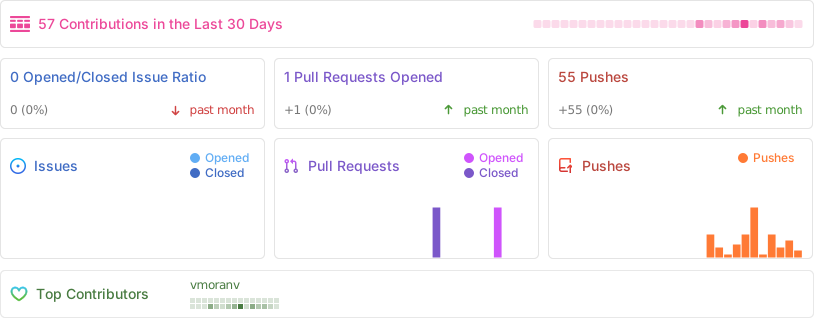
Project Stats
Установить Jshook в Claude Desktop, Claude Code, Cursor
unyly install jshookСтавит в Claude Desktop, Claude Code, Cursor и VS Code — сам разбирается с npx, uvx и сборкой из исходников.
Впервые? Поставь CLI: curl -fsSL https://unyly.org/install | sh
Или настроить вручную
Выполни в терминале:
claude mcp add jshook -- npx -y @jshookmcp/jshookFAQ
Jshook MCP бесплатный?
Да, Jshook MCP бесплатный — установка в пару кликов через Unyly без оплаты.
Нужен ли API-ключ для Jshook?
Нет, Jshook работает без API-ключей и переменных окружения.
Jshook — hosted или self-hosted?
Self-hosted: сервер запускается локально на твоей машине командой из раздела установки.
Как установить Jshook в Claude Desktop, Claude Code или Cursor?
Открой Jshook на unyly.org, выбери вкладку своего клиента (Claude Desktop, Claude Code, Cursor) и нажми Install — конфиг сгенерируется автоматически, без правки JSON.
Похожие MCP
GitHub
PRs, issues, code search, CI status
 автор: GitHub
Filesystem
Secure file operations with configurable access controls.
Memory
Knowledge graph-based persistent memory system.
Template MCP Server
A CLI tool to create a new Model Context Protocol server project with TypeScript support, dual transport options, and an extensible structure
 автор: mcpdotdirect
Compare Jshook with
Не уверен что выбрать?
Найди свой стек за 60 секунд
Автор?
Embed-бейдж для README
Похожее
Все в категории development