
K8s
БесплатноНе проверенA lightweight MCP server that enables AI assistants to deploy, inspect, and operate Kubernetes workloads through high-level workflow tools, reducing token usage

Описание
A lightweight MCP server that enables AI assistants to deploy, inspect, and operate Kubernetes workloads through high-level workflow tools, reducing token usage with structured outputs.
README
AI-native Kubernetes operations for agents and fast-moving teams.
k8s-mcp is a lightweight MCP server that lets AI assistants deploy, inspect, and operate Kubernetes workloads through high-level workflow tools instead of raw kubectl commands — with structured outputs that significantly reduce token usage.
Works with Claude Code · Codex CLI · Gemini CLI · Opencode · and any MCP-compatible agent.
Less kubectl. More done.
Demo
Why This Exists
AI assistants today can suggest kubectl commands. But actually operating a cluster still means switching contexts, copy-pasting commands, manually debugging failures, and repeatedly checking logs and events. That creates a slow human-in-the-loop cycle.
k8s-mcp closes this gap by giving AI agents task-complete tools instead of low-level primitives. Instead of chaining:
kubectl get pod
kubectl describe pod
kubectl logs
agents can call tools like diagnose_pod() or wait_for_ready() — and get structured results in one shot.
What makes it different
k8s-mcp is designed around workflows, not raw resource access — optimized for:
- AI agent execution loops — deploy, observe, diagnose, retry, validate
- Lower token usage — structured outputs instead of long shell transcripts
- Beginner-friendly operations — less manual command chaining
- Faster iteration — fewer moving pieces between "please deploy this" and a working result
Key capabilities
- Faster and lighter than shell tools — native MCP tools return structured data directly to the AI, avoiding shell spawning, CLI output parsing, and large text streaming
- Diagnose issues in one shot —
diagnose_podcombines status, conditions, events, and failing-container logs into a single report - Autonomous deploy loops — apply manifests, wait for readiness, detect failures, and iterate without manual back-and-forth
- Generate deployment manifests — create a working Kubernetes starting point automatically instead of writing YAML from scratch
- Query and take action — list pods, read logs, inspect configs, scale deployments, restart workloads, apply manifests, and delete resources from the conversation
- Detect config drift — export live resources as YAML and compare against local manifests
- Secure by Design — reuses your
~/.kube/configand your organization's existing auth flow (SSO, OIDC, certificate). Never stores or manages credentials - Work with any MCP client — supports stdio, HTTP, and SSE transports
How it compares
Some Kubernetes MCP servers focus on broad resource-level API access. k8s-mcp focuses on workflow-level tools designed for AI agents.
| k8s-mcp | Traditional MCP servers | |
|---|---|---|
| Focus | Workflow-level tools | Raw resource APIs |
| Usability | Beginner-friendly | Kubernetes expertise required |
| Outputs | Summarized, structured | Raw API responses |
| Agent efficiency | High — fewer calls, lower token usage | Requires more reasoning and chaining |
Who Is This For
- AI engineers building agent workflows that interact with Kubernetes
- Researchers deploying models on Kubernetes without deep k8s expertise
- Developers who want to automate cluster operations from their IDE
- Teams experimenting with AI-driven DevOps
If you want broad, low-level Kubernetes API access, there are other MCP servers better suited for that. If you want an agent that can actually operate a cluster with less manual overhead, this project is for you.
Quick Start
1. Install
git clone [email protected]:jingyanjiang/k8s-mcp.git
cd k8s-mcp
pipx install .
This puts k8s-mcp on your PATH and works from any directory.
You can also use uv tool install . or pip install .. For development, use poetry install.
2. Verify your Kubernetes access
k8s-mcp reads your existing ~/.kube/config. Before using it, verify:
kubectl auth whoami
kubectl get all -n <your-namespace>
The server inherits whatever permissions your kubeconfig user has. No additional credentials are needed.
Note: Some operations (e.g.,
list_namespaces,list_nodes) require cluster-wide permissions. If a request fails with403 Forbidden, ask your cluster admin for the necessary RBAC roles.
3. Add to your MCP client
Claude Code / Claude Desktop
Add to .mcp.json (project-level) or ~/.claude.json (global):
{
  "mcpServers": {
    "k8s": {
      "type": "stdio",
      "command": "k8s-mcp",
      "args": ["--transport", "stdio"]
    }
  }
}
OpenAI Codex CLI
Add to ~/.codex/config.toml (user-level) or .codex/config.toml (project-level):
[mcp_servers.k8s]
command = "k8s-mcp"
args = ["--transport", "stdio"]
Gemini CLI
Add to ~/.gemini/settings.json (user-level) or .gemini/settings.json (project-level):
{
  "mcpServers": {
    "k8s": {
      "command": "k8s-mcp",
      "args": ["--transport", "stdio"]
    }
  }
}
Opencode
Add to opencode.json in your project root:
{
  "mcp": {
    "k8s": {
      "type": "local",
      "command": ["k8s-mcp", "--transport", "stdio"]
    }
  }
}
If your MCP client can't find
k8s-mcpon PATH, use the absolute path instead (runwhich k8s-mcpto find it).
The server starts automatically when your MCP client connects — no manual commands needed.
Using Poetry instead of a global install?
Replace "command": "k8s-mcp" with "command": "poetry" and set args to ["run", "k8s-mcp", "--transport", "stdio"]. You must also add "cwd": "/absolute/path/to/k8s-mcp" so Poetry can find the project.
Other transport modes
The server supports three transport modes:
# stdio (for local MCP clients like Claude Code)
k8s-mcp --transport stdio

# Streamable HTTP (for remote/networked clients)
k8s-mcp --transport streamable-http

# SSE (Server-Sent Events)
k8s-mcp --transport sse
For HTTP transports, configure bind address and port via environment variables:
export K8S_MCP_HOST=0.0.0.0   # default: localhost
export K8S_MCP_PORT=8000       # default: 8000
4. (Optional) Install the k8s-ops skill for Claude Code
For Claude Code users, this repo ships an opinionated workflow skill at skills/k8s-ops/. It encodes multi-step playbooks for deploy, debug, rollout, and audit on top of the raw MCP tools — useful when you want the agent to follow a tested sequence (e.g., debug decision tree, pre-flight rollout checks) rather than improvise.
Install with a symlink so updates from git pull flow through automatically:
ln -s "$(pwd)/skills/k8s-ops" ~/.claude/skills/k8s-ops
Then in Claude Code, invoke it with /k8s-ops (e.g., /k8s-ops debug, /k8s-ops audit NAMESPACE=foo). The skill is also model-invoked — it activates automatically when you ask the agent to deploy, diagnose, restart, or audit Kubernetes workloads.
Skip this step if you're using a different MCP client. The MCP server itself works without it.
5. Try it out
Please check the status of my namespace: <namespace>
Please deploy the app in this repo to my k8s cluster. Make a plan first, then implement it.
My pods in namespace X keep crashing. Can you figure out what's wrong?
Sample Use Cases
Check cluster status
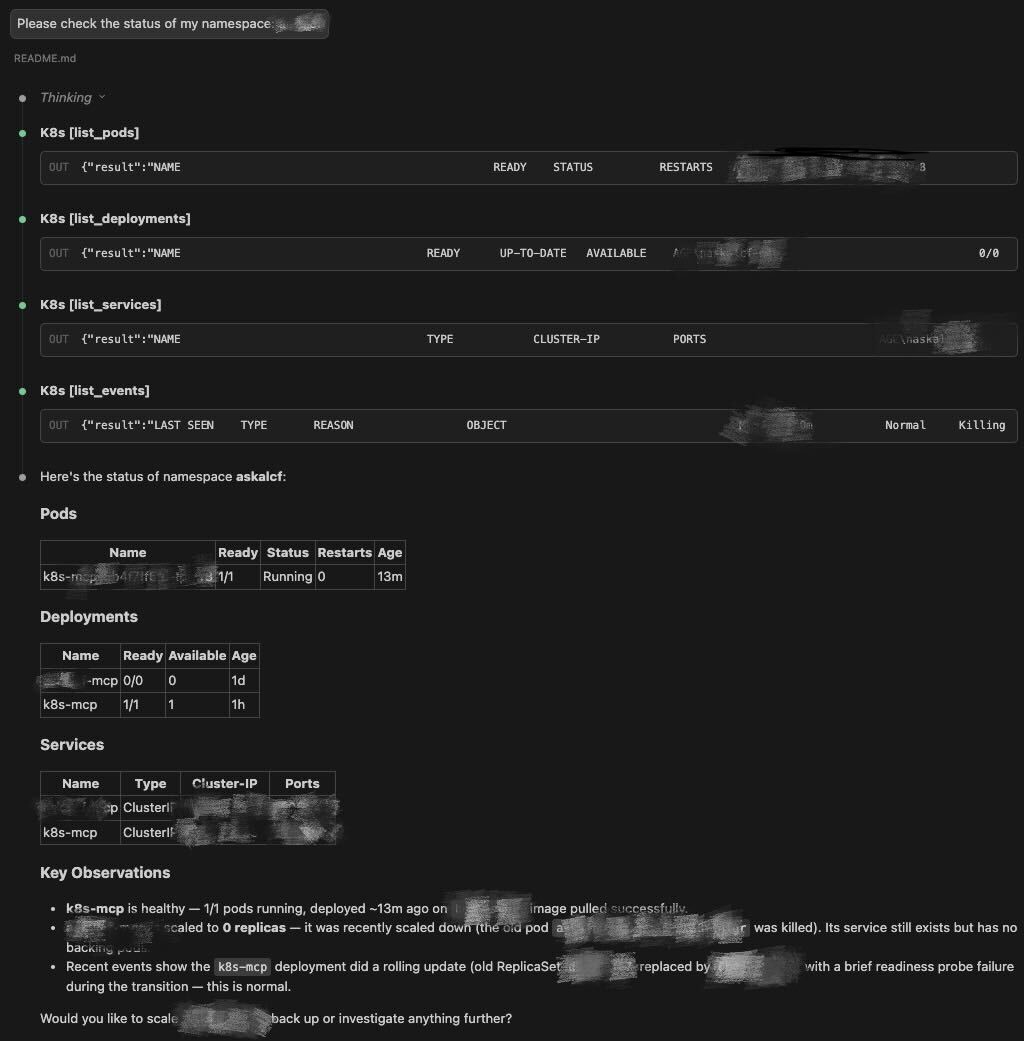
"Please check the status of my namespace: xxxxx"
The assistant will list pods, deployments, services, and events in the namespace, surfacing any issues it finds.
Deploy an application
"Please deploy the app/server in this repo to a k8s cluster for me. Make a plan first, then implement it."
The agent will:
- Analyze the repo structure
- Confirm the target cluster, namespace, image registry, and tag
- Generate Kustomize manifests
- Apply the deployment
- Wait for readiness and return structured health results
Diagnose a failing workload
"My pods in namespace X keep crashing. Can you figure out what's wrong?"
The agent will inspect pod status, conditions, events, and container logs — then return a structured explanation with suggested fixes. No more manually running describe and logs in a loop.
Tools
Signature tools
These best represent the project's workflow-oriented design:
| Tool | Description |
|---|---|
diagnose_pod |
One-shot diagnostics — combines status, conditions, events, and failing-container logs |
wait_for_ready |
Poll a pod or deployment until ready or timeout (enables autonomous deploy loops) |
apply_manifest |
Apply YAML manifests (create or update, supports multi-document) |
apply_kustomize |
Render and apply a Kustomize directory (equivalent to kubectl apply -k) |
get_resource_yaml |
Export a live resource as clean YAML (for config drift detection) |
generate_deploy_manifests |
Generate Kubernetes manifests for deploying k8s-mcp itself to a cluster |
Full tool reference
All operations are exposed as MCP tools — you interact with them conversationally through your AI assistant.
Cluster Context
| Tool | Description |
|---|---|
get_contexts |
List available kubeconfig contexts |
get_current_context |
Show the active context, cluster, and user |
Namespaces
| Tool | Description |
|---|---|
list_namespaces |
List all namespaces in the cluster |
Pods
| Tool | Description |
|---|---|
list_pods |
List pods (by namespace, label, or all namespaces) |
get_pod |
Get detailed pod information |
get_pod_logs |
Fetch container logs (with tail, previous container support) |
delete_pod |
Delete a pod (with configurable grace period) |
diagnose_pod |
One-shot diagnostics — combines status, conditions, events, and logs from failing containers |
exec_command |
Execute a command inside a running container (e.g., curl, env, nslookup) |
Deployments
| Tool | Description |
|---|---|
list_deployments |
List deployments (by namespace, label, or all namespaces) |
get_deployment |
Get detailed deployment information |
scale_deployment |
Scale a deployment to N replicas |
restart_deployment |
Rolling restart (equivalent to kubectl rollout restart) |
get_rollout_status |
Check if a rollout is complete, in progress, or stuck |
Services
| Tool | Description |
|---|---|
list_services |
List services (by namespace, label, or all namespaces) |
get_service |
Get detailed service information |
ConfigMaps
| Tool | Description |
|---|---|
list_configmaps |
List ConfigMaps (by namespace, label, or all namespaces) |
get_configmap |
Get a ConfigMap's metadata and data contents |
Secrets
| Tool | Description |
|---|---|
list_secrets |
List Secrets with type and key counts |
get_secret |
Get Secret metadata and key names; optionally decode values with masking |
ServiceAccounts
| Tool | Description |
|---|---|
list_service_accounts |
List ServiceAccounts (by namespace, label, or all namespaces) |
get_service_account |
Get ServiceAccount details including secrets and automount config |
RBAC (Roles & Bindings)
| Tool | Description |
|---|---|
list_roles |
List Roles (by namespace or all); optionally include ClusterRoles |
get_role |
Get Role or ClusterRole details including permission rules |
list_role_bindings |
List RoleBindings (by namespace or all); optionally include ClusterRoleBindings |
get_role_binding |
Get RoleBinding or ClusterRoleBinding details including subjects and role reference |
Nodes
| Tool | Description |
|---|---|
list_nodes |
List cluster nodes with status and roles |
get_node |
Get detailed node information |
Events
| Tool | Description |
|---|---|
list_events |
List events, optionally filtered by resource name |
Jobs
| Tool | Description |
|---|---|
list_jobs |
List jobs with completion status and duration |
Ingresses
| Tool | Description |
|---|---|
list_ingresses |
List Ingresses with hosts, class, and TLS info |
get_ingress |
Get detailed Ingress information including routing rules |
Generic Operations
| Tool | Description |
|---|---|
apply_manifest |
Apply YAML manifests (create or update, supports multi-document) |
apply_kustomize |
Render and apply a Kustomize directory (equivalent to kubectl apply -k) |
delete_resource |
Delete any resource by type and name (supports abbreviations like po, svc, deploy) |
describe_resource |
Describe any resource — combines spec/status with related events (like kubectl describe) |
get_resource_yaml |
Export a live resource as clean YAML (for config drift detection) |
Resource Metrics
| Tool | Description |
|---|---|
top_pods |
Show CPU/memory usage per pod (requires metrics-server) |
top_nodes |
Show CPU/memory usage per node with capacity percentages |
Readiness
| Tool | Description |
|---|---|
wait_for_ready |
Poll a pod or deployment until ready or timeout (enables autonomous deploy loops) |
Deployment Generation
| Tool | Description |
|---|---|
generate_deploy_manifests |
Generate Kubernetes manifests for deploying k8s-mcp itself to a cluster |
Safety
k8s-mcp is designed with practical safeguards:
- Namespace scoping — agents confirm the target namespace before taking action
- Destructive action confirmation — delete, scale-to-zero, and restart operations require explicit user approval
- Read-only queries by default — most tools are non-destructive
Always review actions before applying changes in production environments.
Project Status
This project is actively maintained and evolving. Feedback, suggestions, and contributions are welcome.
Contributing
Pull requests and ideas are welcome. If you're experimenting with AI-driven DevOps, I'd love to hear what workflows would be useful.
License
MIT
Установить K8s в Claude Desktop, Claude Code, Cursor
unyly install k8s-mcpСтавит в Claude Desktop, Claude Code, Cursor и VS Code — сам разбирается с npx, uvx и сборкой из исходников.
Впервые? Поставь CLI: curl -fsSL https://unyly.org/install | sh
Или настроить вручную
Выполни в терминале:
claude mcp add k8s-mcp -- uvx k8s-mcpFAQ
K8s MCP бесплатный?
Да, K8s MCP бесплатный — установка в пару кликов через Unyly без оплаты.
Нужен ли API-ключ для K8s?
Нет, K8s работает без API-ключей и переменных окружения.
K8s — hosted или self-hosted?
Self-hosted: сервер запускается локально на твоей машине командой из раздела установки.
Как установить K8s в Claude Desktop, Claude Code или Cursor?
Открой K8s на unyly.org, выбери вкладку своего клиента (Claude Desktop, Claude Code, Cursor) и нажми Install — конфиг сгенерируется автоматически, без правки JSON.
Похожие MCP
GitHub
PRs, issues, code search, CI status
 автор: GitHub
Filesystem
Secure file operations with configurable access controls.
Memory
Knowledge graph-based persistent memory system.
Template MCP Server
A CLI tool to create a new Model Context Protocol server project with TypeScript support, dual transport options, and an extensible structure
 автор: mcpdotdirect
Compare K8s with
Не уверен что выбрать?
Найди свой стек за 60 секунд
Автор?
Embed-бейдж для README
Похожее
Все в категории development