
@Kamiazya/Whiteboard
БесплатноНе проверенEnables AI agents to collaboratively draw and annotate Excalidraw diagrams in real-time via MCP tools, synced to a browser canvas.

Описание
Enables AI agents to collaboratively draw and annotate Excalidraw diagrams in real-time via MCP tools, synced to a browser canvas.
README

A collaborative whiteboard for Claude Code, Codex, and Gemini CLI. Draw with your AI agent to align on specs, architecture, and workflows — directly on a shared real-time canvas.
npm version License: Apache-2.0 CI
Start here
whiteboard is a browser-first whiteboard that grows with you: open a canvas in your browser, run it locally for durable private storage, and self-host it for a team when you're ready.
Try it in your browser — no account; your canvas data stays in your own browser. Kept in your browser: runs in your browser, data stays on your machine. Get started → — runs locally from a checkout today.
▶ Draw with your AI agent
The fastest way to get value today. Claude Code, Codex, or Gemini draw on the canvas alongside you over MCP. Local daemon: a server on your own machine.
Self-host for your team — run whiteboard as a shared server behind your own identity provider and TLS. Server mode: a shared server you operate. → Self-host with Docker
How whiteboard works
You and your agent both reach the same whiteboard — they talk, the agent acts, skills shape the prompts. The kamiazya/whiteboard plugin packages three skills and a Whiteboard MCP server together; the agent calls MCP tools via stdio and the daemon syncs the canvas to your browser through the whiteboard extension, picking up what the agent wrote within about half a second.

Diagram drawn with whiteboard itself — its source is architecture.canvas, a JSON Canvas 1.0 document any JSON Canvas-compatible tool can open.
@kamiazya/whiteboard-mcp runs a spatial canvas editor in your browser and exposes MCP tools so Claude Code, Codex, Gemini CLI, or any MCP-capable agent can draw, annotate, and refine diagrams alongside you. Documents live locally in the daemon's data directory (~/.whiteboard/ by default), reach the browser within about half a second while the daemon runs, and read back as OKF Markdown or JSON Canvas 1.0 — both round-trip losslessly through the same codec that exports the PNG/SVG images on this page.

Reach for whiteboard when…
- You're aligning with your agent on a design and text alone keeps drifting. Sketch the request flow once, ask the agent to fill in the missing edges, point at the diagram instead of re-explaining.
- You're reviewing a change and want to mark up the architecture together. Open an existing workspace, ask the agent to add the new path, compare against the previous frame, export a PNG for the PR description.
- You're writing docs or onboarding material and want a reusable diagram. Drive the agent to produce the diagram, drop the exported PNG into the doc, and keep the canvas itself around to reopen and update later.
| Aligning on a design | Reviewing and marking up | Presenting or sharing |
|---|---|---|
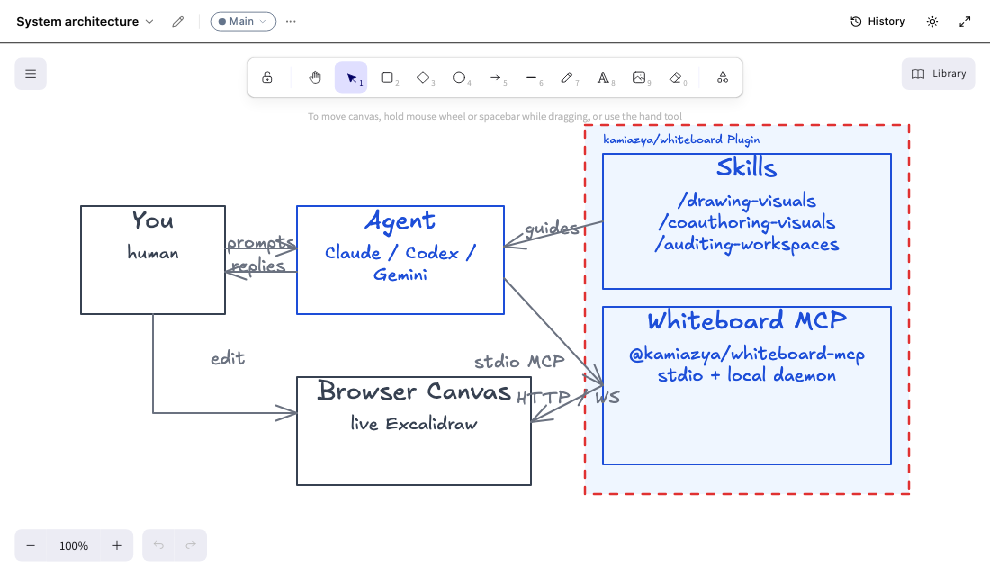 |
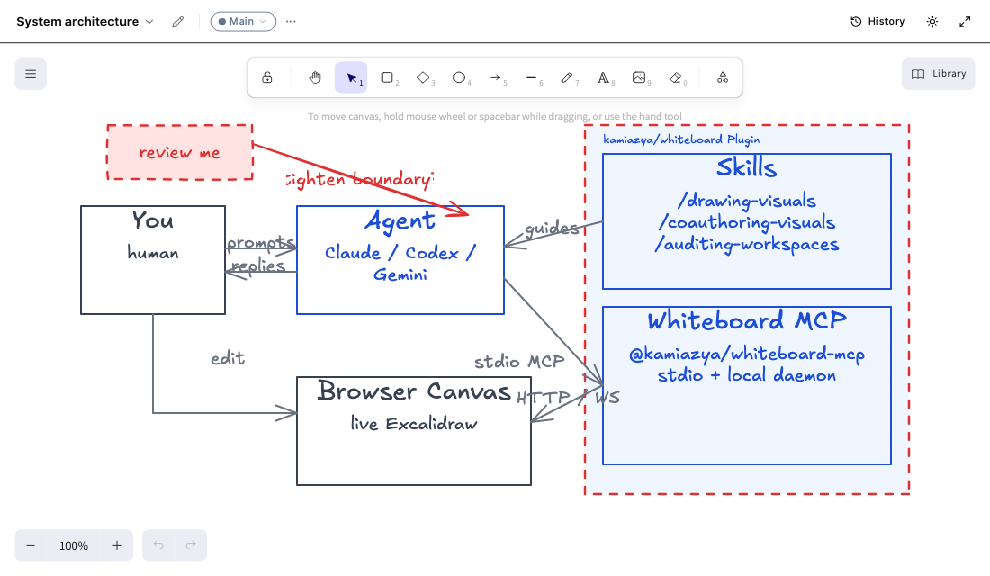 |
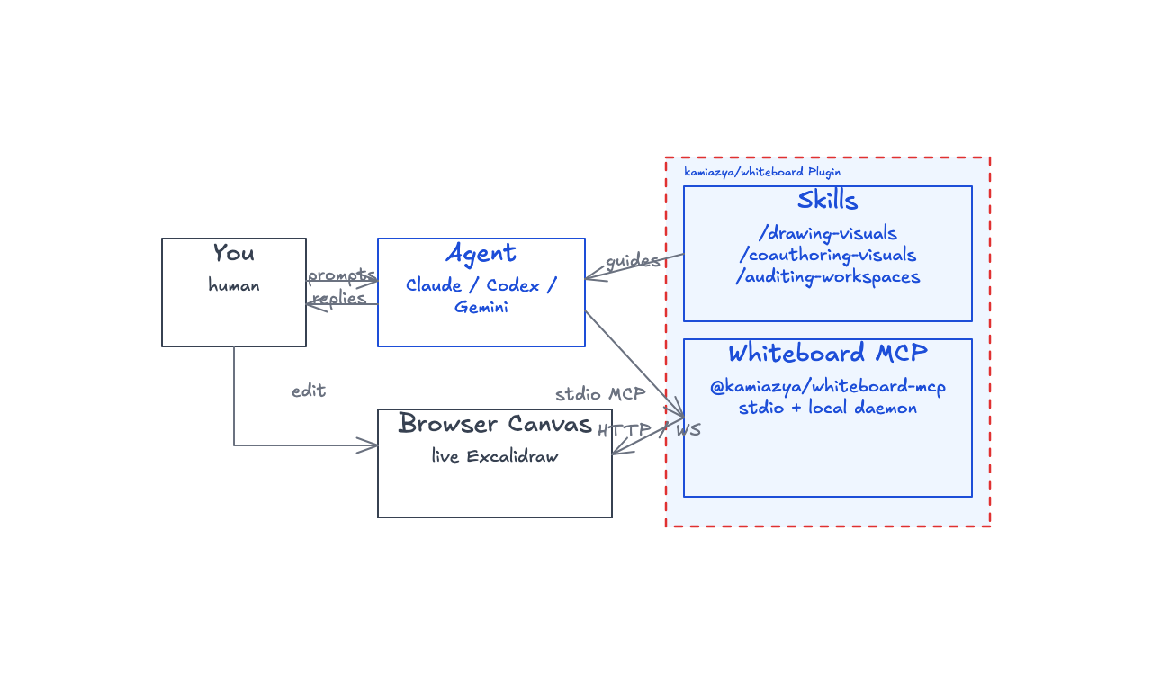 |
| Agent drew it — you guided the layout | You annotated it — review notes on the canvas | Chrome-free render — clean export for docs |
The same workflow works across any scenario — the agent draws boxes, arrows, and labels on a fresh canvas:

Auth service flow drawn by the agent — numbered steps, cache callout, color-coded components.
Quick install
Claude Code
In a Claude Code session, run:
/plugin marketplace add kamiazya/whiteboard
/plugin install whiteboard@whiteboard-marketplace
This installs the MCP server and the bundled /drawing-visuals, /coauthoring-visuals, and /auditing-workspaces skills in one step.
MCP only (no skills)
claude mcp add whiteboard -- npx -y @kamiazya/whiteboard-mcp@latest
Starts the MCP server only — the
/drawing-visuals,/coauthoring-visuals, and/auditing-workspacesskills are not installed this way, and there is no manual step that adds them: they are carried by the plugin, not by the npm package. Use the plugin install above if you want them.
Codex
In a Codex session, run:
codex plugin marketplace add kamiazya/whiteboard@stable
The @stable pin tracks the latest release instead of the development branch.
Then open /plugins, choose kamiazya Whiteboard → whiteboard → Install plugin, and restart Codex. This installs the MCP server and the bundled skills in one step.
MCP only (no skills)
Add to ~/.codex/config.toml:
[mcp_servers.whiteboard]
command = "npx"
args = ["-y", "@kamiazya/whiteboard-mcp@latest"]
Starts the MCP server only — the
/drawing-visuals,/coauthoring-visuals, and/auditing-workspacesskills are not installed this way, and there is no manual step that adds them: they are carried by the plugin, not by the npm package. Use the plugin install above if you want them.
Gemini CLI
gemini extensions install https://github.com/kamiazya/whiteboard
MCP only (no extension)
Add to ~/.gemini/settings.json:
{
  "mcpServers": {
    "whiteboard": {
      "command": "npx",
      "args": ["-y", "@kamiazya/whiteboard-mcp@latest"]
    }
  }
}
Starts the MCP server only — the
/drawing-visuals,/coauthoring-visuals, and/auditing-workspacesskills are not installed this way, and there is no manual step that adds them: they are carried by the plugin, not by the npm package. Use the plugin install above if you want them.
Verify
In your agent session, ask it to call wb_workspace_edit({ workspaceId: "default", ops: [{ op: "document.create", path: "smoke", kind: "spatial" }] }). The call creates the document in the daemon's data directory (~/.whiteboard by default); with the web app connected to the daemon (below), open smoke in it to see it.
default is the segment of the first workspace a data directory gets: it is created the first time anything opens the directory, and it is the workspace the web app opens first. An agent can use it as workspaceId without being told anything else; a workspace you create later is addressed by its own id or the segment it was given.
Connect the web app to your local daemon
Already have the browser canvas open (see Get started)
and a local daemon running? The hosted app reaches it through the
whiteboard browser extension and a native messaging host that
whiteboard native-host install --json registers with your browser (run it
from a global install, not npx; see
Get the whiteboard command).
The daemon listens on an owner-only local socket and no network port, so no
web page can reach it directly, and nothing needs pasting or approving: once
connected, the tab works on the daemon's workspaces with live sync,
automatic version checkpoints on top of the manual version history the
browser keeps on its own.
- Chrome, Edge, Brave and Firefox are supported; Safari keeps its data in the browser for now.
- While releases are
0.0.xthe extension is loaded by hand from a build of this repository. - Prefer a config file over exporting env vars by hand? See
Configuration → Config file
for the
.whiteboardrc/.whiteboard/config.yamlauto-load and precedence rules.
See Connect to a local daemon for the full flow, including moving a workspace this browser keeps — history, identity, and images intact — into the daemon.
Bundled skills
Three opinionated SKILL.md packs ship with the plugin, which wires them up automatically. They are not part of the @kamiazya/whiteboard-mcp npm package, so the MCP-only routes above (claude mcp add, the Codex CLI snippet, npx, the Gemini mcpServers entry) start the server without them.
| Skill | When to use |
|---|---|
/drawing-visuals |
When screen layout, structure, flow, or comparison still feels too ambiguous in text alone — start drawing on the canvas together. |
/coauthoring-visuals |
A structured loop for evolving visuals with the agent: gather context, structure frame by frame, run fresh-viewer tests on what you draw. |
/auditing-workspaces |
Audit a workspace's documents — find empty spatial canvases, near-duplicate paths, and documents with no recorded kind; report cleanup candidates. |
Example transcript
You    Use whiteboard to sketch the request flow for our auth service:
       client → API gateway → token service → DB. Highlight where caching lives.

Agent  { results: [{ documentId }] } = wb_workspace_edit({ workspaceId: "default",
         ops: [{ op: "document.create", path: "auth-flow", kind: "spatial" }] })
       wb_canvas_edit({ workspaceId: "default", documentId, mode: "apply", ops: [
         /* 4 service boxes, the arrows between them, and: */
         { op: "node.add", node: { id: "cache-note", type: "text",
                                   text: "cache lives here" } },
         { op: "tidy" },
       ] })
       wb_scene_render({ workspaceId: "default", documentId })

       Drew a 4-stage flow on the auth-flow canvas. Cache callout placed
       between API gateway and token service. SVG attached.
The agent returns the wb_scene_render result so the next turn can reason about what was actually drawn — closing the loop between prompt and pixels.
Documentation
| Topic | Where |
|---|---|
| Local checkout, HTTP MCP development loop, repo-local config override | docs/contributing/development.md |
| Environment variables, storage layout, Codex sandbox quirks | docs/reference/configuration.md |
| Components, data flow, MCP tool surface, design boundaries | docs/explanation/architecture.md |
| Export formats (SVG, OKF Markdown, JSON Canvas) and their tools | docs/reference/export-formats.md |
MCP debugging workflow (Inspector, MCP_HTTP_DEBUG, transport checks) |
docs/contributing/mcp-debugging.md |
| Trust model for all three runtimes (browser, local daemon, server mode) | docs/explanation/security-model.md |
| Connecting a browser tab to a local daemon, moving a browser workspace into it | docs/how-to/connect-to-local-daemon.md |
| Live-sync message shapes between daemon and browser | docs/contributing/architecture/wire-protocol.md |
| Test layers, commit conventions, release process | CONTRIBUTING.md |
Limitations
- No MCP tool currently returns a raster (PNG) image or
ImageContent—wb_scene_renderis the closest equivalent for handing a rendered canvas back to an LLM. - The published transport is
stdio. The HTTP MCP endpoint (pnpm mcp:http:dev) is for local development. - The published
stdioentry opens the store in its own process: it takes the same automatic History checkpoints and compaction as the daemon. It has no direct path to the browser —wb_viewport_setanswersdelivered: false, and the agent-activity highlight and version overlays need the daemon's process — but what it writes still reaches an open tab: the daemon follows the shared record every 500 ms for the workspaces a page is subscribed to (WHITEBOARD_WORKSPACE_TAIL_MS), and each process reads through to the record on every access, so the agent also sees what you drew or created.
See docs/reference/configuration.md for sandbox quirks.
License
The whole codebase lives in this public monorepo. Today every package is Apache-2.0. The relicense applies to this source tree and to releases made from it going forward; npm versions published before the switch remain MIT-licensed. When the managed-hosting (SaaS) composition layer lands, only that layer — the Cloudflare Workers app and its Cloudflare-specific storage adapters — will be published under the Fair Source License (FSL-1.1-Apache-2.0): free to self-host and use internally, not usable to offer a competing hosted service, and automatically becoming Apache-2.0 two years after each release. Everything else stays Apache-2.0.
The project name and logo are not licensed for use in third-party commercial hosting offerings.
Установка @Kamiazya/Whiteboard
У этого сервера нет опубликованного пакета — он собирается из исходников. Открой репозиторий и следуй инструкции в README.
▸ github.com/kamiazya/whiteboardFAQ
@Kamiazya/Whiteboard MCP бесплатный?
Да, @Kamiazya/Whiteboard MCP бесплатный — установка в пару кликов через Unyly без оплаты.
Нужен ли API-ключ для @Kamiazya/Whiteboard?
Нет, @Kamiazya/Whiteboard работает без API-ключей и переменных окружения.
@Kamiazya/Whiteboard — hosted или self-hosted?
Self-hosted: сервер запускается локально на твоей машине командой из раздела установки.
Как установить @Kamiazya/Whiteboard в Claude Desktop, Claude Code или Cursor?
Открой @Kamiazya/Whiteboard на unyly.org, выбери вкладку своего клиента (Claude Desktop, Claude Code, Cursor) и нажми Install — конфиг сгенерируется автоматически, без правки JSON.
Похожие MCP
LibreOffice Tools
Enables AI agents to read, write, and edit Office documents via LibreOffice with token-efficient design. Supports multiple formats including DOCX, XLSX, PPTX, a
 автор: passerbyflutter
Figma
Extract design specs and assets
 автор: Figma
dannote/figma-use
Figma control: create shapes, text and components, and set styles, auto-layout, variables and exports.
 автор: dannote
Logo.dev
Search and retrieve company logos by brand or domain. Customize size, format, and theme to match your design needs. Accelerate design, prototyping, and content
 автор: NOVA-3951
Design Inspiration Server
Searches top design platforms like Dribbble and Behance to provide UI inspiration, color palettes, and layout patterns via the Serper API. It allows users to re
 автор: YonasValentin
PIX4Dmatic
Enables GUI automation for controlling PIX4Dmatic on Windows through MCP. Supports launching, focusing, capturing screenshots, sending hotkeys, clicking UI elem
 автор: jangjo123
mcp-dockmaster
An Open-Sourced UI to install and manage MCP servers for Windows, Linux and macOS.
ariekogan/ateam-mcp
Build, validate and deploy multi-agent AI solutions on the ADAS platform: design skills with tools and manage the solution lifecycle.
 автор: ariekogan
thinkchainai/mcpbundles
Create custom tool bundles, connect providers with OAuth or API keys, and use one MCP server across many integrations, with a UI for bundles and credentials.
 автор: thinkchainai
jau123/MeiGen-AI-Design-MCP
Image generation and editing with a curated prompt library, prompt enhancement and routing across local ComfyUI, MeiGen Cloud and OpenAI-compatible APIs.
 автор: jau123
Compare @Kamiazya/Whiteboard with
Не уверен что выбрать?
Найди свой стек за 60 секунд
Автор?
Embed-бейдж для README
Похожее
Все в категории design