
Kanban Agent
БесплатноНе проверенAttaches a file-based kanban workflow to any project, allowing agents to create, claim, complete, and block work items using git as the locking mechanism.

Описание
Attaches a file-based kanban workflow to any project, allowing agents to create, claim, complete, and block work items using git as the locking mechanism.
README
File-based kanban for coding-agent fleets. A PM agent writes markdown work
items into work-items/pending/, worker agents claim them with git mv, and
the folder a file sits in is its status — no database, no service, no
lock server. The repo is the queue, git is the lock, and any agent (Claude
Code or otherwise) or any human with a file manager can operate it. On top of
the convention sit a zero-dependency live dashboard (the cockpit) and an
MCP server that attaches the workflow to any project and drives the queue
through tools.
Why
When several coding agents work a backlog in parallel, the coordination layer usually becomes the hard part: a ticket API to integrate, a database to host, credentials to distribute. Kanban Agent removes that layer instead of adding to it:
- Plain files — a work item is a markdown file; its folder is its status. Every agent can read and write files; no SDK required.
- Git is the lock — claiming an item is
git mv pending/007-… in-progress/007-…. Two workers cannot both win the move, and history doubles as an audit log. - Reviewable backlog — items travel with the code. Specs, acceptance criteria and results are diffable, greppable and PR-reviewable.
- Watchable — the cockpit tails every queue on the machine over
fs.watch+ SSE, so you can watch a fleet burn down a backlog live.
Quickstart
git clone https://github.com/gak4u/kanban-agent.git
cd kanban-agent
npm start            # → http://localhost:4400
Requires Node ≥ 20. Zero npm dependencies, no build step. On first start the
server seeds projects.json from projects.example.json, which points at the
bundled examples/demo-project — so you get a
populated board out of the box. Edit projects.json to track your own
projects.
The convention
Each tracked project has a work-items/ directory at its root
(full spec: docs/convention.md):
work-items/
  pending/        NNN-slug.md   ← ready to be picked up
  in-progress/    NNN-slug.md   ← claimed by a worker
  blocked/        NNN-slug.md   ← stuck; has a "## Blocked" note
  done/           NNN-slug.md   ← finished + verified
  _TEMPLATE.md  README.md  WORKER_PROMPT.md  _artifacts/   ← not work items
- Folder = status. Files carry a
status:frontmatter field but it goes stale; the folder is always authoritative. NNNordering. Items areNNN-slug.mdwith a zero-padded number that is allocated once across all four folders — it doubles as FIFO/priority order. Workers always claim the lowest-numbered pending item.- Frontmatter fields (all optional, parsed leniently):
id,title,type(feature|bug|chore),priority(P1|P2|P3),created(YYYY-MM-DD),status,depends_on/stacks_on(item number),needs_migration(bool). - Claim protocol. A worker claims an item by moving it:
git mv work-items/pending/NNN-slug.md work-items/in-progress/— the move is the lock; never touch a file already inin-progress/. Finished items get their## Resultsection filled and move todone/; stuck items get a## Blockednote and move toblocked/.
The cockpit
A read-only web dashboard over every queue on the machine:
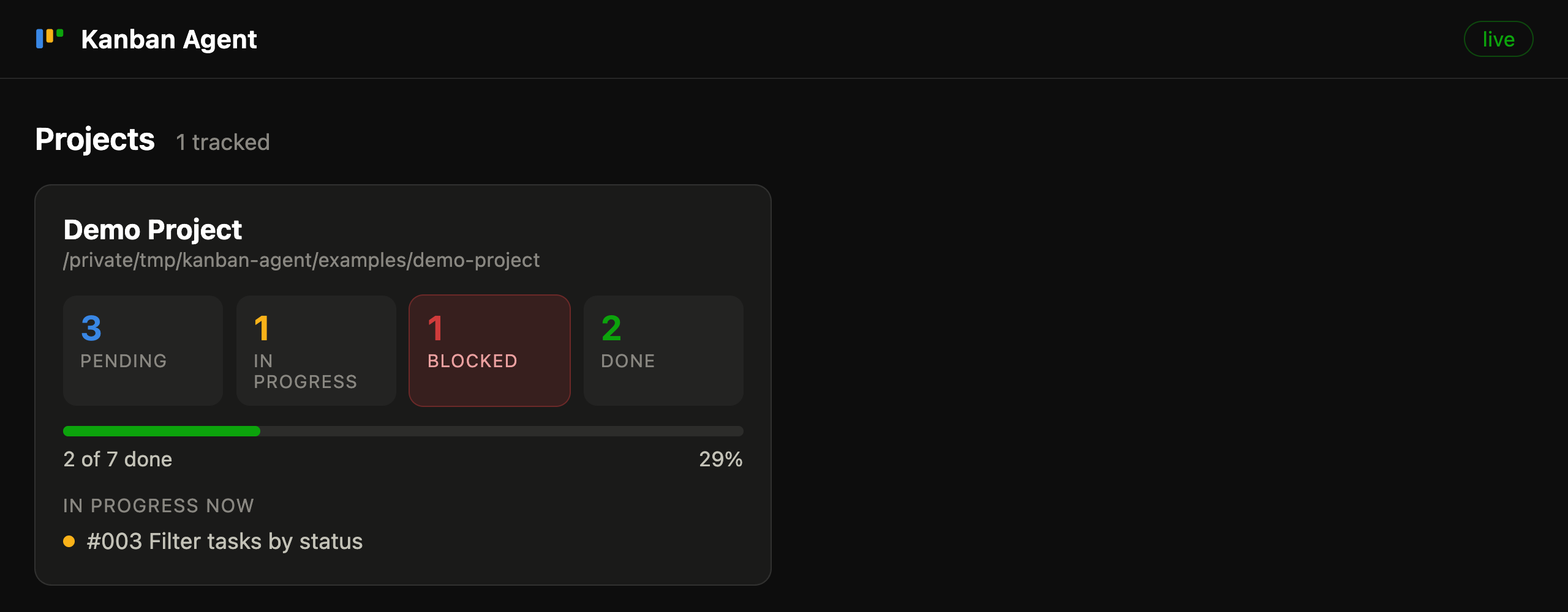
- Overview — one card per project: per-status counts, done-vs-total progress, what is in progress right now; blocked counts light up when > 0.
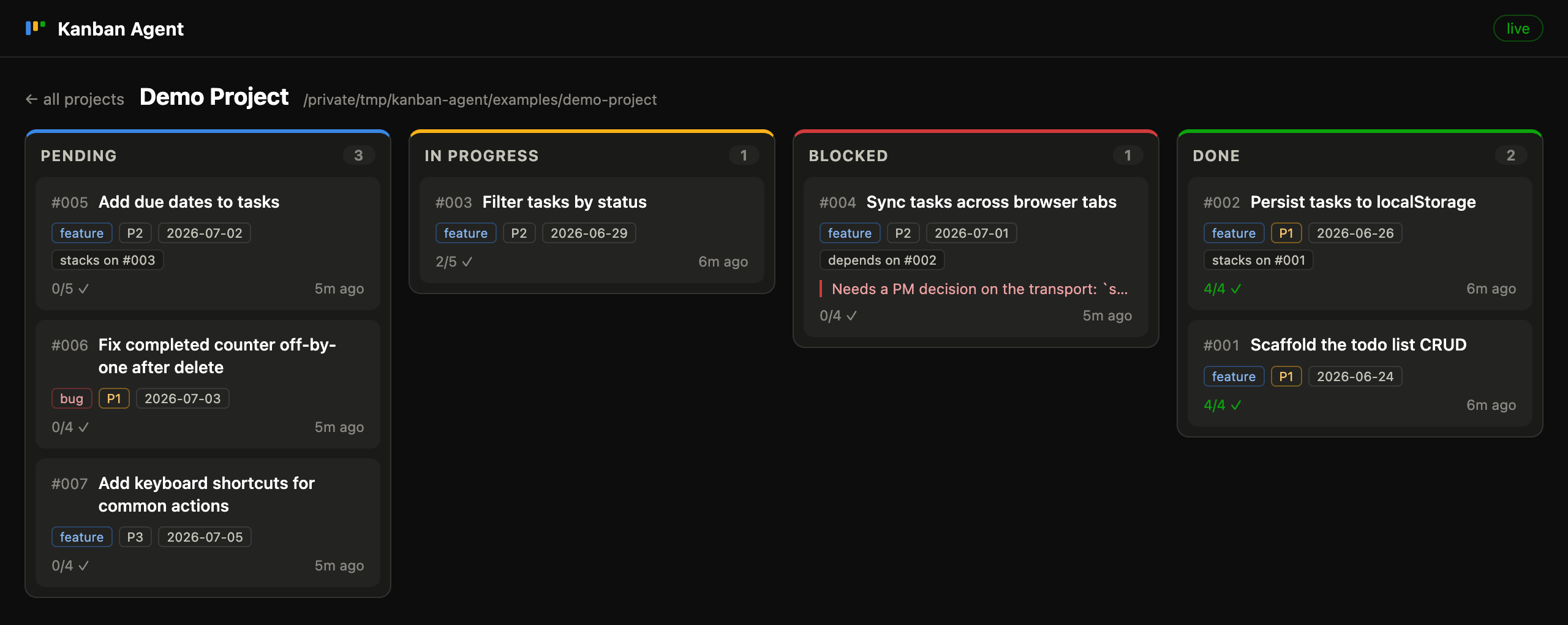
- Board — four kanban columns per project, cards ordered by item number
(Done newest-first) with type/priority badges, acceptance-criteria progress,
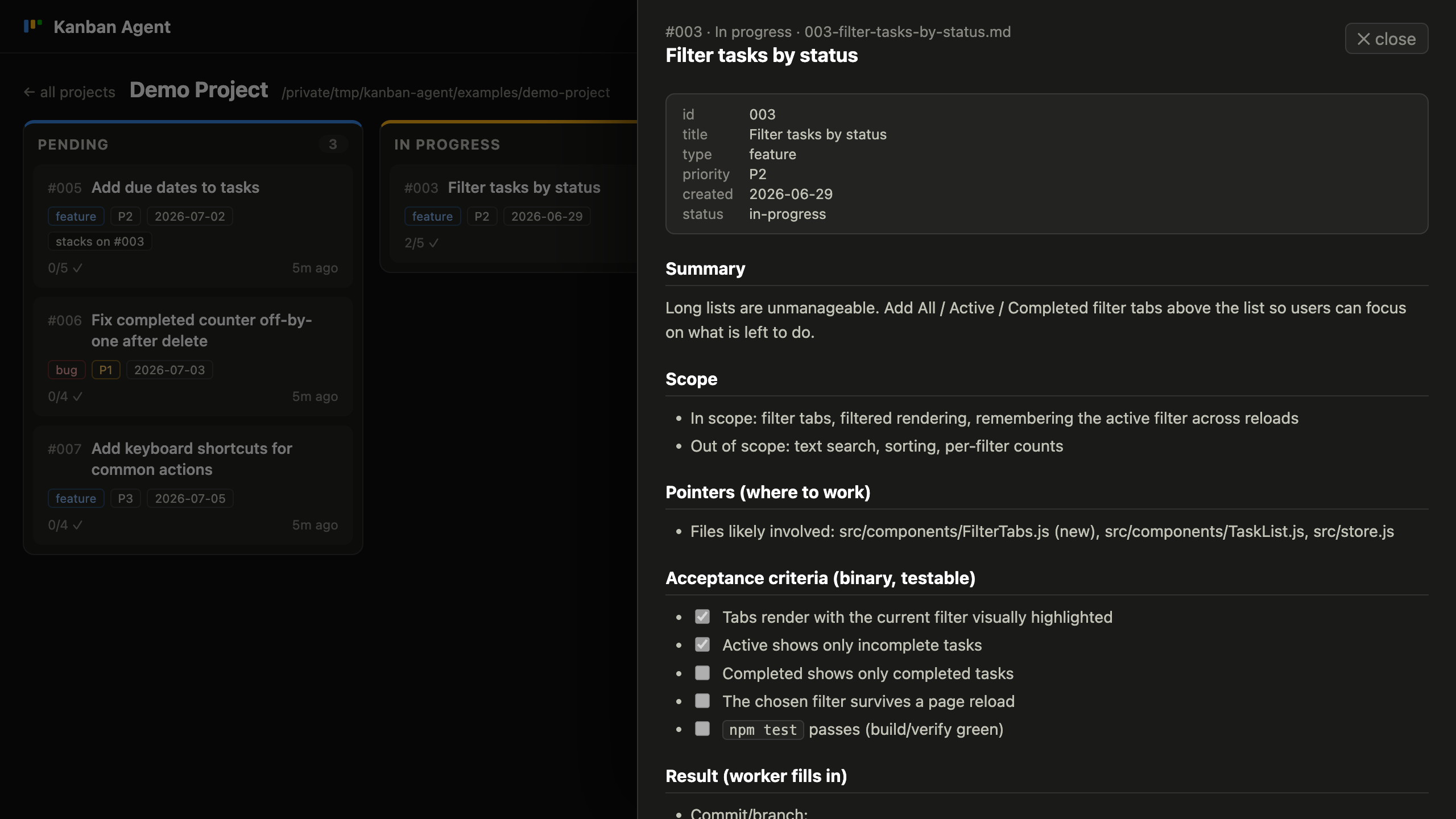
stacks_on/depends_onchips and last-activity time. - Item drawer — click a card for the rendered markdown, with frontmatter
as a key/value header (a stale frontmatter
statusis flagged). - Live — the server watches the status folders (
fs.watch) and pushes refreshes over SSE; the UI falls back to 10-second polling if SSE fails.
The server binds to 127.0.0.1 only (localhost tool, no auth) and never writes
to tracked projects. API: GET /api/projects (all queues, parsed),
GET /api/item?project=&status=&file= (one item, raw + rendered),
GET /api/events (SSE refresh stream).
The MCP server
mcp/server.js is the write side: it attaches the workflow to any project and
operates queues from any MCP client (sole dependency:
@modelcontextprotocol/sdk).
cd mcp && npm install        # once
claude mcp add --scope user kanban-agent -- node /path/to/kanban-agent/mcp/server.js
(claude mcp list should then show kanban-agent … ✔ Connected.)
Hosted mode (one server for a team)
The same tool set can be served over the MCP Streamable HTTP transport so a
team's agents share one server: per-user Bearer tokens (roles admin /
member), server-managed projects operated by name, created_by/claimed_by
attribution with completion commits authored as the item's creator (and pushed
to the project's origin), an /admin panel for users + projects, and user
chips / an active-claims strip on the dashboard.
node server/bootstrap.js     # once — creates the user store, prints the admin token
npm run mcp-http             # serves http://0.0.0.0:4401/mcp (port: KANBAN_MCP_PORT)
Each user registers the server with their own token (stdio one-liner above stays the local single-user path):
claude mcp add --transport http kanban-agent http://<server>:4401/mcp --header "Authorization: Bearer <token>"
Reading the cockpit board stays unauthenticated — tokens gate writes and administration. Architecture, team quickstart, attribution/push flow and ops notes: docs/hosted.md.
Attach the workflow to a project
- Call
attach_workflowwith the project's absolute path (optionallyverify_command, e.g.npm test && npm run build, andapp_urlfor live checks). It scaffoldswork-items/{pending,in-progress,blocked,done,_artifacts}/with the queueREADME.md,_TEMPLATE.mdand a parameterizedWORKER_PROMPT.md, and appends a## Work-item queuesection to the project'sCLAUDE.md(orAGENTS.md). Idempotent — a second run skips everything that exists. - Commit the scaffold in that project.
- Have a PM agent write items (
create_work_item, or by hand from_TEMPLATE.md— thepm-write-itemsprompt sets an agent up for this), then spawn workers with theworker-loopprompt: claim → implement → verify → done, polling until idle. - Watch it live in the cockpit — the project auto-discovers if it sits under
an
autoDiscoverRootsentry.
Tools
| Tool | What it does |
|---|---|
attach_workflow(project_path, project_name?, verify_command?, app_url?) |
Scaffold the queue + agent instructions into a project (idempotent). |
queue_status(project_path) |
Per-status counts + {id, title, file} lists. |
create_work_item(project_path, title, type, priority, summary, scope, …) |
Allocate the next NNN, write a fully-specified item into pending/. |
claim_next_item(project_path) |
Move the lowest-NNN pending item to in-progress/ (git mv = the lock) and return its markdown. |
complete_item(project_path, id, what_changed, verification, commit?) |
Fill ## Result, move to done/. |
block_item(project_path, id, reason) |
Append a ## Blocked note, move to blocked/. |
get_item(project_path, id) |
Status + raw markdown, searching all folders. |
list_projects() |
Every tracked/discovered project with status counts (hosted mode: the server registry). |
Queue tools accept project_path (absolute path, local mode) or project
(server-managed project name, hosted mode). Admin tools — hosted mode only,
admin role required:
| Tool | What it does |
|---|---|
create_project(name, git_url?) |
Clone or init a git tree under data/projects/<name>/ + scaffold the queue. |
archive_project(name) |
Hide a project from lists; files are never deleted. |
create_user(username, email?, role) |
Create a user; returns the one-time API token. |
revoke_user(username) |
Invalidate a user's token immediately. |
rotate_token(username) |
Issue a new token (returned once), killing the old one. |
| Prompt | What it returns |
|---|---|
worker-loop(project_path) |
The project's WORKER_PROMPT.md — the polling worker loop. |
pm-write-items(project_path) |
PM guidance: verify requests, write fully-specified items. |
All writes are confined to <project_path>/work-items/ (plus the one
instructions append); filenames are validated against NNN-*.md, ids against
\d+ — traversal is rejected.
Configuration
projects.json at the repo root (gitignored; seeded from
projects.example.json on first start):
{
  "projects": [
    { "name": "Demo Project", "path": "examples/demo-project" }
  ],
  "autoDiscoverRoots": ["/absolute/path/to/your/projects"]
}
projects— explicit list;nameis what the UI shows. Paths may be absolute or relative to the config file.autoDiscoverRoots— every direct child of these directories that contains awork-items/folder with at least one status subfolder is added automatically (deduped against the explicit list). New projects appear with zero config.PROJECTS_CONFIG=/path/to/other.json— point the cockpit and the MCP server at an alternate config.PORToverrides the cockpit's port (4400).
More
- docs/convention.md — the full queue convention.
- docs/design.md — how the cockpit and MCP server are built.
- CONTRIBUTING.md — dev setup and PR guidelines.
License
MIT © 2026 gak4u
Установка Kanban Agent
У этого сервера нет опубликованного пакета — он собирается из исходников. Открой репозиторий и следуй инструкции в README.
▸ github.com/gak4u/kanban-agentFAQ
Kanban Agent MCP бесплатный?
Да, Kanban Agent MCP бесплатный — установка в пару кликов через Unyly без оплаты.
Нужен ли API-ключ для Kanban Agent?
Нет, Kanban Agent работает без API-ключей и переменных окружения.
Kanban Agent — hosted или self-hosted?
Self-hosted: сервер запускается локально на твоей машине командой из раздела установки.
Как установить Kanban Agent в Claude Desktop, Claude Code или Cursor?
Открой Kanban Agent на unyly.org, выбери вкладку своего клиента (Claude Desktop, Claude Code, Cursor) и нажми Install — конфиг сгенерируется автоматически, без правки JSON.
Похожие MCP
GitHub
PRs, issues, code search, CI status
 автор: GitHub
Filesystem
Secure file operations with configurable access controls.
Memory
Knowledge graph-based persistent memory system.
Template MCP Server
A CLI tool to create a new Model Context Protocol server project with TypeScript support, dual transport options, and an extensible structure
 автор: mcpdotdirect
Compare Kanban Agent with
Не уверен что выбрать?
Найди свой стек за 60 секунд
Автор?
Embed-бейдж для README
Похожее
Все в категории development