
Kanban Lite
БесплатноНе проверенMCP server for AI agents to manage a lightweight kanban board stored as markdown files, enabling task creation, updates, and column movements.

Описание
MCP server for AI agents to manage a lightweight kanban board stored as markdown files, enabling task creation, updates, and column movements.
README
A lightweight kanban board stored as plain markdown files. Manage your tasks via a web UI, CLI, REST API, or MCP server for AI agents. Everything is human-readable, version-controllable, and lives right in your project.

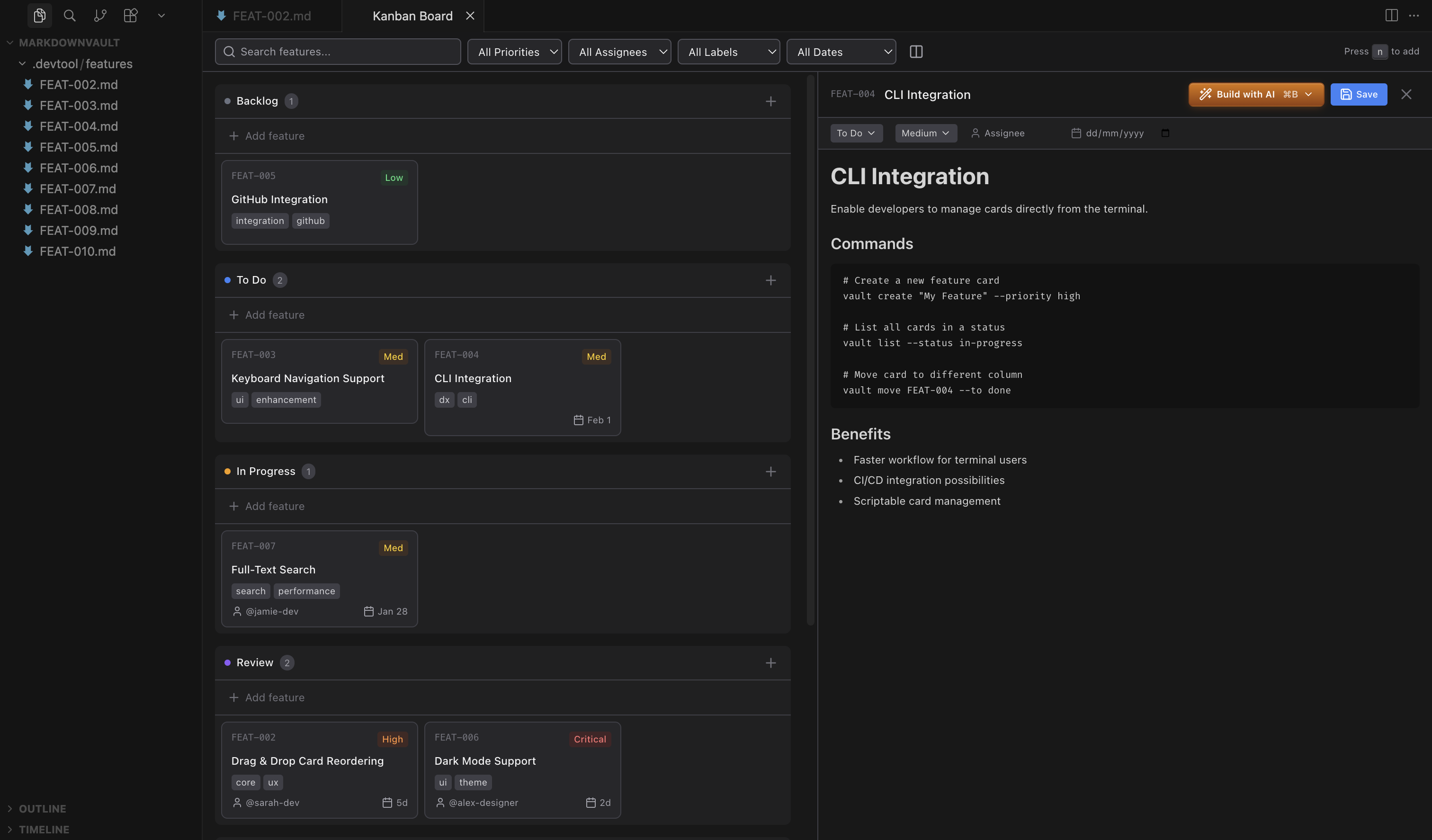
Kanban Skill
Install the kanban skill via skills.sh to give your AI agent full context of your board and the ability to create, update, and move features directly from the terminal. Works with Claude Code, Codex, OpenCode, and any skills.sh-compatible agent.
npx skills add https://github.com/borgius/kanban-lite
See SKILL.md for the full skill reference covering MCP tools, CLI, and REST API.
This repo also ships a dedicated kanban-storage-plugin-author skill for generating third-party card.storage / attachment.storage npm packages that can be selected from .kanban.json:
npx skills add https://github.com/borgius/kanban-lite --skill kanban-storage-plugin-author
See .agents/skills/kanban-storage-plugin-author/SKILL.md for the workflow, bundled references, and package templates.
This workspace also includes a custom VS Code chat agent for building polished Slidev demo decks from repo materials such as the Chat SDK / IncidentMind demo guide:
- .github/agents/slidev-demo-presentation.agent.md — creates or updates beautiful, truthful Slidev demo presentations with strong speaker notes, proof-focused story flow, and Slidev-safe layout guidance.
Quick Start
# Install globally
npm install -g kanban-lite

# Initialize a board in your project
kl init

# Start the web UI
kl serve

# Or create your first card from the terminal
kl add --title "My first task" --priority high
Examples
Start with the stable docs hub at /docs/examples/ for the shipped walkthroughs, then jump into the matching runnable apps:
- Chat SDK / Vercel AI — guide:
/docs/examples/chat-sdk/; app: examples/chat-sdk-vercel-ai/ (ships its own local Kanban Lite instance + seeded comment/form/action workflows); reusable adapter package: kl-adapter-vercel-ai - LangGraph Python — guide:
/docs/examples/langgraph-python/; app: examples/langgraph-python/ - Mastra Agent Ops — guide:
/docs/examples/mastra/; app: examples/mastra-agent-ops/
See examples/README.md for the canonical top-level example app slugs, local install/run expectations, and the placeholder-only env-file convention. The Chat SDK / Vercel AI example now also ships a self-hosted local stack (npm run dev / npm run start print both the Kanban and chat URLs), seeds demo cards with comments/forms/actions, and keeps the chat route honest with live integration coverage when OPENAI_API_KEY is available. The examples stay self-contained outside the root pnpm workspace by default so the main repo build/watch flow remains unchanged.
Features
Web UI
- Multi-board support: Create multiple boards with independent columns and settings
- 5-column workflow: Backlog, To Do, In Progress, Review, Done (fully customizable per board)
- Drag-and-drop: Move cards between columns and reorder within columns
- Split-view editor: Board on left, inline CodeMirror markdown editor on right with the existing toolbar shortcuts preserved
- CodeMirror comments editor: Card comments now use the same CodeMirror-backed markdown composer as the main body editor, with markdown toolbar actions, preview, and consistent keyboard shortcuts in both standalone and VS Code views
- Comment author defaults: The comment composer now pre-fills the author field from the logged-in username when available, and otherwise falls back to
User - Dynamic form tabs: Every attached card form renders as its own tab in the card editor, alongside the built-in markdown, comments, and logs tabs; fields display with consistent spacing and theme-aware styling in both standalone and VS Code webview runtimes
- Meta tab — inline YAML metadata editor: The card editor includes a dedicated
Metatab for editingfrontmatter.metadataas raw YAML inside a CodeMirror editor. In edit mode, valid changes autosave via the existing debounce pipeline; invalid YAML stays as local draft text with an inline error and never reaches storage. In the create-card dialog, metadata is staged locally and included in the card payload on Save; the Save button is disabled while any YAML errors remain unresolved. - Layout toggle: Switch between horizontal and vertical board layouts
- Event-driven pub/sub: SDK events are dispatched through an EventEmitter2-based event bus with wildcard routing, powering webhooks, auth events, and custom subscriptions
- Explicit SDK unread/card-state APIs: Advanced SDK consumers can inspect side-effect-free actor-scoped unread/open state with
getCardState()/getUnreadSummary()and acknowledge it intentionally viamarkCardOpened()/markCardRead()without coupling unread semantics tosetActiveCard()or the UI's active-card selection - SQLite
card.stateauto-derived from storage: When using an external storage plugin (e.g.sqlite,mongodb,postgresql,mysql,redis), card-state is automatically derived from the same storage package — no separatecard.stateconfiguration or package installation required - Real-time updates: WebSocket-powered live sync on the Node standalone server, plus an event-driven Cloudflare Worker mode that uses Durable Object WebSocket invalidations with HTTP latest-state resync between tabs
- Light & dark mode support
- Tabbed settings panel: Settings are organized into General, Board, and Plugin Options tabs, with board-level subviews for Defaults, Title, Actions, Labels, and Meta
- Board settings deep links: Standalone browser routes now include
/settings/board/defaults,/settings/board/title,/settings/board/actions,/settings/board/labels, and/settings/board/meta, with legacy board-setting URLs such as/settings/defaultsand/settings/labelsredirecting to the matching board subview, and the shared settings panel opens the matching left-rail board sub-tab for each route - Broader shared settings coverage: The shared settings UI now exposes
showBuildWithAI,markdownEditorMode, and drawer position alongside the existing layout and display controls - Board title/action editors: Manage
boards.<id>.titlemetadata prefixes andboards.<id>.actionstoolbar actions directly from Board → Title and Board → Actions - Simplified metadata field builder: The Board → Meta settings view now uses a quieter form-and-list layout with stacked edit fields, duplicate-name validation, inline editing, and straightforward controls for deciding which metadata appears on card previews
- Plugin Options tab: Discover providers by capability, flip provider toggles on/off with in-flight loading feedback, edit schema-driven options in dedicated sections after the capability list even before a provider is enabled, keep same-package provider variants separate by
capability + providerId, reuse provider-authored JSON FormsuiSchemalayouts for grouped sections, inline array editors, and code-enabled controls such as callback inline source, reopen stored secrets as masked write-only fields, and install supportedkl-*packages from the UI - Flexible panel layouts: Open card details and creation flows as a right-side drawer or a centered popup
- Adjustable drawer width: Tune drawer mode between 20–80% of the viewport from the Layout settings
- Polished card detail view: Card details now open with a calmer desktop-first split layout, tighter control density, cleaner attachment/comment presentation, and refined popup/drawer styling in both drawer and popup modes
- Custom board backgrounds: Choose between simple plain canvases and a richer library of fancy colorful ambient presets from the settings panel, with multiple light/dark-friendly moods for different boards and preferences
- Zoom controls: Scale the board view and card detail panel independently between 75–150% via settings sliders or keyboard shortcuts
- Column sorting: Sort cards within a column by priority, due date, or creation date from the column menu
- Column visibility controls: Minimize a column into a narrow rail with its name and card count from the column menu, or hide/show columns from Board options → Columns
- Smooth scroll to selection: Board automatically scrolls to the selected card
- URL-synced standalone navigation: In standalone mode, the active board, card, tab, filters, search query, and fuzzy mode persist in browser history and deep links
- Keyboard shortcuts:
N- Create new cardEsc- Close dialogsCmd/Ctrl + Enter- Submit create dialogCtrl/Cmd + =/Ctrl/Cmd + -- Zoom board view in / outCtrl/Cmd + Shift + =/Ctrl/Cmd + Shift + -- Zoom card detail in / out
Cards
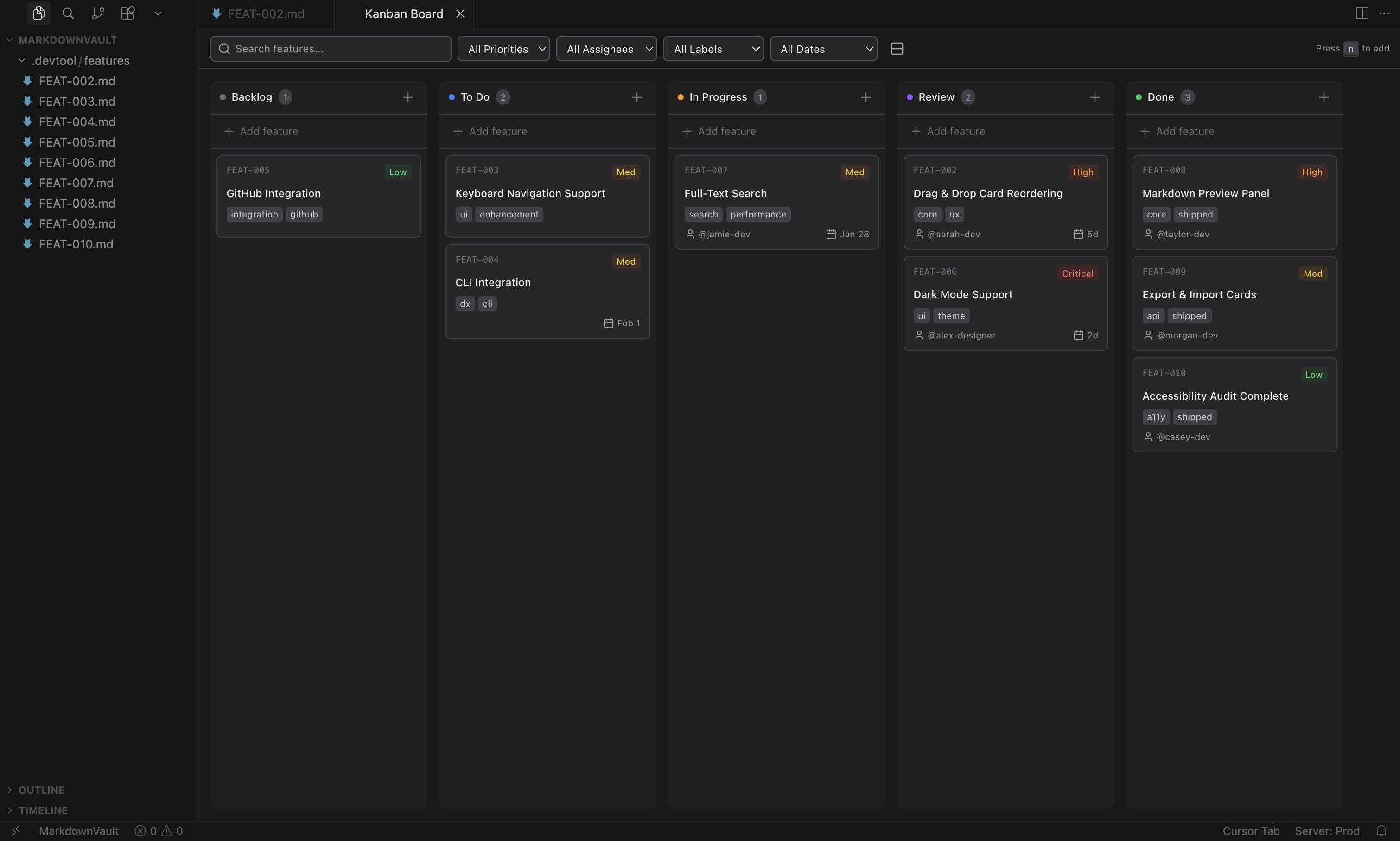
- Priority levels: Critical, High, Medium, Low (color-coded badges)
- Assignees: Assign team members to cards
- Due dates: Smart formatting (Overdue, Today, Tomorrow, "5d", etc.)
- Labels: Tag cards with multiple labels
- Attachments: Attach files to cards
- Comments: Add discussion threads to cards (stored in the same markdown file)
- Streaming comments: AI agents can stream a comment live — a blinking-cursor indicator and
streamingbadge are shown to all connected viewers while text is being written; the comment is persisted once the stream completes (see REST API and sdk.streamComment) - Logs: Append timestamped log entries to cards (stored as
<cardId>.logtext file, supports markdown, optional source labels and structured data objects) - Actions: Attach named triggers to a card (e.g.
retry,deploy,notify) and fire them from the UI, CLI, API, or MCP server — calls a configured webhook with the card's full context - Reusable and inline forms: Attach named workspace forms from
.kanban.jsonor define card-local inline forms directly on the card - Per-form saved data: Each attached form persists its submitted payload separately under
formData[formId], so multiple forms on one card do not collide; stored entries may be partial — the full canonical form state is prepared at runtime by merging config defaults, attachment defaults, persisted data, and metadata ${path}placeholder interpolation: String values in config defaults, attachment defaults, and persisted form data are resolved against full card context (${id},${status},${assignee},${metadata.key}, etc.) before the form tab opens; unresolved placeholders become empty strings- Auto-generated IDs: Based on title and timestamp (e.g.,
implement-dark-mode-2026-01-29) - Timestamps: Created and modified dates tracked automatically
Filtering & Search
- Toolbar search with optional fuzzy mode: Exact search is the default; enable the
Fuzzytoggle in the web UI to match near-misses across card text and metadata values - Metadata token search: Use
meta.field: valuetokens for field-scoped searches that behave consistently across the web UI, CLI, REST API, and MCP - Removable search chips: Mixed searches are split into separate toolbar chips for plain text and each
meta.*token, so you can remove one constraint without clearing the whole query - Metadata filter buttons: Click the filter icon next to rendered metadata values in the card detail panel to inject the correct
meta.field: valuetoken into the shared search box - Clickable label filters: Click a label on a board card or in the card detail panel to immediately filter the board to that label
- Priority filter: Show only critical, high, medium, or low items
- Assignee filter: Filter by team member or show unassigned items
- Label filter: Filter by specific labels
- Due date filters: Overdue, due today, due this week, or no due date
File Organization
- Plain markdown: Cards are standard markdown files with YAML frontmatter
- Status subfolders: Automatically organized into subfolders by status
- Git-friendly: Everything is version-controllable
Installation
npm install -g kanban-lite
CLI
Manage your kanban board from the terminal using kanban-lite or the shorthand kl:
# List all cards
kl list

# List with filters
kl list --status todo --priority high

# Exact and fuzzy search
kl list --search "release meta.team: backend"
kl list --search "meta.team: backnd api plumbng" --fuzzy

# Combine fuzzy search with structured metadata filters
kl list --search "release" --fuzzy --meta sprint=Q1 --meta links.jira=PROJ-123

# Create a card
kl add --title "Implement search" --priority high --label "frontend,search"

# Create a card with actions
kl add --title "Deploy service" --actions "retry,rollback,notify"

# Create a card with attached forms
kl add --title "Investigate outage" --forms '[{"name":"incident-report"}]'

# Update form attachments or persisted per-form data
kl edit investigate-outage --forms @forms.json --form-data @form-data.json

# Show card details
kl show implement-search

# Show the currently active/open card
kl active

# Move to a different column
kl move implement-search in-progress

# Update fields
kl edit implement-search --assignee alice --due 2026-03-01

# Add actions to an existing card
kl edit deploy-service --actions "retry,rollback,notify"

# Trigger an action
kl action trigger deploy-service retry

# Submit a card form payload
kl form submit investigate-outage incident-report --data '{"severity":"high","owner":"alice"}'

# Delete a card
kl delete implement-search

# Attachments
kl attach implement-search                              # List attachments
kl attach add implement-search ./screenshot.png         # Attach a file
kl attach remove implement-search screenshot.png        # Remove attachment

# Comments
kl comment implement-search                             # List comments
kl comment add implement-search --author alice \
  --body "Looks good, needs tests"                      # Add a comment
kl comment stream implement-search --author agent       # Stream comment from stdin
echo "Analysis complete" | kl comment stream 42 --author ci  # Pipe output as comment
kl comment edit implement-search c1 --body "Updated"    # Edit a comment
kl comment remove implement-search c1                   # Remove a comment

# Logs
kl log list implement-search                             # List log entries
kl log add implement-search --text "Build passed"         # Add a log entry
kl log add implement-search --text "Deployed" \
  --source ci --object '{"version":"1.0"}'               # With source and data
kl log clear implement-search                            # Clear all logs

# Board Logs
kl board-log list                                        # List board-level log entries
kl board-log add --text "Deployment complete"            # Add a board log entry
kl board-log add --text "Pipeline passed" \
  --source ci --object '{"build":"42"}'                    # With source and data
kl board-log clear                                       # Clear all board logs

# Board Actions
kl board-actions list --board default                    # List board-level actions
kl board-actions add --board default \
  --key deploy --title "Deploy to Production"            # Add/update a board action
kl board-actions fire --board default deploy             # Trigger a board action

# Boards
kl boards                                               # List boards
kl boards add --id bugs --name "Bug Tracker"            # Create a board
kl boards show bugs                                     # Show board details
kl boards remove bugs                                   # Remove an empty board
kl boards default bugs                                  # Set default board
kl transfer card-42 --from default --to bugs            # Transfer card between boards

# Target a specific board (works with most commands)
kl list --board bugs                                    # List cards in a board
kl add --title "Login bug" --board bugs                 # Create card in a board

# Manage columns
kl columns                                              # List columns
kl columns add --id testing --name Testing              # Add column
kl columns update testing --color "#ff9900"             # Update column
kl columns remove testing                               # Remove column

# Webhooks
kl webhooks                                             # List webhooks
kl webhooks add --url https://example.com/hook          # Register webhook
kl webhooks add --url https://example.com/hook \
  --events task.created,task.moved --secret mykey       # With event filter and secret
kl webhooks update wh_abc123 --active false             # Disable a webhook
kl webhooks update wh_abc123 --events task.created      # Change subscribed events
kl webhooks remove wh_abc123                            # Remove webhook

# Settings
kl settings                                             # Show current settings
kl settings update --compactMode true                   # Update a setting

# Plugin settings
kl plugin-settings list                                # List capability-grouped providers
kl plugin-settings show auth.identity local            # Read one provider's redacted state
kl plugin-settings select callback.runtime callbacks   # Enable the callback runtime provider
kl plugin-settings select auth.identity local          # Select one provider for a capability
kl plugin-settings select webhook.delivery none        # Explicitly disable webhook runtime delivery
kl plugin-settings update-options auth.identity local \
  --options '{"apiToken":"••••••"}'                  # Persist provider options (masked secrets keep existing values)
kl plugin-settings install kl-plugin-auth --scope workspace  # Safe install into the workspace runtime

# Workspace
kl events                                               # List built-in and plugin-declared events
kl events --type before --mask "task.*"                # Filter by phase + wildcard mask
kl pwd                                                  # Print workspace root path

# Storage providers
kl storage status                                       # Show current provider + capability status
kl storage migrate-to-sqlite --sqlite-path .kanban/kanban.db  # Migrate to SQLite
kl storage migrate-to-markdown                          # Migrate back to markdown

# Card state / unread
kl card-state status                                    # Show active card.state backend + default actor contract / availability
kl card-state status <card-id>                          # Show side-effect-free actor-scoped unread/open summary (not active-card UI state)
kl card-state read <card-id>                            # Explicitly acknowledge unread activity for the current actor
kl card-state open <card-id>                            # Acknowledge unread and persist explicit actor-scoped open-card state

# Start web server
kl serve                                                # Start on port 3000
kl serve --port 8080 --no-browser                       # Custom port, no auto-open

# Start MCP server (stdio transport for AI agent integrations)
kl mcp                                                  # Auto-detect directory
kl mcp --dir .kanban                                    # Explicit directory

# Initialize features directory
kl init

# Other
kl version                                              # Print version
kl help                                                 # Show help
kl help sdk                                             # Show SDK documentation
kl help api                                             # Show REST API documentation
Use --json for machine-readable output. Use --dir <path> to specify a custom features directory. Use --board <id> to target a specific board.
--forms accepts a JSON array of attached form descriptors, and --form-data accepts a JSON object keyed by resolved form id. Both flags also support @path/to/file.json.
Standalone Server
Run the kanban board as a web application with a full REST API:
# Using the CLI
kl serve

# Or directly
kanban-md

# With options
kanban-md --port 8080 --dir .kanban --no-browser
The server provides:
- Web UI at
http://localhost:3000— a full React-based kanban board - REST API at
http://localhost:3000/api— full programmatic access - WebSocket — real-time updates for connected clients
In standalone/browser mode, the app automatically retries same-page backend reconnects when possible after the connection drops. If reconnect cannot be restored, the UI shows an in-app connection-lost error with guidance to refresh or reopen the standalone page.
REST API
All responses follow the format { "ok": true, "data": ... } or { "ok": false, "error": "message" }. CORS is enabled for all origins.
The REST API source of truth is the standalone Swagger/OpenAPI spec. Browse the interactive docs at
http://localhost:3000/api/docs, the raw OpenAPI JSON athttp://localhost:3000/api/docs/json, or the generated repo copy at docs/api.md.
Boards
| Method | Endpoint | Description |
|---|---|---|
GET |
/api/boards |
List all boards |
POST |
/api/boards |
Create a board |
GET |
/api/boards/:boardId |
Get board configuration |
PUT |
/api/boards/:boardId |
Update board configuration |
DELETE |
/api/boards/:boardId |
Delete an empty board |
Board Actions
| Method | Endpoint | Description |
|---|---|---|
GET |
/api/boards/:boardId/actions |
List named board actions |
POST |
/api/boards/:boardId/actions |
Replace the board action map |
PUT |
/api/boards/:boardId/actions/:key |
Add or update a single board action title |
DELETE |
/api/boards/:boardId/actions/:key |
Remove a named board action |
POST |
/api/boards/:boardId/actions/:key/trigger |
Trigger a board action webhook event |
Tasks
| Method | Endpoint | Description |
|---|---|---|
GET |
/api/tasks |
List all tasks (query: ?q=&fuzzy=&meta.<field>=&status=&priority=&assignee=&label=) |
GET |
/api/tasks/active |
Get the currently active/open task |
GET |
/api/tasks/:id |
Get a single task |
POST |
/api/tasks |
Create a task, including optional forms and formData |
PUT |
/api/tasks/:id |
Update task properties, including forms and formData |
POST |
/api/tasks/:id/forms/:formId/submit |
Validate and submit a card form payload |
PATCH |
/api/tasks/:id/move |
Move task to column/position |
DELETE |
/api/tasks/:id |
Delete a task |
Board-scoped equivalents are available at /api/boards/:boardId/tasks/..., including POST /api/boards/:boardId/tasks/:id/forms/:formId/submit.
q is the free-text search input, fuzzy=true enables typo-tolerant matching, and meta.<field>=value keeps metadata filtering field-scoped. The same search semantics are shared with kl list --search ... --fuzzy and the MCP list_cards tool.
Transfer
| Method | Endpoint | Description |
|---|---|---|
POST |
/api/boards/:boardId/tasks/:id/transfer |
Transfer a task to another board |
Columns
| Method | Endpoint | Description |
|---|---|---|
GET |
/api/columns |
List all columns |
POST |
/api/columns |
Add a column |
PUT |
/api/columns/:id |
Update a column |
DELETE |
/api/columns/:id |
Delete a column |
Settings
| Method | Endpoint | Description |
|---|---|---|
GET |
/api/settings |
Get board settings |
PUT |
/api/settings |
Update board settings |
Plugins
| Method | Endpoint | Description |
|---|---|---|
GET |
/api/plugin-settings |
List capability-grouped plugin providers and selected-provider state |
GET |
/api/plugin-settings/:capability/:providerId |
Read one provider's redacted options/state |
PUT |
/api/plugin-settings/:capability/:providerId/select |
Persist the selected provider for a capability |
PUT |
/api/plugin-settings/:capability/:providerId/options |
Persist provider options and return the redacted read model |
POST |
/api/plugin-settings/install |
Run the guarded installer for exact unscoped kl-* package names only |
Webhooks
| Method | Endpoint | Description |
|---|---|---|
GET |
/api/webhooks |
List registered webhooks |
POST |
/api/webhooks |
Register a webhook |
PUT |
/api/webhooks/:id |
Update a webhook |
DELETE |
/api/webhooks/:id |
Remove a webhook |
Workspace
| Method | Endpoint | Description |
|---|---|---|
GET |
/api/workspace |
Get workspace root path plus active storage, auth, and webhook provider metadata |
GET |
/api/events |
List built-in and plugin-declared events (`?type=before |
GET |
/api/storage |
Get current card, attachment, and webhook provider status |
POST |
/api/storage/migrate-to-sqlite |
Migrate cards to SQLite ({ sqlitePath? }) |
POST |
/api/storage/migrate-to-markdown |
Migrate cards back to markdown files |
Comments
| Method | Endpoint | Description |
|---|---|---|
GET |
/api/tasks/:id/comments |
List comments on a task |
POST |
/api/tasks/:id/comments |
Add a comment ({ author, content }) |
POST |
/api/tasks/:id/comments/stream |
Stream a comment live — request body is plain-text stream; query param ?author=<name> required. Chunks are broadcast in real-time to connected viewers via WebSocket. |
PUT |
/api/tasks/:id/comments/:commentId |
Update a comment ({ content }) |
DELETE |
/api/tasks/:id/comments/:commentId |
Delete a comment |
Logs
| Method | Endpoint | Description |
|---|---|---|
GET |
/api/tasks/:id/logs |
List log entries on a card |
POST |
/api/tasks/:id/logs |
Add a log entry ({ text, source?, object?, timestamp? }) |
DELETE |
/api/tasks/:id/logs |
Clear all log entries |
Board Logs
| Method | Endpoint | Description |
|---|---|---|
GET |
/api/boards/:boardId/logs |
List board-level log entries |
POST |
/api/boards/:boardId/logs |
Add a board log entry ({ text, source?, object?, timestamp? }) |
DELETE |
/api/boards/:boardId/logs |
Clear all board log entries |
Attachments
| Method | Endpoint | Description |
|---|---|---|
POST |
/api/tasks/:id/attachments |
Upload attachment(s) |
GET |
/api/tasks/:id/attachments/:filename |
Download an attachment |
DELETE |
/api/tasks/:id/attachments/:filename |
Remove an attachment |
Local MinIO attachment plugin setup
For local development in this repo, the published kl-plugin-attachment-s3 package is installed and can be used as the default attachment.storage provider against MinIO.
- local runtime settings live in a workspace
.env(includingAWS_ACCESS_KEY_ID,AWS_SECRET_ACCESS_KEY, and optionalAWS_REGION) - local provider selection lives in the workspace
.kanban.json - the default local card provider stays on
localfs(markdown engine)
Local defaults used by the repo:
- endpoint:
http://127.0.0.1:9000 - console:
http://127.0.0.1:9001 - bucket:
kanban-local - credentials:
minioadmin/minioadmin
Try it locally:
npm run minio:up
npm run test:integration:minio
Note: the S3 attachment plugin still does not expose a stable local attachment directory, but card log files now flow through the attachment capability itself, so MinIO-backed log attachments work too.
For providers that support efficient in-place appends, attachment.storage plugins may also expose an optional append hook. The SDK uses that hook for card logs when available and falls back to a safe read/modify/write update when it is not.
Example: Create a task via API
curl -X POST http://localhost:3000/api/tasks \
  -H "Content-Type: application/json" \
  -d '{
    "content": "# Investigate outage\n\nCollect incident details.",
    "status": "todo",
    "priority": "high",
    "forms": [{"name": "incident-report"}],
    "formData": {"incident-report": {"service": "billing"}}
  }'
Example: Update a task's attached forms via API
curl -X PUT http://localhost:3000/api/tasks/investigate-outage \
  -H "Content-Type: application/json" \
  -d '{
    "forms": [
      {"name": "incident-report"},
      {
        "schema": {
          "type": "object",
          "title": "Postmortem",
          "properties": {
            "summary": {"type": "string"}
          }
        },
        "data": {"summary": "Initial draft"}
      }
    ]
  }'
Example: Submit a task form via API
curl -X POST http://localhost:3000/api/tasks/investigate-outage/forms/incident-report/submit \
  -H "Content-Type: application/json" \
  -d '{
    "data": {
      "severity": "critical",
      "owner": "alice"
    }
  }'
Example: Search tasks via API
curl "http://localhost:3000/api/tasks?q=release&fuzzy=true&meta.team=backend"
curl "http://localhost:3000/api/boards/bugs/tasks?q=meta.team%3A%20backnd&fuzzy=true&meta.region=us-east"
Webhooks
Register webhooks to receive HTTP POST notifications when data changes. Webhooks fire from all interfaces — REST API, CLI, MCP server, and the web UI — ensuring consistent event delivery regardless of how a mutation is triggered.
See the full Webhooks documentation for detailed event payloads, signature verification, and delivery behavior.
Install and compatibility
Webhook runtime behavior is now owned by the external kl-plugin-webhook package wherever the host already exposes a plugin seam. That package owns the webhook.delivery provider, the listener-only runtime subscriber, the standalone /api/webhooks routes, the kl webhooks CLI command surface, and the webhook MCP tools registered through the narrow mcpPlugin seam.
The SDK owns the mutation lifecycle: it awaits before-event listeners before a write, emits after-events exactly once after commit, and webhook delivery listens only to that committed after-event phase.
For advanced SDK consumers, the same package also exports an additive SDK extension bag discoverable through sdk.getExtension('kl-plugin-webhook'). Core KanbanSDK webhook methods remain stable compatibility shims over that same provider-backed implementation.
- Install it in the same environment that runs Kanban Lite (CLI, standalone server, MCP server, extension host, or SDK consumer).
- Existing
.kanban.jsonwebhook registrations stay in the top-levelwebhooksarray as a compatibility fallback; no migration is required. - A workspace that only sets
plugins["webhook.delivery"]still activates webhook plugin discovery for the provider, standalone routes, CLI command loading, and MCP tool registration. - MCP now uses the same active-package discovery model as CLI and standalone.
kl-plugin-webhookregisterslist_webhooks,add_webhook,update_webhook, andremove_webhookthrough the plugin seam while preserving their public names, schemas, auth wrapping, and secret redaction behavior. - Generated docs such as
docs/webhooks.mdare source-driven; update generator metadata and regenerate them instead of editing the generated markdown by hand.
npm install kl-plugin-webhook
For local sibling-repo development, a checkout at ../kl-plugin-webhook is resolved automatically. npm link ../kl-plugin-webhook is optional, but still useful when you want an explicit local package link.
{
  "plugins": {
    "webhook.delivery": {
      "provider": "webhooks",
      "options": {
        "webhooks": [
          {
            "id": "wh_a1b2c3d4e5f67890",
            "url": "https://example.com/hook",
            "events": ["task.created", "task.updated"],
            "active": true
          }
        ]
      }
    }
  }
}
Webhook management still converges on the same SDK methods, but ownership is now split by host surface:
- SDK: additive extension path via
sdk.getExtension('kl-plugin-webhook'), plus stable compatibility shims onsdk.listWebhooks(),sdk.createWebhook(),sdk.updateWebhook(),sdk.deleteWebhook(), andsdk.getWebhookStatus() - REST API: plugin-owned
/api/webhooksroutes via the standalone HTTP plugin seam - CLI: plugin-owned
kl webhooks,kl webhooks add,kl webhooks update,kl webhooks remove - MCP: plugin-owned
list_webhooks,add_webhook,update_webhook,remove_webhookvia themcpPluginregistration seam
Events
| Event | Trigger |
|---|---|
task.created |
A new task is created |
form.submit |
A card form payload is validated, persisted, and submitted |
task.updated |
Task properties are changed |
task.moved |
Task is moved to a different column or transferred between boards |
task.deleted |
A task is deleted |
comment.created |
A comment is added to a task |
comment.updated |
A comment is edited |
comment.deleted |
A comment is removed |
column.created |
A new column is added |
column.updated |
Column name or color is changed |
column.deleted |
A column is removed |
attachment.added |
A file is attached to a task |
attachment.removed |
An attachment is removed from a task |
settings.updated |
Board display settings are changed |
board.created |
A new board is created |
board.updated |
Board configuration is changed |
board.deleted |
A board is deleted |
board.action |
A board-level action is triggered from the toolbar, CLI, REST API, or MCP |
card.action.triggered |
A card action is triggered |
board.log.added |
A board log entry is appended |
board.log.cleared |
Board log entries are cleared |
log.added |
A card log entry is appended |
log.cleared |
Card log entries are cleared |
storage.migrated |
Card storage is migrated between providers |
form.submitted |
A card form payload is validated, persisted, and submitted |
Payload
{
  "event": "task.created",
  "timestamp": "2026-02-21T10:30:00.000Z",
  "data": { "id": "my-task", "status": "todo", "priority": "high", "..." : "..." }
}
Headers
Content-Type: application/jsonX-Webhook-Event: task.createdX-Webhook-Signature: sha256=<hmac>(if a secret is configured)Authorization: Bearer <token>(whenKANBAN_LITE_TOKENis set in the webhook runtime)
Manage via CLI or API
# Register
kl webhooks add --url https://example.com/hook --events task.created,task.moved --secret mykey

# Update
kl webhooks update wh_abc123 --active false
kl webhooks update wh_abc123 --events task.created,task.deleted

# API
curl -X POST http://localhost:3000/api/webhooks \
  -H "Content-Type: application/json" \
  -d '{"url": "https://example.com/hook", "events": ["task.created", "task.moved"], "secret": "mykey"}'
Webhook registrations are stored in .kanban.json at the workspace root and persist across server restarts.
Subscriptions support exact event names, *, and prefix wildcards ending in .* such as task.* or board.log.*. Only committed SDK after-events are delivered; before-events such as form.submit stay internal to the SDK lifecycle.
Card Forms
Forms let you attach structured JSON Schema-driven workflows directly to cards. Each attachment becomes its own tab in the webview card editor, is validated with the SDK-owned rules, and can be submitted from the UI, CLI, REST API, SDK, or MCP.
Define reusable workspace forms
Declare named reusable forms in .kanban.json under the top-level forms map:
{
  "forms": {
    "incident-report": {
      "schema": {
        "type": "object",
        "title": "Incident Report",
        "properties": {
          "severity": { "type": "string", "enum": ["low", "medium", "high", "critical"] },
          "owner": { "type": "string" },
          "service": { "type": "string" }
        },
        "required": ["severity", "owner"]
      },
      "ui": {
        "type": "VerticalLayout",
        "elements": [
          { "type": "Control", "scope": "#/properties/severity" },
          { "type": "Control", "scope": "#/properties/owner" },
          { "type": "Control", "scope": "#/properties/service" }
        ]
      },
      "data": {
        "severity": "medium"
      }
    }
  }
}
Attach forms to cards
Cards can attach reusable named forms or inline card-local definitions in frontmatter:
forms:
  - name: incident-report
  - schema:
      type: object
      title: Postmortem
      properties:
        summary:
          type: string
    data:
      summary: Initial draft
formData:
  incident-report:
    service: billing
Merge order and submit behavior
For every attached form, the resolved payload is built in this order, from lowest to highest priority:
- Workspace form defaults from
.kanban.json(forms.<name>.data) - Card-scoped attachment defaults, then previously persisted
formData[formId] - Card metadata fields whose keys exist in the form schema
- The submitted payload
The SDK validates that final payload before persistence and before any form.submit webhook fires.
After a successful submission, Kanban Lite also appends a card log entry containing the submitted payload for traceability.
Webview behavior
- Every attached form renders as an extra tab in the card editor.
- Tabs are stable and deep-linkable in standalone mode using
form:<resolved-id>tab ids. - Tab labels use the resolved display name and render as
form: <Form Name>. - Shared config forms show a Shared badge in the tab content.
- Shared config forms may define
name(default: capitalized form key) anddescription(default: empty string) in.kanban.json. - Submit stays disabled until validation passes, and successful submissions update the card's saved
formData. - Successful submissions also append a system card log whose JSON object includes
formId,formName, and the submittedpayload.
Programmatic submission surfaces
- SDK:
await sdk.submitForm({ cardId, formId, data, boardId? }) - CLI:
kl form submit <cardId> <formId> --data '<json|@file>' - REST API:
POST /api/tasks/:id/forms/:formId/submit - Board-scoped REST API:
POST /api/boards/:boardId/tasks/:id/forms/:formId/submit - MCP:
submit_card_form
Card Actions
Actions let you attach named triggers to a card — things like retry, deploy, rollback, or notify. When triggered, the system sends an HTTP POST to a single global action webhook URL configured in .kanban.json, with the action name and the full card context. Your webhook handles the actual work.
How it works
- Configure the webhook URL in
.kanban.json:
{
  "actionWebhookUrl": "https://example.com/kanban-actions"
}
- Add actions to a card — either as an array of action keys, or an object mapping action keys to display titles:
# Array form — action key is used as the button label
actions: ["retry", "rollback", "notify-slack"]

# Object form — keys are the action names sent to the webhook, values are the UI labels
actions:
  retry: "Retry deployment"
  rollback: "Roll back to v1"
  notify-slack: "Notify Slack"
- Trigger an action from any interface:
- UI: Open a card in the editor — a "Run Action" dropdown appears in the header when the card has actions. Click to select and fire.
- CLI:
kl action trigger <cardId> <action> - REST API:
POST /api/tasks/:id/actions/:action - SDK:
await sdk.triggerAction(cardId, action) - MCP:
trigger_actiontool
Webhook payload
{
  "action": "notify-slack",
  "board": "default",
  "list": "in-progress",
  "card": {
    "id": "42-deploy-v2",
    "status": "in-progress",
    "priority": "high",
    "assignee": "alice",
    "labels": ["deploy"],
    "content": "# Deploy v2.0\n...",
    "actions": ["retry", "rollback", "notify-slack"]  // or {"retry": "Retry deployment", ...}
  }
}
The webhook receives the full card object (same shape as the SDK Card type, minus filePath). Your server responds with any 2xx status to acknowledge; non-2xx responses are treated as errors.
Managing actions
Actions are stored in the actions field of the card's YAML frontmatter — either as a plain string array or as a key→title object. Edit them directly in the markdown file, or use any interface:
# Add actions when creating a card
kl add --title "Deploy service" --priority high --actions "retry,rollback,notify-slack"

# Update actions on an existing card
kl edit 42 --actions "retry,rollback,notify-slack,promote"

# Trigger
kl action trigger 42 notify-slack
# Via REST API
curl -X POST http://localhost:3000/api/tasks/42/actions/notify-slack

# Create card with actions via API
curl -X POST http://localhost:3000/api/tasks \
  -H "Content-Type: application/json" \
  -d '{"content": "# Deploy v2.0", "status": "todo", "actions": ["retry", "rollback"]}'
Notes
- There is one global webhook URL for all actions across all boards. The
actionfield in the payload tells your server which action was triggered; theboardandlistfields provide context. - If
actionWebhookUrlis not set, triggering an action returns an error. - Actions are fire-and-forget — no retry logic or delivery guarantees are built in. Implement idempotency and retries in your own webhook handler if needed.
- Action strings have no special meaning to Kanban Lite; you define the vocabulary.
Board Actions
Board actions are the board-level sibling to card actions. Define them once per board, and they appear in the toolbar Actions dropdown for that board.
If you prefer not to edit raw JSON, the shared settings panel now exposes the same per-board action list under Board → Actions, including stable action keys and user-facing titles.
How it works
- Define actions on the board in
.kanban.json:
{
  "boards": {
    "default": {
      "name": "Default Board",
      "actions": {
        "deploy": "Deploy to Production",
        "announce": "Post release update"
      }
    }
  }
}
- Trigger them from any interface:
- UI: Use the toolbar Actions dropdown on a board that defines actions.
- CLI:
kl board-actions fire --board <boardId> <key> - REST API:
POST /api/boards/:boardId/actions/:key/trigger - MCP:
trigger_board_action
- Receive a webhook event: triggering a board action emits a
board.actionevent containing the board ID, action key, and display title.
Managing board actions
# List existing actions
kl board-actions list --board default

# Add or update a named action
kl board-actions add --board default --key deploy --title "Deploy to Production"

# Remove an action
kl board-actions remove --board default deploy

# Trigger an action
kl board-actions fire --board default deploy
n8n Integration
Kanban Lite ships a first-party n8n package at packages/n8n-nodes-kanban-lite, published as n8n-nodes-kanban-lite. It adds two nodes:
Kanban Lite— app node for boards, cards, columns, comments, attachments, labels, settings, storage, forms, webhooks, workspace info, and auth statusKanban Lite Trigger— trigger node for transport-aware Kanban Lite events
Both nodes support two connection modes:
| Mode | Best for | Requirements |
|---|---|---|
| Remote API | Connecting n8n to a running standalone Kanban Lite server | Configure the Kanban Lite API credential with server URL and auth settings |
| Local SDK | Running n8n on the same machine as the workspace for direct local access | Configure the Kanban Lite SDK (Local) credential, make the workspace path accessible to n8n, and install kanban-lite in the n8n runtime so the node can load kanban-lite/sdk |
Trigger parity is intentionally asymmetric:
- Local SDK mode can subscribe to both before-events and after-events from the canonical SDK event catalog
- Remote API mode receives after-events only through webhook delivery from the standalone server
- Remote API trigger mode requires a reachable n8n webhook URL so Kanban Lite can POST event deliveries back into the workflow
In practice, that means SDK mode can observe pre-commit events such as card.create, column.reorder, storage.migrate, or form.submit, while both modes can observe committed events such as task.created, task.updated, board.created, comment.updated, attachment.added, form.submitted, storage.migrated, and auth.allowed / auth.denied.
See packages/n8n-nodes-kanban-lite/README.md for installation steps, credential setup, action coverage, and trigger examples.
CrewAI Integration
Kanban Lite ships a first-party Python package at packages/kl-adapter-crewai, published as kl-adapter-crewai. It wraps kanban-lite REST API operations as CrewAI BaseTool subclasses so specialized agents (PM, Dev, QA) can each manage their own board lane.
pip install kl-adapter-crewai
from crewai import Agent
from kl_adapter_crewai import KanbanLiteClient, KanbanLiteToolkit

client = KanbanLiteClient("http://localhost:3000")
toolkit = KanbanLiteToolkit(client=client)

pm_agent = Agent(
    role="Project Manager",
    goal="Keep the board organized",
    backstory="You are a seasoned PM.",
    tools=toolkit.get_tools(),
)
9 tools are available: list_cards, get_card, create_card, update_card, move_card, delete_card, list_columns, get_comments, add_comment. Use toolkit.get_tools(read_only=True) for report-only agents.
See packages/kl-adapter-crewai/README.md for full setup, multi-agent examples, and authentication configuration.
LangChain / LangGraph Integration
Kanban Lite ships a first-party LangChain adapter at packages/kl-adapter-langchain, published as kl-adapter-langchain. It exposes all kanban-lite features as 39 LangChain StructuredTool instances — including streaming comments, labels, actions, logs, and attachments.
npm install kl-adapter-langchain @langchain/core
# optional – for LangGraph state/nodes:
npm install @langchain/langgraph
Quick Start
import { KanbanSDK } from 'kanban-lite/sdk'
import { createKanbanToolkit } from 'kl-adapter-langchain'

const sdk = new KanbanSDK('/path/to/.kanban')
await sdk.init()

const tools = createKanbanToolkit(sdk)
// Pass `tools` to any LangChain agent or LangGraph ToolNode
LangGraph Support
Optional LangGraph helpers (getKanbanBoardState, createRefreshBoardNode, createKanbanToolNode) provide a board-state annotation and pre-built graph nodes for stateful agent workflows.
Streaming Comments
The streamCommentDirect helper enables true chunk-by-chunk comment streaming from an AsyncIterable<string> (e.g. an LLM textStream), with onStart / onChunk callbacks for live WebSocket broadcast.
See packages/kl-adapter-langchain/README.md for detailed usage, selective tool loading, streaming examples, and LangGraph integration guide.
MCP Server
Expose your kanban board to AI agents (Claude, Cursor, etc.) via the Model Context Protocol.
Setup with Claude Code
Add to your .claude/settings.json:
{
  "mcpServers": {
    "kanban": {
      "type": "stdio",
      "command": "npx",
      "args": ["kanban-lite", "mcp"],
      "env": {
        "KANBAN_DIR": "/path/to/your/project/.kanban"
      }
    }
  }
}
Or run directly:
kl mcp                          # Auto-detect directory
kl mcp --dir .kanban            # Explicit directory
kanban-mcp --dir .kanban        # Via dedicated binary
Available Tools
| Tool | Description |
|---|---|
list_boards |
List all boards in the workspace |
create_board |
Create a new board with optional custom columns |
get_board |
Get board configuration and details |
delete_board |
Delete an empty board |
list_board_actions |
List all named actions defined on a board |
add_board_action |
Add or update a named board action |
remove_board_action |
Remove a named board action |
trigger_board_action |
Trigger a board action webhook event |
transfer_card |
Move a card from one board to another |
list_cards |
List/filter cards by status, priority, assignee, label, searchQuery, fuzzy, and metaFilter |
get_card |
Get full details of a card (supports partial ID matching) |
get_card_state_status |
Get the active card.state provider status for the workspace |
get_card_state |
Get the side-effect-free unread/open summary for one card |
open_card |
Explicitly acknowledge unread activity and persist actor-scoped open-card state |
read_card |
Explicitly acknowledge unread activity without changing open-card state |
get_active_card |
Get the currently active/open card, or null if none is active |
create_card |
Create a new card with title, body, status, priority, metadata, forms, and formData |
update_card |
Update fields of an existing card, including forms and formData |
submit_card_form |
Validate and submit a card form payload through the shared SDK workflow |
move_card |
Move a card to a different status column |
delete_card |
Permanently delete a card |
trigger_action |
Trigger a named action on a card, calling the configured action webhook |
list_attachments |
List attachments on a card |
add_attachment |
Attach a file to a card (copies to card directory) |
remove_attachment |
Remove an attachment reference from a card |
list_comments |
List comments on a card |
add_comment |
Add a comment to a card |
stream_comment |
Stream a comment to a card (content is delivered through the streaming path so connected viewers see it live) |
update_comment |
Edit a comment's content |
delete_comment |
Remove a comment from a card |
list_logs |
List log entries on a card |
add_log |
Add a log entry to a card |
clear_logs |
Clear all log entries from a card |
list_board_logs |
List board-level log entries |
add_board_log |
Add a board-level log entry |
clear_board_logs |
Clear all board-level log entries |
list_columns |
List all board columns |
add_column |
Add a new column to the board |
update_column |
Update a column's name or color |
remove_column |
Remove a column (must be empty) |
list_available_events |
List built-in and plugin-declared SDK events with optional phase/mask filters |
get_settings |
Get board display settings |
update_settings |
Update board display settings |
list_webhooks |
List registered webhooks |
add_webhook |
Register a new webhook |
update_webhook |
Update a webhook (url, events, secret, active) |
remove_webhook |
Remove a webhook |
get_workspace_info |
Get workspace root path, kanban directory, and active storage provider metadata |
For agent-driven search, pass searchQuery for free text (including inline tokens like meta.team: backend), set fuzzy: true to widen matching across text and metadata values, or use metaFilter when you want structured dot-notation field filters.
| get_storage_status | Get current card/attachment storage provider status |
| migrate_to_sqlite | Migrate all card data from markdown to SQLite |
| migrate_to_markdown | Migrate all card data from SQLite back to markdown files |
All card, column, comment, and attachment tools accept an optional boardId parameter to target a specific board.
SDK
Use the kanban SDK programmatically in your own tools. The KanbanSDK class is the single source of truth — the CLI, MCP server, VSCode extension, and standalone server all delegate to it.
import { KanbanSDK } from 'kanban-lite/sdk'

const sdk = new KanbanSDK('/path/to/.kanban')

// Boards
const boards = sdk.listBoards()
sdk.createBoard('bugs', 'Bug Tracker', { description: 'Track production bugs' })
await sdk.transferCard('42', 'default', 'bugs')
await sdk.deleteBoard('bugs')

// Cards (all accept optional boardId as last argument)
const cards = await sdk.listCards()
const activeCard = await sdk.getActiveCard()
const card = await sdk.createCard({ content: '# My Task', status: 'todo', priority: 'high' })
await sdk.moveCard(card.id, 'in-progress')
await sdk.updateCard(card.id, { assignee: 'alice' })
await sdk.deleteCard(card.id)

// Cards with actions
const deployCard = await sdk.createCard({
  content: '# Deploy v2.0',
  status: 'todo',
  priority: 'high',
  actions: ['retry', 'rollback', 'notify-slack']
})

// Cards with attached forms
const incidentCard = await sdk.createCard({
  content: '# Investigate outage',
  forms: [{ name: 'incident-report' }],
  formData: { 'incident-report': { service: 'billing' } },
})

// Submit a form payload with SDK-owned validation + persistence
await sdk.submitForm({
  cardId: incidentCard.id,
  formId: 'incident-report',
  data: { severity: 'critical', owner: 'alice' },
})

// Trigger an action (POSTs to the actionWebhookUrl in .kanban.json)
await sdk.triggerAction(deployCard.id, 'notify-slack')

// Discover built-in and plugin-declared events
const allEvents = sdk.listAvailableEvents()
const taskBeforeEvents = sdk.listAvailableEvents({ type: 'before', mask: 'task.*' })

// Add/replace actions on an existing card
await sdk.updateCard(deployCard.id, { actions: ['retry', 'rollback', 'notify-slack', 'promote'] })

// Comments
await sdk.addComment('card-id', 'alice', 'Looks good!')
await sdk.updateComment('card-id', 'c1', 'Updated')
await sdk.deleteComment('card-id', 'c1')

// Attachments
await sdk.addAttachment('card-id', '/path/to/file.png')
await sdk.removeAttachment('card-id', 'file.png')

// Columns
const columns = sdk.listColumns()
sdk.addColumn({ id: 'testing', name: 'Testing', color: '#ff9900' })
sdk.updateColumn('testing', { name: 'QA' })
await sdk.removeColumn('testing')

// Settings
const settings = sdk.getSettings()
sdk.updateSettings({ ...settings, compactMode: true })
Plugins can also contribute additive SDK methods without patching core. Call sdk.getExtension(id) to access a plugin's extension bag when that package is active. Webhooks are the first concrete example: kl-plugin-webhook contributes webhook CRUD through sdk.getExtension('kl-plugin-webhook'), while the direct sdk.listWebhooks() / createWebhook() / updateWebhook() / deleteWebhook() methods remain compatibility shims for existing callers.
Plugins may also declare discoverable event names through their sdkExtensionPlugin.events catalog. sdk.listAvailableEvents() merges those declarations with the built-in before/after event catalog and supports the same dotted wildcard masks used by the shared event bus.
When a host surface passes sdk into a plugin context, that value is now the full public KanbanSDK instance rather than a narrowed helper facade. Plugin code can call the same public methods core uses — for example sdk.getBoard(...), sdk.getExtension(...), and sdk.getConfigSnapshot() for a cloned read-only view of the current .kanban.json state. Prefer SDK methods and snapshot reads wherever an equivalent public API exists; keep direct plugin-owned writes only for flows that still lack a public SDK writer.
Event Bus
The SDK exposes a pub/sub event bus for custom subscriptions, and it now owns the full mutation lifecycle.
- Before-events are awaited in registration order and may either return plain-object overrides (immutably deep-merged over a cloned input, with the original input preserved when no listener changes it) or throw to veto the write.
- After-events fire exactly once after commit and stay non-blocking so side-effect listeners do not affect the caller.
- The legacy
onEventcallback still works as a compatibility subscription hook for SDK consumers, but runtime plugins should use the listener-onlyregister()/unregister()contract.
You can subscribe either through KanbanSDK convenience proxies or directly through sdk.eventBus for advanced workflows. Both paths support wildcard matching and typed event envelopes:
// Subscribe to all task events directly on the SDK
const unsub = sdk.on('task.*', (event) => {
  console.log(event.type, event.data, event.timestamp)
})

// Wait for the next matching event once
const nextCreate = sdk.waitFor('task.created', { timeout: 1000 })

// Subscribe to auth events
sdk.once('auth.denied', (event) => {
  console.warn('Access denied:', event.actor, event.meta)
})

// Advanced access is still available on the shared EventBus instance
sdk.eventBus.onAny((name, event) => {
  console.log('saw event', name, event.timestamp)
})

// Clean up when done
unsub()
sdk.destroy()
Convenience methods available on KanbanSDK: on, once, many, onAny, off, offAny, waitFor, eventNames, listenerCount, hasListeners, and removeAllListeners.
See the full SDK documentation for detailed API reference, types, error handling, and file layout.
Data Storage
By default, cards are stored as markdown files with YAML frontmatter in .kanban/boards/<boardId>/ within your project:
---
id: "implement-dark-mode-toggle-2026-01-25"
status: "todo"
priority: "high"
assignee: "john"
dueDate: "2026-01-25"
created: "2026-01-25T10:30:00.000Z"
modified: "2026-01-25T14:20:00.000Z"
labels: ["feature", "ui"]
actions: ["retry", "notify-slack"]
order: 0
---

# Implement dark mode toggle

Add a toggle in settings to switch between light and dark themes...

---
comment: true
id: "c1"
author: "alice"
created: "2026-01-25T15:00:00.000Z"
---
Should we support system preference detection too?

---
comment: true
id: "c2"
author: "john"
created: "2026-01-25T15:30:00.000Z"
---
Yes, good idea. I'll add that as a follow-up.
Comments are stored as additional YAML documents in the same file, keeping everything in one place and version-controllable.
When you switch the card.storage provider to sqlite or mysql, card/comment persistence moves behind that provider while .kanban.json remains the source of truth for board config, columns, labels, settings, forms, and webhooks.
For first-party storage plugins, attachment.storage now follows the active card.storage provider automatically and reuses the same provider options. Configure attachment.storage explicitly only when you want a different attachment provider such as S3.
Plugin Settings
Kanban Lite now exposes one shared plugin-settings workflow across the Settings panel, CLI, REST API, and MCP surfaces.
- Capability-grouped inventory: the Plugin Options tab groups providers by capability such as
card.storage,attachment.storage,card.state,callback.runtime,auth.identity,auth.policy, andwebhook.delivery. - Storage-backed
attachment.storagereuse: when attachments come from the active storage plugin (sqlite,mongodb,postgresql,mysql,redis), Plugin Options reuses the same provider/database settings ascard.storageinstead of showing a second DB configuration form. - Storage-backed
card.statereuse: whencard.statecomes from the active storage plugin (sqlite,mongodb,postgresql,mysql,redis), Plugin Options reuses the same provider/database settings ascard.storageinstead of showing a second DB configuration form. - Selected-provider semantics: enablement is represented only by the selected provider stored under
plugins[capability]in.kanban.json; there is no separate enabled boolean. The UI now uses per-provider on/off toggles, andwebhook.deliverymay be explicitly disabled withprovider: "none"while preserving stored options for later re-enable. - Discovery metadata: every provider row carries its package name and discovery source (
builtin,workspace,dependency,global, orsibling) so you can tell why it is available in the current runtime. - Schema-driven configuration: when a provider exports
optionsSchema(), the UI renders provider options in dedicated sections after the capability list through the same JSON Forms stack used elsewhere in the app instead of bespoke per-provider forms. Schema-backed providers remain editable even while toggled off; inactive-provider saves are cached underpluginOptions[capability][providerId]and restored intoplugins[capability]when that provider is enabled later. Providers may also supply a matchinguiSchemaso nested arrays and object-heavy settings render with explicit groups, detail editors, and conditional rules instead of the generic fallback layout. Plugin settings discovery resolves sync/async schema metadata before it reaches JSON Forms, so provider authors may derive enum lists or other schema values from the active SDK runtime. - Callback runtime: the first-party
kl-plugin-callbackpackage uses the same schema-driven path atplugins["callback.runtime"]. Itsoptions.handlers[]payload is one ordered mixed list forinlineandprocesshandlers, and the inlinesourcefield now renders in an embedded CodeMirror JavaScript editor inside the shared Plugin Options flow. - Masked secret behavior: read/list surfaces return redacted option payloads only. Persisted secret fields reopen as masked write-only placeholders (
••••••); leave the masked value unchanged to keep the current secret, or type a new value to replace it. - Guarded installs: in-product installs accept only exact unscoped
kl-*package names plus an explicitworkspaceorglobalscope. They always run with lifecycle scripts disabled, reject version specifiers / flags / URLs / paths / shell fragments, and surface only redacted diagnostics.
The same nouns are used everywhere:
- CLI:
kl plugin-settings <list|show|select|update-options|install> - REST API:
/api/plugin-settings,/api/plugin-settings/:capability/:providerId,/select,/options, and/install - MCP:
list_plugin_settings,select_plugin_settings_provider,update_plugin_settings_options, andinstall_plugin_settings_package
For the deeper runtime model, provider discovery rules, and plugin authoring details, see docs/plugins.md.
Storage Providers
Kanban Lite resolves storage by capability namespace. When no explicit config is present, it defaults to:
card.storage→localfsattachment.storage→ followscard.storage(localfsby default)
Legacy .kanban.json fields still work and are normalized into the same runtime capability map:
{
  "storageEngine": "sqlite",
  "sqlitePath": ".kanban/kanban.db"
}
The equivalent capability-based config is:
{
  "plugins": {
    "card.storage": {
      "provider": "sqlite",
      "options": {
        "sqlitePath": ".kanban/kanban.db"
      }
    }
  }
}
If both forms are present, plugins[namespace] wins for that namespace and legacy fields remain as compatibility aliases.
| Capability | Default | Core providers / compatibility ids | Notes |
|---|---|---|---|
card.storage |
localfs |
localfs, sqlite, mysql, postgresql, mongodb, redis |
Core owns localfs (markdown engine). Legacy markdown input is normalized to localfs. sqlite, mysql, postgresql, mongodb, and redis are compatibility ids that resolve to kl-plugin-storage-sqlite, kl-plugin-storage-mysql, kl-plugin-storage-postgresql, kl-plugin-storage-mongodb, and kl-plugin-storage-redis. |
attachment.storage |
follows card.storage |
localfs, sqlite, mysql, postgresql, mongodb, redis |
Core owns localfs. For first-party storage plugins, omitted or redundant matching attachment.storage config is auto-derived from the active card.storage provider and reuses its options. Configure this namespace only when you want a different provider such as kl-plugin-attachment-s3. |
For first-party storage plugins, selecting card.storage is enough to activate the matching attachment handler with the same options:
{
  "plugins": {
    "card.storage": {
      "provider": "sqlite",
      "options": {
        "sqlitePath": ".kanban/kanban.db"
      }
    }
  }
}
If you want a different attachment backend, configure attachment.storage explicitly. For example, keep MySQL cards but move attachments to S3:
{
  "plugins": {
    "card.storage": {
      "provider": "mysql",
      "options": {
        "host": "localhost",
        "port": 3306,
        "user": "kanban",
        "password": "secret",
        "database": "kanban_db"
      }
    },
    "attachment.storage": {
      "provider": "kl-plugin-attachment-s3"
    }
  }
}
Installing and selecting providers
- Core built-ins are
localfs(card.storage) andlocalfs(attachment.storage). - Legacy
card.storage: "markdown"values are normalized tolocalfs. sqlite,mysql,postgresql,mongodb, andredisremain valid provider ids, but they resolve to the external packageskl-plugin-storage-sqlite,kl-plugin-storage-mysql,kl-plugin-storage-postgresql,kl-plugin-storage-mongodb, andkl-plugin-storage-redis.- External providers are resolved by npm package name at runtime from the environment running the CLI, standalone server, MCP server, extension host, or the published ESM SDK build. Install them in that environment before selecting them in
.kanban.json. - Missing plugin packages fail with an actionable install hint (for example
npm install <package>). - This repository also contains a developer-facing example/scaffold external attachment provider at
tmp/kl-plugin-attachment-s3for S3-compatible object stores. It is a separate package workspace, not a built-inkanban-liteprovider.
Plugin package manifest
Every first-party plugin package exports a pluginManifest constant that declares its capabilities and optional integration surfaces. The engine uses this manifest for fast discovery:
export const pluginManifest = {
  id: 'kl-plugin-storage-sqlite',
  capabilities: {
    'card.storage': ['sqlite'],
    'attachment.storage': ['sqlite'],
    'card.state': ['sqlite'],
  },
} as const
The KLPluginPackageManifest and PluginIntegrationNamespace types are exported from kanban-lite/sdk for compile-time validation. Plugin packages should also import shared runtime contracts (for example CardStoragePlugin, AttachmentStoragePlugin, WebhookProviderPlugin, StandaloneHttpPlugin, KanbanCliPlugin, and plugin-settings schema metadata types) from kanban-lite/sdk instead of re-declaring local structural copies. Third-party plugins without pluginManifest still work via legacy probing.
Webhook delivery provider
Webhook delivery keeps its own top-level webhookPlugin config key. Selecting that key is enough to activate webhook package discovery for every supported plugin-owned surface: webhook.delivery, standalone /api/webhooks, the CLI webhooks command, and the MCP webhook tools registered by the package.
{
  "webhookPlugin": {
    "webhook.delivery": {
      "provider": "webhooks"
    }
  }
}
- The default runtime provider id is
webhooks. - The
webhooksid resolves to the external packagekl-plugin-webhook. - The persisted
.kanban.jsonwebhooksarray is unchanged and remains the registry source of truth. - The package owns runtime delivery, standalone webhook routes, CLI webhook commands, and MCP webhook tool registration where those plugin seams are available.
- Advanced SDK consumers can use
sdk.getExtension('kl-plugin-webhook'); direct webhook SDK methods remain stable compatibility shims. - A sibling checkout at
../kl-plugin-webhookis resolved automatically for local development. - Generated webhook reference docs are emitted from
scripts/generate-webhooks-docs.ts; regenerate them from source metadata instead of editingdocs/webhooks.mddirectly.
Callback runtime provider
Same-runtime callback automation is owned by the external kl-plugin-callback package. Install it in the runtime environment, then select the callbacks provider through the shared plugin-settings flow at plugins["callback.runtime"].
{
  "plugins": {
    "callback.runtime": {
      "provider": "callbacks",
      "options": {
        "handlers": [
          {
            "name": "log task creation",
            "type": "inline",
            "events": ["task.created"],
            "enabled": true,
            "source": "async ({ event, sdk }) => { console.log(event.event, sdk.constructor.name) }"
          },
          {
            "name": "notify local worker",
            "type": "process",
            "events": ["task.created", "task.updated"],
            "enabled": true,
            "command": "node",
            "args": ["scripts/callback-worker.mjs"],
            "cwd": "."
          }
        ]
      }
    }
  }
}
handlers[]is one ordered mixed list; each matching row is eitherinlineorprocess.- Inline handlers are trusted same-runtime JavaScript evaluated with
new Function. They are not sandboxed, run with host process privileges, and receive exactly one argument shaped as({ event, sdk }). - Process handlers are normal subprocesses, not sandboxed. They receive one serialized
{ event }JSON payload on stdin only and do not receive a live SDK object. - Matching handlers run in order. Failures are logged, then later matching handlers continue.
- Inline JavaScript now uses the shared CodeMirror-backed JavaScript editor in Plugin Options; there is still no separate callback-specific management surface.
MySQL setup and runtime expectations
Use the MySQL compatibility provider id by selecting provider: "mysql" under plugins["card.storage"]:
{
  "plugins": {
    "card.storage": {
      "provider": "mysql",
      "options": {
        "host": "localhost",
        "port": 3306,
        "user": "kanban",
        "password": "secret",
        "database": "kanban_db"
      }
    }
  }
}
Notes:
databaseis required.- Install
kl-plugin-storage-mysqlin the host environment that loads the plugin. - The
mysql2driver is an optional runtime dependency of that external package and is loaded lazily. Install it only in environments that actually use the MySQL provider. mysqlstores cards/comments in MySQL, and the matching attachment handler is auto-derived from the same package/options unless you explicitly choose a differentattachment.storageprovider.
npm install kl-plugin-storage-mysql mysql2
PostgreSQL setup and runtime expectations
Use the PostgreSQL compatibility provider id by selecting provider: "postgresql" under plugins["card.storage"]:
{
  "plugins": {
    "card.storage": {
      "provider": "postgresql",
      "options": {
        "host": "localhost",
        "port": 5432,
        "user": "kanban",
        "password": "secret",
        "database": "kanban_db"
      }
    }
  }
}
Notes:
databaseis required.- Install
kl-plugin-storage-postgresqlin the host environment that loads the plugin. - The
pgdriver is an optional runtime dependency of that external package and is loaded lazily. Install it only in environments that actually use the PostgreSQL provider. postgresqlstores cards/comments in PostgreSQL, and the matching attachment handler is auto-derived from the same package/options unless you explicitly choose a differentattachment.storageprovider.
npm install kl-plugin-storage-postgresql pg
MongoDB
{
  "plugins": {
    "card.storage": {
      "provider": "mongodb",
      "options": {
        "uri": "mongodb://localhost:27017",
        "database": "kanban_db"
      }
    }
  }
}
Notes:
databaseis required.- Install
kl-plugin-storage-mongodbin the host environment that loads the plugin. - The
mongodbdriver is an optional runtime dependency of that external package and is loaded lazily. Install it only in environments that actually use the MongoDB provider. mongodbstores cards/comments in MongoDB, and the matching attachment handler is auto-derived from the same package/options unless you explicitly choose a differentattachment.storageprovider.
npm install kl-plugin-storage-mongodb mongodb
Redis
{
  "plugins": {
    "card.storage": {
      "provider": "redis",
      "options": {
        "host": "localhost",
        "port": 6379,
        "db": 0
      }
    }
  }
}
Notes:
- Install
kl-plugin-storage-redisin the host environment that loads the plugin. - The
ioredisdriver is an optional runtime dependency of that external package and is loaded lazily. Install it only in environments that actually use the Redis provider. redisstores cards/comments in Redis hashes, and the matching attachment handler is auto-derived from the same package/options unless you explicitly choose a differentattachment.storageprovider.
npm install kl-plugin-storage-redis ioredis
Provider status surfaces
These commands/endpoints/tools expose provider ids and host-facing metadata without requiring callers to guess which compatibility shim or external package is active:
kl storage statusGET /api/storageGET /api/workspace- MCP:
get_storage_status,get_workspace_info
Core localfs (markdown engine) reports watchGlob: "boards/**/*.md". The sqlite, mysql, postgresql, mongodb, and redis compatibility providers report isFileBacked: false and watchGlob: null through their external plugin metadata, so host layers do not have to infer them from the storage engine name. Standalone GET /api/storage and GET /api/workspace also include providers["webhook.delivery"], and SDK consumers can call sdk.getWebhookStatus() to see whether kl-plugin-webhook is active. When the plugin is not installed, webhookProvider returns 'none' and webhook CRUD methods throw a deterministic install error.
For attachment.storage, the same first-party storage plugins (sqlite, mongodb, postgresql, mysql, redis) are auto-derived from the active card.storage provider and reuse the same option payload. There is no need to keep a matching plugins["attachment.storage"] block unless you want a different provider such as S3.
For card.state, card-state is automatically derived from the active card.storage plugin. When card.storage is localfs (default), the built-in file-backed provider is used. When card.storage is an external plugin (sqlite, mongodb, postgresql, mysql, redis), card-state is loaded from the same storage package. There is no need to install or configure a separate card.state package. In auth-absent mode, both surfaces share the same stable default actor contract. When a real auth.identity provider is configured but no actor can be resolved, status/read/open surfaces report identity-unavailable / ERR_CARD_STATE_IDENTITY_UNAVAILABLE instead of implying that the backend itself is missing. This actor-scoped unread/open state is separate from get_active_card, kl active, and /api/tasks/active, which describe UI-style active-card selection.
In the shared Plugin Options workflow, that means the storage-backed attachment.storage and card.state rows are informational only: they follow the selected card.storage provider automatically and do not require second connection-option blocks in .kanban.json.
Migrating between compatibility-backed providers
CLI:
# Check current engine
kl storage status

# Migrate to SQLite
kl storage migrate-to-sqlite --sqlite-path .kanban/kanban.db

# Migrate back to markdown
kl storage migrate-to-markdown
REST API:
curl -X POST http://localhost:3000/api/storage/migrate-to-sqlite \
  -H 'Content-Type: application/json' \
  -d '{"sqlitePath": ".kanban/kanban.db"}'
SDK:
const sdk = new KanbanSDK('.kanban')
await sdk.init()

// Migrate to SQLite
const count = await sdk.migrateToSqlite('.kanban/kanban.db')
console.log(`Migrated ${count} cards to SQLite`)

// Or migrate back
await sdk.migrateToMarkdown()
These migration helpers are compatibility aliases for the markdown ↔ sqlite flow. Existing files / the database are not deleted during migration — they serve as a manual backup until you remove them.
If a workspace was explicitly using the sqlite or mysql attachment compatibility provider, migrating back to markdown automatically drops that incompatible attachment override so the legacy localfs default continues to work without manual config cleanup.
MCP tools: get_storage_status, migrate_to_sqlite, migrate_to_markdown
Auth / Authz Plugin Contract
Kanban Lite ships auth/authz capability namespaces for auth.identity and auth.policy, enforced through listener-only before-events that run before a write is committed.
Auth listeners can veto a mutation by throwing AuthError, optionally return plain-object input overrides, and preserve the same clean denial behavior across standalone, CLI, MCP, and the extension host.
Host surfaces now install request-scoped auth with sdk.runWithAuth(authContext, fn) before calling SDK mutators. The first-party auth listener resolves identity/policy from that scoped carrier plus the before-event's actor/board hints; auth is no longer threaded through positional mutation args or a BeforeEventPayload.auth field.
Install the package in the environment that loads Kanban Lite:
npm install kl-plugin-auth
For local sibling-repo development, a checkout at ../kl-plugin-auth is resolved automatically. npm link ../kl-plugin-auth is optional, but useful when you want an explicit local package link.
The shipped provider ids behave as before:
auth.identity→noop: all callers are treated as anonymous (identity always resolves tonull).auth.policy→noop: all actions are allowed regardless of identity (policy always returnstrue).
When non-noop auth providers are configured, the SDK now performs pre-action authorization for the privileged async mutation surface used by the Node-hosted adapters (standalone server, CLI, MCP, and the VS Code extension host). Workspaces without auth providers configured remain fully open-access.
Provider references for both namespaces are read from .kanban.json via the plugins key — the same namespace used for storage providers:
{
  "plugins": {
    "auth.identity": { "provider": "kl-plugin-auth" },
    "auth.policy": { "provider": "kl-plugin-auth", "options": { "strict": true } }
  }
}
Raw bearer tokens, token-to-role maps, and other live secrets must not be stored in .kanban.json. Token acquisition is host-specific (VS Code SecretStorage, env vars for CLI/MCP, in-memory or cookies for standalone). Password hashes for the local provider may be stored in config.
rbac provider
Kanban Lite ships a first-party Role-Based Access Control (RBAC) provider pair (rbac) in kl-plugin-auth. It enforces a fixed three-role action matrix without requiring a login flow or external identity service.
Enable it in .kanban.json:
{
  "plugins": {
    "auth.identity": { "provider": "kl-plugin-auth" },
    "auth.policy": { "provider": "kl-plugin-auth" }
  }
}
Token validation: Tokens are opaque strings validated against a runtime-owned principal registry supplied by the host at startup. Unknown or absent tokens resolve to null (deny). A Bearer prefix is stripped before the registry lookup. Token values, token-to-role maps, and role assignments must remain in host/runtime configuration only and must never appear in .kanban.json or diagnostics.
Role levels:
| Role | Permitted actions |
|---|---|
user |
form.submit, comment.create, comment.update, comment.delete, attachment.add, attachment.remove, card.action.trigger, log.add |
manager |
All user actions plus card.create, card.update, card.move, card.transfer, card.delete, board.action.trigger, log.clear, board.log.add |
admin |
All manager actions plus all board/config mutations: board.create, board.update, board.delete, settings.update, webhook.*, label.*, column.*, storage.migrate, and more |
Roles are cumulative upward: admin includes all manager and user actions.
When you enable auth.policy: rbac or auth.policy: kl-plugin-auth through the shared Plugin Options UI and no saved policy options exist yet, Kanban Lite now materializes the default permissions matrix from the built-in RBAC_ROLE_MATRIX into .kanban.json so you start from an editable baseline instead of an empty config block. The same backfill also runs when plugin-settings refresh sees a selected auth-policy provider with an empty options object.
Scope limits (v1):
- Action-level only: access decisions are made per-action, not per-row or per-card.
- No login flow: the provider has no interactive authentication UI.
- No row filtering: a denied action blocks the write; no partial result filtering is performed.
- Node-hosted only: the RBAC provider runs exclusively in the Node host layer; no browser execution is performed.
- Tokens are resolved from the host token source at call time and are never persisted to
.kanban.json, returned in API responses, or echoed in error bodies or logs.
local provider
Kanban Lite also ships a first-party local workspace auth provider pair (local) in kl-plugin-auth.
- Standalone UI: unauthenticated browser requests redirect to a plugin-served
/auth/loginpage. - Standalone API: every
/api/*request requires eitherAuthorization: Bearer <token>or an authenticated standalone session cookie. - CLI: use
--token <value>for a one-off invocation, or the shared workspace token fromKANBAN_LITE_TOKEN(KANBAN_TOKENis still accepted as a compatibility alias). - MCP: use the shared workspace token from
KANBAN_LITE_TOKEN(KANBAN_TOKENis still accepted as a compatibility alias). - Workspace token bootstrap: when the standalone auth plugin starts and
KANBAN_LITE_TOKENis missing, it generates akl-...token and saves it to<workspaceRoot>/.env.
Enable it in .kanban.json with bcrypt-hashed passwords:
{
  "plugins": {
    "auth.identity": {
      "provider": "kl-plugin-auth",
      "options": {
        "roles": ["user", "manager", "admin"],
        "users": [
          {
            "username": "alice",
            "password": "$2b$12$REPLACE_WITH_BCRYPT_HASH",
            "role": "user"
          }
        ]
      }
    },
    "auth.policy": { "provider": "kl-plugin-auth" }
  }
}
Use the CLI to add users without manually computing bcrypt hashes:
kl auth create-user --username alice --password s3cr3t
kl auth create-user --username admin --password s3cr3t --role reviewer
This command hashes the password, appends the user entry to plugins["auth.identity"].options.users, seeds the default user / manager / admin role catalog when missing, and appends any new custom role to plugins["auth.identity"].options.roles.
The shared settings UI now exposes that roles[] catalog directly beside users[], seeds it with user, manager, and admin by default, and uses it as the live enum source for both users[].role and auth.policy.permissions[].role. The local policy itself remains permissive for any authenticated identity unless you configure an explicit auth.policy.options.permissions[] matrix. Anonymous callers are still denied with auth.identity.missing.
To override the default role behavior, add a custom permission matrix on auth.policy. In the shared Plugin Options UI, each row now picks one role plus the before-events that role may run:
{
  "plugins": {
    "auth.policy": {
      "provider": "local",
      "options": {
        "permissions": [
          {
            "role": "admin",
            "actions": ["settings.update", "board.delete"]
          }
        ]
      }
    }
  }
}
Legacy options.matrix role maps remain supported for backward compatibility, and the shared Plugin Options UI now edits the simpler role-based permissions format while sourcing its action picker from the before-event catalog.
Host token sources
- Standalone REST API:
Authorization: Bearer <token>request header, or authenticated standalone cookie session - CLI:
--token <value>for one-off calls, orKANBAN_LITE_TOKENenvironment variable (KANBAN_TOKENstill accepted as an alias) - MCP:
KANBAN_LITE_TOKENenvironment variable (KANBAN_TOKENstill accepted as an alias) - VS Code extension host: secure
SecretStorage(Kanban Lite: Set Auth Token/Clear Auth Tokencommands)
Raw tokens are treated as write-only input: they are never returned in REST responses, CLI/MCP output, logs, errors, or webview messages.
Diagnostics / status
- SDK:
sdk.getAuthStatus() - Standalone REST API:
GET /api/authandGET /api/workspace - CLI:
kl auth status - MCP:
get_auth_status
These status surfaces expose only safe metadata such as active provider ids, whether auth is configured, whether a host token source is currently present, and the transport/token-source label.
Configuration
Board configuration is stored in .kanban.json at your project root. It supports multiple boards, each with their own columns and settings:
{
  "version": 2,
  "defaultBoard": "default",
  "boards": {
    "default": {
      "name": "Default Board",
      "columns": [
        { "id": "backlog", "name": "Backlog", "color": "#6b7280" },
        { "id": "todo", "name": "To Do", "color": "#3b82f6" },
        { "id": "in-progress", "name": "In Progress", "color": "#f59e0b" },
        { "id": "review", "name": "Review", "color": "#8b5cf6" },
        { "id": "done", "name": "Done", "color": "#22c55e" }
      ],
      "actions": {
        "deploy": "Deploy to Production",
        "announce": "Post release update"
      },
      "metadata": ["customer", "owner"],
      "title": ["ticket", "customer"],
      "nextCardId": 1,
      "defaultStatus": "backlog",
      "defaultPriority": "medium"
    }
  },
  "showPriorityBadges": true,
  "showAssignee": true,
  "showDueDate": true,
  "showLabels": true,
  "compactMode": false,
  "boardZoom": 100,
  "cardZoom": 100,
  "panelMode": "drawer",
  "drawerWidth": 50,
  "forms": {
    "incident-report": {
      "schema": {
        "type": "object",
        "title": "Incident Report",
        "properties": {
          "severity": { "type": "string" },
          "owner": { "type": "string" }
        }
      },
      "data": {
        "severity": "medium"
      }
    }
  },
  "actionWebhookUrl": "https://example.com/kanban-actions",
  "customHeadHtml": "<script src='https://cdn.example.com/analytics.js'></script>",
  "customHeadHtmlFile": "head-extras.html",
  "basePath": "/kanban"
}
customHeadHtml injects raw HTML into the standalone board's <head> element — useful for analytics snippets, custom CSS, or guided-tour scripts. customHeadHtmlFile does the same but reads from a file path relative to the workspace root; when both are set, customHeadHtmlFile takes precedence.
basePath enables subfolder deployments behind a reverse proxy. Set it to the URL prefix under which the board is served (e.g. "/kanban") so that all asset URLs, the WebSocket endpoint, and API routes are correctly prefixed. Leave unset (or empty) for root-domain deployments.
When you deploy the standalone UI through the Cloudflare Worker entrypoint, the browser now switches to an event-driven hybrid live-sync transport: a Durable Object-backed /ws connection sends invalidation notices, while authoritative board/card refreshes continue over /api/webview-sync. That keeps cross-tab updates event-driven without periodic polling, and reconnects resync the latest state rather than replaying every missed event.
The generated Durable Object also persists workspace active-card selection, so /api/tasks/active, preview routes, and follow-up requests keep working even though the Worker runtime has no writable local filesystem. Non-Worker hosts still fall back to the local .active-card.json sidecar, and the Node standalone server remains the only host with full raw WebSocket payload parity for push-heavy flows.
The interactive scripts/deploy-cloudflare-worker.mjs flow also accepts repeatable --custom-domain <hostname> values (or KANBAN_CF_CUSTOM_DOMAIN / KANBAN_CF_CUSTOM_DOMAINS in .env.cloudflare) and emits Cloudflare Worker custom_domain route blocks in the generated wrangler.toml. Set KANBAN_CF_CUSTOM_DOMAIN_ZONE / --custom-domain-zone <zone> when you want to pin the target zone explicitly; otherwise the script infers it from the hostname. The generated config also keeps workers_dev = true, so env-driven deployments can attach hostnames like kl.incidentmind.com without giving up the default *.workers.dev URL.
Cloudflare deploys now also reuse already-existing R2 buckets when --create-resources is enabled, so repeat deploys stop tripping Wrangler's noisy “bucket already exists” error. The same helper auto-bundles the default webhook delivery provider (webhooks → kl-plugin-webhook) unless the config explicitly sets plugins["webhook.delivery"].provider to "none".
Columns are fully customizable per board — add, remove, rename, or recolor them from the web UI, CLI, or REST API.
boards.<id>.title is an optional ordered string array of metadata keys whose rendered values prefix user-visible card titles without changing stored markdown titles, slugs, or filenames. For example, with "title": ["ticket", "customer"], a card whose markdown title is # Investigate outage and metadata is { "ticket": "INC-42", "customer": "Acme" } renders as INC-42 Acme Investigate outage across the webview, VS Code sidebar, CLI, and MCP read surfaces. You can edit the same ordered list from Board → Title in the shared settings panel.
boardZoom and cardZoom set the default zoom percentage (75–150) for the board view and card detail panel respectively. They can also be adjusted live in the Settings panel or with Ctrl/Cmd + = / Ctrl/Cmd + - keyboard shortcuts.
panelMode controls whether card flows open as a centered popup or a drawer. When using drawer mode, drawerWidth sets the default width percentage (20–80) for card creation and detail panels, and drawerPosition chooses which edge (right, left, top, or bottom) the drawer uses.
forms defines reusable JSON Schema/JSON Forms descriptors that any card can attach by name. Card-local inline forms still live on the card frontmatter under forms, while submitted values persist per card under formData.
AI Agent Integration
- Vercel AI Chat SDK adapter (
kl-adapter-vercel-ai): Reusable npm package providing pre-builttool()definitions and a REST client for kanban-lite — covers cards CRUD, streaming comments, labels, actions, forms, columns, and boards. See packages/kl-adapter-vercel-ai/. - Claude Code: Default, Plan, Auto-edit, and Full Auto modes
- Codex: Suggest, Auto-edit, and Full Auto modes
- OpenCode: Agent integration support
- AI receives card context (title, priority, labels, description) for informed assistance
Development
Prerequisites
- Node.js 18+
- pnpm
Setup
# Install dependencies
pnpm install

# Start development (watch mode)
pnpm dev

# Build for production
pnpm build

# Build individually
pnpm build:cli
pnpm build:mcp
pnpm build:standalone-server

# Run tests
pnpm test

# Type checking
pnpm typecheck

# Linting
pnpm lint
Documentation Site
A static product and documentation website lives in packages/docs-site (Eleventy-powered, private to the monorepo). It renders root docs as reference pages without relocating them.
# Build the static site
npm run site:build

# Develop with live reload
npm run site:dev

# Or use the workspace-scoped commands directly
pnpm --filter @kanban-lite/docs-site build
pnpm --filter @kanban-lite/docs-site dev
Release Workflow
Use the root release commands for the coordinated npm + GitHub release path:
# Patch release
npm run release

# Minor release
npm run release:minor

# Major release
npm run release:major
The coordinated release flow now:
- verifies the git working tree is clean
- checks npm and GitHub auth, pausing so you can refresh the npm release token if needed
- builds
kanban-liteonce and each publishable workspace package once - bumps every public package version without creating intermediate git tags
- packages
releases/kanban-lite-<version>.vsix - publishes all public workspace packages to npm, including
kanban-lite - creates a single
chore: release vX.Y.Zcommit, tags it, and pushes the branch plus tag - creates or updates the matching GitHub release artifact in place
If you also need VS Code Marketplace and Open VSX publishing for the extension package, run this separately after the release build is ready:
pnpm --filter kanban-lite run publish:all
Tech Stack
Web UI: React 18, Vite, Tailwind CSS, Zustand, Tiptap SDK/CLI/MCP: TypeScript, Node.js, @modelcontextprotocol/sdk
Architecture
src/
  sdk/           # Core SDK (no external dependencies)
  cli/           # CLI tool (built on SDK)
  mcp-server/    # MCP server (built on SDK)
  standalone/    # Standalone web server (uses SDK)
  webview/       # React frontend
  shared/        # Shared types
Acknowledgments
This project was originally created by LachyFS. Thank you for building the foundation that made Kanban Lite possible.
License
MIT
Установка Kanban Lite
У этого сервера нет опубликованного пакета — он собирается из исходников. Открой репозиторий и следуй инструкции в README.
▸ github.com/borgius/kanban-liteFAQ
Kanban Lite MCP бесплатный?
Да, Kanban Lite MCP бесплатный — установка в пару кликов через Unyly без оплаты.
Нужен ли API-ключ для Kanban Lite?
Нет, Kanban Lite работает без API-ключей и переменных окружения.
Kanban Lite — hosted или self-hosted?
Self-hosted: сервер запускается локально на твоей машине командой из раздела установки.
Как установить Kanban Lite в Claude Desktop, Claude Code или Cursor?
Открой Kanban Lite на unyly.org, выбери вкладку своего клиента (Claude Desktop, Claude Code, Cursor) и нажми Install — конфиг сгенерируется автоматически, без правки JSON.
Похожие MCP
Notion
Read and write pages in your workspace
 автор: Notion
Linear
Issues, cycles, triage — from Claude
 автор: Linear
Google Drive
Search and read your Drive files
 автор: Google
mindsdb/mindsdb
Connect and unify data across various platforms and databases with [MindsDB as a single MCP server](https://docs.mindsdb.com/mcp/overview).
 автор: mindsdb
Compare Kanban Lite with
Не уверен что выбрать?
Найди свой стек за 60 секунд
Автор?
Embed-бейдж для README
Похожее
Все в категории productivity