loading…
/ru
Весь каталог
Project context with
Kanboard
БесплатноManage Kanboard projects, tasks, columns, swimlanes, comments, and file attachments via natural language. TypeScript implementation with 37 tools, multi-project
Описание
Manage Kanboard projects, tasks, columns, swimlanes, comments, and file attachments via natural language. TypeScript implementation with 37 tools, multi-project routing via .kanboard.yaml, Docker multi-arch image, and provenance-signed npm releases.
README
📋 Kanboard MCP
Kanboard, plug-and-play in any AI editor.
A Model Context Protocol server that brings your Kanboard board into Claude Code, Claude Desktop, Cursor, Cline, Zed, and beyond — so your agent can read, plan, and update tasks the same way you would.
39 typed tools · JSON-RPC batching · Dual authentication · TypeScript strict · 1016 tests
npm version License: MIT Node.js >=22 Tests TypeScript Strict MCP Compatible
What it looks like

You:    Take this customer email and turn it into a Mobile sprint backlog.

Claude (via kanboard-mcp):
  → list_projects()                    ✓ resolved "Mobile" = #42
  → list_columns(42)                   ✓ Backlog = #588
  → create_tasks_batch(42, [...])      ✓ 8 tasks created in #42/Backlog
  → list_my_tasks()                    ✓ priorities re-sorted

Done — 8 tasks in Mobile/Backlog, sorted by priority.
Top 3:  "Fix login error on iOS 18.2"  (P1)
        "Flaky CI on PR #1247"          (P1)
        "Onboarding redesign review"    (P2)
The same flow works for every kind of board work — pulling overdue tasks, opening a daily standup summary, breaking a doc into subtasks, or updating a comment on someone's PR. The agent picks the tools, you stay in the loop.
Why Kanboard MCP
- 39 typed tools across 9 groups — full CRUD on projects, columns, swimlanes, tasks, subtasks, comments, attachments, and members. No half-supported entities, no read-only stubs.
- JSON-RPC 2.0 batching — create up to 100 tasks in one HTTP round-trip. Turn an email, a meeting transcript, or a doc into a sprint backlog in seconds.
- Dual authentication — personal token (acts as you, with your Kanboard identity) or application token (service identity for CI, bots, and shared agents).
- Walk-up project resolver — drop one
.kanboard.yamlat your repo root, every tool auto-resolves the project context. Switch repos, your agent switches boards. - Zero runtime HTTP dependencies — native Node 22
fetch, 4 production deps total. Audit surface is intentionally tiny. - Pino structured logging with automatic secret redaction — token values never reach stdout, stderr, or any log line, at any log level.
- TypeScript strict mode + 1016 unit tests across 65 test files. Integration suite gated against accidental writes to non-sandbox projects.
- Smart retries for reads only — idempotent calls retry transparently on transient HTTP failures (429 / 502 / 503 / 504); mutations never retry.
- Hard per-request timeouts — every JSON-RPC call runs under
AbortSignal.timeout()(default 15 s, configurable viaKANBOARD_TIMEOUT_MS). Requests cannot hang the agent indefinitely — slow or unresponsive backends surface as a cleanTimeoutErroryour agent can recover from. - Debuggable from day one — speaks plain MCP over stdio, so the official MCP Inspector works out of the box. Inspect schemas, fire individual tool calls, watch JSON-RPC traffic in a browser UI. See Debugging with MCP Inspector.
60-second quick start
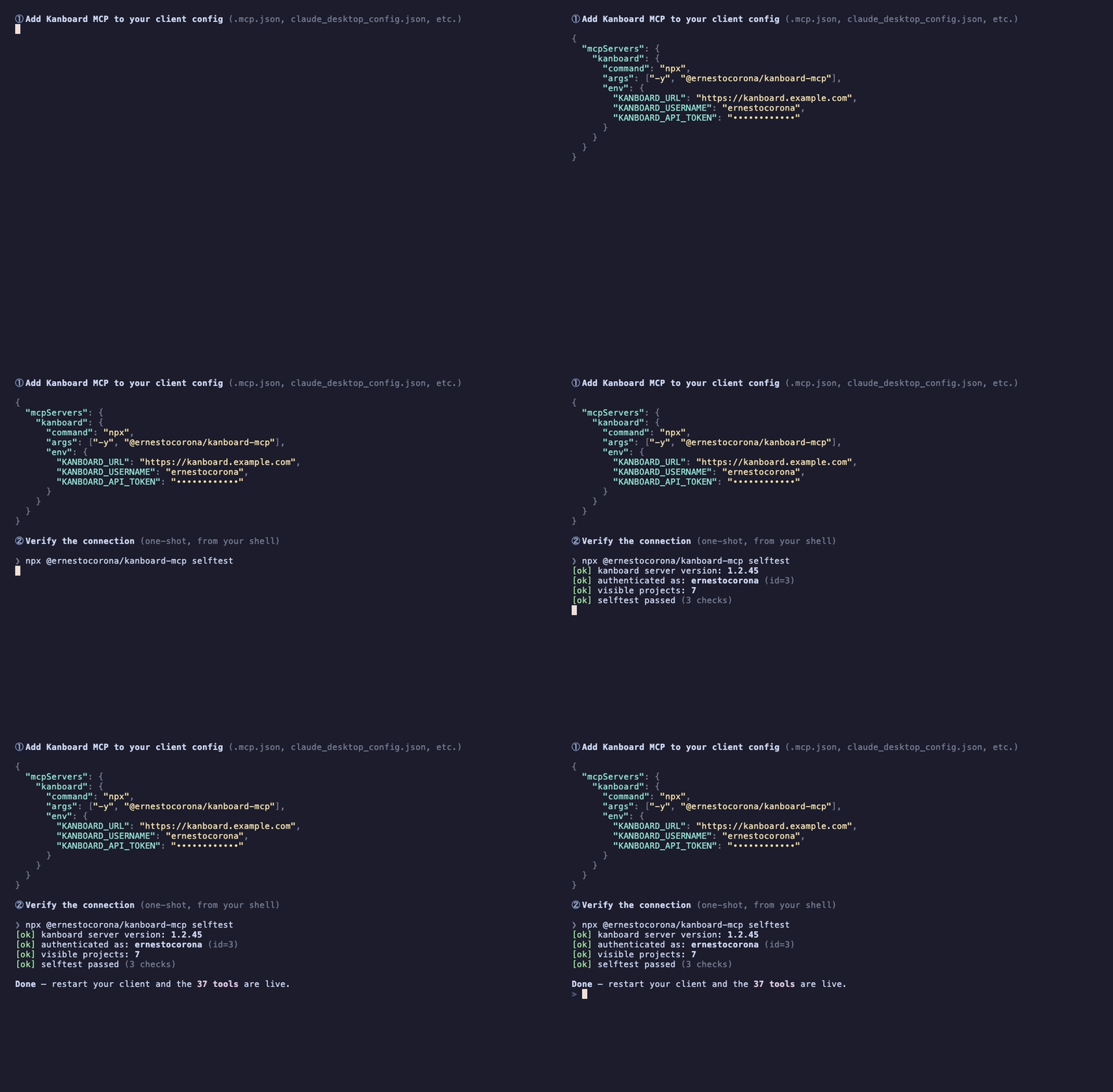
1. Get a Kanboard API token
In Kanboard: Profile → API → Generate token (personal mode), or Settings → API → Application token (app mode for service accounts).
2. Add Kanboard MCP to your client
Recommended path: npx — zero install, always latest. Drop this block into your MCP client config:
{
  "mcpServers": {
    "kanboard": {
      "command": "npx",
      "args": ["-y", "@ernestocorona/kanboard-mcp"],
      "env": {
        "KANBOARD_URL": "https://your-kanboard.example.com",
        "KANBOARD_USERNAME": "your-kanboard-login",
        "KANBOARD_API_TOKEN": "your-personal-token"
      }
    }
  }
}
Restart your MCP client. Done — the 39 tools are now available to your agent.
Why
npx? It fetches@ernestocorona/kanboard-mcpfrom npm on demand, caches it locally, and runs it as the MCP server. You never run a separate install command, and you always get the latest published version — no upgrade chore, no$PATHto manage. This is also why step 3's selftest works without any prior install:npxhandles the fetch transparently.
3. Verify
KANBOARD_URL=https://your-kanboard.example.com \
KANBOARD_USERNAME=your-login \
KANBOARD_API_TOKEN=your-token \
npx @ernestocorona/kanboard-mcp selftest
Expected output (exit 0 = ready):
[ok] kanboard server version: 1.x.x
[ok] authenticated as: your-login (id=3)
[ok] visible projects: 7
[ok] selftest passed (3 checks)
Documentation
Full docs live in ./docs/ and follow the Diátaxis framework:
- Tutorials — hand-held walkthroughs to learn by doing.
- How-to guides — recipes for batching, multi-project setups, integration tests, and CI.
- Reference — exact contracts for every tool, every config knob, and every error.
- Explanation — the why behind authentication modes, the retry policy, and the batch architecture.
Start at the docs index to pick the right entry point.
Installation methods
Just want it working? Use the npx row (first entry below) — it's the recommended path for the vast majority of users. The other methods exist for specific use cases (frequent local runs, Bun/pnpm runtimes, production deployments, or hacking on the source).
| Method | When to use | Command |
|---|---|---|
npx (recommended) |
Most users. Zero install, always uses the latest published version. | npx -y @ernestocorona/kanboard-mcp |
| Global install | You run the server frequently and want a stable binary on $PATH. |
npm i -g @ernestocorona/kanboard-mcp then kanboard-mcp |
bunx / pnpm dlx |
You use Bun or pnpm as your runner. Same package, same behavior. | bunx @ernestocorona/kanboard-mcp |
| Docker (GHCR) | Production-style deployment, CI agents, isolated environments. Multi-arch image (linux/amd64, linux/arm64), runs as non-root. |
docker run -i --rm -e KANBOARD_URL -e KANBOARD_USERNAME -e KANBOARD_API_TOKEN ghcr.io/ernestocorona/kanboard-mcp:latest |
| Clone + node | You want to fork, hack, or run from source. | git clone … → npm i → npm run build → node dist/index.js |
Heads up: the package is ESM-only and requires Node ≥ 22. Older Node versions will fail at startup.
Run with Docker
The published image (ghcr.io/ernestocorona/kanboard-mcp) is built for linux/amd64 and linux/arm64, runs as the non-root node user, and speaks MCP over stdio — exactly like the npm version. Point your client at docker instead of npx:
{
  "mcpServers": {
    "kanboard": {
      "command": "docker",
      "args": [
        "run", "-i", "--rm",
        "-e", "KANBOARD_URL",
        "-e", "KANBOARD_USERNAME",
        "-e", "KANBOARD_API_TOKEN",
        "ghcr.io/ernestocorona/kanboard-mcp:latest"
      ],
      "env": {
        "KANBOARD_URL": "https://your-kanboard.example.com",
        "KANBOARD_USERNAME": "your-kanboard-login",
        "KANBOARD_API_TOKEN": "your-personal-token"
      }
    }
  }
}
The -i flag is mandatory — MCP needs stdin attached to pipe JSON-RPC frames. --rm keeps the container ephemeral. Pin to a specific tag (:0.3, :0.3.2) in production instead of :latest.
Compatible MCP clients
MCP is a transport-level standard. The same JSON snippet from the quick start works in every client below — only the file path differs.
| Client | Config file |
|---|---|
| Claude Code | .mcp.json (per-project) or ~/.claude.json (global) |
| Claude Desktop | ~/Library/Application Support/Claude/claude_desktop_config.json (macOS) · %APPDATA%\Claude\claude_desktop_config.json (Windows) |
| Cursor | .cursor/mcp.json (per-project) or ~/.cursor/mcp.json (global) |
| Cline (VS Code extension) | VS Code → Cline panel → MCP Servers → Add |
| Zed | ~/.config/zed/settings.json → context_servers block |
| Continue (VS Code / JetBrains) | ~/.continue/config.json |
| Goose (Block) | ~/.config/goose/profiles.yaml |
| Windsurf (Codeium) | ~/.codeium/windsurf/mcp_config.json |
If your editor speaks MCP stdio, this server works in it. If it doesn't speak MCP at all yet (some chat tools still don't), it can't be plugged in until support lands upstream.
Application mode (service identity)
For CI pipelines, bots, and shared agents — use Kanboard's protocol-level jsonrpc user instead of a human account:
{
  "mcpServers": {
    "kanboard": {
      "command": "npx",
      "args": ["-y", "@ernestocorona/kanboard-mcp"],
      "env": {
        "KANBOARD_URL": "https://your-kanboard.example.com",
        "KANBOARD_AUTH_MODE": "app",
        "KANBOARD_API_TOKEN": "your-application-token"
      }
    }
  }
}
In app mode, KANBOARD_USERNAME is not required and is ignored. Comments and tasks created via app mode are authored by the jsonrpc system user.
Project context with .kanboard.yaml
Drop a .kanboard.yaml at your repo root and every tool that needs a project auto-resolves it. The server walks up from cwd (stops at $HOME or git root):
# Use exactly one — they are mutually exclusive
project_id: 12
# project_identifier: "MYPROJ"

# Optional defaults, override per call if needed
default_column_id: 2
default_swimlane_id: 1
default_owner_id: 5
default_category_id: 3
You can still override per call by passing project_id explicitly. The file is cached for the process lifetime — restart the server to pick up changes.
Tool catalog
39 tools across 9 groups. Each one ships with a strict Zod schema for inputs and outputs — inputs are validated before any HTTP request; outputs are parsed into a stable, type-safe contract regardless of Kanboard's per-version response shape.
Project Management (8 tools)
| Tool | Description | Example Usage |
|---|---|---|
list_projects |
List projects you can access | "Show me all my projects" |
get_project |
Fetch project details by id or identifier | "Show me the Backend project" |
create_project |
Create a new project | "Create a project called Mobile App" |
update_project |
Rename or update project metadata | "Rename the V1 project to V2" |
delete_project |
Permanently delete a project (requires confirmation) | "Delete the archived Sprint 1 project" |
add_project_user |
Grant a user access with a role | "Add Maria as manager to Mobile" |
remove_project_user |
Revoke a user's access (requires confirmation) | "Remove John from the Backend project" |
list_project_users |
List members and their roles | "Who has access to the Backend project?" |
Column Management (5 tools)
| Tool | Description | Example Usage |
|---|---|---|
list_columns |
List board columns in order | "Show me the columns of the Mobile board" |
create_column |
Add a new column | "Add a 'QA Review' column to Mobile" |
update_column |
Rename or modify a column | "Rename 'WIP' to 'In Progress'" |
move_column |
Reorder columns | "Move 'QA Review' before 'Done'" |
delete_column |
Remove a column (requires confirmation) | "Delete the empty 'On Hold' column" |
Swimlane Management (5 tools)
| Tool | Description | Example Usage |
|---|---|---|
list_swimlanes |
List project swimlanes | "Show me all team swimlanes" |
create_swimlane |
Add a team or workstream swimlane | "Create a 'Frontend Team' swimlane" |
update_swimlane |
Rename or modify a swimlane | "Rename Mobile Team to Cross-Platform Team" |
move_swimlane |
Reorder swimlanes | "Move Backend Team above Frontend" |
delete_swimlane |
Remove a swimlane (requires confirmation) | "Delete the inactive team swimlane" |
Task Management (10 tools)
| Tool | Description | Example Usage |
|---|---|---|
list_tasks |
List active or closed tasks in a project | "Show me all open tasks in Mobile" |
get_task |
Fetch full task details with metadata | "Show me task #1234" |
create_task |
Create a single task | "Create 'Fix login bug' in Backlog" |
update_task |
Edit any task field, move column, assign owner | "Move task #1234 to In Progress and assign it to me" |
delete_task |
Permanently delete a task (requires confirmation) | "Delete task #1234" |
close_task |
Archive a task off the active board — reversible, not a delete | "Close task #1234" |
reopen_task |
Restore a closed task to the active board | "Reopen task #1234" |
move_task_position |
Reposition a task within or across columns | "Move task #1234 to the top of Done" |
list_my_tasks |
List tasks assigned to the authenticated user | "What's on my plate?" |
list_overdue_tasks |
List all tasks past their due date | "Show me what's overdue" |
Batch Operations (1 tool)
| Tool | Description | Example Usage |
|---|---|---|
create_tasks_batch |
Create up to 100 tasks in a single JSON-RPC round-trip | "Turn this email thread into a sprint backlog" |
Subtask Management (4 tools)
| Tool | Description | Example Usage |
|---|---|---|
list_subtasks |
List subtasks of a task | "Show me the subtasks of #1234" |
create_subtask |
Add a subtask | "Add 'Write tests' as a subtask of #1234" |
update_subtask |
Edit a subtask or change its status | "Mark subtask #56 as done" |
delete_subtask |
Remove a subtask (requires confirmation) | "Delete subtask #56" |
Comment Management (3 tools)
| Tool | Description | Example Usage |
|---|---|---|
create_comment |
Add a comment to a task | "Comment 'Blocked on design review' on #1234" |
update_comment |
Edit one of your comments | "Update my last comment on #1234" |
delete_comment |
Remove your comment (requires confirmation) | "Delete my last comment on #1234" |
Attachment Management (2 tools)
| Tool | Description | Example Usage |
|---|---|---|
attach_file_to_task |
Attach a file by path or base64, 5 MB cap | "Attach this design.png to #1234" |
delete_task_file |
Remove an attachment (requires confirmation) | "Delete the old spec.pdf from #1234" |
Lookups (1 tool)
| Tool | Description | Example Usage |
|---|---|---|
list_categories |
List task categories defined in a project | "Show me all task categories" |
Destructive tools (
delete_*,remove_*) require an explicitconfirmation: trueflag in the input. Without it, the tool refuses and returns a structured error — your agent can't accidentally wipe a project on a typo.
Configuration
Environment variables
| Variable | Required | Default | Description |
|---|---|---|---|
KANBOARD_URL |
Yes | — | Base URL of your Kanboard instance, e.g. https://kanboard.example.com |
KANBOARD_API_TOKEN |
Yes | — | API token (personal or application, depending on auth mode) |
KANBOARD_AUTH_MODE |
No | personal |
personal (acts as a Kanboard user) or app (service identity) |
KANBOARD_USERNAME |
personal mode only | — | Your Kanboard login username |
KANBOARD_TIMEOUT_MS |
No | 15000 |
Per-request HTTP timeout in milliseconds |
LOG_LEVEL |
No | info |
Pino log level: trace, debug, info, warn, error, fatal |
Required variables are validated at startup. Missing or invalid values cause an immediate non-zero exit before any tool is registered or any network call is made.
.kanboard.yaml schema
project_id: 12                    # numeric project ID
# OR
project_identifier: "MYPROJ"      # string identifier (alphanumeric, dash, underscore)

# Optional defaults
default_column_id: 2
default_swimlane_id: 1
default_owner_id: 5
default_category_id: 3
project_id and project_identifier are mutually exclusive — exactly one must be set.
Security
Defaults are designed to fail safe:
- Access control is Kanboard's job — each user runs the server with their own personal token; every tool call is authorized against Kanboard's existing project ACL. There is no parallel permission system to maintain or drift out of sync — if a user cannot see a project in Kanboard's UI, the MCP cannot see it either. Application mode is reserved for service identities (CI pipelines, bots, shared agents). See The access-control model.
- Token storage — keep
KANBOARD_API_TOKENin.env(gitignored) or in your MCP client'senvblock. Never paste a token into chat or commit one to a repository. - Automatic redaction — the Pino logger redacts
apiToken,req.headers.authorization,*.token,*.secret, andcredentials.apiTokenfrom every log line at every log level. Token values never appear verbatim in any output. - Stdout reserved for MCP — all logging goes to stderr exclusively. Stdout is the MCP protocol channel — no leaks possible there.
- Destructive tools require confirmation — every
delete_*andremove_*tool refuses to run unless the caller passesconfirmation: true. This is enforced at the schema layer, not at runtime. - Integration test gating — integration tests refuse to run unless
RUN_INTEGRATION=1andKANBOARD_TEST_PROJECT_IDare set, AND the target project name contains"sandbox"or"test". The suite aborts before any write request if these conditions aren't met. - Auth errors fail loud — if
getMe()fails at startup (wrong personal token), the server exits — it never falls back silently to a default identity. - Token rotation — rotate your Kanboard API token regularly. The server picks up the new token on next start; no in-memory cache to invalidate.
For vulnerability disclosure, see SECURITY.md.
Roadmap
- v0.3.x (current) — full CRUD across all entities; destructive tools behind
confirmationflag; 1016 tests; production-ready stdio transport; official multi-arch Docker image on GHCR. - v0.4 — HTTP/SSE transport for team deployments; multi-tenant per-user authentication via headers.
- v0.5 — webhooks support; IMAP inbox watcher (email-to-task ingestion); webhook-driven notifications back to Kanboard.
Development
git clone https://github.com/ErnestoCorona/kanboard-mcp.git
cd kanboard-mcp
npm install

npm run typecheck       # tsc --noEmit (TypeScript strict mode)
npm run lint            # ESLint flat config
npm run lint:fix        # ESLint with auto-fix
npm run test            # 1016 unit tests, no network (default for `npm test`)
npm run test:int        # integration tests (requires .env + RUN_INTEGRATION=1)
npm run build           # tsup ESM bundle → dist/
npm run dev             # tsup watch mode
npm run selftest        # smoke test against live Kanboard
Integration tests
Set up a .env (copy from .env.example) pointing to a Kanboard project whose name contains sandbox or test:
RUN_INTEGRATION=1
KANBOARD_URL=https://your-kanboard.example.com
KANBOARD_USERNAME=your-login
KANBOARD_API_TOKEN=your-token
KANBOARD_TEST_PROJECT_ID=42
All test entities are prefixed [TEST-{ISO-timestamp}] and cleaned up by the suite's afterAll hook using the v0.3 destructive tools.
Debugging with MCP Inspector
The fastest way to poke at the server by hand — list tool schemas, fire individual calls, and watch the JSON-RPC envelopes — is the official MCP Inspector:
KANBOARD_URL=https://your-kanboard.example.com \
KANBOARD_USERNAME=your-login \
KANBOARD_API_TOKEN=your-token \
npx @modelcontextprotocol/inspector -- npx -y @ernestocorona/kanboard-mcp
The -- is required — the Inspector CLI consumes flags like -e and -y for its own use, so we tell it explicitly that everything after -- belongs to the spawned MCP server command.
The Inspector opens a local UI (default http://127.0.0.1:6274) with all 39 tools under the Tools tab, each one carrying its full Zod-derived schema. See the full how-to for environment passthrough, app-mode setup, and common gotchas.
Pre-commit
The repo uses husky + gitleaks to block commits containing secrets, plus commitlint on the commit-msg hook to enforce Conventional Commits. Run npm install once after cloning to install hooks.
Troubleshooting
npm run selftest exit-code propagation under tsx
scripts/preflight.sh runs npm run selftest, which delegates to tsx src/cli/selftest.ts. On some host setups, tsx (invoked through the npm wrapper) does not always propagate a non-zero process.exit(N) from the script back to the parent shell — so preflight.sh may report exit 0 even when the selftest actually failed internally.
This is a pre-existing tsx / npm behaviour, not specific to kanboard-mcp. Workarounds:
- Re-run
scripts/preflight.shtwo or three times beforenpm publishand confirm a clean run each time. - Or check the selftest output explicitly for the
selftest passline on stderr before trusting the exit code.
If you need a hard guarantee, run npx tsx src/cli/selftest.ts directly (without the npm wrapper) — that path tends to propagate exit codes more reliably.
Contributing
Issues and pull requests are welcome. Please read CONTRIBUTING.md before opening a PR. All contributors are expected to follow the Code of Conduct.
License
MIT © Ernesto Corona
Acknowledgments
This project was originally developed at aisys-media GmbH (Würzburg, Germany) and is released as open source with their permission. Thanks to the team for the green light to share this work with the wider community.
Author
Ernesto Corona — senior architect, TypeScript / Node / MCP servers. GitHub · npm
Установить Kanboard в Claude Desktop, Claude Code, Cursor
Выполни в терминале:
claude mcp add kanboard-mcp -- npx FAQ
Kanboard MCP бесплатный?
Да, Kanboard MCP бесплатный — установка в один клик через Unyly без оплаты.
Нужен ли API-ключ для Kanboard?
Нет, Kanboard работает без API-ключей и переменных окружения.
Kanboard — hosted или self-hosted?
Доступен hosted-вариант: Unyly запускает сервер в облаке, локальная установка не обязательна.
Как установить Kanboard в Claude Desktop, Claude Code или Cursor?
Открой Kanboard на unyly.org, выбери вкладку своего клиента (Claude Desktop, Claude Code, Cursor) и нажми Install — конфиг сгенерируется автоматически, без правки JSON.


