
karanb192/reddit-mcp-buddy
БесплатноНе проверенBrowse Reddit posts, search content, and analyze user activity without API keys. Works out-of-the-box with Claude Desktop.

Описание
Browse Reddit posts, search content, and analyze user activity without API keys. Works out-of-the-box with Claude Desktop.
README
Reddit Browser for Claude Desktop and AI Assistants
A Model Context Protocol (MCP) server that enables Claude Desktop and other AI assistants to browse Reddit, search posts, and analyze user activity. Clean, fast, and actually works - browse subreddits with no API keys; add free Reddit credentials for search, comments, user analysis, and full metrics.
npm version npm downloads GitHub stars License: MIT
🎬 See It In Action
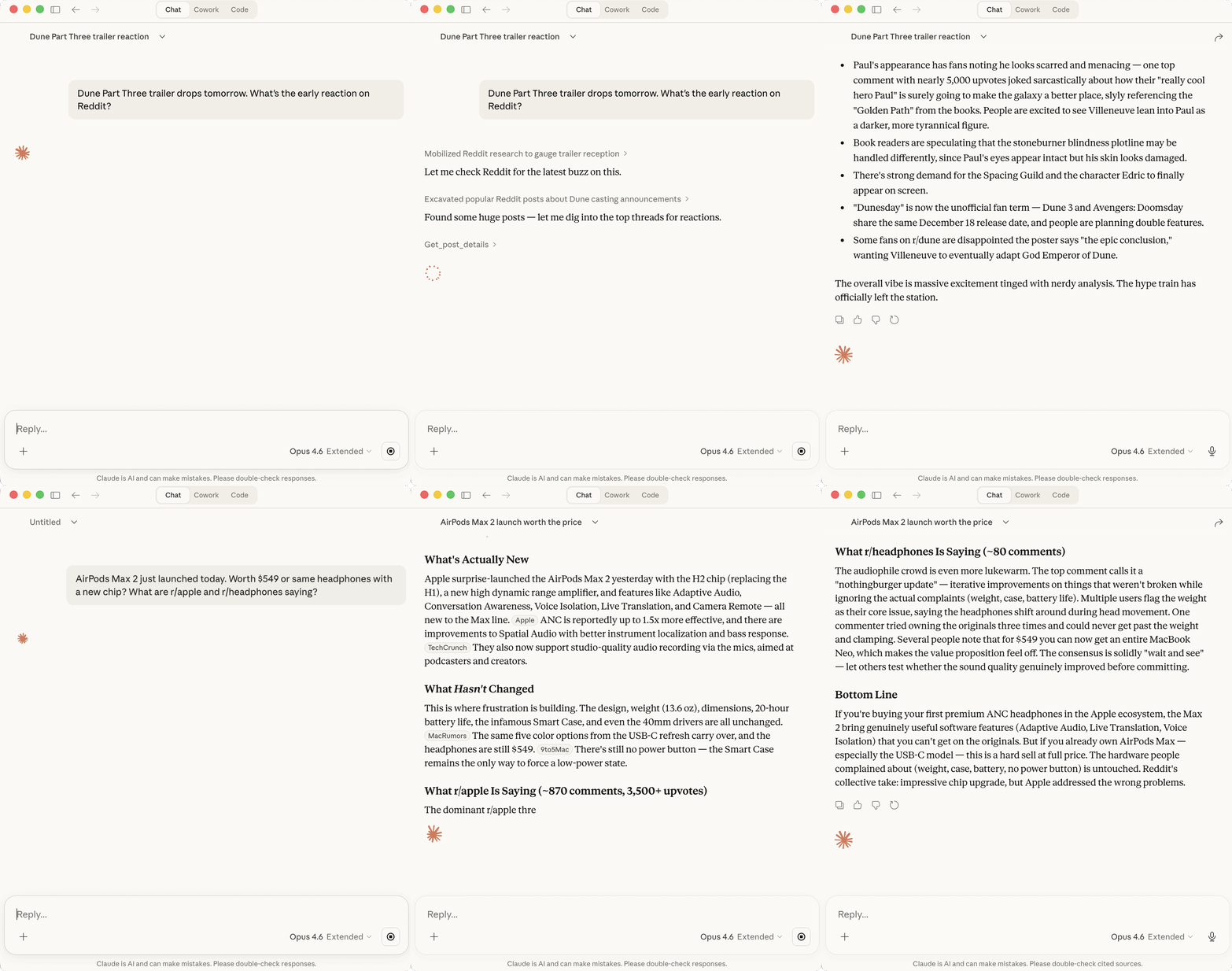
Claude checking Reddit's reaction to the Dune Part Three trailer and whether the AirPods Max 2 are worth $549
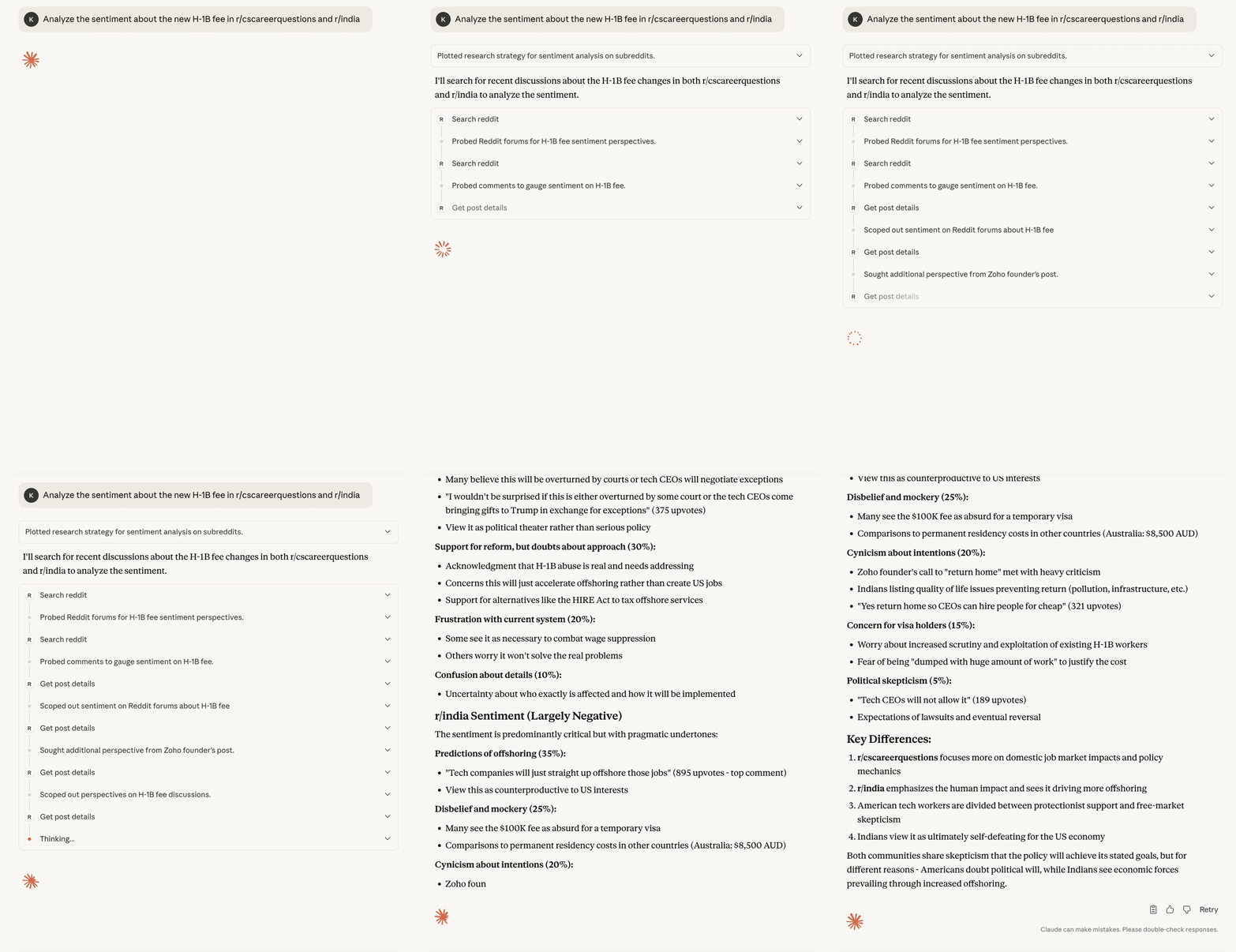
Claude analyzing real-time sentiment about H-1B visa changes across r/cscareerquestions and r/india
Table of Contents
- What makes Reddit MCP Buddy different?
- Quick Start
- What can it do?
- Available Tools
- Authentication
- Installation Options
- Comparison with Other Tools
- Troubleshooting
- Development
- Support
- Related Resources
What makes Reddit MCP Buddy different?
- 🚀 Zero setup - Browse subreddits instantly, no Reddit API registration needed (search, comments, user analysis, and engagement metrics need free credentials)
- ⚡ Up to 10x more requests - Three-tier authentication system (10/60/100 requests per minute)
- 🎯 Clean data - No fake "sentiment analysis" or made-up metrics
- 🧠 LLM-optimized - Built specifically for AI assistants like Claude
- 📦 TypeScript - Fully typed, reliable, and maintainable
- ✅ Proven rate limits - Thoroughly tested authentication tiers with verification tools
Quick Start (30 seconds)
For Claude Desktop - Desktop Extension (Easiest!)
- Download: reddit-mcp-buddy.mcpb
- Install: Open the downloaded file
- Done! Reddit tools are now available in Claude
For Claude Desktop - NPM Method (Alternative)
Add this to your claude_desktop_config.json:
{
  "mcpServers": {
    "reddit": {
      "command": "npx",
      "args": ["-y", "reddit-mcp-buddy"]
    }
  }
}
For Claude Code
Run this command to add the MCP server (user scope):
claude mcp add --transport stdio reddit-mcp-buddy -s user -- npx -y reddit-mcp-buddy
For Other MCP Clients
Use the NPM method: npx -y reddit-mcp-buddy
What can it do?
Ask your AI assistant to:
- 📊 "What's trending on Reddit?" - Browse hot posts from r/all
- 🔍 "Search for discussions about AI" - Search across all subreddits
- 💬 "Get comments from this Reddit post" - Fetch post with full comment threads
- 👤 "Analyze user spez" - Get user history, karma, and activity
- 📚 "Explain Reddit karma" - Understand Reddit terminology
Available Tools
browse_subreddit
Browse posts from any subreddit with sorting options.
- Subreddit:
  - "all" - entire Reddit frontpage
  - "popular" - trending across Reddit
  - Any specific subreddit (e.g., "technology", "programming", "science")
- Sort by: hot, new, top, rising, controversial
- Time range: hour, day, week, month, year, all (for top/controversial sort)
- Include subreddit info: Optional flag for subreddit metadata (requires credentials)
No credentials? Results are served from Reddit's public RSS feed (
data_source: "rss"):score,num_comments,upvote_ratio, andnsfwcome backnull, and theinclude_nsfwfilter can't be applied. Add credentials (Authentication) for full data via the API.
search_reddit
Search across Reddit or specific subreddits.
- Query: Your search terms
- Filter by: subreddit, author, time, flair
- Sort by: relevance, hot, top, new, comments
get_post_details
Get a post with all its comments.
- Input:
  - Reddit URL (supports multiple formats), OR
  - Post ID alone (will auto-detect subreddit, 2 API calls), OR
  - Post ID + subreddit (most efficient, 1 API call)
- Supported URL formats:
  - reddit.com, www.reddit.com
  - old.reddit.com, new.reddit.com
  - np.reddit.com (No Participation links)
  - m.reddit.com (mobile links)
  - redd.it short URLs
  - URLs with query params (?utm_source=...) or fragments (#comment)
- Options: comment sorting, depth, link extraction
user_analysis
Analyze a Reddit user's profile.
- Username: Any Reddit user
- Returns: karma, posts, comments, active subreddits
reddit_explain
Get explanations of Reddit terms.
- Terms: karma, cake day, AMA, ELI5, etc.
Authentication (Optional)
Want more requests? Add Reddit credentials to your Claude Desktop config:
Setup Steps
- Go to https://www.reddit.com/prefs/apps
- Click "Create App" or "Create Another App"
- Fill out the form:
- Name: Any name (e.g., "reddit-mcp-buddy")
- App type: Select "script" (CRITICAL for 100 rpm!)
- Description: Optional
- About URL: Leave blank
- Redirect URI:
http://localhost:8080(required but unused)
- Click "Create app"
- Find your credentials:
- Client ID: The string under "personal use script"
- Client Secret: The secret string
- Update your Claude Desktop config:
{
  "mcpServers": {
    "reddit": {
      "command": "npx",
      "args": ["-y", "reddit-mcp-buddy"],
      "env": {
        "REDDIT_CLIENT_ID": "your_client_id",
        "REDDIT_CLIENT_SECRET": "your_client_secret",
        "REDDIT_USERNAME": "your_username",
        "REDDIT_PASSWORD": "your_password"
      }
    }
  }
}
Three-Tier Authentication System
Reddit MCP Buddy supports three authentication levels, each with different rate limits:
| Mode | Rate Limit | Required Credentials | Best For |
|---|---|---|---|
| Anonymous | 10 req/min* | None | Testing, light usage |
| App-Only | 60 req/min | Client ID + Secret | Regular browsing |
| Authenticated | 100 req/min | All 4 credentials | Heavy usage, automation |
*Server-side cap. Anonymous requests are served from Reddit's logged-out RSS feed, which applies its own stricter per-IP throttle (often one uncached request per 25-60 seconds). The 15-minute cache and automatic retries absorb much of this, but sustained anonymous browsing is effectively slower than 10 req/min.
How It Works:
- Anonymous Mode: Default mode, no setup required. Only
browse_subreddit(plus the offlinereddit_explain) works: Reddit blocks the logged-out JSON API, so browse results come from Reddit's public RSS feed (data_source: "rss") with engagement metrics and NSFW flags asnull. The remaining tools require credentials. - App-Only Mode: Uses OAuth2 client credentials grant (works with both script and web apps)
- Authenticated Mode: Uses OAuth2 password grant (requires script app type)
Important Notes:
- Script apps support BOTH app-only (60 rpm) and authenticated (100 rpm) modes
- Web apps only support app-only mode (60 rpm maximum)
- For 100 requests/minute, you MUST use a script app with username + password
Privacy & Data Handling
Reddit MCP Buddy is designed with privacy and transparency in mind. Here's how your data is handled:
Data Collection
- Reddit API Data: The server fetches public Reddit content (posts, comments, user profiles) through Reddit's official API
- No Tracking: We don't collect, store, or transmit any analytics, telemetry, or usage data
- No Third Parties: All data flows directly between your machine, Reddit's API, and your AI assistant
Local Storage
- Authentication Credentials (optional):
- Stored locally in
~/.reddit-mcp-buddy/auth.jsonwhen using--authCLI setup - Passwords are never written to disk - only used in-memory for OAuth token exchange
- Environment variables (recommended for Claude Desktop) are never persisted by this server
- Stored locally in
- Cache Data:
- Reddit API responses are temporarily cached in memory to improve performance
- Cache size limited to 50MB maximum
- All cache data is cleared when the server stops
- Can be disabled with
REDDIT_BUDDY_NO_CACHE=true
Data Transmission
- Reddit API Only: Your credentials are only sent to Reddit's official OAuth endpoints (
https://oauth.reddit.comandhttps://www.reddit.com) - No External Services: No data is sent to any other external services, analytics platforms, or third parties
- Local Processing: All data processing happens locally on your machine
Security Notes
- Read-Only Operations: All tools are read-only - the server never posts, comments, or modifies any Reddit content
- Credential Safety:
- OAuth tokens are refreshed automatically and kept in memory; only
--authCLI setups also cache the token in~/.reddit-mcp-buddy/auth.json(file mode 600) - Client secrets are treated as sensitive and never logged
- Use environment variables in Claude Desktop config for maximum security
- OAuth tokens are refreshed automatically and kept in memory; only
- Open Source: Full source code is available at https://github.com/karanb192/reddit-mcp-buddy for security auditing
GDPR & Privacy Compliance
- No Personal Data Collection: We don't collect or process any personal data beyond what's necessary to authenticate with Reddit's API
- User Control: You control all credentials and can delete
~/.reddit-mcp-buddy/auth.jsonat any time - Right to Erasure: Simply delete the auth file or uninstall the server to remove all local data
Questions or Concerns?
If you have any privacy questions or concerns, please open an issue on GitHub.
Testing & Development
Testing Your Rate Limits
Reddit MCP Buddy includes comprehensive testing tools to verify your authentication is working correctly:
# Clone the repository first
git clone https://github.com/karanb192/reddit-mcp-buddy.git
cd reddit-mcp-buddy
npm install

# Test with your current environment settings
npm run test:rate-limit

# Test specific authentication modes
npm run test:rate-limit:anon    # Test anonymous mode (10 rpm)
npm run test:rate-limit:app     # Test app-only mode (60 rpm)
npm run test:rate-limit:auth    # Test authenticated mode (100 rpm)
The rate limit tester will:
- Start a local server instance
- Make rapid API requests to test rate limits
- Display a real-time progress bar
- Confirm which authentication tier you're using
- Show exactly when rate limiting kicks in
Interactive Authentication Setup (for local testing only)
For local development and testing, you can set up authentication interactively:
npx -y reddit-mcp-buddy --auth
This will prompt you for Reddit app credentials and save them locally. Note: This does NOT work with Claude Desktop - use environment variables in your Claude config instead.
Testing with HTTP Mode
To test the server directly in your terminal:
# Run in HTTP mode on port 3000
npx -y reddit-mcp-buddy --http

# Or with custom port
REDDIT_BUDDY_PORT=8080 npx -y reddit-mcp-buddy --http
Note: The server runs in stdio mode by default (for Claude Desktop). Use --http flag for testing with Postman MCP or direct API calls.
Installation Options
Global Install
npm install -g reddit-mcp-buddy
reddit-buddy --http  # For testing
From Source
git clone https://github.com/karanb192/reddit-mcp-buddy.git
cd reddit-mcp-buddy
npm install
npm run build
npm link
Using Docker
git clone https://github.com/karanb192/reddit-mcp-buddy.git
cd reddit-mcp-buddy
docker build -t reddit-mcp-buddy .
docker run -it reddit-mcp-buddy
Claude Desktop Extension
For one-click installation in Claude Desktop, download the pre-built extension:
📦 Download reddit-mcp-buddy.mcpb
Installation: Simply open the downloaded .mcpb file - Claude Desktop will automatically install the extension and the Reddit tools will be immediately available.
Build from Source (Optional)
If you prefer to build the extension yourself:
git clone https://github.com/karanb192/reddit-mcp-buddy.git
cd reddit-mcp-buddy
./scripts/build-mcpb.sh
Note: Most users should use the standard npm installation method shown in Quick Start.
Comparison with Other Tools
| Feature | Reddit MCP Buddy | Other MCP Tools |
|---|---|---|
| Zero Setup | ✅ Browse instantly; free keys unlock the rest | ❌ Keys required for everything |
| Max Rate Limit | ✅ 100 req/min proven | ❓ Unverified claims |
| Language | TypeScript/Node.js | Python (most) |
| Tools Count | 5 (focused) | 8-10 (redundant) |
| Fake Metrics | ✅ Real data only | ❌ "Sentiment scores" |
| Search | ✅ Full search | Limited or none |
| Caching | ✅ Smart caching | Usually none |
| LLM Optimized | ✅ Clear params | Confusing options |
| Rate Limit Testing | ✅ Built-in tools | ❌ No verification |
Rate Limits
| Mode | Requests/Minute | Cache TTL | Setup Required |
|---|---|---|---|
| Anonymous | 10 | 15 min | None |
| App-only | 60 | 5 min | Client ID + Secret |
| Authenticated | 100 | 5 min | All credentials |
Cache TTL applies to subreddit listings. Post details (10 min), search results (10 min), and user profiles (15 min) use fixed TTLs in all modes. Anonymous throughput is additionally bounded by Reddit's own per-IP RSS throttle, which is stricter than 10/min for uncached requests.
Why Reddit MCP Buddy?
What others do wrong:
- ❌ Fake metrics - "sentiment scores" that are just keyword counting
- ❌ Complex setup - Requiring API keys just to start
- ❌ Bloated responses - Returning 100+ fields of Reddit's raw API
- ❌ Poor LLM integration - Confusing parameters and unclear descriptions
What we do right:
- ✅ Real data only - If it's not from Reddit's API, we don't make it up
- ✅ Clean responses - Only the fields that matter
- ✅ Clear parameters - LLMs understand exactly what to send
- ✅ Fast & cached - Responses are instant when possible
Examples
Your AI can now answer:
"What are the top posts about GPT-4 today?"
→ search_reddit with query="GPT-4", time="day", sort="top"
"Show me what's trending in technology"
→ browse_subreddit with subreddit="technology", sort="hot"
"What do people think about this article?"
→ search_reddit with the article URL to find discussions
"Analyze the user DeepFuckingValue"
→ user_analysis with username="DeepFuckingValue"
"Get the comments from this Reddit post"
→ get_post_details with url="https://reddit.com/r/..."
"What's trending across all of Reddit?"
→ browse_subreddit with subreddit="all", sort="hot"
Troubleshooting
Common Issues
"Can't achieve 100 requests/minute"
- Ensure your app type is "script" not "web" or "installed"
- Script apps created by one account can only authenticate as that same account
- Run
npm run test:rate-limit:authto verify (requires cloning the repo) - If still failing, create a new script app while logged into the authenticating account
"Command not found" error
# Ensure npm is installed
node --version
npm --version

# Try the full global-bin path
$(npm prefix -g)/bin/reddit-mcp-buddy
Browsing works but search / comments / user analysis fail
- Without credentials only
browse_subreddit(served from Reddit's public RSS feed, no scores or comment counts) and the offlinereddit_explainwork - Anonymous browsing can also hit Reddit's own RSS rate limit (HTTP 429); the server retries automatically, but sustained throttling can still fail
- Solution: Add Reddit credentials (see Authentication)
Rate limit errors
- Without auth: 10 requests/minute server cap, and Reddit's own RSS feed throttles harder per IP (the server retries automatically)
- With app credentials only: 60 requests/minute
- With full authentication: 100 requests/minute
- Solution: Add Reddit credentials (see Authentication)
"Subreddit not found"
- Check spelling (case-insensitive)
- Some subreddits may be private or quarantined
- Try "all" or "popular" instead
Connection issues
- Reddit may be down (check https://www.redditstatus.com)
- Firewall blocking requests
- Try restarting the MCP server
Environment Variables
Authentication Variables
| Variable | Description | Required | Rate Limit |
|---|---|---|---|
REDDIT_CLIENT_ID |
Reddit app client ID | No | 60 req/min (with secret) |
REDDIT_CLIENT_SECRET |
Reddit app secret | No | 60 req/min (with ID) |
REDDIT_USERNAME |
Reddit account username | No | 100 req/min (with all 4) |
REDDIT_PASSWORD |
Reddit account password | No | 100 req/min (with all 4) |
REDDIT_USER_AGENT |
Custom user agent string (applies when credentials are configured) | No | - |
Server Configuration
| Variable | Description | Default |
|---|---|---|
REDDIT_BUDDY_HTTP |
Run as HTTP server instead of stdio | false |
REDDIT_BUDDY_PORT |
HTTP server port (when HTTP=true) | 3000 |
REDDIT_BUDDY_HOST |
Interface the HTTP server binds to | 127.0.0.1 |
REDDIT_BUDDY_ALLOWED_ORIGINS |
Comma-separated browser origins allowed to call the HTTP endpoint | none |
REDDIT_BUDDY_ALLOWED_HOSTS |
Comma-separated host:port values accepted in the Host header (DNS-rebinding protection) |
loopback values when bound to localhost |
REDDIT_BUDDY_NO_CACHE |
Disable caching (always fetch fresh) | false |
HTTP mode has no authentication. It binds to localhost so only your machine can reach it, and rejects Host headers outside the loopback set. Setting
REDDIT_BUDDY_HOST=0.0.0.0exposes it to your whole network - only do that on a trusted network (e.g. inside Docker, which sets it deliberately). On a non-loopback bind the Host check is off by default, since clients legitimately arrive with a container IP or service name; setREDDIT_BUDDY_ALLOWED_HOSTSto restrict it. Browser requests are rejected unless their origin is listed inREDDIT_BUDDY_ALLOWED_ORIGINS; non-browser clients like Postman are unaffected.
Technical Details
Smart Caching System
Reddit MCP Buddy includes intelligent caching to improve performance and reduce API calls:
- Memory Safe: Hard limit of 50MB - won't affect your system performance
- Per-Content TTLs: Post details (10min), user profiles (15min), search results (10min); subreddit listings use the mode default (15min anonymous, 5min with credentials)
- LRU Eviction: Automatically removes least-used data when approaching limits
- Hit Tracking: Optimizes cache based on actual usage patterns
This means faster responses and staying well within Reddit's rate limits, all while using minimal system resources.
Development
# Install dependencies
npm install

# Run in development
npm run dev

# Build
npm run build

# Run tests
npm test                     # Unit tests
npm run test:integration     # Integration tests
npm run test:all             # All tests

# Test rate limits
npm run test:rate-limit       # Test with current environment
npm run test:rate-limit:anon  # Test anonymous mode (10 rpm)
npm run test:rate-limit:app   # Test app-only mode (60 rpm)
npm run test:rate-limit:auth  # Test authenticated mode (100 rpm)

# Lint
npm run lint

# Type check
npm run typecheck
Requirements
- Node.js >= 18.0.0
- npm or yarn
- TypeScript 5.5+
Contributing
PRs welcome! See CONTRIBUTING.md for guidelines.
We keep things simple:
- No fake analytics
- Clean, typed code
- Clear documentation
- Fast responses
Support
🔗 Related Resources
Official MCP Resources
- MCP Registry - Official registry of MCP servers
- MCP Specification - Official Model Context Protocol specification
- MCP TypeScript SDK - SDK used to build this server
- MCP Servers Repository - Collection of official MCP server implementations
- Awesome MCP Servers - Community-curated list of MCP servers
Where to Find This Server
- MCP Registry API Link - Direct API query for this server
- MCP Registry Search - Search for "reddit" to find all versions
- NPM Package - Install via npm/npx
- GitHub Repository - Source code and issues
View All Versions via API
# Get all versions of reddit-mcp-buddy from the registry
curl -s "https://registry.modelcontextprotocol.io/v0/servers?search=reddit-mcp-buddy" | jq

# Get just names, version numbers, and latest flag
curl -s "https://registry.modelcontextprotocol.io/v0/servers?search=reddit-mcp-buddy" | \
  jq '.servers[] | {name: .server.name, version: .server.version, isLatest: ._meta."io.modelcontextprotocol.registry/official".isLatest}'
License
MIT - Use it however you want!
Made with ❤️ for the MCP community. No venture capital, no tracking, just a good MCP server.
Built by Karan Bansal (Head of AI at ArmorCode). I write about Claude Code, MCP, and production agentic AI at karanbansal.in/blog.
Установка karanb192/reddit-mcp-buddy
У этого сервера нет опубликованного пакета — он собирается из исходников. Открой репозиторий и следуй инструкции в README.
▸ github.com/karanb192/reddit-mcp-buddyFAQ
karanb192/reddit-mcp-buddy MCP бесплатный?
Да, karanb192/reddit-mcp-buddy MCP бесплатный — установка в пару кликов через Unyly без оплаты.
Нужен ли API-ключ для karanb192/reddit-mcp-buddy?
Нет, karanb192/reddit-mcp-buddy работает без API-ключей и переменных окружения.
karanb192/reddit-mcp-buddy — hosted или self-hosted?
Self-hosted: сервер запускается локально на твоей машине командой из раздела установки.
Как установить karanb192/reddit-mcp-buddy в Claude Desktop, Claude Code или Cursor?
Открой karanb192/reddit-mcp-buddy на unyly.org, выбери вкладку своего клиента (Claude Desktop, Claude Code, Cursor) и нажми Install — конфиг сгенерируется автоматически, без правки JSON.
Похожие MCP
ARA
Generate images, video and audio from any AI agent — one connector.
 автор: ARA
Omni Video
An MCP server that transforms LLM-enabled IDEs into professional video editors by pre-processing footage into text proxies, generating motion graphics via HTML/
 автор: buildwithtaza
YouTube
Transcripts, channel stats, search
 автор: YouTube
EverArt
AI image generation using various models.
 автор: modelcontextprotocol
Compare karanb192/reddit-mcp-buddy with
Не уверен что выбрать?
Найди свой стек за 60 секунд
Автор?
Embed-бейдж для README
Похожее
Все в категории media