

Описание
Autonomous QA for modern devs
README

Kery
AI agents that test your web app and find bugs — no test scripts required.





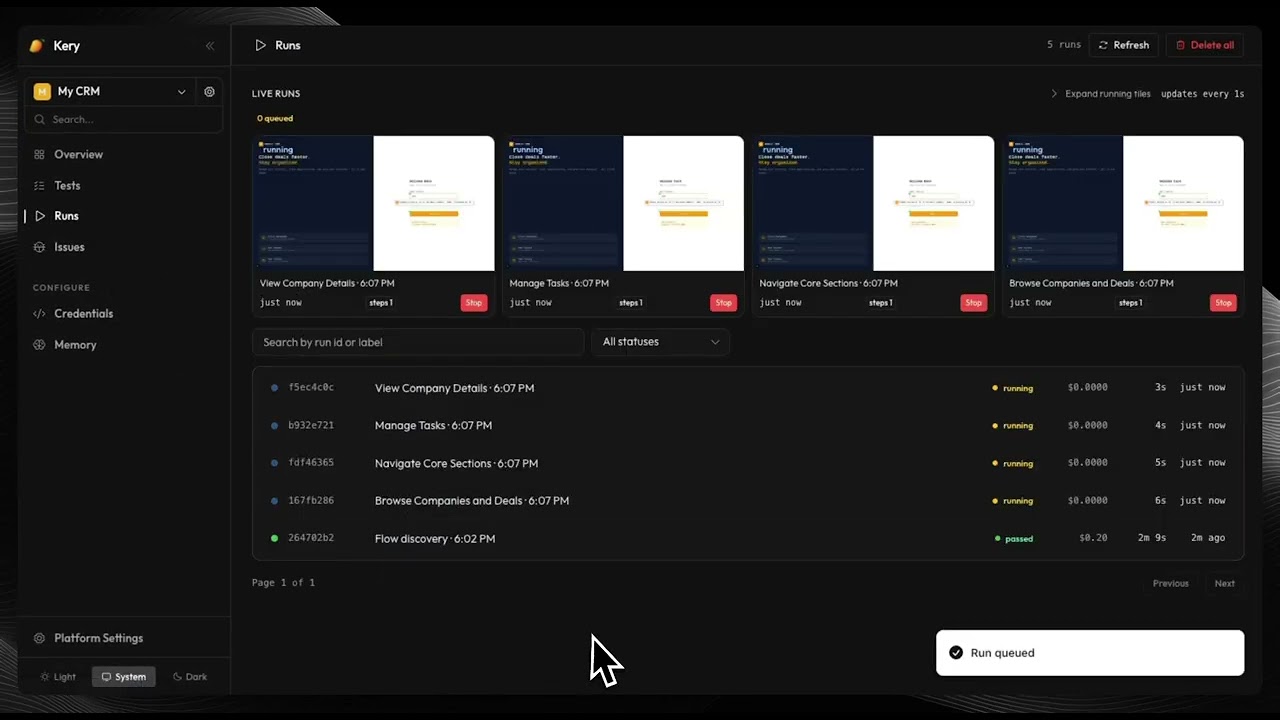
Point Kery at your web app, pick an LLM provider, and let it loose. It crawls every route, runs intent-driven tests, and hands you a report of visual, functional, and UX bugs — with screenshots and bounding boxes. No selectors to write. No scripts to maintain.
👾 Join the Discord — get help, share what you find, follow development.
Quick Start
The fastest path: one command sets up everything.
npx keryai
The CLI wizard asks for your LLM provider and API key, generates a docker-compose.yml, and starts all services. Dashboard opens at http://localhost:11111.
Manual Docker setup:
cp .env.example .env
# Add at least one LLM key — see Configuration below
docker compose up -d
Local development (no Docker):
# Requires Node 20+, PostgreSQL 16+, Redis
npm install
DATABASE_URL=postgresql://kery:kery@localhost:11112/kery npm run migrate
npm run dev:api   # API + Dashboard → http://localhost:11111
How It Works
1. Scan — Kery BFS-crawls your app and builds a map of every route, form, modal, and interaction.
2. Plan — For each route or saved test intent, a path-planning agent generates a sequence of steps to exercise that flow.
3. Run — A Navigator agent drives a real Playwright browser, observing the page via accessibility tree and screenshots. A Review Agent and Filmstrip Reviewer run in parallel, watching for visual and UX regressions.
4. Report — A Triage Agent deduplicates findings, filters false positives using memory from past runs, and outputs bugs categorized by type (visual / functional / UX) and severity — each with a screenshot and bounding box.
Features
App Discovery
- BFS crawler maps all routes, links, forms, and modals
- Route health dashboard — clean / issues / stale / untested
- Depth and scope controls per project
Autonomous Testing
- Intent-driven tests: describe what to test in plain English
- Supports authenticated flows — form login, Clerk, Supabase, OAuth, API tokens
- Navigator agent uses accessibility tree + screenshots, not brittle CSS selectors
- Stagehand self-healing: when the DOM shifts, elements are found by intent
Bug Detection
- Visual bugs — layout breaks, rendering glitches, pixel regressions
- Functional bugs — broken flows, unexpected errors, failed assertions
- UX bugs — confusing copy, missing feedback, accessibility gaps
- Screenshot per bug with highlighted bounding box; URL, severity, and source agent
Agent Memory
- Learns successful navigation paths across runs
- Records known false positives, ignore regions, and bug patterns
- Confidence scoring with decay — memory stays fresh, not compounding
Integrations
- MCP server: run tests and triage bugs from Claude Code, Cursor, or any MCP-compatible IDE
- TypeScript client SDK for CI/CD and custom orchestration
- REST API + SSE streaming for real-time run progress
LLM Flexibility
- OpenRouter (recommended), OpenAI, Anthropic, Google Gemini
- Each agent role (Navigator, Review, Auxiliary, Stagehand) configurable independently
- Per-run token and cost tracking
MCP — Run Kery from Your IDE
Install the MCP server and run tests without leaving your editor.
npx keryai # select "Install MCP" during setup
Or add it manually to your MCP config:
{
  "mcpServers": {
    "kery": {
      "command": "npx",
      "args": ["-y", "@keryai/mcp"],
      "env": { "KERY_BASE_URL": "http://localhost:11111" }
    }
  }
}
Once connected, your AI assistant can scan your app, run tests, and triage bugs inline — no context switching.
Available tools: kery_scan, kery_run_test, kery_get_bugs, kery_update_bug, kery_list_routes, kery_memory, kery_get_coverage, and 20+ more.
Configuration
| Variable | Default | Description |
|---|---|---|
DATABASE_URL |
postgresql://kery:kery@localhost:11112/kery |
PostgreSQL connection string |
OPENROUTER_API_KEY |
— | OpenRouter key (routes to all models — recommended) |
OPENAI_API_KEY |
— | Direct OpenAI key |
ANTHROPIC_API_KEY |
— | Direct Anthropic key |
GEMINI_API_KEY |
— | Direct Google Gemini key |
AGENT_MODEL |
claude-haiku-4-5 |
Model for browser navigation decisions |
AUXILIARY_MODEL |
gemini-2.5-pro |
Crawl, path planning, memory curation, summarization |
REVIEW_AGENT_MODEL |
claude-sonnet-4-6 |
Post-run holistic and filmstrip screenshot analysis |
STAGEHAND_ENABLED |
true |
Enable Stagehand for semantic element finding |
RUN_TIMEOUT_MINUTES |
15 |
Max wall-clock time per test run |
All model settings are also configurable via the dashboard under Settings.
Architecture
packages/
  engine/     — Core agent loop, LLM client, crawler, memory, bug triage
  db/         — PostgreSQL storage adapter (StorageAdapter interface)
  kery/       — CLI setup wizard (npx keryai)
  mcp/        — Model Context Protocol server (@keryai/mcp)
  client/     — TypeScript HTTP client SDK (@keryai/client)

apps/
  api/        — Fastify HTTP server
  web/        — React dashboard
  worker/     — Test run executor (BullMQ)
The engine is storage-agnostic via the StorageAdapter interface — PostgreSQL is the default, but other backends can be plugged in.
Contributing
Issues and pull requests are welcome. Please open an issue to discuss large changes before starting work.
git clone https://github.com/keryai/kery
cd kery
npm install
cp .env.example .env
docker compose up postgres redis -d
npm run dev
License
Apache 2.0 — see LICENSE.
Установка Kery
У этого сервера нет опубликованного пакета — он собирается из исходников. Открой репозиторий и следуй инструкции в README.
▸ github.com/Kery-HQ/KeryFAQ
Kery MCP бесплатный?
Да, Kery MCP бесплатный — установка в пару кликов через Unyly без оплаты.
Нужен ли API-ключ для Kery?
Нет, Kery работает без API-ключей и переменных окружения.
Kery — hosted или self-hosted?
Self-hosted: сервер запускается локально на твоей машине командой из раздела установки.
Как установить Kery в Claude Desktop, Claude Code или Cursor?
Открой Kery на unyly.org, выбери вкладку своего клиента (Claude Desktop, Claude Code, Cursor) и нажми Install — конфиг сгенерируется автоматически, без правки JSON.
Похожие MCP
GitHub
PRs, issues, code search, CI status
 автор: GitHub
Filesystem
Secure file operations with configurable access controls.
Memory
Knowledge graph-based persistent memory system.
Template MCP Server
A CLI tool to create a new Model Context Protocol server project with TypeScript support, dual transport options, and an extensible structure
 автор: mcpdotdirect
Compare Kery with
Не уверен что выбрать?
Найди свой стек за 60 секунд
Автор?
Embed-бейдж для README
Похожее
Все в категории development