
Kibana
БесплатноНе проверенEnables AI assistants to manage Kibana security alerts, rules, and exception lists via the Model Context Protocol.

Описание
Enables AI assistants to manage Kibana security alerts, rules, and exception lists via the Model Context Protocol.
README
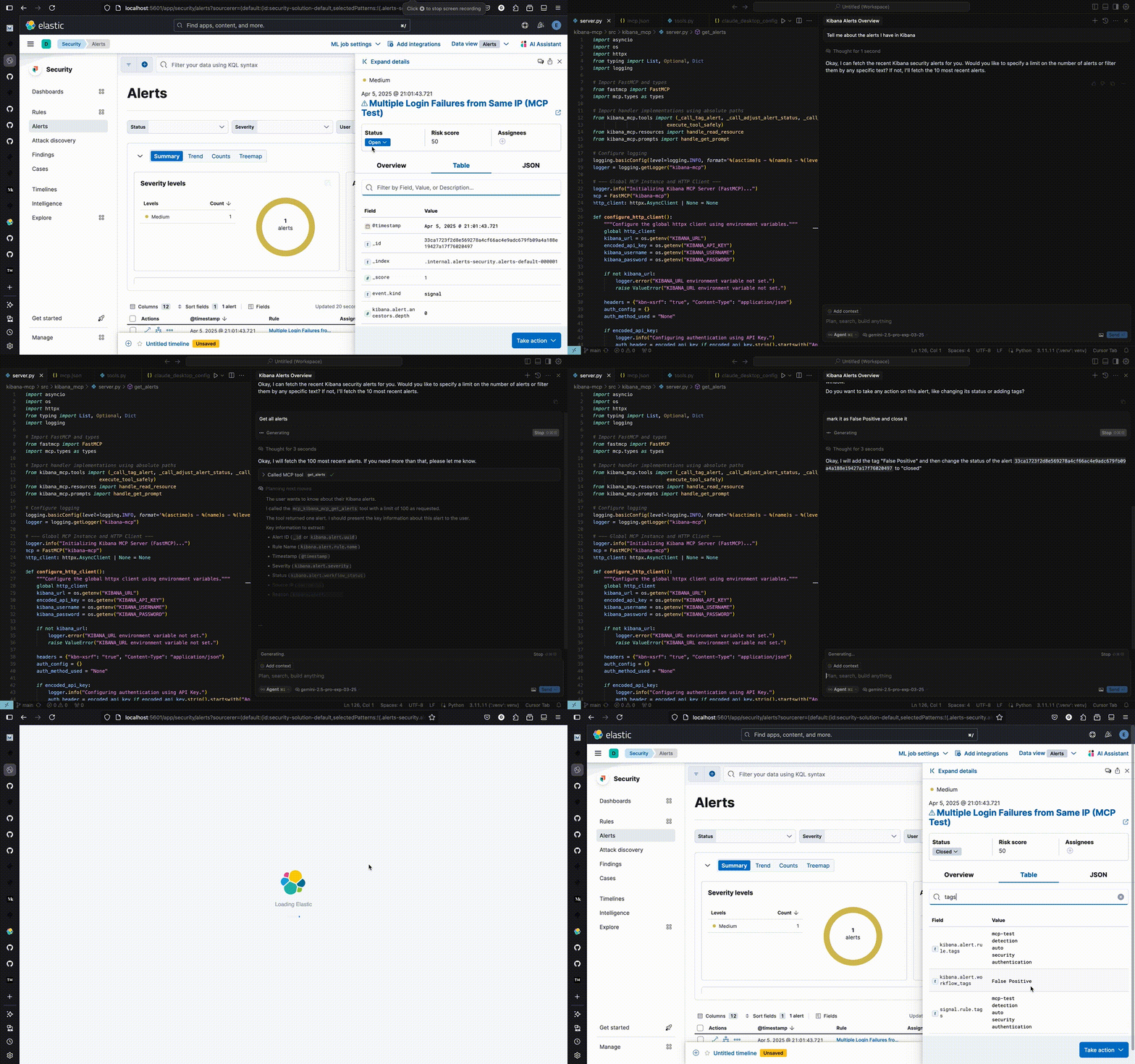
Model Context Protocol (MCP) server for Kibana Security - manage alerts, rules, and exceptions via AI assistants.
Quick Start
1. Clone and Build
git clone https://github.com/ggilligan12/kibana-mcp.git
cd kibana-mcp
docker build -t kibana-mcp .
2. Configure MCP Client
Add to your MCP client config (Claude Desktop, Cursor, etc.):
Option A: Using Environment Variables (Recommended)
First, set your credentials:
export KIBANA_URL="https://your-kibana.example.com:5601"

# Option 1: API Key (recommended)
export KIBANA_API_KEY="your_base64_api_key"

# Option 2: Username/Password
# export KIBANA_USERNAME="your_username"
# export KIBANA_PASSWORD="your_password"
Then add to your MCP config:
{
  "mcpServers": {
    "kibana-mcp": {
      "command": "docker",
      "args": ["run", "-i", "--rm", "--network", "host", "-e", "KIBANA_URL", "-e", "KIBANA_API_KEY", "kibana-mcp"]
    }
  }
}
For username/password, use:
{
  "mcpServers": {
    "kibana-mcp": {
      "command": "docker",
      "args": ["run", "-i", "--rm", "--network", "host", "-e", "KIBANA_URL", "-e", "KIBANA_USERNAME", "-e", "KIBANA_PASSWORD", "kibana-mcp"]
    }
  }
}
Option B: Direct Credentials (Easier for Claude Desktop)
Using API Key:
{
  "mcpServers": {
    "kibana-mcp": {
      "command": "docker",
      "args": [
        "run", "-i", "--rm", "--network", "host",
        "-e", "KIBANA_URL=https://your-kibana.example.com:5601",
        "-e", "KIBANA_API_KEY=your_base64_api_key",
        "kibana-mcp"
      ]
    }
  }
}
Using Username/Password:
{
  "mcpServers": {
    "kibana-mcp": {
      "command": "docker",
      "args": [
        "run", "-i", "--rm", "--network", "host",
        "-e", "KIBANA_URL=https://your-kibana.example.com:5601",
        "-e", "KIBANA_USERNAME=your_username",
        "-e", "KIBANA_PASSWORD=your_password",
        "kibana-mcp"
      ]
    }
  }
}
Note: Option B is less secure but more convenient for tools like Claude Desktop where environment variables are harder to manage.
Available Tools
get_alerts- Fetch security alertstag_alert- Add tags to alertsadjust_alert_status- Change alert status (open/acknowledged/closed)find_rules- Search detection rulesget_rule_exceptions- Get rule exception itemsadd_rule_exception_items- Add exceptions to rulescreate_exception_list- Create new exception listsassociate_shared_exception_list- Link exception lists to rules
Local Development
# Install dependencies
uv sync

# Set environment variables (see above)

# Run locally
uv run kibana-mcp
Test Environment
# Start local Kibana/Elasticsearch with test data
pip install -r testing/requirements-dev.txt
./testing/quickstart-test-env.sh

# Access at http://localhost:5601 (elastic/elastic)
Установить Kibana в Claude Desktop, Claude Code, Cursor
unyly install kibana-mcpСтавит в Claude Desktop, Claude Code, Cursor и VS Code — сам разбирается с npx, uvx и сборкой из исходников.
Впервые? Поставь CLI: curl -fsSL https://unyly.org/install | sh
Или настроить вручную
Выполни в терминале:
claude mcp add kibana-mcp -- uvx kibana-mcpFAQ
Kibana MCP бесплатный?
Да, Kibana MCP бесплатный — установка в пару кликов через Unyly без оплаты.
Нужен ли API-ключ для Kibana?
Нет, Kibana работает без API-ключей и переменных окружения.
Kibana — hosted или self-hosted?
Self-hosted: сервер запускается локально на твоей машине командой из раздела установки.
Как установить Kibana в Claude Desktop, Claude Code или Cursor?
Открой Kibana на unyly.org, выбери вкладку своего клиента (Claude Desktop, Claude Code, Cursor) и нажми Install — конфиг сгенерируется автоматически, без правки JSON.
Похожие MCP
Fetch
Web content fetching and conversion for efficient LLM usage.
AWS KB Retrieval
Retrieval from AWS Knowledge Base using Bedrock Agent Runtime.
 автор: modelcontextprotocol
Spring AI MCP Server
Provides auto-configuration for setting up an MCP server in Spring Boot applications.
llm-analysis-assistant
A very streamlined mcp client that supports calling and monitoring stdio/sse/streamableHttp, and can also view request responses through the /logs page. It also
 автор: xuzexin-hz
Compare Kibana with
Не уверен что выбрать?
Найди свой стек за 60 секунд
Автор?
Embed-бейдж для README
Похожее
Все в категории ai