
Klipper Documentation
БесплатноНе проверенProvides searchable access to Klipper 3D printer firmware documentation through automated Git synchronization and full-text search capabilities.

Описание
Provides searchable access to Klipper 3D printer firmware documentation through automated Git synchronization and full-text search capabilities.
README
npm version License: MIT TypeScript Node.js MCP Compatible
AI-Powered Klipper Documentation at Your Fingertips
A Model Context Protocol (MCP) server that transforms how you interact with Klipper 3D printer firmware documentation.
🚀 Quick Start • 📖 Documentation • 🔧 Configuration • 🤝 Contributing
🖼️ See It In Action
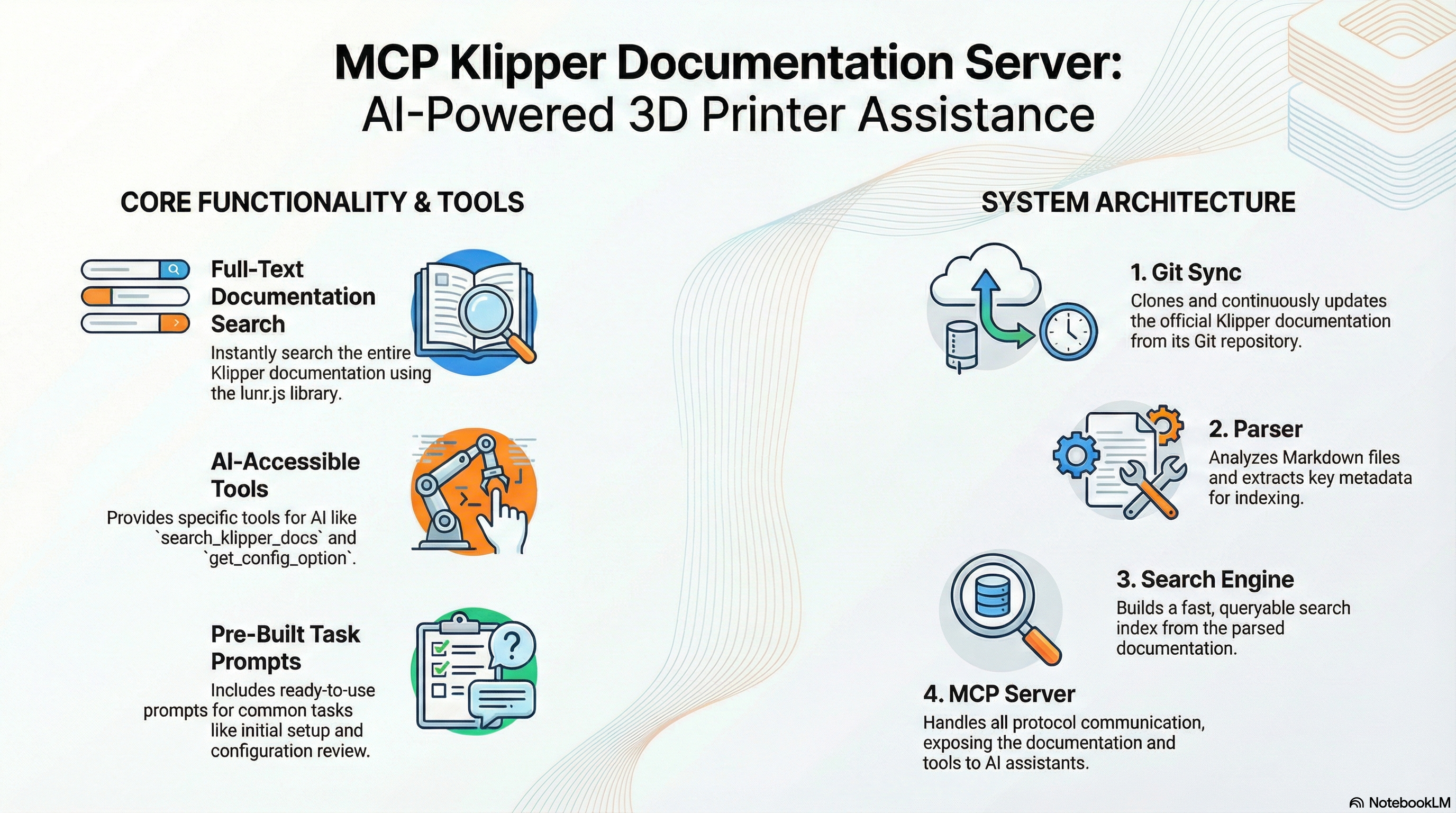
Experience seamless Klipper documentation access directly within Claude Desktop. Search configurations, browse documentation, and get instant answers to your 3D printing questions.
🎯 Why This Matters
Klipper's documentation is comprehensive but scattered across dozens of markdown files. Finding the right configuration option or troubleshooting guide means multiple clicks and searches. This changes everything.
The Problem
- 🔍 Fragmented Documentation: 50+ separate markdown files
- 🐛 Configuration Complexity: Hard to find specific option details
- ⏱️ Context Switching: Jump between docs and your config files
- 🤖 AI Limitations: Claude can't access local Klipper docs
The Solution
- 🔎 Unified Search: Search all documentation instantly
- ⚙️ Smart Config Lookup: Get exact configuration sections
- 📚 Intelligent Browsing: Navigate by logical categories
- 🤖 AI Integration: Claude becomes your Klipper expert
🚀 Quick Start
Prerequisites
- Node.js >= 20.0.0
- npm or yarn
- Claude Desktop (for MCP integration)
Installation
# Install globally
npm install -g mcp-klipper-docs

# Or install locally in your project
npm install mcp-klipper-docs
Claude Desktop Setup
Open your Claude Desktop config file:
- Windows:
%APPDATA%\Claude\claude_desktop_config.json - macOS:
~/Library/Application Support/Claude/claude_desktop_config.json
- Windows:
Add the MCP server:
Option 1: Global Installation (Recommended)
{
  "mcpServers": {
    "klipper-docs": {
      "command": "node",
      "args": ["C:\\Users\\bpuhnk\\AppData\\Roaming\\npm\\node_modules\\mcp-klipper-docs\\dist\\server.js"]
    }
  }
}
Option 2: Using npx
{
  "mcpServers": {
    "klipper-docs": {
      "command": "npx",
      "args": ["-y", "[email protected]"]
    }
  }
}
Option 3: Local Development
{
  "mcpServers": {
    "klipper-docs": {
      "command": "node",
      "args": ["C:\\Users\\bpuhnk\\source\\repos\\MCP_Klipper\\dist\\server.js"]
    }
  }
}
- Restart Claude Desktop
That's it! 🎉 Claude now has instant access to all Klipper documentation.
📦 Package Information
- npm Package: mcp-klipper-docs
- Version: 1.0.1
- Repository: GitHub
- License: MIT
- Author: Ben Phillips
🔍 Verification
After installation, verify everything works:
# Check package installation
npm list -g mcp-klipper-docs

# Test server startup
node C:\Users\bpuhnk\AppData\Roaming\npm\node_modules\mcp-klipper-docs\dist\server.js

# Or using npx
npx -y [email protected]
🛠️ What Can You Do?
🔍 Search Documentation
"Search for BLTouch configuration"
"Find information about pressure advance"
"Look up extruder tuning guides"
⚙️ Get Configuration Details
"Get configuration for [extruder]"
"Show me stepper_x settings"
"What are the bed_mesh parameters?"
📚 Browse by Section
"Browse calibration documentation"
"Show me hardware configuration sections"
"What's in the troubleshooting section?"
📊 Get Statistics
"How many documents are available?"
"What sections exist in the documentation?"
"Show me index statistics"
🏗️ Architecture
Core Components
graph TD
    A[Claude Desktop] --> B[MCP Protocol]
    B --> C[MCP Server]
    C --> D[Search Engine]
    C --> E[Document Parser]
    C --> F[Git Sync]
    D --> G[Lunr.js Index]
    E --> H[Markdown Files]
    F --> I[Klipper Repository]
Technology Stack
| Component | Technology | Purpose |
|---|---|---|
| Runtime | Node.js 20+ | JavaScript execution |
| Language | TypeScript 5.3+ | Type safety & development |
| Protocol | MCP SDK 1.0+ | Claude Desktop integration |
| Search | Lunr.js 2.3+ | Full-text search indexing |
| Git | simple-git 3.22+ | Repository synchronization |
| Parsing | marked 11.1+ | Markdown processing |
| Metadata | gray-matter 4.0+ | Frontmatter extraction |
Data Flow
- Repository Sync: Automatically pulls latest Klipper documentation
- Document Parsing: Extracts content, metadata, and structure
- Index Building: Creates searchable lunr.js index
- MCP Integration: Exposes tools and resources via MCP protocol
- AI Interaction: Claude searches and retrieves documentation
📋 Available Tools
🔎 search_klipper_docs
Search across all Klipper documentation with relevance scoring.
Parameters:
query(string): Search termslimit(number, optional): Max results (default: 10)section(string, optional): Filter by section
Example:
{
  "query": "BLTouch configuration",
  "limit": 5,
  "section": "hardware"
}
⚙️ get_config_option
Retrieve specific configuration sections from Config_Reference.
Parameters:
option(string): Configuration option nameinclude_examples(boolean, optional): Include code examples
Example:
{
  "option": "extruder",
  "include_examples": true
}
📚 browse_documentation
Browse documentation by section or get overview information.
Parameters:
section(string, optional): Section to browseinclude_stats(boolean, optional): Include statistics
Example:
{
  "section": "calibration",
  "include_stats": true
}
📊 get_index_stats
Get documentation index statistics and metadata.
No parameters required.
📁 MCP Resources
All documentation files are available as MCP resources:
- URI Scheme:
klipper://docs/{document-id} - Format: Markdown with metadata
- Access: Direct file reading or browsing
Example Resources:
klipper://docs/Config_Referenceklipper://docs/BLTouchklipper://docs/Installationklipper://docs/Troubleshooting
🔧 Advanced Configuration
Environment Variables
| Variable | Default | Description |
|---|---|---|
GIT_REPOSITORY |
https://github.com/Klipper3d/klipper.git |
Klipper repository URL |
GIT_BRANCH |
master |
Repository branch |
DATA_DIR |
./data |
Local data directory |
LOG_LEVEL |
info |
Logging level (debug, info, warn, error) |
UPDATE_INTERVAL |
3600 |
Auto-update interval in seconds |
Docker Deployment
# Build the image
docker build -t mcp-klipper-docs .

# Run the container
docker run -d \
  --name mcp-klipper-docs \
  -v $(pwd)/data:/app/data \
  mcp-klipper-docs
Docker Compose
version: '3.8'
services:
  mcp-klipper-docs:
    build: .
    container_name: mcp-klipper-docs
    volumes:
      - ./data:/app/data
    environment:
      - LOG_LEVEL=info
      - UPDATE_INTERVAL=3600
    restart: unless-stopped
📊 Performance Metrics
Index Statistics
- Documents: 56 Klipper documentation files
- Words: 135,000+ indexed words
- Sections: 11 categorized sections
- Build Time: ~400ms for full index
- Search Speed: <10ms for typical queries
Memory Usage
- Base Memory: ~50MB
- Index Memory: ~25MB
- Peak Memory: ~100MB during updates
Network Usage
- Initial Clone: ~50MB (one-time)
- Updates: ~1-5MB (changes only)
- API Calls: Local only (no external dependencies)
🧪 Development
Local Development Setup
# Clone the repository
git clone https://github.com/yourusername/mcp-klipper-docs.git
cd mcp-klipper-docs

# Install dependencies
npm install

# Run in development mode
npm run dev

# Run tests
npm test

# Build for production
npm run build
Project Structure
mcp-klipper-docs/
├── src/
│   ├── server.ts          # Main MCP server
│   ├── config.ts          # Configuration management
│   ├── logger.ts          # Logging utilities
│   ├── git-sync.ts        # Git repository operations
│   ├── parser.ts          # Markdown document parsing
│   ├── search.ts          # Search engine implementation
│   ├── types.ts           # TypeScript type definitions
│   └── errors.ts          # Error handling
├── tests/                 # Test suite
├── docs/                  # Additional documentation
├── img/                   # Images and assets
├── data/                  # Local Klipper repository
└── dist/                  # Built JavaScript files
Testing
# Run all tests
npm test

# Run tests in watch mode
npm run test:watch

# Run with coverage
npm run test -- --coverage

# Lint code
npm run lint

# Fix linting issues
npm run lint:fix
🤝 Contributing
We welcome contributions from the Klipper community! Here's how you can help:
🐛 Reporting Issues
- Check existing issues first
- Use the issue templates provided
- Include:
- Steps to reproduce
- Expected vs actual behavior
- Environment details
- Relevant logs
💡 Feature Requests
- Open a discussion first for major features
- Provide clear use cases
- Consider implementation complexity
- Think about edge cases
🔧 Code Contributions
- Fork the repository
- Create a feature branch:
git checkout -b feature/amazing-feature - Make your changes:
- Follow existing code style
- Add tests for new functionality
- Update documentation
- Run the test suite:
npm test - Submit a pull request
📝 Documentation
- Fix typos and improve clarity
- Add examples and use cases
- Update README and guides
- Translate documentation (if you speak other languages)
📈 Roadmap
Version 1.1 (Planned)
- Enhanced Search: Fuzzy matching and spell correction
- Cross-references: Link related configuration options
- Version Support: Support multiple Klipper versions
- Performance: Optimized indexing and caching
Long-term Vision
- Multi-language: Internationalization support
- Community Docs: User-contributed documentation
- AI Features: Smart recommendations and assistance
- Integration: Other AI assistant platforms
🙏 Acknowledgments
Core Technologies
- Model Context Protocol - For enabling AI assistant integration
- Klipper - For the excellent 3D printer firmware
- Lunr.js - For powerful search capabilities
- TypeScript - For type-safe development
Community
- Klipper Community - For maintaining comprehensive documentation
- MCP Community - For protocol development and support
- Open Source Contributors - For the tools and libraries we use
📄 License
This project is licensed under the MIT License - see the LICENSE file for details.
📞 Support & Community
Get Help
- 📖 Documentation: Check this README and the
/docsfolder - 🐛 Issues: Report bugs on GitHub
- 💬 Discussions: Join GitHub Discussions
- 📦 npm Issues: Report package issues
Community
- Discord: Join the Klipper and MCP communities
- Reddit: r/klipper and r/3Dprinting
- Twitter/X: Follow @bpuhnk @klipper3d and MCP updates
MCP Registry
- Registry Entry: Available for MCP server discovery
- Installation:
npm install -g mcp-klipper-docs - Version: 1.0.1 (Latest)
⭐ If this project helps you, consider giving it a star!
Made with ❤️ by the 3D printing community, for the 3D printing community.
Установить Klipper Documentation в Claude Desktop, Claude Code, Cursor
unyly install klipper-documentationСтавит в Claude Desktop, Claude Code, Cursor и VS Code — сам разбирается с npx, uvx и сборкой из исходников.
Впервые? Поставь CLI: curl -fsSL https://unyly.org/install | sh
Или настроить вручную
Выполни в терминале:
claude mcp add klipper-documentation -- npx -y mcp-klipper-docsПошаговые гайды: как установить Klipper Documentation
FAQ
Klipper Documentation MCP бесплатный?
Да, Klipper Documentation MCP бесплатный — установка в пару кликов через Unyly без оплаты.
Нужен ли API-ключ для Klipper Documentation?
Нет, Klipper Documentation работает без API-ключей и переменных окружения.
Klipper Documentation — hosted или self-hosted?
Self-hosted: сервер запускается локально на твоей машине командой из раздела установки.
Как установить Klipper Documentation в Claude Desktop, Claude Code или Cursor?
Открой Klipper Documentation на unyly.org, выбери вкладку своего клиента (Claude Desktop, Claude Code, Cursor) и нажми Install — конфиг сгенерируется автоматически, без правки JSON.
Похожие MCP
GitHub
PRs, issues, code search, CI status
 автор: GitHub
Filesystem
Secure file operations with configurable access controls.
Memory
Knowledge graph-based persistent memory system.
Template MCP Server
A CLI tool to create a new Model Context Protocol server project with TypeScript support, dual transport options, and an extensible structure
 автор: mcpdotdirect
Compare Klipper Documentation with
Не уверен что выбрать?
Найди свой стек за 60 секунд
Автор?
Embed-бейдж для README
Похожее
Все в категории development