
KnowFlow
БесплатноНе проверенA unified knowledge retrieval tool for MCP-compatible LLMs, enabling structured external knowledge access from local files and future integrations.

Описание
A unified knowledge retrieval tool for MCP-compatible LLMs, enabling structured external knowledge access from local files and future integrations.
README
A versatile, unified knowledge retrieval tool operating according to the Model Context Protocol (MCP). KnowFlow enhances Large Language Models by providing structured external knowledge on demand.
🚀 Overview
KnowFlow simulates a simplified version of Retrieval-Augmented Generation (RAG), enabling LLMs to dynamically fetch context or domain-specific information from external knowledge bases, resulting in precise, context-aware responses.
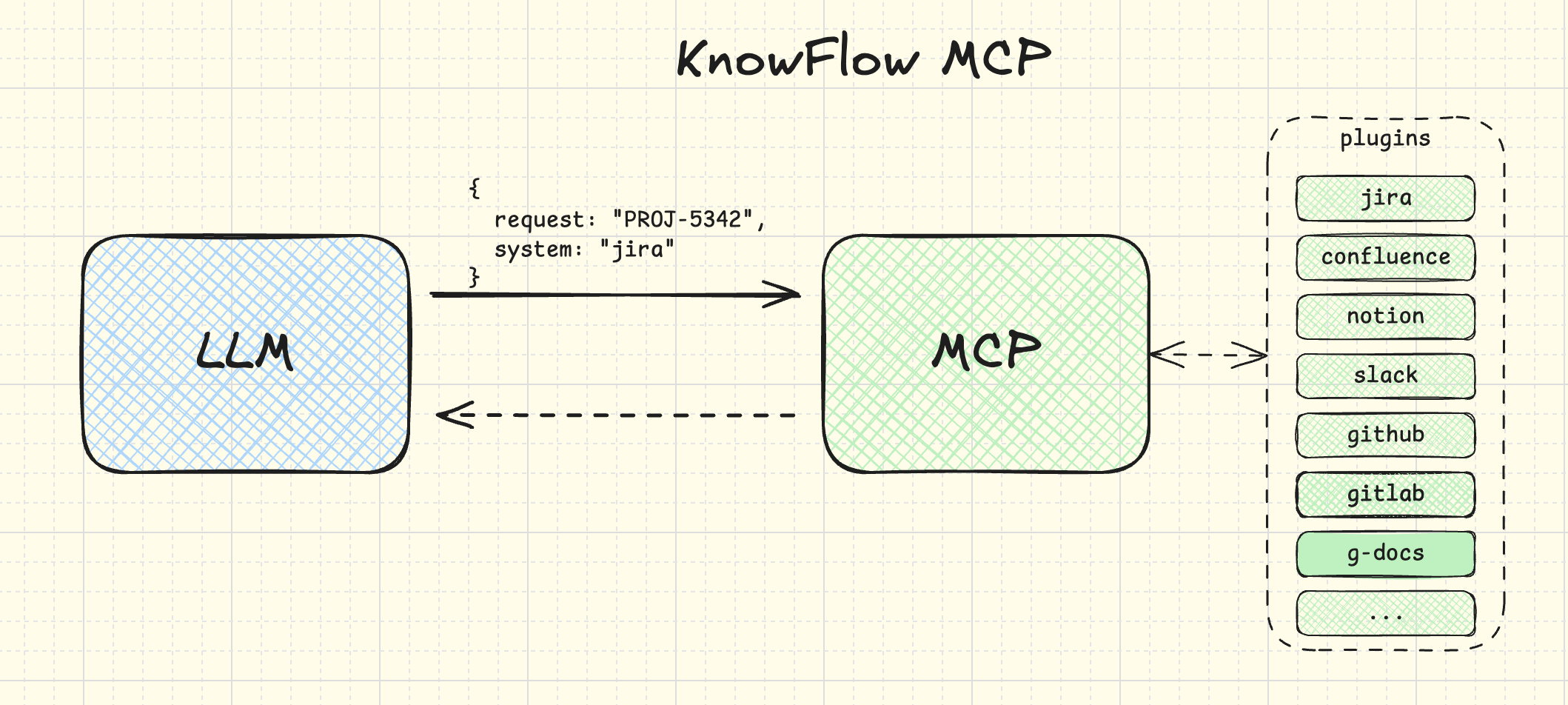
Core Features
- Responds to knowledge retrieval requests from MCP-compatible LLMs
- Performs searches across knowledge sources based on queries received from LLMs
- Provides structured responses with clear source metadata
- Establishes a foundation for integration with multiple knowledge sources
📋 Requirements
- Node.js (version 16.x or higher)
- TypeScript (version 4.x or higher)
- npm or yarn
🛠️ Installation
# Clone the repository
git clone https://github.com/esurovtsev/know-flow-mcp.git
cd know-flow-mcp

# Install dependencies
npm install
# or
yarn install
🔧 Configuration
Create a .env file in the root directory with the following configuration:
KNOWLEDGE_DIR=./knowledge
Where KNOWLEDGE_DIR is the path to the directory containing your knowledge base files (.txt and .md files).
🚀 Usage
# Build the project
npm run build
# or
yarn build

# Start the server
npm start
# or
yarn start
🔗 MCP Configuration
To use KnowFlow with any MCP-compatible LLMs (such as Claude, GPT-4, etc.), you can use the provided mcp-config.json file:
{
  "mcpServers": {
    "knowflow": {
      "command": "node",
      "args": ["dist/index.js"]
    }
  }
}
This configuration file tells MCP-compatible LLMs how to start and connect to the KnowFlow MCP server. You would typically place this file in your project directory and reference it when setting up the LLM to use MCP servers.
Note: Once KnowFlow is stable and published to npm, the command will change to npx know-flow-mcp instead of node dist/index.js.
🧪 Testing with MCP Inspector
The MCP Inspector is a tool that allows you to test your MCP server without needing to integrate with an LLM.
# Run the Inspector with your MCP server
npx @modelcontextprotocol/inspector node dist/index.js
This will start the MCP Inspector web interface (typically at http://127.0.0.1:6274) where you can:
- View all available tools exposed by the server
- Test the
search_knowledgetool by sending requests with different parameters - View the responses and debug the communication
If you encounter port conflicts, you can specify custom ports:
npx @modelcontextprotocol/inspector node dist/index.js --port 8080 --proxy-port 8081
Where:
--portspecifies the web interface port (default: 6274)--proxy-portspecifies the proxy server port (default: 6277)
Example Response Format
{
  "content": "We agreed to consolidate all backend modules under a single monorepo using Nx.",
  "metadata": {
    "reference": "architecture-notes.md",
    "source": "docs",
    "lastModified": "2024-03-14",
    "score": 0.95
  }
}
🧪 Testing
# Run tests
npm test
# or
yarn test
📝 API Documentation
Detailed API documentation will be available once the project reaches a more mature stage.
🗂️ Project Structure
know-flow-mcp/
├── src/                # Source code
│   ├── index.ts        # Entry point
│   ├── server.ts       # MCP server definition and tool registration
│   ├── core/           # Core functionality
│   ├── plugins/        # Plugin system for knowledge sources
│   └── services/       # Services including KnowledgeService
├── dist/               # Compiled JavaScript files
├── .gitignore          # Git ignore file
├── LICENSE             # MIT License
├── package.json        # Project metadata and dependencies
├── README.md           # Project documentation
└── tsconfig.json       # TypeScript configuration
🔌 Plugin System
KnowFlow uses a plugin-based architecture to integrate with different knowledge sources:
- Plugins are discovered synchronously at startup
- Each plugin represents a different knowledge source (docs, jira, confluence, etc.)
- The KnowledgeService coordinates searches across all available plugins
- New knowledge sources can be added by implementing the plugin interface
🔮 Future Roadmap
The foundational design explicitly anticipates integration with additional knowledge sources such as:
- Notion pages
- Confluence documentation
- Google Docs documents
- Linear and Jira issues or tickets
- Other popular knowledge repositories utilized by developers and organizations
🤝 Contributing
Contributions are welcome! Please feel free to submit a Pull Request.
📄 License
This project is licensed under the MIT License - see the LICENSE file for details.
Установка KnowFlow
У этого сервера нет опубликованного пакета — он собирается из исходников. Открой репозиторий и следуй инструкции в README.
▸ github.com/esurovtsev/know-flow-mcpFAQ
KnowFlow MCP бесплатный?
Да, KnowFlow MCP бесплатный — установка в пару кликов через Unyly без оплаты.
Нужен ли API-ключ для KnowFlow?
Нет, KnowFlow работает без API-ключей и переменных окружения.
KnowFlow — hosted или self-hosted?
Self-hosted: сервер запускается локально на твоей машине командой из раздела установки.
Как установить KnowFlow в Claude Desktop, Claude Code или Cursor?
Открой KnowFlow на unyly.org, выбери вкладку своего клиента (Claude Desktop, Claude Code, Cursor) и нажми Install — конфиг сгенерируется автоматически, без правки JSON.
Похожие MCP
GitHub
PRs, issues, code search, CI status
 автор: GitHub
Filesystem
Secure file operations with configurable access controls.
Memory
Knowledge graph-based persistent memory system.
Template MCP Server
A CLI tool to create a new Model Context Protocol server project with TypeScript support, dual transport options, and an extensible structure
 автор: mcpdotdirect
Compare KnowFlow with
Не уверен что выбрать?
Найди свой стек за 60 секунд
Автор?
Embed-бейдж для README
Похожее
Все в категории development