
Kontrol
БесплатноНе проверенA self-hosted MCP server that enables AI coding agents to read, edit, search, and run code in local projects with human review loops and policy controls.

Описание
A self-hosted MCP server that enables AI coding agents to read, edit, search, and run code in local projects with human review loops and policy controls.
README

Kontrol
A local control plane for WebUI and CLI coding agents: MCP workspace access, ACP worker dispatch, human review gates, and policy authority.
Kontrol control plane overview
Your machine. Your agents. Your approval gate.
Kontrol is a self-hosted control plane for extending WebUI and CLI coding agents in a specific, review-gated way. It exposes your local project files over MCP, dispatches bounded work to registered ACP agents, routes results back through human review, and enforces policy around the tools and paths agents can touch.
You run it on your machine, expose it through a tunnel you control, and decide which agents get to operate, what they can do, and when their work is allowed to land.
What Makes It Different
Most MCP file-server bridges stop at "read/write/edit." Kontrol adds three layers on top:
Ralphie Muntz Loop — Agents submit work for human review. The WebUI reviewer (or another authorized MCP reviewer) shows the backend-neutral checkpoint diff. Human approves, requests changes, or rejects. The agent continues from durable feedback state — even if the agent process died and restarted.
Continuation Outbox — Every review decision generates a structured continuation packet with verdict, required actions, and resumption instructions. The packet crosses from the review surface to the next agent turn, so work continues without losing context.
Policy Mode — Per-tool and per-path approval rules. A dangerous command can require a one-time approval, or you can approve it for an entire workspace session. Read-only inspection stays fast; destructive ops pause for human judgment.
Underneath it all is transactional workflow state with an append-only event log: submissions, feedback, approvals, continuations, runs, and policy decisions are persisted in SQLite, and the event stream wakes WebUI watchers and blocked agents. High-volume agent output/thought telemetry is buffered for transport efficiency and may be compacted after retention; lifecycle and review events remain the durable workflow record.
Installation
Kontrol requires Node 22.19+, 24.x, or 26.x.
For an installed product, use the public package:
npm install -g @b-a-m-n/[email protected]
kontrol init
kontrol serve
For source development, clone the repo and link the CLI locally:
git clone [email protected]:B-A-M-N/Kontrol.git
cd Kontrol
npm install --include=dev
npm run build
npm link
kontrol init
kontrol serve
To start the complete local development stack (MCP server, configured ACP adapters, and Secure MCP tunnel) from this checkout, use:
kontrol up
kontrol up uses the checkout's .env and performs the same preflight and
readiness checks as start-all.sh.
The checkout also provides ./restart-kontrol.sh for development/integration
generations. It builds and verifies the replacement generation
before stopping old owned processes and rolls back if a readiness stage fails.
For the complete stable-beta release gate, run:
npm run gate:beta
The canonical gate requires a matching wall-clock soak receipt. For a staged release review, run the code gate, soak the exact candidate, then join the receipts:
npm run gate:beta:code
npm run soak:beta -- --hours 12 --build-id CANDIDATE_BUILD_ID --diagnostics-secret "$KONTROL_DIAGNOSTICS_SECRET" --tunnel-url http://127.0.0.1:8080
npm run gate:beta:final
gate:beta:code writes beta-code-qualification.json; the final gate writes
beta-qualification.json only when the code receipt, candidate identity,
clean checkout, and soak snapshots all match. gate:beta runs the full code
gate and also requires the soak receipt in one invocation. --allow-dirty is
only for collecting local feedback; a dirty checkout can never qualify.
Run that explicit wall-clock soak with a duration appropriate to the release (12 hours is the minimum enforced by the canonical stable-beta gate):
npm run soak:beta -- --hours 12 --url http://127.0.0.1:7676 --build-id CANDIDATE_BUILD_ID --diagnostics-secret "$KONTROL_DIAGNOSTICS_SECRET" --tunnel-url http://127.0.0.1:8080
Add --workspace-path and, when needed, --read-path to include an allowed
workspace read in each fresh MCP transport. The runner records latency,
reconnect, transient, stale-route, diagnostic, supervisor, tunnel, integrity,
and leak metrics in beta-soak.json. It exits nonzero if the soak is
interrupted, observes a failed iteration, or its final assertions fail.
Routine development startup defaults to the fast preflight (syntax/typecheck
plus a fresh atomic build) so reconnecting does not rerun the entire test
suite. Set KONTROL_STARTUP_PROFILE=normal for the full test gate, or
KONTROL_STARTUP_PROFILE=release for the full gate plus the dirty-checkout
guard. KONTROL_SKIP_PREFLIGHT_TESTS=true remains a legacy alias for the fast
profile; all readiness checks still run.
During setup, Kontrol asks for:
- the local project folders agents are allowed to open
- the local port, usually
7676 - your public HTTPS base URL from Cloudflare Tunnel, ngrok, Pinggy, Tailscale Funnel, or another reverse proxy
Use the public origin without /mcp:
https://your-tunnel-host.example.com
When the client connects, Kontrol opens an Owner password approval page. Enter the password printed by kontrol init. It's also stored in:
~/.kontrol/auth.json
Keep that password private.
Connect Any MCP Client
The default local endpoint:
http://127.0.0.1:7676/mcp
GET /healthz reports only process liveness. It intentionally does not expose
process, build, or workflow details.
GET /core-readyz checks KONTROL's own database, MCP handler,
workspace/review/ACP initialization, and internal runtime build consistency
while adapters are still starting; its public payload contains only boolean
check status. GET /readyz is strict operational readiness: it also
requires live configured worker agents. The launcher additionally performs an
actual MCP initialize, agent discovery, workspace open, file read, and bash
round trip before declaring the stack ready.
Most users connect through a public HTTPS tunnel:
https://your-tunnel-host.example.com/mcp
Kontrol speaks standard MCP over Streamable HTTP. Any compatible client works: ChatGPT, Claude, Codex, Cursor, Windsurf, custom tooling.
OpenAI Secure MCP Tunnel
To connect Kontrol to ChatGPT without exposing an inbound port, run it locally and
route ChatGPT through an OpenAI Secure MCP Tunnel. In that setup use KONTROL_AUTH_MODE=tunnel: Kontrol binds a loopback address and disables its own auth gate on /mcp, so ChatGPT connects with No Authentication. Access control is delegated to the tunnel and to the OpenAI workspace that owns it. OAuth (the default for public deployments) is intentionally off here, because its authorization server is not reachable through the tunnel.
KONTROL_AUTH_MODE=tunnel
HOST=127.0.0.1
PORT=7676
kontrol serve
Register the server in the tunnel client with No Authentication, pointing at the loopback origin. The managed checkout launcher (./start-all.sh) keeps a persistent supervisor running after startup and repairs failed tunnel/adapter components using thresholded restarts:
tunnel-client run \
  --mcp.server-url "http://127.0.0.1:7676/mcp"
Tunnel recovery is deliberately scoped: a live tunnel daemon that reports a
temporary control-plane throttle, authentication failure, or upstream outage
is shown as degraded and is not churned. A local stale-registration response
gets a bounded restart of the same configured tunnel profile/ID. If the
external connector has already lost its route, reconnect it with a fresh MCP
initialize; the old mcp-session-id is disposable and is never treated as
the recovery authority.
For stable long-running process priority on Linux, install the per-user
systemd core unit from the compiled CLI. The unit launches an immutable,
validated release, sets Nice=0, applies a bounded restart budget, and reads
one explicit environment file. With no serviceComponents configured it
starts only the MCP core; adapters and the tunnel can be brought into the same
production lifecycle via serviceComponents in ~/.kontrol/config.json (see
docs/configuration.md), or left on the checkout orchestration path for the
full development stack:
kontrol service install
kontrol service start
kontrol service restart restarts the immutable release already installed in
the unit. Use kontrol service upgrade to select the current build candidate,
reload the unit, verify core readiness, and restore the previous unit and
validated database backup if the candidate fails to start.
Use kontrol service status or logs for service-level diagnostics. Direct
./start-all.sh remains available for foreground/development use.
Supported lifecycle paths (P1 #27)
KONTROL defines exactly one authoritative path per context:
| Context | Path | Notes |
|---|---|---|
| Production / install on Linux | kontrol service ... (kontrol-core.service + optional kontrol.target with adapter/tunnel units) |
Owns restart/priority policy for the MCP core and configured components |
| Development / integration | ./start-all.sh (tmux sessions + component supervisor) |
Fast validated preflight by default; atomic build generation with rollback |
| Test / release | npm run typecheck && npm run test && npm run build |
The release gate CI and kontrol service install rely on |
The systemd core unit is the supported production lifecycle for the MCP core
on Linux. Its default environment file is
~/.config/kontrol/environment (override with KONTROL_USER_ENV_FILE). The
full adapter/tunnel stack remains the checkout launcher path. macOS and
Windows support development and integration runs, but Kontrol does not ship a
production launchd or Windows Service manager. kontrol serve remains the
underlying process it launches — it is not itself a production lifecycle
manager. Startup
preflight depth is controlled by KONTROL_STARTUP_PROFILE (see
docs/configuration.md): release runs the complete gate including the
dirty-checkout guard; dev-fast skips the test suite for iteration.
The launcher uses KONTROL_TUNNEL_PROFILE (default
sample_mcp_with_dcr). If that profile points at a retired or stale tunnel,
set KONTROL_TUNNEL_ID=tunnel_... in .env after creating or selecting the
current registration in OpenAI Tunnels, then restart the stack and reconnect
the ChatGPT connector to that same tunnel ID.
The review WebUI is served as a self-contained MCP App resource (its CSS and JS are
inlined into a single workspace-app.html), so the ChatGPT iframe needs no localhost
fetches. See Configuration Reference
for the full security rules.
Each MCP mcp-session-id is an isolated transport context. Kontrol does not pool
sessions merely because clients share a logical name, so multiple conversations
can use the server concurrently. Workspace and review continuity is carried by
explicit durable IDs rather than by assuming that separate transports belong to
one conversation.
What Agents Can Do
Once connected, an agent can open an approved project folder as a workspace and:
- read, write, and edit files
- search code and inspect directories
- run shell commands for tests, builds, git, and package scripts
- use isolated Git worktrees for parallel sessions
- follow project instructions from
AGENTS.mdandCLAUDE.md - discover local agent skills from your skill folders
- show tool cards and optional change summaries in ChatGPT Apps-compatible hosts
- submit work for human review and continue from feedback
Ralphie Muntz Loop
The review loop is event-driven and provider-agnostic:
Agent submits work → Kontrol captures diff, emits ReviewRequested
     ↓
Human reviewer inspects checkpoint in WebUI / authorized MCP reviewer
     ↓
Human approves, requests changes, or rejects
     ↓
Kontrol persists feedback event + generates continuation packet
     ↓
If agent is live: it unblocks and continues
If agent stopped: it reads feedback when it resumes
This loop lives in Kontrol's event log, not in any specific host. You can review submissions from the same interface you use to chat, from a terminal, or from a future tool.
Skill Names
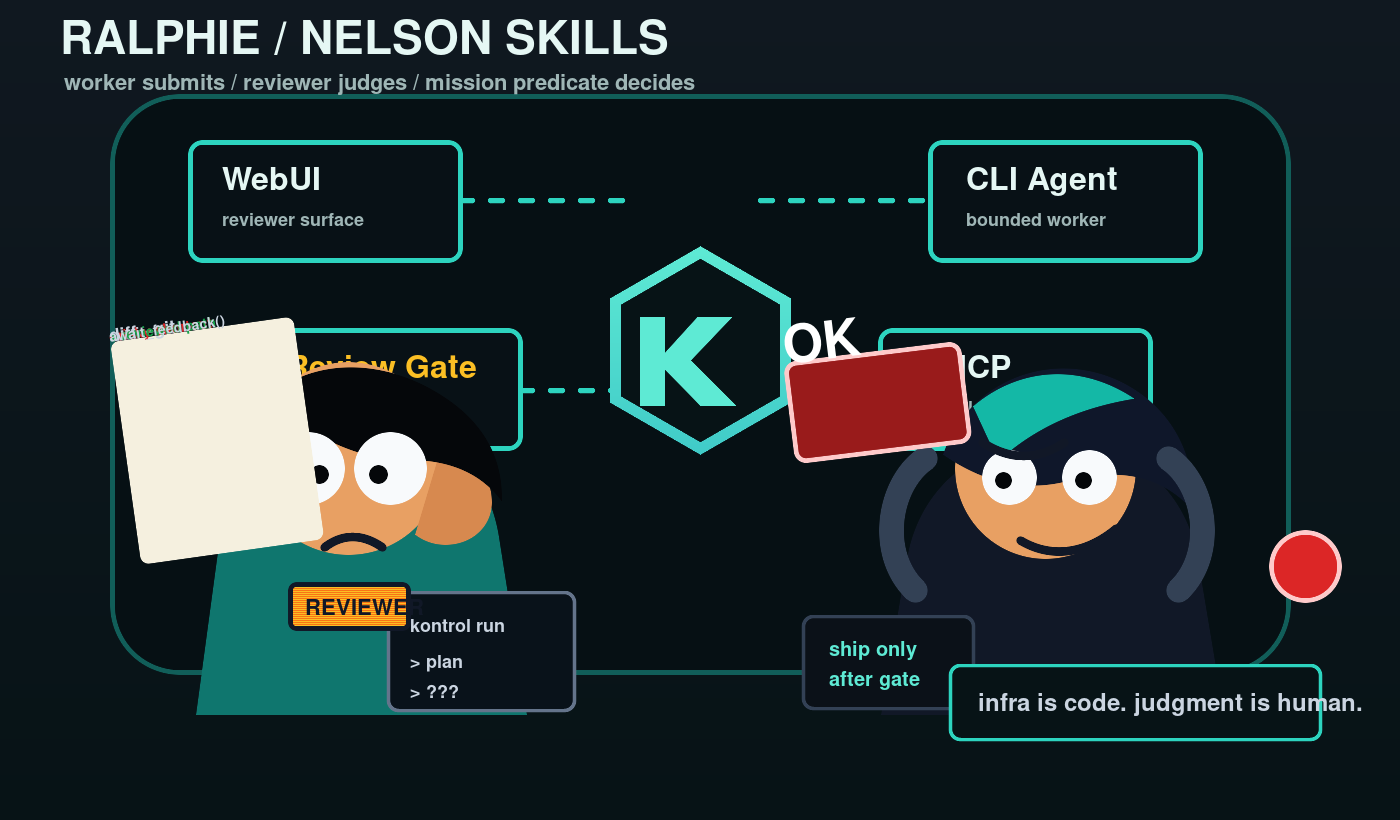
The project ships a few deliberately memorable Agent Skills. The names are not the product surface; they are protocol handles for the loop:
ralphie-muntz-loopis the worker-side contract. The CLI agent does bounded work, submits a diff, waits for feedback, and resumes only from durable review state.nelson-wiggum-loopis the reviewer-side contract. The WebUI or MCP reviewer starts work, inspects the submission, and is the only side allowed to say the work is done.kontrol-supervised-missionis the mission-control contract. It adds objective, criteria, findings, evidence, work orders, and approval blockers on top of the transport loop.
The joke names make the rendezvous easy to remember. The authority model is serious: workers do not approve themselves, review is bound to the exact submission and workspace snapshot, and completion is gated by the reviewer or mission predicate.
Policy Mode
Control which operations require human approval:
# Require approval for bash, allow file edits freely
KONTROL_POLICY_TOOL_BASH=ask KONTROL_POLICY_TOOL_WRITE=allow

# Deny access to sensitive paths (structured JSON — the per-rule env format
# `KONTROL_POLICY_PATH_<glob>` is no longer supported; it is not valid
# shell assignment syntax)
KONTROL_POLICY_PATH_RULES='[{"pattern":"/etc/ssh/**","mode":"deny"}]'

# Default trust posture: ALLOW (read-only operations are frictionless; shell
# and mutating tools are controlled by their own tool rules). Set to `ask`
# for a stricter posture where anything not explicitly allowed requires a
# human decision.
KONTROL_POLICY_MODE=allow
Modes:
| Mode | Behavior |
|---|---|
| allow | Tool or path is always permitted |
| deny | Tool or path is always blocked |
| ask | Returns a retryable approval card for direct MCP calls; work-session calls may wait |
When a direct MCP call requires approval, Kontrol returns a durable, retryable approval card immediately so a tunnel or host reconnect cannot strand the HTTP request. The WebUI decision is then used by a retry of the same operation. Controlled ACP/work-session calls may retain blocking semantics. "Approve for work session" caches the decision for the rest of the work session so repeat operations don't re-prompt; "Approve for workspace" caches until the workspace closes; "Approve once" does not cache.
Retries carry an explicit opaque resume identity: the card's approvalId echoed back as the optional approvalResumeId argument on the identical tool call. A reconnect that lost its conversation correlation still consumes the human's original decision instead of prompting again — "Approve once" stays one-shot, and a resume token only bridges when the retried operation's content matches the durable row exactly, so a known id can never authorize a different operation.
Mental Model
Kontrol is a durable review mailbox and policy authority, not just a file server.
You decide which roots are allowed. You decide which tools require approval. The agent does its work, submits for review, and continues from structured feedback. Durable workflow state and the append-only event log are the authority every surface reads from: CLI, WebUI, MCP tools, and ACP adapters.
For a normal session:
- Start your tunnel.
- Run
kontrol serve. - Connect your MCP agent to the public
/mcpURL. - Approve the connection with the Owner password.
- Ask the agent to open a project inside one of your allowed roots.
- Review submissions as they come in.
Documentation
Platform Support
| Platform | Status | Notes |
|---|---|---|
| Linux | Supported / production | Requires Node, npm, Git, and Bash. |
| macOS | Supported / development | Requires Node, npm, Git, and Bash; no bundled launchd service. |
| Windows with Git Bash, WSL, MSYS2, or Cygwin Bash | Supported / development | Git Bash is the simplest native Windows setup; no bundled Windows Service. |
Windows PowerShell or cmd.exe only |
Not supported yet | Install Git Bash or use WSL. |
kontrol doctor
Attribution
Kontrol grew out of an idea I had been kicking around for a while, then side-binned because the local MCP/workspace layer was the hard part to get right. When I saw that Waishnav had built DevSpace, I used that MCP implementation as the base and extended it in the direction I had been trying to reach.
The original DevSpace project is distributed under the MIT License. Kontrol keeps that attribution while adding ACP worker dispatch, durable review loops, supervised missions, policy approvals, and adapter integrations. I can see how this style of local, review-gated agent control plane might be useful beyond my own setup, so the fork now has its own name and product direction.
Local Development
npm install --include=dev
npm run dev
npm run typecheck
npm test
npm run build
npm run start
Установка Kontrol
У этого сервера нет опубликованного пакета — он собирается из исходников. Открой репозиторий и следуй инструкции в README.
▸ github.com/B-A-M-N/KontrolFAQ
Kontrol MCP бесплатный?
Да, Kontrol MCP бесплатный — установка в пару кликов через Unyly без оплаты.
Нужен ли API-ключ для Kontrol?
Нет, Kontrol работает без API-ключей и переменных окружения.
Kontrol — hosted или self-hosted?
Self-hosted: сервер запускается локально на твоей машине командой из раздела установки.
Как установить Kontrol в Claude Desktop, Claude Code или Cursor?
Открой Kontrol на unyly.org, выбери вкладку своего клиента (Claude Desktop, Claude Code, Cursor) и нажми Install — конфиг сгенерируется автоматически, без правки JSON.
Похожие MCP
GitHub
PRs, issues, code search, CI status
 автор: GitHub
Filesystem
Secure file operations with configurable access controls.
Memory
Knowledge graph-based persistent memory system.

Unyly Deploy
Deploy sites and MCP servers to Unyly straight from your AI agent
 автор: Unyly
Amap Maps Mcp Server
MCP server for using the AMap Maps API
 автор: duxiaohui
PayMCP
Lightweight payments layer for MCP servers: turn tools into paid endpoints with a two-line decorator. [PyPI](https://pypi.org/project/paymcp/) · [npm](https://w
 автор: blustAI
Template MCP Server
A CLI tool to create a new Model Context Protocol server project with TypeScript support, dual transport options, and an extensible structure
 автор: mcpdotdirect
Supabase
Database, auth and storage
 автор: Supabase
Everything
Reference / test server with prompts, resources, and tools.
Git
Tools to read, search, and manipulate Git repositories.
Compare Kontrol with
Не уверен что выбрать?
Найди свой стек за 60 секунд
Автор?
Embed-бейдж для README
Похожее
Все в категории development