
Kvm Pilot
БесплатноНе проверенSmart hands for your AI agents - write-capable KVM+BMC+SSH MCP server: gated, verified, audited.

Описание
Smart hands for your AI agents - write-capable KVM+BMC+SSH MCP server: gated, verified, audited.
README






kvm-pilot
Smart hands for your AI agents. A write-capable, multi-plane (KVM + BMC + SSH) MCP server for controlling physical machines — gated, verified, audited.
kvm-pilot lets an agent drive a headless box through POST, firmware, the
bootloader, and an OS install with no agent on the target: it works at the
pixel level through an IP-KVM (PiKVM, the GL.iNet GLKVM fork GL-RM1 /
GL-RM1PE, BliKVM), at the structured-state level through a BMC (Redfish on
iDRAC/iLO/OpenBMC, IPMI on BMCs that predate Redfish), and over SSH once an OS
is up. A pluggable vision subsystem reads a KVM screenshot and tells you what
boot phase the machine is in — bios_menu, grub_menu, installer_progress,
login_prompt, crash_screen, and so on — and a safety layer gates every
destructive operation behind operator opt-ins and per-call approvals.
Vision runs on Claude or any local OpenAI-compatible VLM (LM Studio, Ollama, vLLM, llama.cpp). Point it at a model on your own GPU and the screenshots never leave your network and cost nothing per frame.
How it works
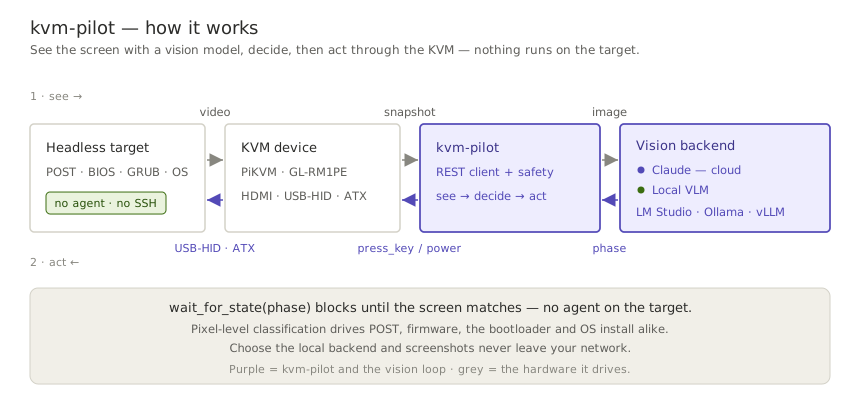
kvm-pilot runs a see → decide → act loop, and the screen is its only sensor:
it pulls a screenshot from the KVM, a vision model classifies the boot phase, and
kvm-pilot acts back through the KVM's keyboard and power. Because it works at the
pixel level, there is no agent on the target — the same loop drives POST,
firmware, the bootloader, and an OS install.
A real, unedited run against a GLKVM on the home fleet — an honest preflight, a headless snapshot (watch it wake the on-demand encoder), a gated dry-run power-cycle, and the boot console the agent actually saw:

Quickstart
One install gives you the whole product — the kvm-pilot CLI, the
kvm-pilot-mcp MCP server, and the bundled Claude skill — nothing to
clone. The current release line is a pre-release, so --pre is required
(a plain pip install kvm-pilot deliberately picks up no pre-release;
0.1.0a1 is yanked and much older than this README — don't use it).
pip install --pre kvm-pilot                    # CLI + skill + MCP server + WebSocket events
pip install --pre "kvm-pilot[totp]"            # + 2FA / TOTP support (pyotp)
Driving a KVM from an AI agent (MCP)
claude mcp add kvm-pilot -s user \
    -e KVM_PILOT_PROFILE=<profile> -e KVM_PILOT_MCP_READ_ONLY=1 -- \
    kvm-pilot-mcp
KVM_PILOT_MCP_READ_ONLY=1 is the recommended first rung of the trust ladder
— the agent can see everything and touch nothing until your hardware is
verified. The Getting started guide
covers credentials, Claude Desktop JSON config, sample prompts, and climbing
the ladder. The server is published to the official
MCP registry
as io.github.DustinTrap/kvm-pilot, so registry-aware hosts can discover
and install it by name. Agents: the repo root carries an
llms.txt doc map.
Scripting from Python
from kvm_pilot import KVMClient
from kvm_pilot.vision import ScreenAnalyzer, make_backend

kvm = KVMClient("192.168.8.1", "admin", "secret")

# Classify the current screen with Claude (model auto-resolved at runtime)
analyzer = ScreenAnalyzer(kvm, make_backend("anthropic"))
print(analyzer.classify().phase)

# Or run entirely on a local VLM — nothing leaves your network
local = make_backend("local", base_url="http://127.0.0.1:1234/v1", model="qwen2.5-vl-7b")
analyzer = ScreenAnalyzer(kvm, local)

# Block until the box reaches the GRUB menu, then pick the first entry
analyzer.wait_for_state("grub_menu", timeout=120)
kvm.press_key("Enter")
For the latest unreleased tree:
pip install "kvm-pilot[totp,ws] @ git+https://github.com/DustinTrap/kvm-pilot"
CLI
kvm-pilot info     --host 192.168.8.1 --user admin --ask-passwd   # prompt (no echo)
kvm-pilot capabilities --profile homelab                 # what this driver supports
kvm-pilot snapshot screen.jpg --profile homelab
kvm-pilot --timeout 60 power-cycle --profile homelab --dry-run   # log, don't send
kvm-pilot eject --profile homelab                        # detach virtual media
kvm-pilot events --profile homelab --count 5             # stream events ('ws' extra)
kvm-pilot watch grub_menu --profile homelab \
    --backend local --vision-url http://127.0.0.1:1234/v1 --vision-model qwen2.5-vl-7b
The CLI prompts for confirmation before any destructive action (power, virtual
media — including uploads — keyboard/mouse injection, GPIO). Use --yes to
skip prompts in automation, or --dry-run to log intended actions without
sending them — dry-run short-circuits before the prompt, so it never blocks
waiting for input. --timeout (HTTP per-request timeout) is a global flag and
goes before the subcommand; watch keeps its own --timeout for the vision
wait deadline.
Profiles like homelab live in ~/.config/kvm-pilot/config.toml. See
docs/cli.md for the full command table (every subcommand, the
capability it needs, and its gating), and
docs/configuration.md for the config-file format,
every KVM_PILOT_* environment variable, and the precedence between flags,
env, and profiles.
GLKVM setup note: on GL.iNet firmware the PiKVM REST API is disabled by default (every
/api/*call 404s, surfaced as a clearApiDisabledError), and a firmware upgrade can re-disable it. Enable it in/etc/kvmd/nginx-kvmd.confand pin the driver with--driver glkvm/driver = "glkvm"— full steps in the troubleshooting guide.
The tool surface, by plane
The same capability protocols span three actuation planes, so one agent workflow can mix pixels, structured BMC state, and shell access — with every destructive effect gated per class:
| Plane | Read | Act (operator-gated) |
|---|---|---|
| KVM — pixels & HID (PiKVM · GLKVM · BliKVM) | snapshot · classify_screen · wait_for_state · power_state · logs · list_virtual_media |
power · type_text / press_key / send_shortcut / mouse · calibrate_mouse · mount_iso / eject |
| BMC — structured state (Redfish · IPMI) | info · boot_options · logs (SEL) · sensors (CLI) |
power · set_boot_device · SOL console (CLI console) |
| SSH — in-band & appliance | ssh_reachable · appliance_status · access_paths |
ssh_exec · wake (WoL) · appliance_reboot |
| Meta — evidence & intake | capabilities · support_matrix · healthcheck |
file_firmware_report |
The canonical per-tool reference — annotations, effect gates, approval lifecycle — is the MCP server README; the CLI covers the full surface in docs/cli.md.
Status & maturity
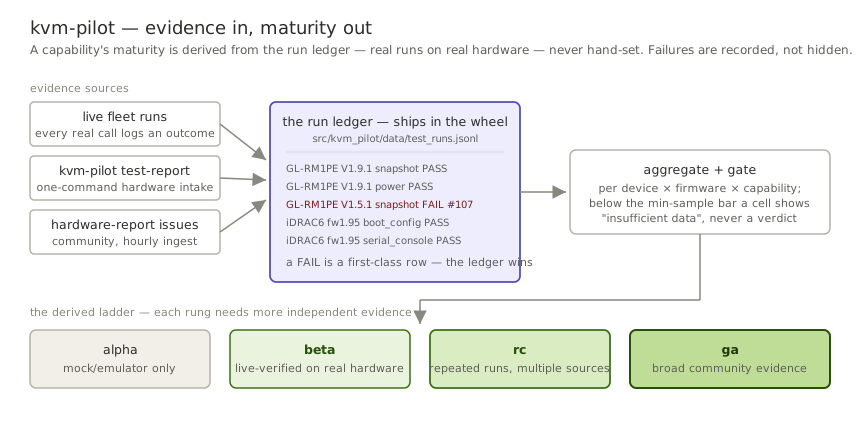
Status: beta — ready for broader testing. (The exact version lives in the CHANGELOG; install with
pip install --pre kvm-pilot.) The core paths have graduated from mocked-only to live-verified: a fleet of GL-RM1PE units has exercisedsnapshot/healthcheck/logs/power_state/virtual_media/infoacross two firmware lines — on V1.9.1 those capabilities sit at beta maturity in the run ledger that ships in the wheel, derived from real runs, never hand-edited — and a Dell iDRAC6 has exercised the IPMI driver live end-to-end (power, boot-device, sensors, event log, SOL serial console). The paths that can hurt are hardened: transports never re-fire a destructive request, MCP approvals are signed single-use receipts with an audit trail, and every destructive effect — power, HID, media, boot-config, appliance, SSH, external writes — has its own operator opt-in gate. Recent betas added remote boot-device control (Redfish, IPMI, and in-bandefibootmgr), Wake-on-LAN, an IPMI driver for BMCs that predate Redfish, a serial (SOL) console, mouse auto-calibration, and headless native-resolution GLKVM snapshots;kvm-pilot test-reportturns contributing evidence into one command, and the firmware registry feeds itself (firmware-checkauto-files registry updates). Now we need your hardware. PiKVM, BliKVM, other GLKVM models, and Redfish BMCs (iDRAC/iLO/OpenBMC) are the combos the matrix needs most — success or failure, a hardware report takes two minutes and the hourly ingest does the rest. Anything the Hardware-Compatibility list doesn't show as exercised is still unverified: expect some API movement before 1.0, note the remote firmware-flash no-op on GL-RM1PE (#94/#95), and don't point destructive ops at a machine you can't afford to have power-cycled unexpectedly. See Compatibility.
Boot-phase detection
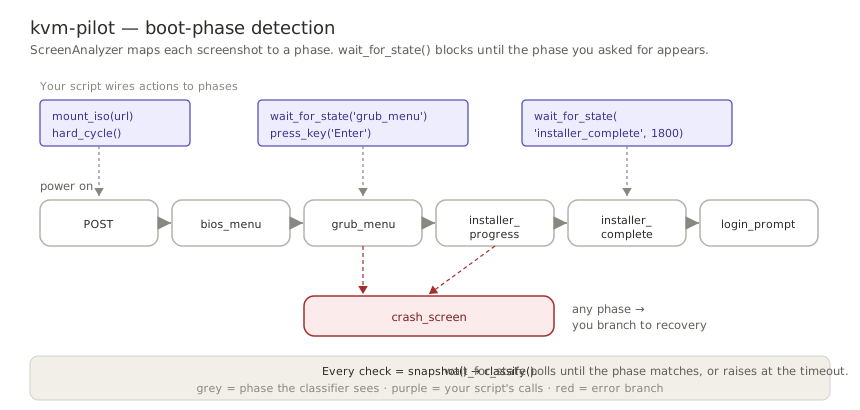
The vision classifier maps each screenshot to a phase — bios_menu,
grub_menu, installer_progress, login_prompt, crash_screen, and so on.
wait_for_state() polls the screen and blocks until the phase you asked for
appears (or a timeout fires), so an unattended install becomes a few waits with
actions wired between them:
Sensing model
Vision is the most expensive way to read a screen — a model call per frame — and
most of what it infers (power state, boot phase, liveness, a crash) is also
available as a field, an event, or a line of text. The direction of
kvm-pilot is to treat classification as a hierarchy: answer from the cheapest
signal the device exposes, and fall through to OCR and finally a vision model
only when nothing cheaper can.
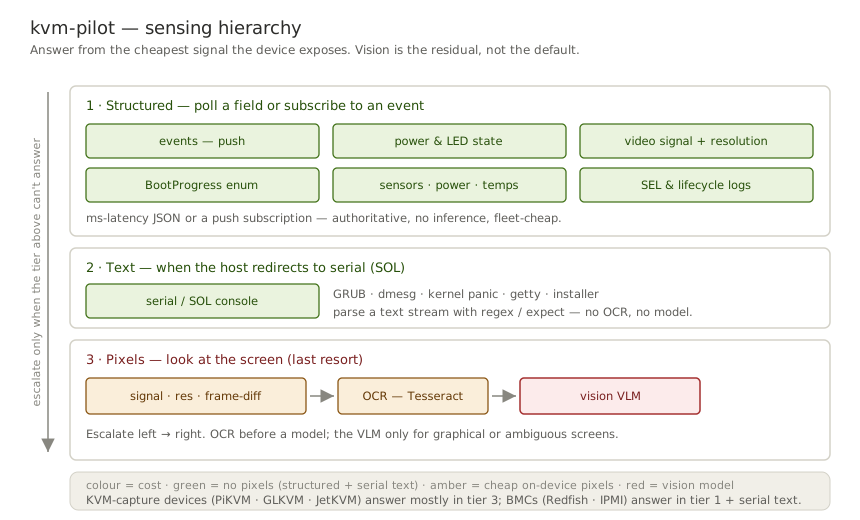
The PiKVM/GLKVM client already exposes the cheap end — ATX and HID LEDs,
video-signal and resolution, on-device OCR (?ocr=true), logs, Prometheus
metrics, and a WebSocket event stream. The capability protocols
add Logs, BootProgress, Sensors, SerialConsole, Watchdog, and
BootConfig as the seam for BMC drivers (Redfish/IPMI), where the boot phase
is a structured enum (BootProgress.LastState) and the console is a serial
text stream rather than pixels. Different device classes are nearly
complementary: capture devices are strong on pixels, BMCs on structured state
and serial text.
Safety model
Power-offs, hard resets, virtual-media connect/disconnect and image uploads,
keyboard/mouse injection (type_text, press_key, shortcuts, clicks), GPIO,
boot-config changes, and Redfish/IPMI resets are classified as destructive
and pass through a safety layer:
- dry-run short-circuits first: it logs the intended call and skips it entirely — the confirm callback is never invoked, so dry runs never prompt or block.
- confirmation — a callback that can veto any destructive call that would
really be sent. The library default allows everything (so plain scripts
work); the CLI installs an interactive
y/Nprompt unless you pass--yes.
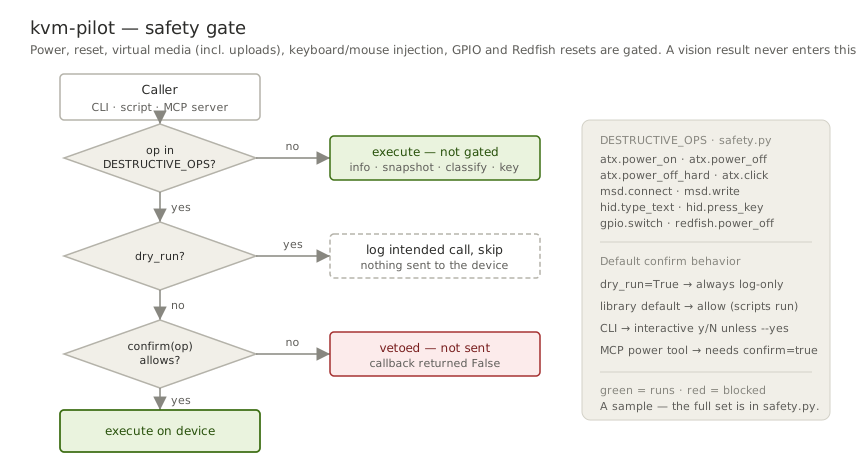
The destructive set is defined explicitly in kvm_pilot.safety.DESTRUCTIVE_OPS
so it is auditable rather than guessed. A vision classification can never
trigger a destructive action on its own — you wire that yourself, and the
safety layer still applies. On the MCP side each destructive effect class
additionally needs an operator opt-in env gate plus a per-call approval backed
by a signed single-use receipt — the trust ladder
(READ_ONLY → DRY_RUN → per-effect ALLOW_*) is drawn in the
MCP server README.
This software controls real hardware and can power-cycle or interrupt a running machine. Read SECURITY.md before exposing a KVM to the internet.
No hard-coded model version
There is no model version string anywhere in the code. The Anthropic backend
resolves the newest vision-capable model at runtime via the Models API and
caches it; set KVM_PILOT_VISION_MODEL or pass model= to pin one. The local
backend uses whatever model you loaded on your server. Bring your own backend,
endpoint, and model.
How this differs from other clients
pikvm-lib is a fine general-purpose
PiKVM client. kvm-pilot is aimed at a different job:
- Vision-based boot-phase detection — classify BIOS/GRUB/installer/crash
states from screenshots, with blocking
wait_for_stateloops. This is the core feature andpikvm-libhas no equivalent. - Pluggable local or cloud VLM — run inference on your own GPU at zero per-frame cost, or on Claude.
- A safety layer around destructive operations (dry-run + confirmation).
- GLKVM-fork awareness — documents the API-enable prerequisite and GL hardware quirks that bite GL-RM1PE users.
- Stdlib-only client core — the driver/vision code imports only the standard
library (the bundled MCP server pulls the
mcpSDK; feature extras are opt-in).
If you just want to script power and HID against a stock PiKVM and don't need
the vision layer, pikvm-lib may be the simpler choice.
On the BMC side, sushy, DMTF's
python-redfish-library, and
pyghmi (IPMI) are mature, far more complete BMC
management SDKs — if you need account/firmware/network configuration,
EventService subscriptions, or hardware-proven maturity, use them. kvm-pilot
trades that completeness for one uniform capability surface across device
classes (IP-KVMs and BMCs behind the same protocols), the same safety layer
gating every destructive call, and the vision loop on devices that have pixels.
Compatibility
| Device | Status |
|---|---|
| GL-RM1PE (Comet PoE) | Primary target — exercised live: read/healthcheck/logs verified on firmware V1.5.1 release2 & V1.9.1 release1; snapshot verified on V1.9.1 (on V1.5.1 it fails with a clear error — undecodable H.264 frame, #107/#151); remote flash a no-op (#94/#95); encoder wedges >1080p (#107) |
| Dell iDRAC6 — IPMI (PowerEdge R710) | Exercised live: power / boot-device / sensors / event log (SEL) / SOL serial console all verified over ipmitool lanplus (fw 1.95) |
| GL-RM1 (Comet) | Expected to work (same firmware family); untested |
| PiKVM v3 / v4 | Expected to work (upstream API); untested |
| BliKVM | Expected to work (PiKVM-compatible API); untested |
| Redfish BMCs (iDRAC7+, iLO, OpenBMC) | Emulator-verified (in-repo emulator + DMTF sushy-tools in CI); live-BMC validation pending (#29) |
The GL-RM1PE (read/snapshot paths) and a Dell iDRAC6 over IPMI are the combos run live so far — everything else is "expected to work" pending validation. The Hardware-Compatibility list is the authoritative, per-capability record. ATX power control needs the ATX adapter wired to the target's front-panel header: on the GL Comet family (GL-RM1 / GL-RM1PE) that is GL.iNet's separately sold ATX board (GL-ATXPC), while PiKVM v3/v4 kits include the ATX adapter in the box and BliKVM bundles vary by model — check yours. Without ATX wiring, ATX calls return errors from the device. Reports of success or failure on any hardware are exactly what this beta needs — please open a hardware report.
Architecture
kvm-pilot is built on a modular, driver-plugin architecture so support can
expand to many KVM/BMC devices (PiKVM family, Redfish BMCs, IPMI BMCs, JetKVM, …).
Each device implements only the capability protocols its hardware supports; the
CLI, safety layer, and vision subsystem stay device-agnostic. A make_driver(kind)
registry (mirroring make_backend) builds drivers by name, and a hardware-free
FakeDriver lets you exercise the whole loop — capabilities, safety gating, the
analyzer — with no device (kvm-pilot capabilities --driver fake). See
docs/architecture.md for the design and diagram.
A RedfishDriver (make_driver("redfish")) speaks the DMTF Redfish API to
server BMCs — Dell iDRAC, HPE iLO, Supermicro, Lenovo XCC, OpenBMC — in one
stdlib-only client. It shows why capabilities are segmented: a BMC's set is
complementary to a PiKVM's (strong on structured state — power, boot phase,
sensors, logs, virtual media — with no keyboard/mouse/screenshot), and the driver
stays portable by following Redfish hypermedia rather than hard-coding vendor ids:
from kvm_pilot.drivers import make_driver

bmc = make_driver("redfish", host="idrac.lan", user="root", passwd="…")
bmc.get_boot_progress()        # 'os_running'  — structured, no screenshot
bmc.read_sensors()["temperatures"]
bmc.power_off(wait=True)       # mapped to the target's actual ResetType, gated
An IpmiDriver (make_driver("ipmi")) covers BMCs that predate Redfish
(e.g. Dell iDRAC6) over the system ipmitool: power, boot-device control,
sensors, the SEL event log, and an SOL serial console (kvm-pilot console).
Both are on the CLI too — kvm-pilot info --driver redfish --host idrac.lan ….
Capability-specific subcommands a BMC can't serve (type, snapshot, events)
fail cleanly rather than crashing. Add --redfish-auth basic for an endpoint
without a SessionService (emulators, or a BMC with session auth disabled).
Documentation
Full user and developer docs live in docs/ (architecture, design decisions, the Redfish reference, the troubleshooting & FAQ, contributing, and the security policy). The project wiki is an auto-generated, nicely formatted mirror of that folder, and the repo root carries an llms.txt doc map for AI agents.
License
Apache License 2.0 — see LICENSE and NOTICE. kvm-pilot is
independent and not affiliated with or endorsed by the PiKVM project, GL.iNet,
or Anthropic; those names are used only for compatibility description.
Установить Kvm Pilot в Claude Desktop, Claude Code, Cursor
unyly install kvm-pilotСтавит в Claude Desktop, Claude Code, Cursor и VS Code — сам разбирается с npx, uvx и сборкой из исходников.
Впервые? Поставь CLI: curl -fsSL https://unyly.org/install | sh
Или настроить вручную
Выполни в терминале:
claude mcp add kvm-pilot -- uvx kvm-pilotFAQ
Kvm Pilot MCP бесплатный?
Да, Kvm Pilot MCP бесплатный — установка в пару кликов через Unyly без оплаты.
Нужен ли API-ключ для Kvm Pilot?
Нет, Kvm Pilot работает без API-ключей и переменных окружения.
Kvm Pilot — hosted или self-hosted?
Self-hosted: сервер запускается локально на твоей машине командой из раздела установки.
Как установить Kvm Pilot в Claude Desktop, Claude Code или Cursor?
Открой Kvm Pilot на unyly.org, выбери вкладку своего клиента (Claude Desktop, Claude Code, Cursor) и нажми Install — конфиг сгенерируется автоматически, без правки JSON.
Похожие MCP
Fetch
Web content fetching and conversion for efficient LLM usage.
AWS KB Retrieval
Retrieval from AWS Knowledge Base using Bedrock Agent Runtime.
 автор: modelcontextprotocol
Spring AI MCP Server
Provides auto-configuration for setting up an MCP server in Spring Boot applications.
llm-analysis-assistant
A very streamlined mcp client that supports calling and monitoring stdio/sse/streamableHttp, and can also view request responses through the /logs page. It also
 автор: xuzexin-hz
Compare Kvm Pilot with
Не уверен что выбрать?
Найди свой стек за 60 секунд
Автор?
Embed-бейдж для README
Похожее
Все в категории ai