
LangExtract Web
БесплатноНе проверенWeb application wrapping Google's LangExtract library for structured information extraction with web UI, REST API, and MCP server interfaces.

Описание
Web application wrapping Google's LangExtract library for structured information extraction with web UI, REST API, and MCP server interfaces.
README

LangExtract Web
🔍 Extract structured information from text using LLMs — A web UI + API + MCP wrapper for Google's LangExtract library.
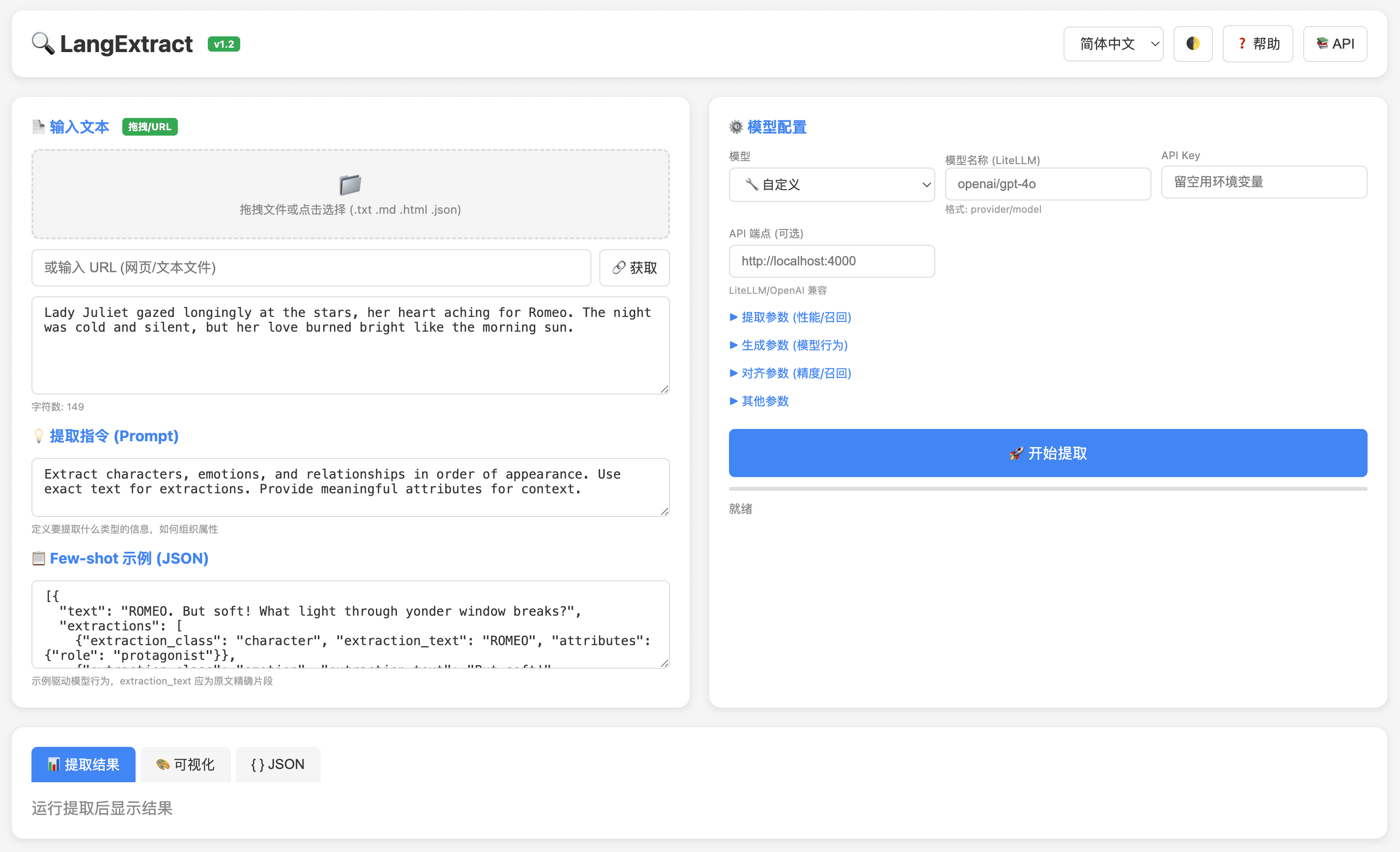
✨ Features
- 🎯 Precise Source Grounding — Every extraction maps back to exact text positions
- 📚 Few-shot Learning — Define extraction tasks with just a few examples, no fine-tuning needed
- 📄 Long Document Optimization — Chunking + multi-pass extraction for high recall
- 🌐 Web UI — Modern, responsive interface with dark mode and i18n support
- 🔌 REST API — Full Swagger documentation at
/docs - 🤖 MCP Support — Model Context Protocol for AI assistant integration
- 🔧 LiteLLM Compatible — Use any LLM provider (Gemini, OpenAI, Claude, Ollama, etc.)
- 📁 File Upload — Drag & drop files or fetch from URL
🚀 Quick Start
Docker (Recommended)
docker run -d -p 8600:8600 \
  -e LANGEXTRACT_API_KEY=your-gemini-api-key \
  neosun/langextract:latest
Docker Compose
services:
  langextract:
    image: neosun/langextract:latest
    ports:
      - "8600:8600"
    environment:
      - LANGEXTRACT_API_KEY=${LANGEXTRACT_API_KEY}
      - OPENAI_API_KEY=${OPENAI_API_KEY}
      - OLLAMA_HOST=http://host.docker.internal:11434
    volumes:
      - /tmp/langextract:/tmp/langextract
    extra_hosts:
      - "host.docker.internal:host-gateway"
docker compose up -d
📦 Installation
From Source
git clone https://github.com/neosun100/langextract-web.git
cd langextract-web

# Install dependencies
pip install -e .
pip install flask flask-cors flasgger gunicorn

# Run
python app.py
Environment Variables
| Variable | Description | Required |
|---|---|---|
LANGEXTRACT_API_KEY |
Gemini API Key | Yes (for Gemini) |
OPENAI_API_KEY |
OpenAI API Key | For OpenAI models |
OLLAMA_HOST |
Ollama server URL | For local models |
PORT |
Server port (default: 8600) | No |
🎮 Usage
Web UI
- Open http://localhost:8600
- Enter text or drag & drop a file / paste URL
- Define extraction prompt and few-shot examples
- Select model and configure parameters
- Click "Extract" and view results with visualization
REST API
# Health check
curl http://localhost:8600/health

# Extract
curl -X POST http://localhost:8600/api/extract \
  -H "Content-Type: application/json" \
  -d '{
    "text": "Lady Juliet gazed at the stars, her heart aching for Romeo.",
    "prompt": "Extract characters and emotions",
    "examples": [{
      "text": "ROMEO spoke softly",
      "extractions": [{"extraction_class": "character", "extraction_text": "ROMEO"}]
    }],
    "model_id": "gemini-2.5-flash"
  }'
Full API documentation: http://localhost:8600/docs
MCP Integration
{
  "mcpServers": {
    "langextract": {
      "command": "docker",
      "args": ["exec", "-i", "langextract", "python", "mcp_server.py"]
    }
  }
}
⚙️ Configuration
Extraction Parameters
| Parameter | Default | Description |
|---|---|---|
max_char_buffer |
1000 | Characters per inference chunk |
extraction_passes |
1 | Number of extraction rounds (higher = better recall) |
max_workers |
10 | Parallel workers for speed |
batch_length |
10 | Chunks per batch |
temperature |
0 | Sampling temperature (0 = deterministic) |
context_window_chars |
- | Cross-chunk context for coreference |
Supported Models
| Provider | Models |
|---|---|
gemini-2.5-flash ⭐, gemini-2.5-pro |
|
| OpenAI | gpt-4o, gpt-4o-mini |
| Anthropic | claude-3-5-sonnet-20241022 |
| Ollama | gemma2:2b, llama3.2:3b, etc. |
| LiteLLM | Any provider/model format |
🏗️ Tech Stack
- Backend: Flask, Gunicorn
- Core: LangExtract by Google
- LLM: Google Gemini, OpenAI, Anthropic, Ollama
- Container: Docker
📝 Changelog
v1.2.0
- ✨ File drag & drop upload
- ✨ URL content fetching
- ✨ Custom model support (LiteLLM)
- ✨ Full parameter exposure in UI
- ✨ Project introduction section
v1.0.0
- 🎉 Initial release with Web UI + API + MCP
🤝 Contributing
Contributions welcome! Please read the Contributing Guide.
📄 License
Apache 2.0 - See LICENSE
Based on LangExtract by Google.
⭐ Star History
📱 Follow Us

Установить LangExtract Web в Claude Desktop, Claude Code, Cursor
unyly install langextract-webСтавит в Claude Desktop, Claude Code, Cursor и VS Code — сам разбирается с npx, uvx и сборкой из исходников.
Впервые? Поставь CLI: curl -fsSL https://unyly.org/install | sh
Или настроить вручную
Выполни в терминале:
claude mcp add langextract-web -- uvx langextractПошаговые гайды: как установить LangExtract Web
FAQ
LangExtract Web MCP бесплатный?
Да, LangExtract Web MCP бесплатный — установка в пару кликов через Unyly без оплаты.
Нужен ли API-ключ для LangExtract Web?
Нет, LangExtract Web работает без API-ключей и переменных окружения.
LangExtract Web — hosted или self-hosted?
Self-hosted: сервер запускается локально на твоей машине командой из раздела установки.
Как установить LangExtract Web в Claude Desktop, Claude Code или Cursor?
Открой LangExtract Web на unyly.org, выбери вкладку своего клиента (Claude Desktop, Claude Code, Cursor) и нажми Install — конфиг сгенерируется автоматически, без правки JSON.
Похожие MCP
LibreOffice Tools
Enables AI agents to read, write, and edit Office documents via LibreOffice with token-efficient design. Supports multiple formats including DOCX, XLSX, PPTX, a
 автор: passerbyflutter
Figma
Extract design specs and assets
 автор: Figma
dannote/figma-use
Figma control: create shapes, text and components, and set styles, auto-layout, variables and exports.
 автор: dannote
Logo.dev
Search and retrieve company logos by brand or domain. Customize size, format, and theme to match your design needs. Accelerate design, prototyping, and content
 автор: NOVA-3951
Design Inspiration Server
Searches top design platforms like Dribbble and Behance to provide UI inspiration, color palettes, and layout patterns via the Serper API. It allows users to re
 автор: YonasValentin
PIX4Dmatic
Enables GUI automation for controlling PIX4Dmatic on Windows through MCP. Supports launching, focusing, capturing screenshots, sending hotkeys, clicking UI elem
 автор: jangjo123
mcp-dockmaster
An Open-Sourced UI to install and manage MCP servers for Windows, Linux and macOS.
ariekogan/ateam-mcp
Build, validate and deploy multi-agent AI solutions on the ADAS platform: design skills with tools and manage the solution lifecycle.
 автор: ariekogan
thinkchainai/mcpbundles
Create custom tool bundles, connect providers with OAuth or API keys, and use one MCP server across many integrations, with a UI for bundles and credentials.
 автор: thinkchainai
jau123/MeiGen-AI-Design-MCP
Image generation and editing with a curated prompt library, prompt enhancement and routing across local ComfyUI, MeiGen Cloud and OpenAI-compatible APIs.
 автор: jau123
Compare LangExtract Web with
Не уверен что выбрать?
Найди свой стек за 60 секунд
Автор?
Embed-бейдж для README
Похожее
Все в категории design