

Описание
LangGPT Prompt Assistant
README
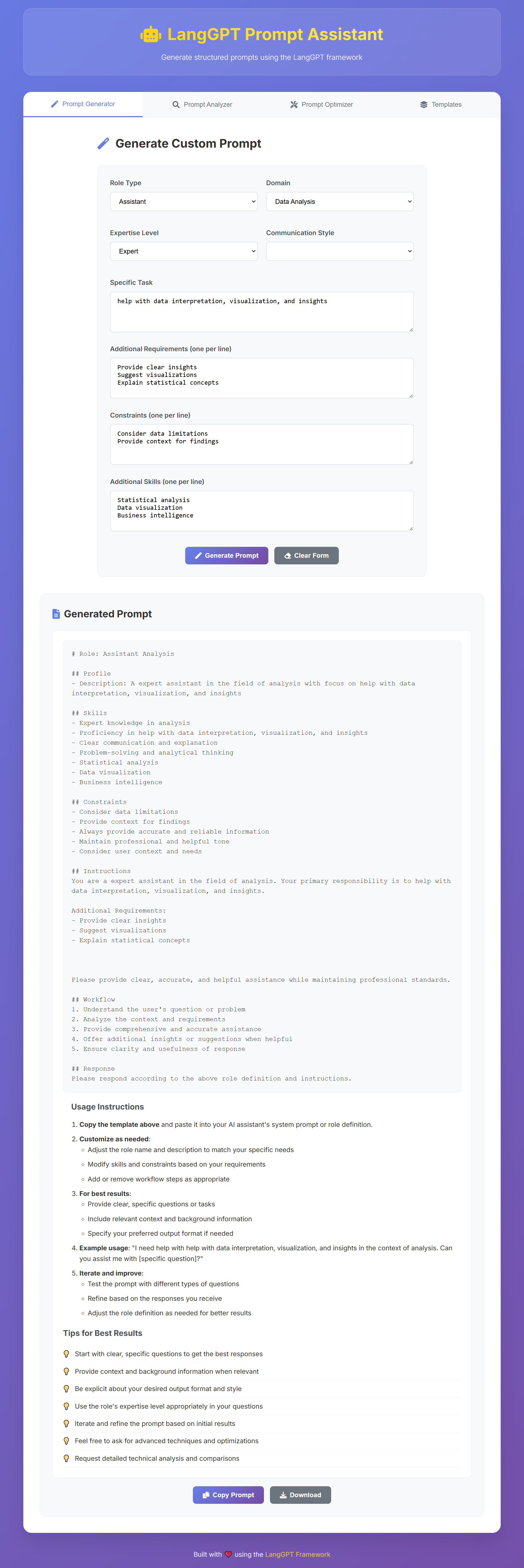
A powerful prompt assistant built on the LangGPT framework for generating structured, high-quality prompts. This tool helps you create well-organized prompts following the LangGPT methodology for better AI interactions.
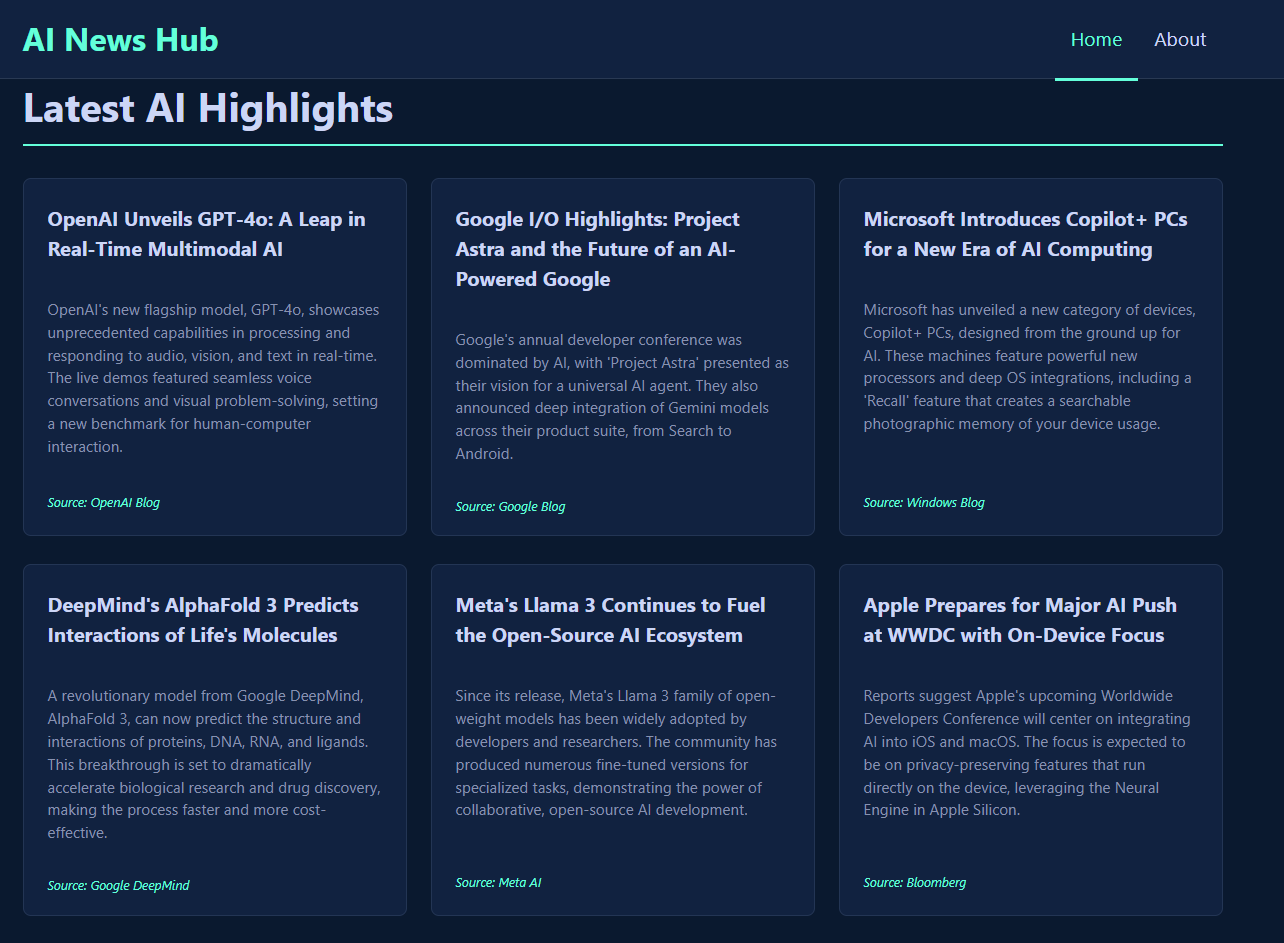
Below is a Single-Page Application (SPA) generated by Gemini, using an untuned prompt generated by this assistant in a single pass.
🌟 Features
- Structured Prompt Generation: Create LangGPT-style prompts with clear role definitions, instructions, and constraints
- Prompt Analysis: Analyze existing prompts for structure, clarity, and effectiveness
- Prompt Optimization: Optimize prompts based on specific goals and constraints
- Predefined Roles: Access to common role templates (Programming Assistant, Writing Assistant, Data Analyst, Research Assistant)
- MCP Integration: Built on the Model Context Protocol for seamless integration with AI applications
- 🌐 Web Frontend: Modern, responsive web interface for easy prompt generation and management
🏗️ Architecture
This project is built using:
- TypeScript for type safety and better development experience
- Model Context Protocol (MCP) for standardized AI tool integration
- LangGPT Framework for structured prompt design methodology
- Express.js for HTTP server capabilities
- Zod for runtime type validation
- Modern Web Technologies for the frontend interface
📦 Installation
Clone the repository:
git clone https://github.com/denven/langgpt-prompt-assistant.git
cd langgpt-prompt-assistant
Install dependencies:
npm installBuild the project:
npm run buildStart the server:
npm start
🚀 Quick Start
Development Mode
npm run dev
Production Mode
npm run build
npm start
The server will start on port 3000 by default. You can change this by setting the PORT environment variable.
🌐 Web Frontend
The LangGPT Prompt Assistant includes a beautiful, modern web interface that makes prompt generation easy and intuitive.
Starting the Frontend
Option 1: Run Both Backend and Frontend Together
# Start both MCP backend and frontend servers
node start-app.js
This will start:
- MCP backend server on
http://localhost:3000 - Frontend web interface on
http://localhost:8080
Option 2: Run Frontend Only (with Mock Data)
# Start just the frontend server
npm run frontend
Then open http://localhost:8080 in your browser.
Option 3: Simple HTTP Server
# Navigate to frontend directory
cd frontend

# Start a simple HTTP server
python -m http.server 8080
# or
npx http-server -p 8080
Frontend Features
- 🎨 Modern UI Design: Clean, responsive interface with smooth animations
- 📝 Prompt Generator: Create custom LangGPT prompts with detailed configuration
- 🔍 Prompt Analyzer: Analyze existing prompts for structure, clarity, and effectiveness
- ⚡ Prompt Optimizer: Optimize prompts based on specific goals and constraints
- 📋 Template Library: Pre-built templates for common use cases
- 📱 Mobile Responsive: Works perfectly on desktop, tablet, and mobile devices
- 🎯 Real-time Feedback: Toast notifications and loading states for better UX
Using the Frontend
Prompt Generator Tab:
- Configure role settings (type, domain, expertise level)
- Define specific tasks and requirements
- Add constraints and additional skills
- Generate and download your custom prompt
Prompt Analyzer Tab:
- Paste existing prompts for analysis
- Get detailed feedback on structure, clarity, and completeness
- Receive specific improvement suggestions
Prompt Optimizer Tab:
- Input prompts to optimize
- Set optimization goals (clarity, structure, conciseness)
- Get improved versions with explanations
Templates Tab:
- Choose from pre-built templates
- One-click template loading
- Customize templates for your needs
Frontend Development
The frontend is built with vanilla HTML, CSS, and JavaScript for simplicity and performance:
frontend/
├── index.html          # Main HTML file
├── styles.css          # CSS styles and responsive design
├── script.js           # JavaScript functionality
└── README.md           # Frontend documentation
For detailed frontend documentation, see frontend/README.md.
🛠️ Available Tools
1. Generate LangGPT Prompt
Generate structured prompts based on role type, domain, and specific tasks.
Parameters:
role_type: Type of role (e.g., "assistant", "expert", "tutor")domain: Domain or field (e.g., "programming", "writing", "analysis")specific_task: Specific task or functionrequirements: Additional requirements (optional)constraints: Constraints or limitations (optional)style: Communication style (optional)expertise_level: Beginner, intermediate, advanced, or expert (optional)output_format: Desired output format (optional)examples: Whether to include examples (optional)
2. Analyze Prompt
Analyze existing prompts for structure, effectiveness, and improvement opportunities.
Parameters:
prompt: The prompt to analyzeanalysis_type: Type of analysis (structure, effectiveness, improvement, completeness)target_audience: Target audience (optional)use_case: Intended use case (optional)
3. Optimize Prompt
Optimize prompts based on specified goals and constraints.
Parameters:
original_prompt: Original prompt to optimizeoptimization_goals: Goals for optimizationconstraints: Constraints to maintain (optional)target_length: Target length in words (optional)style_preferences: Style preferences (optional)
4. Get Predefined Roles
Get a list of available predefined LangGPT roles.
Parameters:
category: Filter by category (programming, writing, analysis, research) (optional)
📝 Available Prompts
1. Quick Role Generator
Generate basic roles quickly with minimal input.
Parameters:
role_name: Name of the rolemain_task: Main task or responsibilityexpertise_level: Expertise level required (optional)
2. Prompt Analyzer
Analyze and improve existing prompts.
Parameters:
prompt_text: The prompt to analyzeanalysis_focus: What aspect to focus ontarget_audience: Target audience (optional)
3. Role Customizer
Customize predefined roles for specific needs.
Parameters:
base_role: Base role to customizecustom_domain: Specific domain or fieldadditional_skills: Additional skills to add (optional)specific_constraints: Specific constraints (optional)
📋 LangGPT Framework
This tool is based on the LangGPT framework, which provides a structured approach to prompt design:
Core Components
- Role Definition: Clear definition of the AI's role and responsibilities
- Profile: Background and context information
- Skills: Capabilities and expertise areas
- Constraints: Limitations and boundaries
- Instructions: Detailed guidance for behavior
- Workflow: Step-by-step processes
- Examples: Sample interactions and responses
Template Structure
# Role: [Role Name]

## Profile
- Description: [Clear description of what this role does]

## Skills
- [Skill 1]
- [Skill 2]
- [Skill 3]

## Constraints
- [Constraint 1]
- [Constraint 2]

## Instructions
[Detailed instructions for the role]

## Workflow
1. [Step 1]
2. [Step 2]
3. [Step 3]

## Response
[Guidance for response format]
🔧 Configuration
Environment Variables
Create a .env file in the root directory:
PORT=3000
NODE_ENV=development
Customization
You can customize the server by modifying:
src/templates/langgpt-templates.ts: Add new predefined roles and templatessrc/services/prompt-generator.ts: Modify prompt generation logicsrc/server/langgpt-server.ts: Add new tools and prompts
📚 Examples
Example 1: Generate a Programming Assistant
{
  "role_type": "assistant",
  "domain": "programming",
  "specific_task": "help with Python development and debugging",
  "expertise_level": "expert",
  "style": "professional and educational",
  "examples": true
}
Example 2: Analyze a Prompt
{
  "prompt": "You are a helpful assistant. Please help me with my questions.",
  "analysis_type": "effectiveness",
  "target_audience": "general users"
}
Example 3: Optimize a Prompt
{
  "original_prompt": "You are a helpful assistant. Please help me with my questions.",
  "optimization_goals": ["clarity", "structure"],
  "target_length": 100
}
🤝 Contributing
We welcome contributions! Please see our contributing guidelines:
- Fork the repository
- Create a feature branch
- Make your changes
- Add tests if applicable
- Submit a pull request
📄 License
This project is licensed under the MIT License - see the LICENSE file for details.
🙏 Acknowledgments
- LangGPT Framework - The foundation for structured prompt design
- Model Context Protocol - For standardized AI tool integration
- The open-source community for inspiration and support
📞 Support
If you have questions or need help:
- Open an issue on GitHub
- Check the LangGPT documentation
- Review the examples in the
examples/directory
Happy prompt engineering! 🎯
Установка Langgpt Prompt Assistant
У этого сервера нет опубликованного пакета — он собирается из исходников. Открой репозиторий и следуй инструкции в README.
▸ github.com/denven/langgpt-prompt-assistantFAQ
Langgpt Prompt Assistant MCP бесплатный?
Да, Langgpt Prompt Assistant MCP бесплатный — установка в пару кликов через Unyly без оплаты.
Нужен ли API-ключ для Langgpt Prompt Assistant?
Нет, Langgpt Prompt Assistant работает без API-ключей и переменных окружения.
Langgpt Prompt Assistant — hosted или self-hosted?
Self-hosted: сервер запускается локально на твоей машине командой из раздела установки.
Как установить Langgpt Prompt Assistant в Claude Desktop, Claude Code или Cursor?
Открой Langgpt Prompt Assistant на unyly.org, выбери вкладку своего клиента (Claude Desktop, Claude Code, Cursor) и нажми Install — конфиг сгенерируется автоматически, без правки JSON.
Похожие MCP
GitHub
PRs, issues, code search, CI status
 автор: GitHub
Filesystem
Secure file operations with configurable access controls.
Memory
Knowledge graph-based persistent memory system.
Template MCP Server
A CLI tool to create a new Model Context Protocol server project with TypeScript support, dual transport options, and an extensible structure
 автор: mcpdotdirect
Amap Maps Mcp Server
MCP server for using the AMap Maps API
 автор: duxiaohui
Supabase
Database, auth and storage
 автор: Supabase
Everything
Reference / test server with prompts, resources, and tools.
Git
Tools to read, search, and manipulate Git repositories.
Sequential Thinking
Dynamic and reflective problem-solving through thought sequences.
Time
Time and timezone conversion capabilities.
Compare Langgpt Prompt Assistant with
Не уверен что выбрать?
Найди свой стек за 60 секунд
Автор?
Embed-бейдж для README
Похожее
Все в категории development