
LinkedIn Zero
БесплатноНе проверен32 MCP tools for job search, resume analysis, matching, alerts, and exports using public LinkedIn endpoints, with optional read-only browser intelligence.

Описание
32 MCP tools for job search, resume analysis, matching, alerts, and exports using public LinkedIn endpoints, with optional read-only browser intelligence.
README
██╗     ██╗███╗   ██╗██╗  ██╗███████╗██████╗ ██╗███╗   ██╗
██║     ██║████╗  ██║██║ ██╔╝██╔════╝██╔══██╗██║████╗  ██║
██║     ██║██╔██╗ ██║█████╔╝ █████╗  ██║  ██║██║██╔██╗ ██║
███████╗██║██║ ╚████║██║  ██╗███████╗██████╔╝██║██║ ╚████║
             MCP ZERO - public-first LinkedIn intelligence
LinkedIn MCP Zero
A public-first MCP server for LinkedIn jobs, resumes, matching, alerts, exports, and opt-in read-only browser intelligence.
No Docker required · Claude Desktop ready · Claude Code ready · Low-RAM friendly · PyPI published
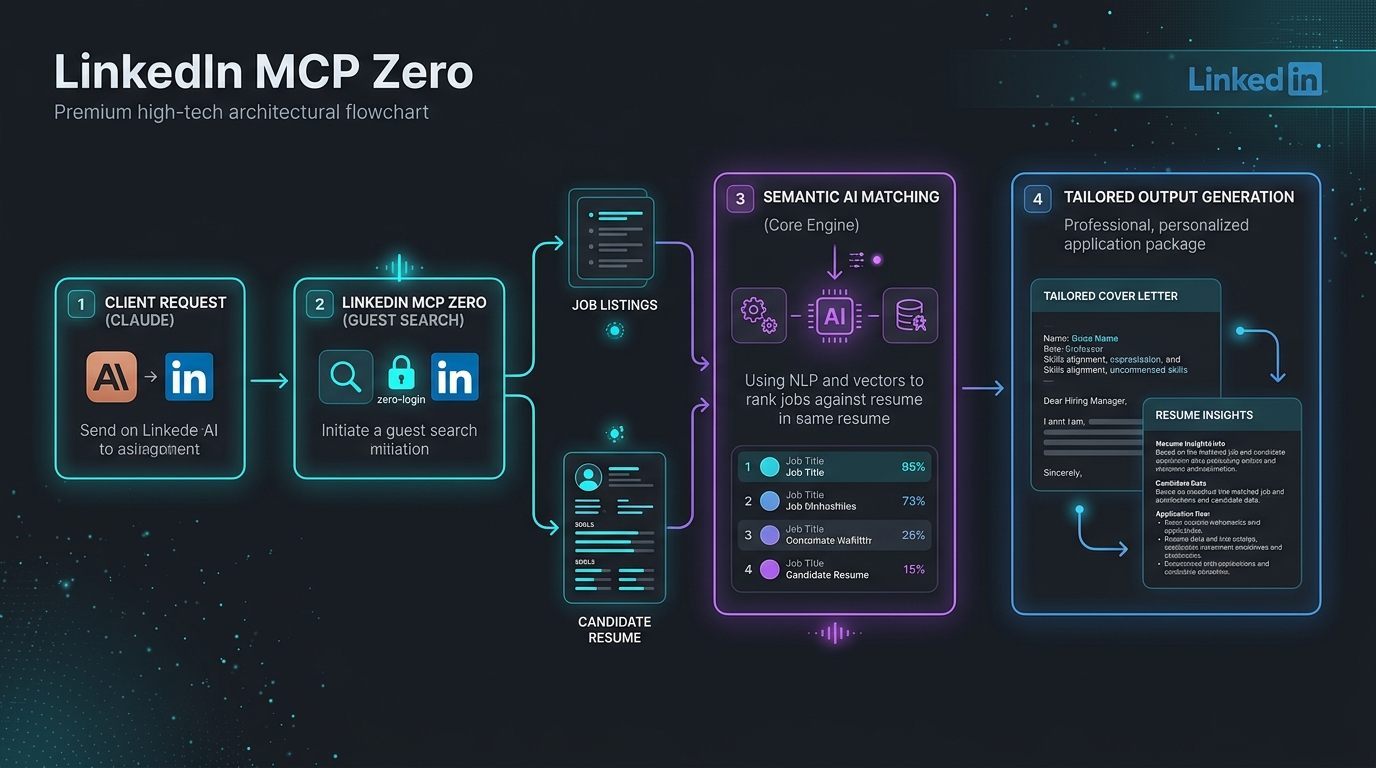
🎨 System Flow
🔌 Works With
- ✅ Claude Desktop (Fully verified)
- ✅ Claude Code (Fully verified)
- ✅ Cursor (Fully verified)
- ✅ VS Code + Copilot (Fully verified)
- ✅ Cline / Roo Code (Fully verified)
- ✅ Any standard Stdio/HTTP MCP client
📊 Feature Comparison
Compare LinkedIn MCP Zero against the next most popular alternatives:
| Feature | stickerdaniel (2.3k★) | Other MCP Servers | LinkedIn MCP Zero (10/10) |
|---|---|---|---|
| Zero-Login Public Tools | ❌ None | ⚠️ 0-2 tools | ✅ 30+ Public Tools |
| Semantic AI Resume Matching | ❌ None | ❌ None | ✅ Yes (TF-IDF & LLM-guided) |
| Local DOCX/PDF Parsing | ❌ None | ❌ None | ✅ Yes (Docling & PyMuPDF) |
| Iterative Progress Reporting | ❌ None | ❌ None | ✅ Yes (MCP Context.report_progress) |
| Wired OpenTelemetry Traces | ❌ None | ❌ None | ✅ Yes (Batch OTel Tracing) |
| Enterprise OAuth 2.1 Security | ❌ None | ❌ None | ✅ Yes (Remote Introspection Middleware) |
| One-Click Diagnostic CLI | ❌ None | ❌ None | ✅ Yes (--doctor verification) |
| Interactive CLI setup | ❌ None | ❌ None | ✅ Yes (Automated Configurator) |
| Zero-Configuration Setup | ❌ None | ⚠️ Complex docker | ✅ Yes (Pure Python / uvx direct) |
Install In One Command
| Client | Command |
|---|---|
| Claude Desktop | uvx --refresh-package linkedin-mcp-zero linkedin-mcp-zero --install-client claude-desktop |
| Claude Code | uvx --refresh-package linkedin-mcp-zero linkedin-mcp-zero --install-client claude-code |
| Cursor | uvx linkedin-mcp-zero --install-client cursor |
| VS Code | uvx linkedin-mcp-zero --install-client vscode |
| Any stdio client | uvx linkedin-mcp-zero |
uvx linkedin-mcp-zero --doctor
Verify after install:
uvx --refresh-package linkedin-mcp-zero linkedin-mcp-zero --verify-client claude-desktop
Browser mode:
uvx --refresh-package linkedin-mcp-zero linkedin-mcp-zero --install-client claude-desktop --with-extra browser
Tool Inventory
Default Tools: 30 Working
These work without LinkedIn login or browser setup.
| # | Tool | Feature | Risk |
|---|---|---|---|
| 1 | search_jobs |
Search public LinkedIn jobs | Public no-login |
| 2 | search_jobs_multi |
Multi-board search; LinkedIn fallback by default | Public no-login |
| 3 | get_job_details |
Full public job details | Public no-login |
| 4 | get_company_jobs |
Public jobs for a company | Public no-login |
| 5 | get_company_profile |
Company signals inferred from public jobs | Public no-login |
| 6 | search_companies |
Company discovery from public job data | Public no-login |
| 7 | get_job_salary |
Salary extraction from job detail pages | Public no-login |
| 8 | get_job_trends |
Role/location hiring trends | Public no-login |
| 9 | get_industry_insights |
Market signals for an industry | Public no-login |
| 10 | search_jobs_advanced |
Job search with filters | Public no-login |
| 11 | analyze_resume |
Local PDF/DOCX/text resume parsing | Local |
| 12 | get_resume_insights |
Local skill gaps and suggestions | Local |
| 13 | match_jobs_to_resume |
Rank public jobs against a resume | Local/public |
| 14 | compare_jobs |
Compare selected jobs | Local/public |
| 15 | export_jobs |
Export jobs to CSV/JSON/XLSX | Local |
| 16 | save_job_alert |
Save a recurring search | Local |
| 17 | get_saved_alerts |
List saved searches | Local |
| 18 | check_saved_alerts |
Run alerts and find new matches | Local/public |
| 19 | get_engine_status |
Runtime, engine, token, cache status | Local |
| 20 | get_help |
Tool documentation | Local |
| 21 | get_usage_stats |
Local response-size/token estimates | Local |
| 22 | get_tool_usage_summary |
Aggregate local usage by tool | Local |
| 23 | reset_usage_stats |
Clear local usage metrics | Local |
| 24 | smart_match_jobs |
AI-powered job matching using client LLM | Local/public |
| 25 | generate_cover_letter |
Tailored cover letter using client LLM | Local/public |
| 26 | analyze_salary_offer |
AI-powered salary analysis using client LLM | Local/public |
| 27 | personalized_job_hunt |
Interactive job search preferences | Local/public |
| 28 | confirm_export |
Export jobs with user confirmation | Local |
| 29 | get_resume_insights_advanced |
Advanced AI-powered resume insights | Local |
| 30 | deep_industry_analysis |
Full industry analysis with progress updates | Local/public |
Browser Tools: +11
Enable with --with-extra browser or --enable-browser. These are read-only,
but they use your logged-in browser session.
| # | Tool | Feature |
|---|---|---|
| 31 | get_my_profile |
Read your profile |
| 32 | get_person_profile |
Read a public/person profile page |
| 33 | search_people |
People search through browser |
| 34 | get_my_connections |
Read your connection list |
| 35 | get_inbox |
Recent conversations list |
| 36 | get_conversation |
Read a conversation thread |
| 37 | get_feed |
Read home feed posts |
| 38 | get_notifications |
Read notifications |
| 39 | get_sidebar_profiles |
Suggested/sidebar profiles |
| 40 | get_company_employees |
Company people page |
| 41 | check_session |
Check CDP/login readiness |
Gated Private-Risk Tool: +1
| # | Tool | Feature |
|---|---|---|
| 42 | get_profile_voyager |
Voyager/private API placeholder, disabled by default |
Default mode exposes 30 usable tools: 29 core local/public tools plus
search_jobs_multi, which falls back to LinkedIn-only results unless the
multi extra is installed. Browser tools appear only with --enable-browser or
--with-extra browser in an installed client config. Voyager/private API mode is
hidden unless explicitly enabled.
Tool counts:
| Mode | Exposed Tools | Notes |
|---|---|---|
| Default | 30 | Safe local/public tools; no LinkedIn login required |
| Browser enabled | 41 | Adds 11 read-only browser tools; needs Chrome/CDP login |
| Browser + Voyager | 42 | Adds gated private-API placeholder |
Safety Model
| Mode | Label | Account Risk |
|---|---|---|
| Local resume/alerts/exports | local_zero_account_risk |
None |
| Public no-login job data | public_no_login_read_only |
No LinkedIn login required |
| Browser tools | browser_readonly_account_risk |
Opt-in account risk |
| Voyager/private API | disabled_private_api_risk |
Disabled by default |
No tool posts, likes, connects, follows, applies, or sends messages.
Browser Mode
Install browser dependencies into the isolated uvx runtime:
uvx linkedin-mcp-zero --install-client claude-desktop --with-extra browser
Start Chrome with remote debugging and log in manually:
google-chrome --remote-debugging-port=9222
Then call check_session from your MCP client.
Global Playwright installs do not count for uvx; use --with-extra browser.
Token Usage Tracking
Claude Desktop has no built-in per-MCP token counter. This server provides a privacy-safe tracker instead:
- Estimated tokens:
ceil(response_chars / 4), always on. - Exact-style counts: optional Anthropic
/v1/messages/count_tokens. - Full tool responses are not stored in the metrics database.
- Exact-style counting sends the counted response text to Anthropic only when
ANTHROPIC_API_KEYandLINKEDIN_MCP_EXACT_TOKEN_COUNT=trueare both set.
Enable exact-style counting:
ANTHROPIC_API_KEY=sk-ant-... LINKEDIN_MCP_EXACT_TOKEN_COUNT=true uvx linkedin-mcp-zero
Use a different token-count model if needed:
LINKEDIN_MCP_TOKEN_COUNT_MODEL=claude-sonnet-4-5
Usage tools:
get_usage_stats
get_tool_usage_summary
reset_usage_stats
Avoid terminal transcript logging as a token strategy; it can expose private profile, inbox, resume, or job data.
Client Config
Print without editing files:
uvx linkedin-mcp-zero --print-config --client claude-desktop
uvx linkedin-mcp-zero --print-config --client vscode
Claude Desktop and Cursor use:
{
  "mcpServers": {
    "linkedin-zero": {
      "command": "/absolute/path/to/uvx",
      "args": ["linkedin-mcp-zero"]
    }
  }
}
VS Code uses:
{
  "servers": {
    "linkedin-zero": {
      "command": "/absolute/path/to/uvx",
      "args": ["linkedin-mcp-zero"]
    }
  }
}
Doctor
uvx linkedin-mcp-zero --doctor
uvx linkedin-mcp-zero --doctor --json
Checks OS, Python, RAM, disk, Chrome, CDP URL, display state, optional extras, and recommended mode.
Development
uv sync --extra dev
uv run --extra dev ruff check .
uv run --extra dev pytest
uv build
Publish only the new version files:
UV_PUBLISH_TOKEN=... uv publish dist/linkedin_mcp_zero-0.3.2*
Установка LinkedIn Zero
У этого сервера нет опубликованного пакета — он собирается из исходников. Открой репозиторий и следуй инструкции в README.
▸ github.com/SanthaKumar-K-2004/linkedin-mcp-zeroFAQ
LinkedIn Zero MCP бесплатный?
Да, LinkedIn Zero MCP бесплатный — установка в пару кликов через Unyly без оплаты.
Нужен ли API-ключ для LinkedIn Zero?
Нет, LinkedIn Zero работает без API-ключей и переменных окружения.
LinkedIn Zero — hosted или self-hosted?
Self-hosted: сервер запускается локально на твоей машине командой из раздела установки.
Как установить LinkedIn Zero в Claude Desktop, Claude Code или Cursor?
Открой LinkedIn Zero на unyly.org, выбери вкладку своего клиента (Claude Desktop, Claude Code, Cursor) и нажми Install — конфиг сгенерируется автоматически, без правки JSON.
Похожие MCP
Playwright
Browser automation, scraping, screenshots
 автор: Microsoft
Puppeteer
Browser automation and web scraping.
 автор: modelcontextprotocol
opentabs-dev/opentabs
Plugin-based MCP server + Chrome extension that gives AI agents access to web applications through the user's authenticated browser session. 100+ plugins with a
 автор: opentabs-dev
robhunter/agentdeals
1,500+ developer infrastructure deals, free tiers, and startup programs across 54 categories. Search deals, compare vendors, plan stacks, and track pricing chan
 автор: robhunter
Compare LinkedIn Zero with
Не уверен что выбрать?
Найди свой стек за 60 секунд
Автор?
Embed-бейдж для README
Похожее
Все в категории browse