
Llmops Claude Mcp Server Intigreation
БесплатноНе проверенLlmops Claude Mcp Server Intigreation — Model Context Protocol server

Описание
Llmops Claude Mcp Server Intigreation — Model Context Protocol server
README
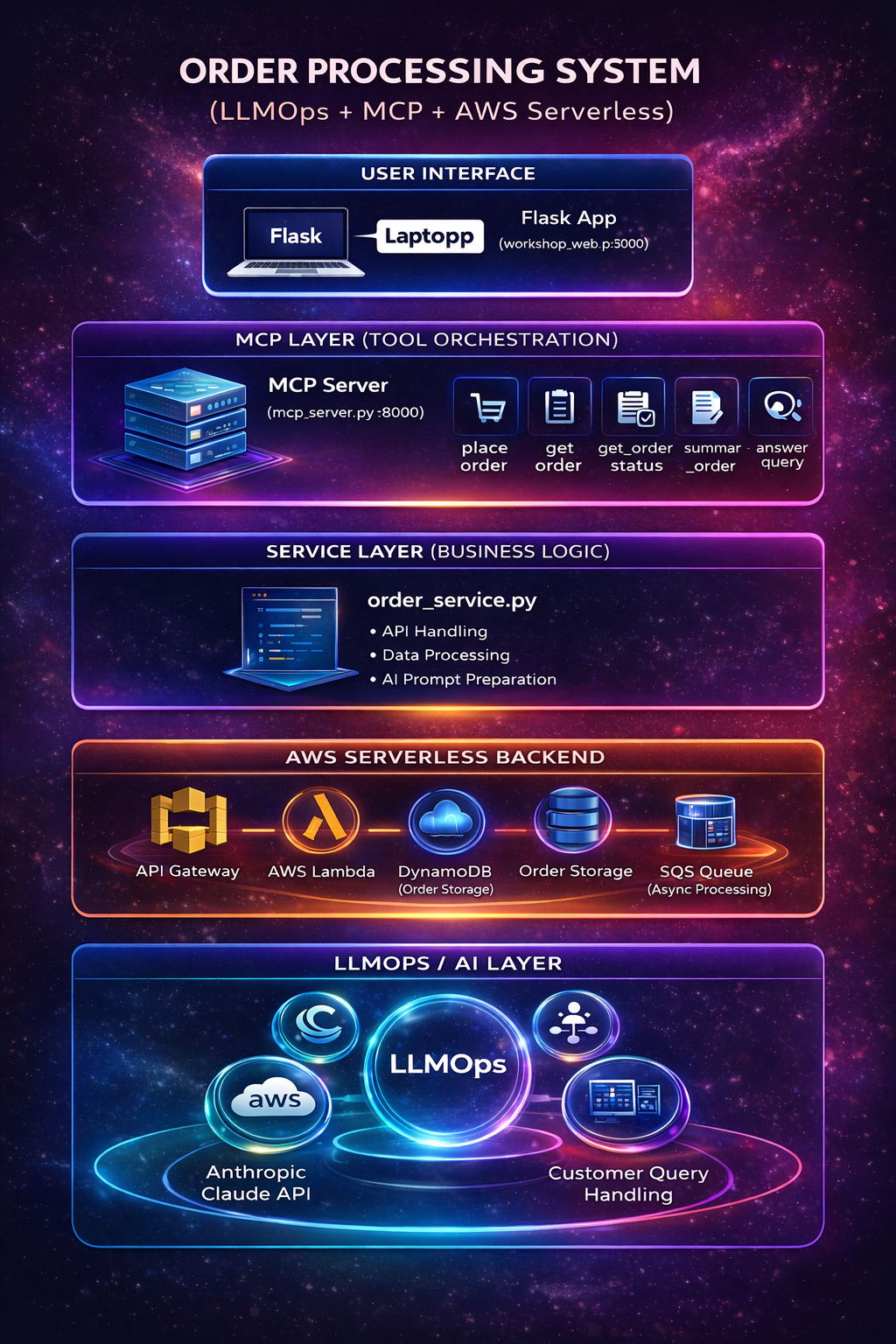
This repository is a workshop-style demo that shows how a browser UI, an MCP server, AWS services, and Claude can work together in one practical order-support flow.
The project lets you:
- create orders from a local web UI
- send order creation requests through MCP tools
- store and update orders in AWS
- process queued orders with SQS and Lambda
- ask Claude customer-support questions about an order
Architecture
The main pieces in this repo are:
web/web.py.pyLocal Flask UI running onhttp://127.0.0.1:3000mcp/mcp_server.pyMCP server that exposes tools overstdioor HTTPmcp/order_service.pyShared order logic for AWS access and Claude callsterraform/Infrastructure for API Gateway, Lambda, DynamoDB, and SQSterraform/lambda/lambda_function.pyLambda handler for order creation and SQS-based processing
Architecture Diagram
                    Browser UI
   ↓
Flask Web App
   ↓
MCP Server
   ↓
order_service.py
   ↓
API Gateway
   ↓
                +----------------------+
                |  SINGLE LAMBDA       |
                |  (lambda_function)   |
                +----------+-----------+
                           |
          ---------------------------------------
          |                                     |
          v                                     v
   DynamoDB (create order)              SQS Queue (send message)
                                             |
                                             v
                                   SAME LAMBDA AGAIN
                                 (triggered by SQS)
                                             |
                                             v
                              Process Order Update
                                             |
                                             v
                                      DynamoDB update
Architecture Summary
- The browser interacts with the local Flask UI.
- The Flask UI sends all order and AI operations to the MCP server.
- The MCP server exposes tools and delegates logic to
order_service.py. order_service.pytalks to AWS for order operations and Anthropic for AI responses.- AWS Lambda creates and processes orders using DynamoDB and SQS.
End-to-End Flow
1. UI flow
- The user opens the local UI at
http://127.0.0.1:3000. - The UI provides three main actions:
- create order
- lookup order
- ask AI about an order
- The UI does not directly call AWS services.
- Instead, it sends requests to the MCP server.
2. MCP flow
- The MCP server receives tool requests from the UI.
- It routes each request to the matching tool handler:
place_orderget_orderget_order_statussummarize_orderanswer_customer_queryget_workshop_config
- The MCP server delegates the actual business logic to
order_service.py.
3. Order creation flow
- The user submits an order in the UI.
- The UI calls the MCP tool
place_order. order_service.pysends the request to the AWS API Gateway endpoint defined byORDER_API_URL.- API Gateway invokes Lambda.
- Lambda validates the payload and creates an order in DynamoDB.
- The initial order is stored with values like:
status = queuedpaymentStatus = pendingshippingStatus = pending
- Lambda sends the order ID to SQS for background processing.
- The success response returns to the MCP server and then back to the UI.
4. Background processing flow
- SQS triggers Lambda asynchronously.
- Lambda reads the order from DynamoDB.
- Lambda updates the order to processed values such as:
status = processedpaymentStatus = paidshippingStatus = ready_for_dispatch
- The updated order is now available for lookup and AI responses.
5. Order lookup flow
- The user enters an order ID in the UI.
- The UI calls one of these MCP tools:
get_orderget_order_statussummarize_order
order_service.pyreads the order from DynamoDB.- The MCP server returns either:
- full order details
- current status
- human-readable summary
6. AI customer-support flow
- The user asks a question such as
What is my order status? - The UI calls the MCP tool
answer_customer_query. order_service.pyloads the order from DynamoDB.- The order details and customer question are sent to Claude through the Anthropic API.
- Claude returns a natural-language answer.
- The answer is returned through the MCP server to the UI.
Request Flow Summary
Browser UI
  -> Flask Web App (port 3000)
  -> MCP Server (port 8000 in HTTP mode)
  -> order_service.py
  -> AWS API Gateway / DynamoDB / SQS / Lambda / Claude API
  -> response back to UI
Project Structure
.
|-- README.md
|-- mcp1.png
|-- mcp/
|   |-- .env
|   |-- mcp_server.py
|   `-- order_service.py
|-- web/
|   |-- requirements.txt
|   |-- web.py.py
|   |-- templates/
|   |   `-- index.html
|   `-- static/
|       |-- app.js
|       `-- styles.css
`-- terraform/
    |-- main.tf
    |-- output.tf
    |-- variable.tf
    |-- lambda.zip
    `-- lambda/
        `-- lambda_function.py
Prerequisites
- Python 3.10+
- AWS account and configured credentials
- Terraform
- Anthropic API key
Local Setup
1. Create and activate a virtual environment
python -m venv .venv
.venv\Scripts\Activate.ps1
2. Install dependencies
pip install -r web\requirements.txt
3. Configure environment variables
Update mcp/.env with your values:
AWS_REGION=us-east-1
ORDERS_TABLE=Orders
ORDER_API_URL=https://your-api-id.execute-api.us-east-1.amazonaws.com/order
ANTHROPIC_API_KEY=your-key
CLAUDE_MODEL=claude-sonnet-4-20250514
MCP_TRANSPORT=http
MCP_HTTP_HOST=127.0.0.1
MCP_HTTP_PORT=8000
If your UI needs an explicit MCP URL, set:
MCP_SERVER_URL=http://127.0.0.1:8000
Run the Project
1. Start the MCP server
HTTP mode:
python mcp\mcp_server.py --http
Or use MCP_TRANSPORT=stdio if connecting from an MCP client over standard input/output.
2. Start the web UI
Open a second terminal and run:
python web\web.py.py
3. Open the UI
Go to:
http://127.0.0.1:3000
MCP Tools Exposed
The MCP server exposes these tools:
place_orderget_orderget_order_statussummarize_orderanswer_customer_queryget_workshop_config
Terraform Infrastructure
From the terraform/ folder:
terraform init
terraform apply
This provisions the AWS resources used by the demo, including:
- API Gateway
- Lambda
- DynamoDB
- SQS
After deployment, make sure ORDER_API_URL in mcp/.env matches the created API endpoint.
Typical Demo Walkthrough
- Start the MCP server.
- Start the Flask UI.
- Create an order from the browser.
- Verify the order is stored with
queuedstatus. - Let SQS and Lambda process the order.
- Check the order status or summary from the UI.
- Ask Claude a customer-style question about the order.
Notes
- The web UI and MCP server are separate processes.
web.py.pyruns on port3000.mcp_server.pyruns on port8000in HTTP mode.- The UI talks to the MCP server, and the MCP server talks to AWS and Claude.
Security Reminder
- Keep
.envfiles private and out of version control. - Rotate any API key that has been exposed.
- Do not commit generated Terraform state or packaged secrets.
from github.com/MultiCloudArchitectDevOps/llmops-claude-mcp-server-intigreation
Установка Llmops Claude Mcp Server Intigreation
У этого сервера нет опубликованного пакета — он собирается из исходников. Открой репозиторий и следуй инструкции в README.
▸ github.com/MultiCloudArchitectDevOps/llmops-claude-mcp-server-intigreationFAQ
Llmops Claude Mcp Server Intigreation MCP бесплатный?
Да, Llmops Claude Mcp Server Intigreation MCP бесплатный — установка в пару кликов через Unyly без оплаты.
Нужен ли API-ключ для Llmops Claude Mcp Server Intigreation?
Нет, Llmops Claude Mcp Server Intigreation работает без API-ключей и переменных окружения.
Llmops Claude Mcp Server Intigreation — hosted или self-hosted?
Self-hosted: сервер запускается локально на твоей машине командой из раздела установки.
Как установить Llmops Claude Mcp Server Intigreation в Claude Desktop, Claude Code или Cursor?
Открой Llmops Claude Mcp Server Intigreation на unyly.org, выбери вкладку своего клиента (Claude Desktop, Claude Code, Cursor) и нажми Install — конфиг сгенерируется автоматически, без правки JSON.
Похожие MCP
Fetch
Web content fetching and conversion for efficient LLM usage.
AWS KB Retrieval
Retrieval from AWS Knowledge Base using Bedrock Agent Runtime.
 автор: modelcontextprotocol
Spring AI MCP Server
Provides auto-configuration for setting up an MCP server in Spring Boot applications.
llm-analysis-assistant
A very streamlined mcp client that supports calling and monitoring stdio/sse/streamableHttp, and can also view request responses through the /logs page. It also
 автор: xuzexin-hz
Compare Llmops Claude Mcp Server Intigreation with
Не уверен что выбрать?
Найди свой стек за 60 секунд
Автор?
Embed-бейдж для README
Похожее
Все в категории ai