
Local Image Search
БесплатноНе проверенPrivacy-first MCP server for macOS that allows AI agents to search local images using natural language descriptions, leveraging MLX CLIP embeddings and LanceDB

Описание
Privacy-first MCP server for macOS that allows AI agents to search local images using natural language descriptions, leveraging MLX CLIP embeddings and LanceDB for fast, fully offline search.
README
Give your AI coding agent the ability to search through all your local images. Privacy-first, 100% local MCP server for macOS. Uses MLX CLIP for embeddings, Daft for batch processing, and Lance for vector storage.
https://github.com/user-attachments/assets/41e167f0-bb73-4310-8c1c-4be07af21cc1
Features
- 100% local - Images and embeddings never leave your machine
- MCP Server - Works with Claude Code and Claude Desktop
- Natural language search - Find images by describing them
- Fast - 260+ images/second on Apple Silicon via MLX
Requirements
- macOS with Apple Silicon (M1/M2/M3/M4)
- uv (for
uvxcommand)
Quick Start
Claude Code
Option 1: CLI
claude mcp add local-image-search -- uvx local-image-search
Option 2: Manual - add to ~/.claude.json:
{
  "mcpServers": {
    "local-image-search": {
      "command": "uvx",
      "args": ["local-image-search"]
    }
  }
}
Claude Desktop
Add to ~/Library/Application Support/Claude/claude_desktop_config.json:
{
  "mcpServers": {
    "local-image-search": {
      "command": "uvx",
      "args": ["local-image-search"]
    }
  }
}
Restart Claude after setup. The first run downloads the model (~600MB) and embeds your images, which may take a few minutes. After that, it only processes new or changed files. By default, it scans your home directory (~) and skips common system folders. See Configuration Logic for details.
Custom Configuration
Scan a specific folder:
{
  "args": ["local-image-search", "~/Pictures"]
}
Custom excludes:
{
  "args": ["local-image-search"],
  "env": {
    "EXCLUDE_DIRS": "Downloads,Desktop,Movies"
  }
}
Faster refresh:
{
  "env": {
    "REFRESH_INTERVAL": "30"
  }
}
Configuration Logic
| Options | Root | Excludes |
|---|---|---|
| None | ~ (home) |
Default excludes |
| Root only | Custom root | None |
| Excludes only | ~ (home) |
Custom excludes |
| Root + Excludes | Custom root | Custom excludes |
Default excludes: Library, .Trash, .cache, Cache, node_modules, .git, .venv, venv
MCP Tools
search_images(query, limit)- Search for images matching a text descriptionget_status()- Check if the service is ready (model loaded, embeddings synced)
Development Setup
# Clone the repo
git clone https://github.com/Eventual-Inc/local-image-search.git
cd local-image-search

# Install dependencies
uv sync

# Download and convert CLIP model (~600MB, first time only)
cd clip && uv run python convert.py && cd ..
CLI Usage
Embed images from a directory
uv run python embed.py ~/Pictures           # embed all images
uv run python embed.py ~/Pictures --dry-run # count and estimate time
uv run python embed.py . --no-recursive     # current dir only
Embeddings are cached in embeddings.lance/. Re-running skips unchanged files.
Supported formats
| Format | Extensions | Tested |
|---|---|---|
| JPEG | .jpg, .jpeg |
Created and embedded |
| PNG | .png |
Created and embedded |
| GIF | .gif |
Created and embedded |
| WebP | .webp |
Created and embedded |
| BMP | .bmp |
Created and embedded |
| TIFF | .tiff, .tif |
Created and embedded |
| HEIC/HEIF | .heic, .heif |
Real iPhone photo + converted PNG |
Corrupted or unreadable images get zero vectors (won't match searches).
Search
Start the server (loads model once):
uv run python server.py
Search via CLI:
uv run python search.py "sunset"           # list results
uv run python search.py "people" -n 10     # show 10 results
Or via API:
curl -X POST http://127.0.0.1:8000/search \
  -H "Content-Type: application/json" \
  -d '{"query": "yellow mouse", "limit": 5}'
Demo scripts
uv run python simple_image_search.py  # basic in-memory search (2 images)
uv run python daft_image_search.py    # batch processing demo
Project Structure
local-image-search/
├── clip/                    # MLX CLIP implementation (from ml-explore/mlx-examples)
│   ├── model.py             # CLIP model architecture
│   ├── clip.py              # Model loading and inference
│   ├── convert.py           # HuggingFace to MLX converter
│   ├── image_processor.py   # Image preprocessing
│   ├── tokenizer.py         # Text tokenization
│   ├── mlx_model/           # Converted model weights (generated)
│   └── LICENSE              # MIT License (Apple Inc.)
├── data/
│   └── pokemon/             # Pokemon artwork (1025 images)
├── embeddings.lance/        # Lance DB storage (generated)
├── mcp_server.py            # MCP server entry point
├── server.py                # FastAPI server for local API
├── search.py                # CLI search tool
├── core.py                  # Shared utilities (EmbedImages, find_images, etc.)
├── embed.py                 # CLI tool to sync embeddings from a directory
├── test_embed.py            # Tests for embed.py
├── simple_image_search.py   # Basic in-memory search demo
├── daft_image_search.py     # Daft-based batch processing demo
├── benchmark.py             # Benchmark script
├── plot_benchmark.py        # Generate benchmark plot
├── benchmark_results.csv    # Raw benchmark data (10 runs)
├── benchmark_plot.png       # Benchmark visualization
├── pyproject.toml           # Project dependencies
└── uv.lock                  # Dependency lockfile
Benchmarks
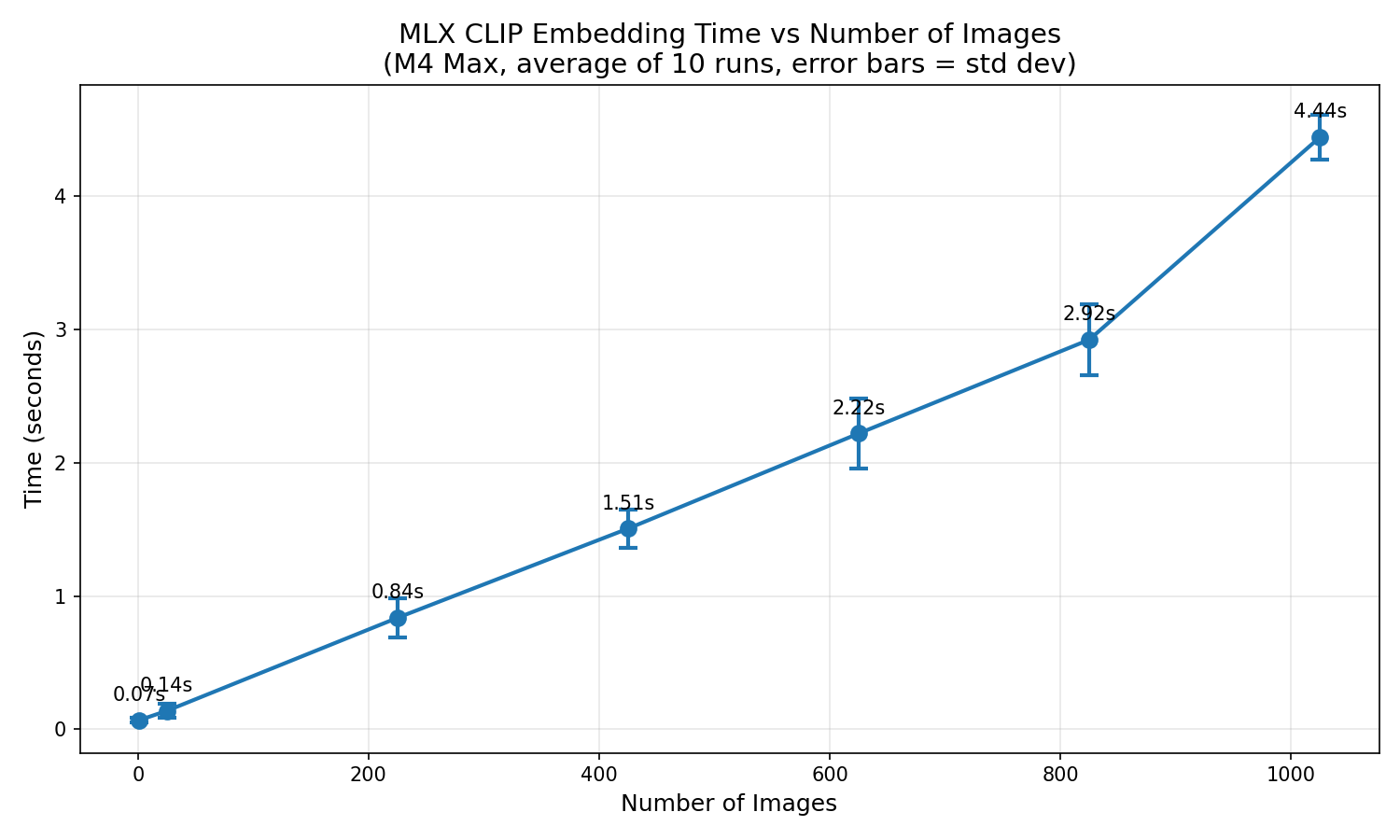
Embedding time for the Pokemon dataset (1025 images) on M4 Max, averaged over 10 runs.
Run benchmarks yourself:
uv run python benchmark.py      # Run one iteration, appends to CSV
uv run python benchmark.py 100  # Benchmark with specific number of images
uv run python plot_benchmark.py # Generate plot from CSV
Real-world performance (M4 Max, home directory)
| Metric | Value |
|---|---|
| Images found | 11,843 |
| Scan time | ~26s |
| Embed time | ~39s |
| Total time | ~65s |
| Embed speed | 260 img/s |
| Re-run (cached) | ~31s (scan only) |
Data Attribution
Pokemon Artwork
- Source: PokeAPI/sprites
- License: Repository is CC0 1.0 Universal
- Copyright: All Pokemon images are Copyright The Pokemon Company
CLIP Implementation
- Source: ml-explore/mlx-examples
- License: MIT License (Apple Inc.)
Установка Local Image Search
У этого сервера нет опубликованного пакета — он собирается из исходников. Открой репозиторий и следуй инструкции в README.
▸ github.com/Eventual-Inc/local-image-searchFAQ
Local Image Search MCP бесплатный?
Да, Local Image Search MCP бесплатный — установка в пару кликов через Unyly без оплаты.
Нужен ли API-ключ для Local Image Search?
Нет, Local Image Search работает без API-ключей и переменных окружения.
Local Image Search — hosted или self-hosted?
Self-hosted: сервер запускается локально на твоей машине командой из раздела установки.
Как установить Local Image Search в Claude Desktop, Claude Code или Cursor?
Открой Local Image Search на unyly.org, выбери вкладку своего клиента (Claude Desktop, Claude Code, Cursor) и нажми Install — конфиг сгенерируется автоматически, без правки JSON.
Похожие MCP
Omni Video
An MCP server that transforms LLM-enabled IDEs into professional video editors by pre-processing footage into text proxies, generating motion graphics via HTML/
 автор: buildwithtaza
ARA
Generate images, video and audio from any AI agent — one connector.
 автор: ARA
YouTube
Transcripts, channel stats, search
 автор: YouTube
EverArt
AI image generation using various models.
 автор: modelcontextprotocol
Compare Local Image Search with
Не уверен что выбрать?
Найди свой стек за 60 секунд
Автор?
Embed-бейдж для README
Похожее
Все в категории media