
Local CRM
БесплатноНе проверенA local-first CRM that exposes customer and project management tools via the Model Context Protocol (MCP), including an analytics server. It integrates seamless

Описание
A local-first CRM that exposes customer and project management tools via the Model Context Protocol (MCP), including an analytics server. It integrates seamlessly with Claude Code or a custom LlamaIndex ReAct agent.
README
A local-first CRM built on the Model Context Protocol (MCP) — customer & project management exposed as MCP tools, driven by either a custom LlamaIndex ReAct agent or directly from Claude Code.





📸 Screenshots
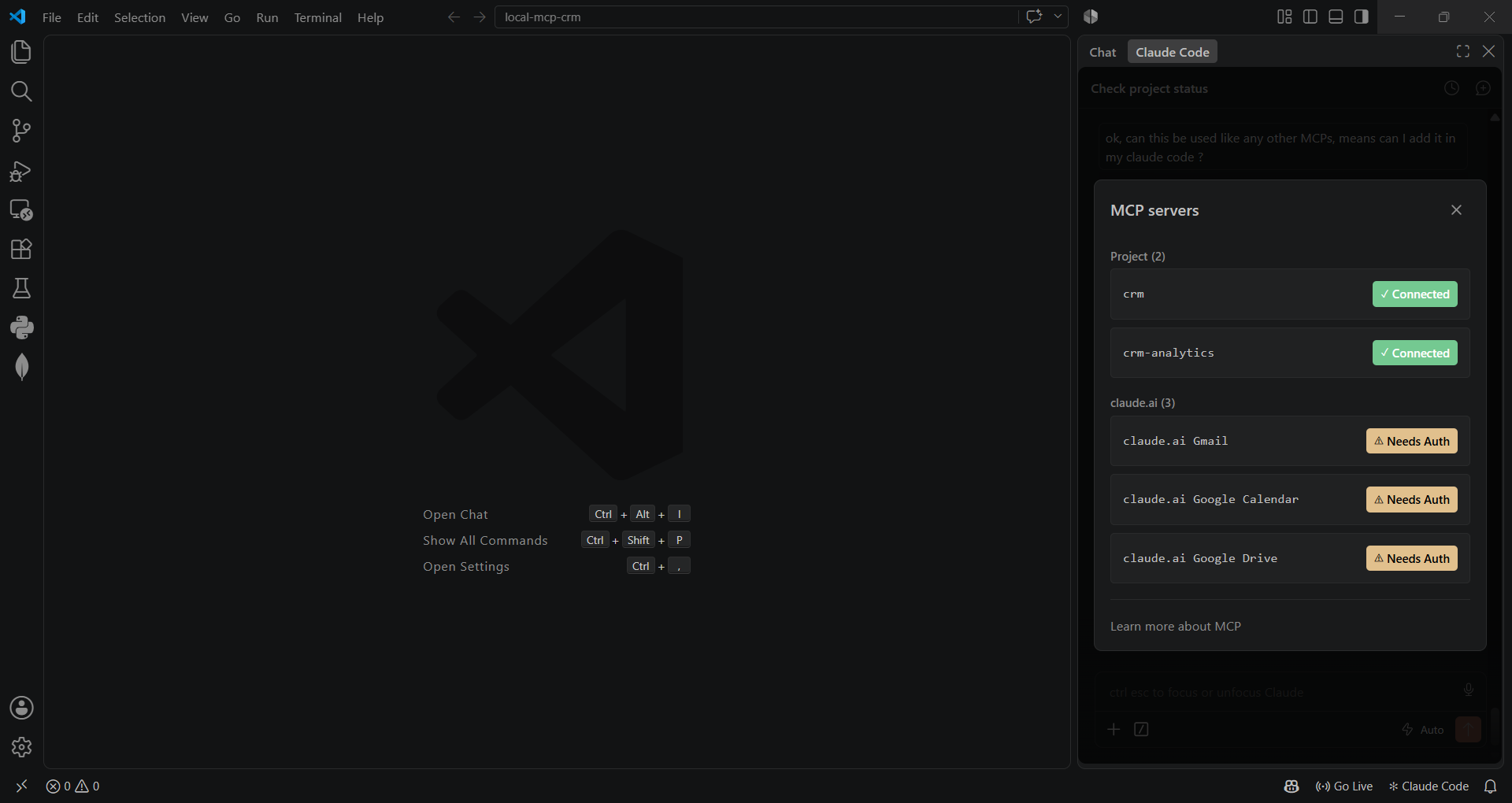
Both servers connected inside Claude Code (VS Code extension):
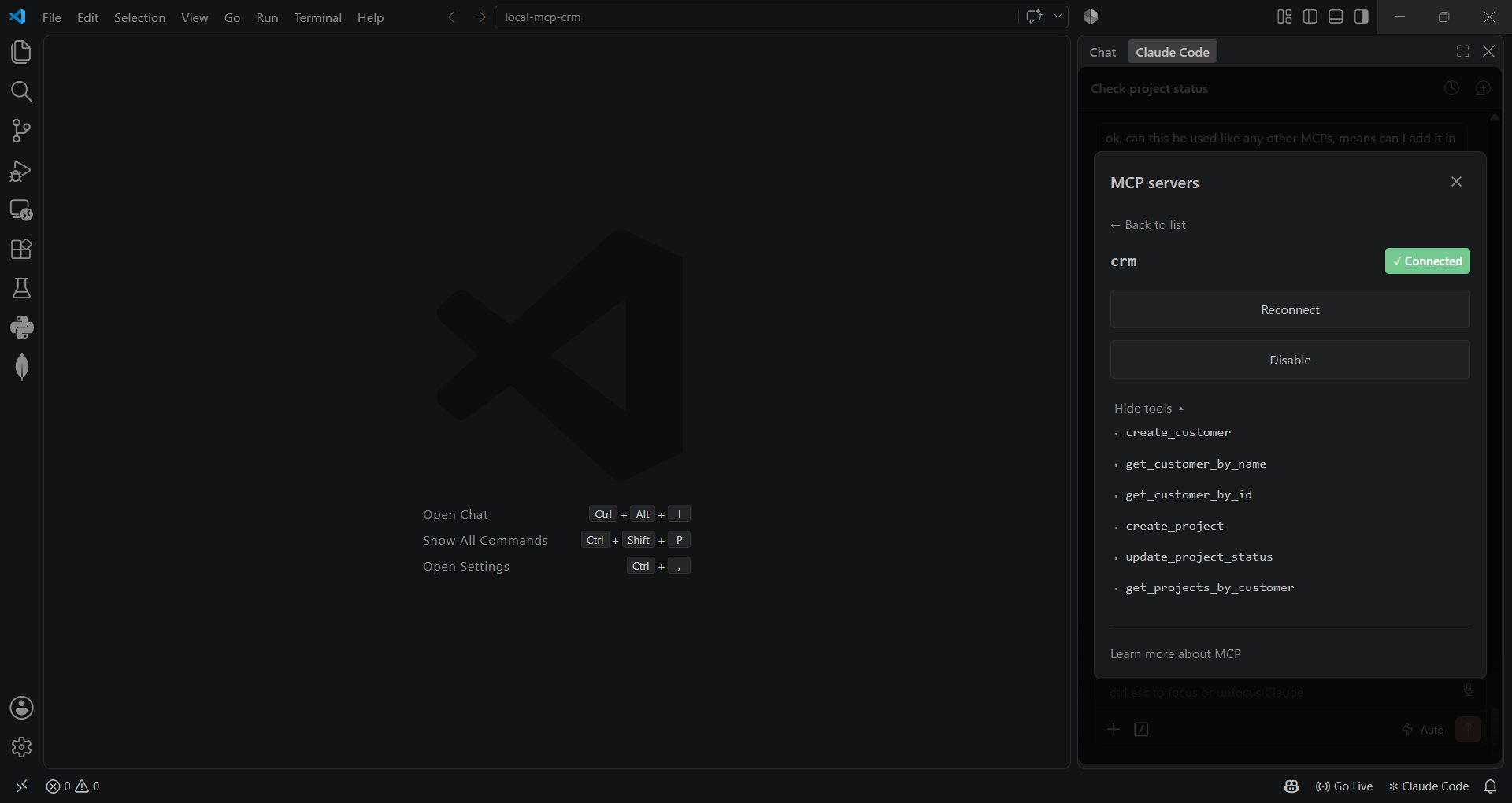
CRM server tools:
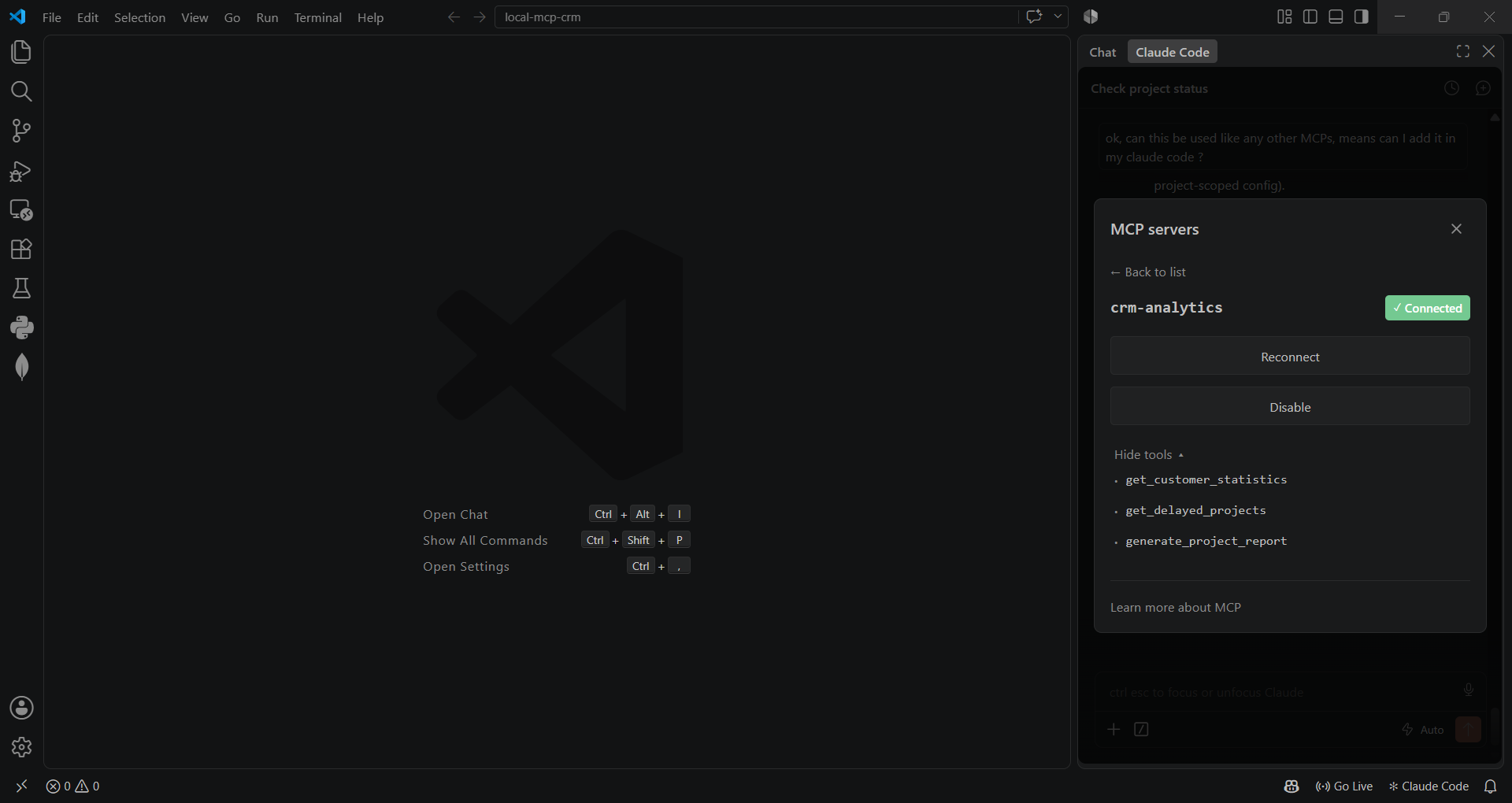
Analytics server tools:
📖 Table of Contents
- Screenshots
- Why this project
- Architecture
- Features
- Tech Stack
- MCP Tools Reference
- Getting Started
- Project Structure
- Roadmap
🎯 Why this project
This is a small, deliberately layered CRM that doubles as a hands-on demonstration of the
Model Context Protocol — the emerging standard for connecting LLMs to tools and data.
It ships two independent MCP servers (crm and crm-analytics), each exposing a clean
set of tools over stdio, and two different clients talking to them:
- A custom agent (
client/) — a LlamaIndexReActAgentwired to a free OpenRouter model, with its own MCP client, tool-schema translation, and a simple multi-turn "collect missing fields" workflow. - Claude Code itself — via
.mcp.json, the same servers plug straight into Claude Code (or any other MCP-compatible client) with zero extra glue code.
The point isn't the CRM domain (customers/projects are intentionally simple) — it's the architecture underneath: a clean repository → service → MCP tool → server pipeline that keeps business logic, data access, and protocol plumbing separate and independently testable.
🏗️ Architecture
flowchart LR
    subgraph Clients
        A["Custom ReAct Agent\n(client/chat.py)"]
        B["Claude Code /\nany MCP client"]
    end

    subgraph Servers["MCP Servers (stdio)"]
        C["CRM Server\nservers/crm_server"]
        D["Analytics Server\nservers/analytics_server"]
    end

    subgraph Domain["Domain Layer"]
        E["Services\n(validation & business rules)"]
        F["Repositories\n(data access)"]
    end

    G[("SQLite\ncrm.db")]

    A -- MCP --> C
    A -- MCP --> D
    B -- MCP --> C
    B -- MCP --> D
    C --> E
    D --> E
    E --> F
    F --> G
Each layer has one job:
- Repositories — raw SQL against SQLite, nothing else.
- Services — validation and business rules (e.g. "can't create a project for a customer that doesn't exist").
- MCP tools — translate service calls into the
{success, data/error, message}shape every tool returns. - Servers — register those tools on a
FastMCPinstance and speak stdio.
✨ Features
- ✅ Customer CRUD — create, look up by name or ID
- ✅ Project lifecycle — create, update status (
Active/Delayed/Completed), list by customer - ✅ Analytics — aggregate stats, delayed-project tracking, per-customer reports
- ✅ Two independent MCP servers, each with a focused tool surface
- ✅ Works as a drop-in MCP integration for Claude Code — no adapter code needed
- ✅ Standalone chat agent with tool-calling via LlamaIndex
ReActAgent - ✅ Layered architecture (repository / service / tool / server) — each piece testable in isolation
🛠️ Tech Stack
| Layer | Technology |
|---|---|
| Protocol | Model Context Protocol (mcp Python SDK, FastMCP) |
| Agent / LLM orchestration | LlamaIndex ReActAgent |
| LLM | OpenRouter (free-tier model) / LM Studio (local, optional) |
| Database | SQLite |
| Language | Python 3.13 |
🔧 MCP Tools Reference
crm server
| Tool | Description |
|---|---|
create_customer |
Create a customer (name, email, company) |
get_customer_by_name |
Look up a customer by name |
get_customer_by_id |
Look up a customer by ID |
create_project |
Create a project under a customer |
update_project_status |
Update a project's status |
get_projects_by_customer |
List all projects for a customer |
crm-analytics server
| Tool | Description |
|---|---|
get_customer_statistics |
Aggregate counts — total customers, total projects, delayed projects |
get_delayed_projects |
List every project currently marked Delayed |
generate_project_report |
Full project report for a single customer |
🚀 Getting Started
Prerequisites
- Python 3.13+
- An OpenRouter API key (free tier works) — only needed for the standalone chat agent, not for using the servers from Claude Code
1. Clone & set up a virtual environment
git clone <your-repo-url>
cd local-mcp-crm

python -m venv .venv
# Windows
.venv\Scripts\activate
# macOS / Linux
source .venv/bin/activate

pip install -r requirements.txt
2. Configure environment variables
cp .env.example .env
# then fill in OPENROUTER_API_KEY (and LM Studio settings, if you use them)
3. Initialize the database
python -m database.schema
4. Run it
Option A — standalone chat agent:
python -m client.chat
Option B — plug into Claude Code:
cp .mcp.json.example .mcp.json
# replace <ABSOLUTE_PATH_TO_PROJECT> with this project's absolute path
# (on macOS/Linux, point "command" at .venv/bin/python instead of .venv/Scripts/python.exe)
Reload Claude Code / run /mcp — you should see crm and crm-analytics connected, as
in the screenshots above.
📂 Project Structure
local-mcp-crm/
├── servers/
│   ├── crm_server/          # MCP server: customers & projects
│   └── analytics_server/    # MCP server: aggregate analytics
├── services/                # Business rules & validation
├── repositories/            # SQLite data access
├── database/                # Schema + connection helper
├── client/                  # Standalone LlamaIndex ReAct agent
├── models/                  # (reserved for typed domain models)
├── tests/                   # Manual verification scripts
├── .env.example
├── .mcp.json.example
└── requirements.txt
🗺️ Roadmap
- Convert the manual scripts in
tests/into a realpytestsuite - Pydantic-based input validation at the MCP tool boundary
- Package
crm_serverandanalytics_serverinto a single MCP server with resource-based tool grouping - CI (lint + tests) on push
Built as a hands-on exploration of the Model Context Protocol.
Установка Local CRM
У этого сервера нет опубликованного пакета — он собирается из исходников. Открой репозиторий и следуй инструкции в README.
▸ github.com/bhairavaa/local-mcp-crmFAQ
Local CRM MCP бесплатный?
Да, Local CRM MCP бесплатный — установка в пару кликов через Unyly без оплаты.
Нужен ли API-ключ для Local CRM?
Нет, Local CRM работает без API-ключей и переменных окружения.
Local CRM — hosted или self-hosted?
Self-hosted: сервер запускается локально на твоей машине командой из раздела установки.
Как установить Local CRM в Claude Desktop, Claude Code или Cursor?
Открой Local CRM на unyly.org, выбери вкладку своего клиента (Claude Desktop, Claude Code, Cursor) и нажми Install — конфиг сгенерируется автоматически, без правки JSON.
Похожие MCP
GitHub
PRs, issues, code search, CI status
 автор: GitHub
Filesystem
Secure file operations with configurable access controls.
Memory
Knowledge graph-based persistent memory system.
Template MCP Server
A CLI tool to create a new Model Context Protocol server project with TypeScript support, dual transport options, and an extensible structure
 автор: mcpdotdirect
Compare Local CRM with
Не уверен что выбрать?
Найди свой стек за 60 секунд
Автор?
Embed-бейдж для README
Похожее
Все в категории development