
Localhost Dev Server Manager
БесплатноНе проверенIdentifies, inspects, and terminates local development servers by port or PID.

Описание
Identifies, inspects, and terminates local development servers by port or PID.
README

localhost-mcp
localhost-mcp MCP server CI npm version License: MIT
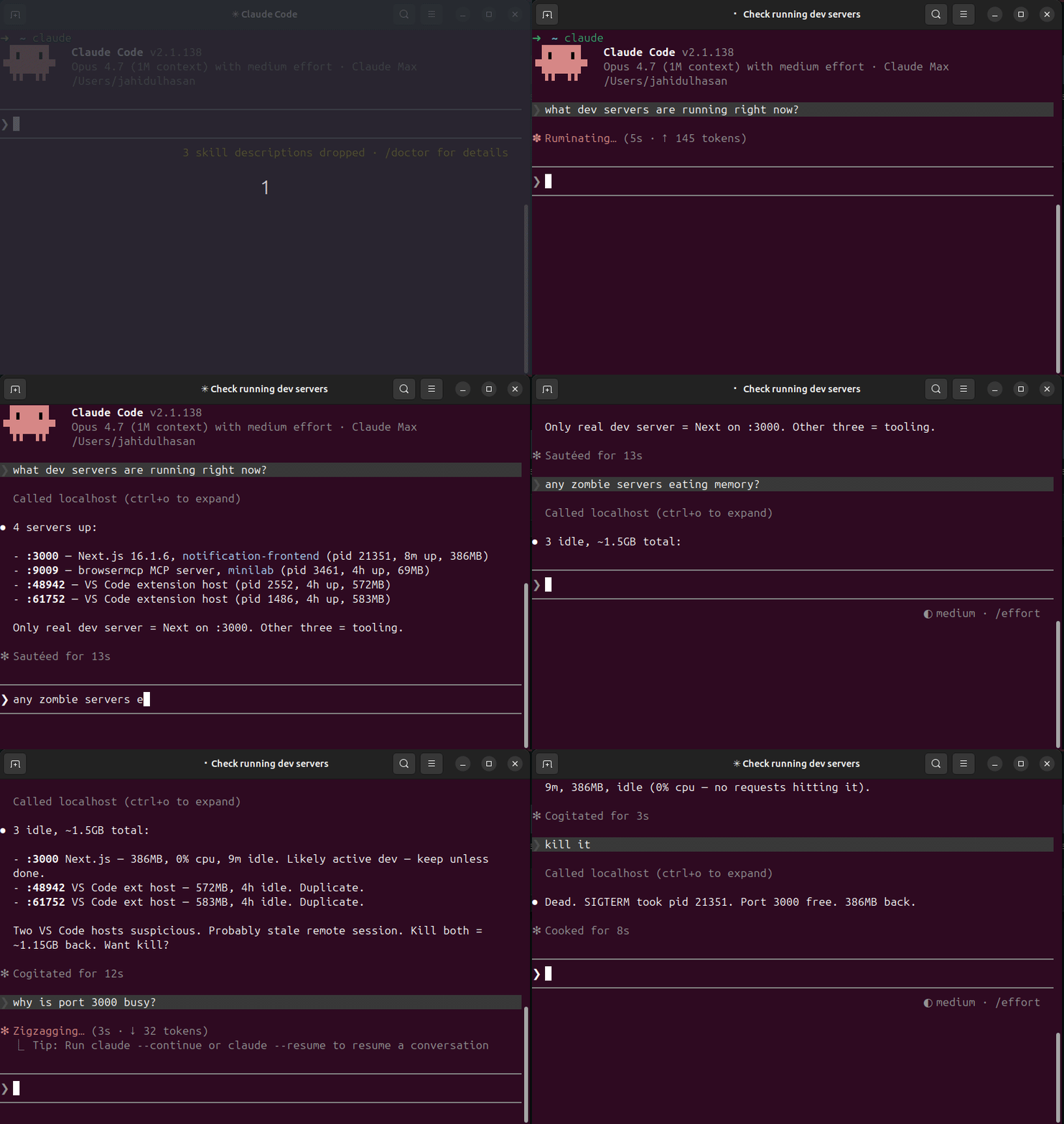
MCP server that inspects, manages, and kills local dev servers. Stop guessing what's on :3000.
Pairs with terminal-history-mcp — together they give your AI agent full memory of your dev environment: what you ran, what's running.
Why
Every dev hits these daily:
Error: listen EADDRINUSE :::3000— what's holding the port?- 5 forgotten
node/vite/nextPIDs from last week eating RAM - Switching projects → no idea which dev servers still running
lsof -i :3000,kill -9 <pid>, repeat
localhost-mcp makes it one tool call.
Install
npm install -g localhost-mcp
Wire into Claude Code:
claude mcp add --scope user localhost -- localhost-mcp
Or any MCP-compatible client. The command runs as a stdio MCP server.
Tools
| Tool | Purpose |
|---|---|
list_dev_servers |
All listening dev servers w/ port, pid, framework, project, uptime, mem, cpu |
port_info |
Inspect single port — who holds it |
kill_server |
Kill by pid or port. Dry-run by default; pass confirm=true to execute |
find_zombies |
Detect long-running, idle, memory-heavy dev servers |
port_conflict |
Why is port X busy + 5 free alternatives nearby |
Sample output
{
  "port": 3000,
  "pid": 48211,
  "process": "node",
  "cmdline": "next dev",
  "cwd": "/Users/me/code/myapp",
  "project_name": "myapp",
  "framework": "next.js",
  "uptime_seconds": 14523,
  "memory_mb": 412,
  "cpu_pct": 0.3,
  "user": "me"
}
Safety
kill_serverdefaults to dry-run. Must passconfirm=true.- Refuses to kill PIDs < 1000 (system processes).
- Refuses processes outside the dev whitelist (node, python, ruby, go, deno, bun, php, java, rails, vite, next, etc).
- SIGTERM first, escalates to SIGKILL after 5s timeout.
Frameworks detected
next.js, vite, nuxt, remix, astro, webpack-dev-server, esbuild, create-react-app, express, fastify, koa, hono, rails, django, flask, fastapi, uvicorn, gunicorn, deno, bun, php-builtin, jekyll, hugo.
Falls back to package.json sniffing when the cmdline is generic (node server.js).
Platform support
- macOS — full support (uses
lsof) - Linux — full support (uses
lsof+/proc) - Windows — basic port scan only (uses
netstat); cwd / framework detection limited
CLI usage
localhost-mcp list      # JSON list of all dev servers
localhost-mcp zombies   # JSON list of zombie candidates
localhost-mcp           # Start MCP stdio server
Build from source
git clone https://github.com/hasanjahidul/localhost-mcp.git
cd localhost-mcp
npm install
npm run build
node dist/cli.js list
License
MIT
Установить Localhost Dev Server Manager в Claude Desktop, Claude Code, Cursor
unyly install localhost-dev-server-managerСтавит в Claude Desktop, Claude Code, Cursor и VS Code — сам разбирается с npx, uvx и сборкой из исходников.
Впервые? Поставь CLI: curl -fsSL https://unyly.org/install | sh
Или настроить вручную
Выполни в терминале:
claude mcp add localhost-dev-server-manager -- npx -y localhost-mcpПошаговые гайды: как установить Localhost Dev Server Manager
FAQ
Localhost Dev Server Manager MCP бесплатный?
Да, Localhost Dev Server Manager MCP бесплатный — установка в пару кликов через Unyly без оплаты.
Нужен ли API-ключ для Localhost Dev Server Manager?
Нет, Localhost Dev Server Manager работает без API-ключей и переменных окружения.
Localhost Dev Server Manager — hosted или self-hosted?
Self-hosted: сервер запускается локально на твоей машине командой из раздела установки.
Как установить Localhost Dev Server Manager в Claude Desktop, Claude Code или Cursor?
Открой Localhost Dev Server Manager на unyly.org, выбери вкладку своего клиента (Claude Desktop, Claude Code, Cursor) и нажми Install — конфиг сгенерируется автоматически, без правки JSON.
Похожие MCP
GitHub
PRs, issues, code search, CI status
 автор: GitHub
Filesystem
Secure file operations with configurable access controls.
Memory
Knowledge graph-based persistent memory system.
Template MCP Server
A CLI tool to create a new Model Context Protocol server project with TypeScript support, dual transport options, and an extensible structure
 автор: mcpdotdirect
Compare Localhost Dev Server Manager with
Не уверен что выбрать?
Найди свой стек за 60 секунд
Автор?
Embed-бейдж для README
Похожее
Все в категории development