
Log Pruner Server
БесплатноНе проверенA Python MCP server that reduces token usage by ~98% when working with log files by auto-detecting format and stripping noise to return only actionable signal.

Описание
A Python MCP server that reduces token usage by ~98% when working with log files by auto-detecting format and stripping noise to return only actionable signal.
README
A Python MCP server that reduces token usage by ~98% when working with log files. Auto-detects file format, strips noise (kubernetes metadata, duplicate fields, boilerplate), and returns only actionable signal. Works with any common log format — no manual conversion needed.
Tools
| Tool | What it does |
|---|---|
read_logs |
Read any log file, return compact table. Auto-detects format and log type (HTTP vs application). |
query_logs |
Query OpenSearch API directly, return compact table |
summarize_logs |
Aggregate summary: level distribution, top loggers/endpoints, error rates |
get_errors |
Full detail for errors — HTTP 5xx, app-log ERROR/WARN, ImpEx failures, stack traces |
get_context |
All entries within N seconds of a timestamp — like grep -C for logs |
Supported Formats
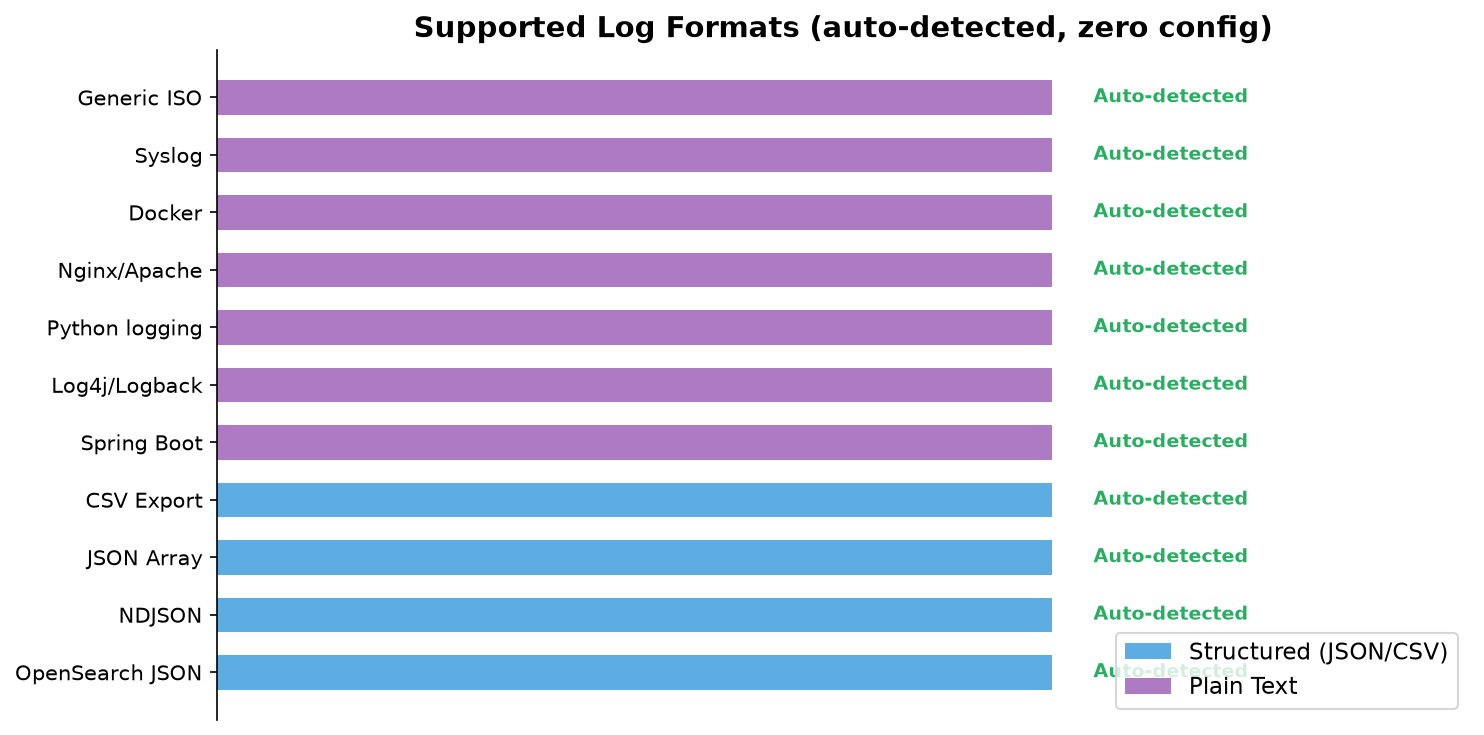
Structured (JSON-based)
| Format | Example source |
|---|---|
| OpenSearch/Elasticsearch JSON | Kibana export, API response (hits.hits[]._source) |
| NDJSON | kubectl logs, docker logs --format json, Fluent Bit, CloudWatch |
| JSON Array | API responses, custom export tools ([{...}, {...}]) |
| OpenSearch/Kibana CSV | Kibana Discover CSV export (with _source.* columns or log column) |
Plain Text
| Format | Pattern |
|---|---|
| Spring Boot | 2026-06-06T15:12:44.842Z INFO 1 --- [thread] logger : message |
| Log4j / Logback | 2026-06-06 15:12:44,842 INFO [thread] [logger] - message |
| Python logging | 2026-06-06 15:12:44,842 - module - ERROR - message |
| Nginx / Apache access | 10.0.0.1 - - [12/Jun/2026:10:53:07 +0000] "GET /path HTTP/1.1" 200 1234 |
| Docker container | 2026-06-06T15:12:44.842Z stdout F message |
| Syslog | Jun 12 10:53:07 hostname process[pid]: message |
| Generic ISO + level | 2026-06-06T15:12:44Z ERROR something broke |
| Generic ISO timestamp | 2026-06-06T15:12:44Z any message here |
Format detection is automatic — just pass any log file path. No configuration needed.
Log Type Auto-Detection
| Type | Detection | Output |
|---|---|---|
| HTTP Access Logs | Has status code, request line, response time | Compact table: timestamp, status, ms, bytes, IP, request |
| Application Logs | Has level, message, thread/logger | Compact table: timestamp, level, thread, message |
If HTTP parsing yields no results, tools automatically fall back to application log parsing.
Domain-Specific Error Detection
SAP Commerce ImpEx
get_errors recognizes ImpEx deployment failures that are often logged at INFO level:
dumped: N(where N > 0) — lines that couldn't be importedcould not import N lines— final failure summaryCan not resolve any more lines— resolution failureImpex import failed— SystemSetupExceptionSHUTTING DOWN— context startup failure
These are surfaced as [IMPEX FAILURE] entries alongside regular errors.
The pattern detection system is extensible — add your own domain-specific patterns to
IMPEX_ERROR_PATTERNSinsrc/parser.py.
Setup
1. Install dependencies
cd log-pruner
pip install -r requirements.txt
2. Configure OpenSearch (optional, for live API access)
export OPENSEARCH_URL="https://your-opensearch-cluster:9200"
export OPENSEARCH_USER="admin"
export OPENSEARCH_PASSWORD="secret"
3. Add to Claude Code
{
  "mcpServers": {
    "log-pruner": {
      "command": "python",
      "args": ["/absolute/path/to/log-pruner/server.py"]
    }
  }
}
For live OpenSearch access, add one entry per environment with connection details:
{
  "mcpServers": {
    "log-pruner-dev": {
      "command": "python",
      "args": ["/absolute/path/to/log-pruner/server.py"],
      "env": {
        "OPENSEARCH_URL": "https://dev-opensearch-cluster:9200",
        "OPENSEARCH_USER": "admin",
        "OPENSEARCH_PASSWORD": "dev-password"
      }
    },
    "log-pruner-staging": {
      "command": "python",
      "args": ["/absolute/path/to/log-pruner/server.py"],
      "env": {
        "OPENSEARCH_URL": "https://staging-opensearch-cluster:9200",
        "OPENSEARCH_USER": "admin",
        "OPENSEARCH_PASSWORD": "staging-password"
      }
    }
  }
}
4. Restart Claude Code
5. Add to your project's CLAUDE.md
## Log Analysis

When the user provides a log file or asks to analyze/debug logs:
- Do NOT read the file with the built-in Read tool — it will flood context
- Pass the file path to the log-pruner MCP tools which strip ~98% of noise:
  - `mcp__log-pruner__read_logs` — compact table from any log file
  - `mcp__log-pruner__summarize_logs` — overview (level distribution, top loggers, error rates)
  - `mcp__log-pruner__get_errors` — all errors with full detail
  - `mcp__log-pruner__get_context` — entries around a specific timestamp
  - `mcp__log-pruner__query_logs` — query live OpenSearch (requires env vars)
Usage Examples
Any Plain Text Log File
read_logs(path="app.log")
→ 1327 app log entries
  TIMESTAMP                | LVL    | THREAD                        | MESSAGE
  2026-06-06T15:12:44Z     | INFO   | main                          | Starting application
  2026-06-06T15:12:45Z     | ERROR  | http-nio-8080-exec-1          | NullPointerException at line 42
  2026-06-06T15:12:46Z     | WARN   | scheduler-1                   | Job took 5000ms
Nginx/Apache Access Logs
read_logs(path="access.log", status_filter="5xx")
→ 3 hits (of 50000 total)
  TIMESTAMP                | ST  |    MS |  BYTES | FROM            | REQUEST
  12/Jun/2026:10:53:07Z    | 500 |       |     56 | 10.0.0.2        | POST /api/login
  12/Jun/2026:10:53:09Z    | 502 |       |      0 | 10.0.0.3        | GET /api/users
NDJSON (kubectl logs, docker logs)
read_logs(path="pod-logs.json")
→ 500 app log entries
  TIMESTAMP                | LVL    | THREAD                        | MESSAGE
  2026-06-06T15:12:44Z     | ERROR  |                               | Connection refused
  2026-06-06T15:12:45Z     | INFO   |                               | Retrying in 5s...
Aggregate Summary
summarize_logs(path="deployment.log")
→ === App Log Summary (3808 entries) ===

  Level distribution:
    INFO: 3749 (98.5%)
    WARN: 55 (1.4%)
    ERROR: 4 (0.1%)

  Top 10 loggers:
    3012x  de.hybris.platform.impex.jalo.imp.ImpExWorker
     215x  de.hybris.platform.servicelayer.impex.impl.DefaultImportService
     ...

  Warnings/Errors (22 unique):
    [WARN] column absolute of type Discount is read-only...
    [ERROR] Can not resolve any more lines...
Error Detection (with ImpEx awareness)
get_errors(path="deployment.log")
→ === ImpEx Failures (3) ===

  [IMPEX FAILURE] 2026-06-06T15:12:46Z
    Thread:  main
    Logger:  de.hybris.platform.impex.jalo.cronjob.ImpExImportJob
    Message: Can not resolve any more lines ... Aborting further passes (at pass 3).

  === Errors (2) ===

  [ERROR] 2026-06-06T15:12:46Z
    Thread:  main
    Logger:  de.hybris.platform.core.Initialization
    Message: SystemSetupException: Impex import failed for : '00037874-ImpEx-Import'
Troubleshooting Workflow
1. read_logs(path="file.log")                    → Quick scan (compact, low tokens)
2. summarize_logs(path="file.log")               → Level distribution, top loggers
3. get_errors(path="file.log")                   → All errors + ImpEx failures
4. get_context(path="file.log", timestamp="..")  → Entries around a specific time
Token Savings
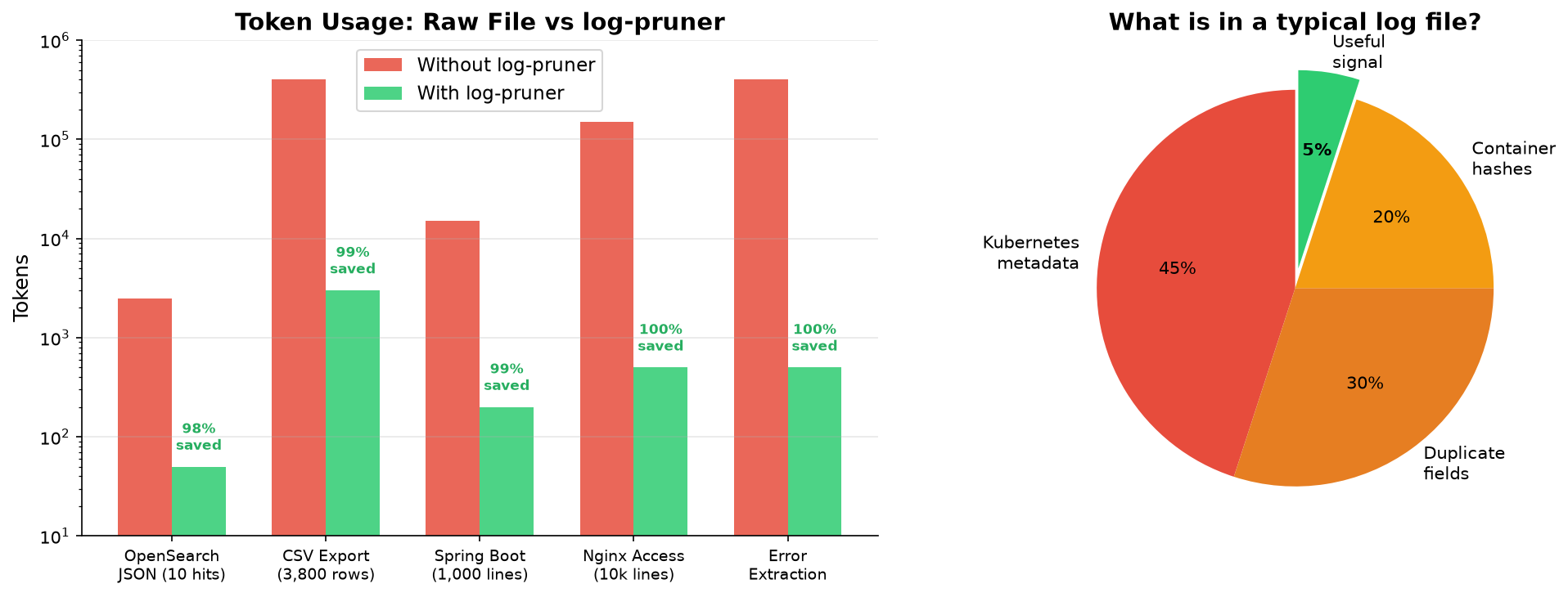
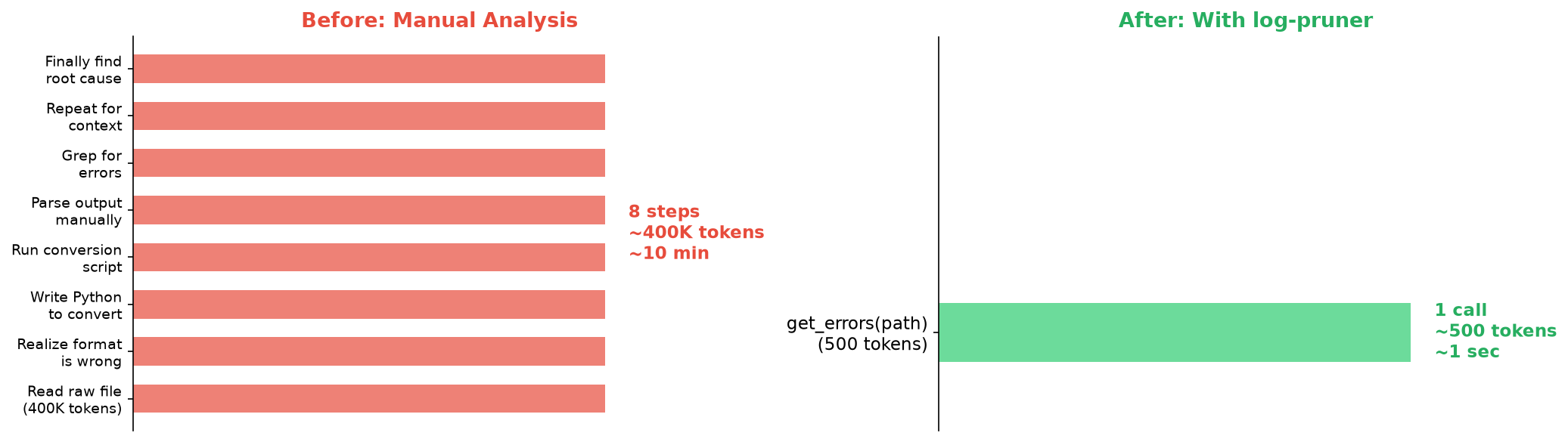
| Input | Without log-pruner | With log-pruner | Savings |
|---|---|---|---|
| 10-hit OpenSearch JSON | ~2,500 tokens | ~50 tokens | ~98% |
| 4MB CSV export (3,800 rows) | ~400,000 tokens | ~3,000 tokens | ~99% |
| 1000-line Spring Boot log | ~15,000 tokens | ~200 tokens | ~99% |
| Nginx access log (10k lines) | ~150,000 tokens | ~500 tokens | ~99% |
| Error extraction from any format | ~400,000 tokens | ~500 tokens | ~99% |
Limitations
- Plain text parsing relies on pattern matching — custom formats without a recognized timestamp pattern won't be parsed (lines are skipped)
- Application log parsing expects JSON in the
logfield or directlevel/messagefields - ImpEx detection is pattern-based — custom error messages outside the known patterns won't be caught
- API mode requires
opensearch-pyand env vars configured - Time filtering uses string comparison (works for ISO timestamps; approximate for other formats)
Установка Log Pruner Server
У этого сервера нет опубликованного пакета — он собирается из исходников. Открой репозиторий и следуй инструкции в README.
▸ github.com/nrapendra-singh/mcp-log-prunerFAQ
Log Pruner Server MCP бесплатный?
Да, Log Pruner Server MCP бесплатный — установка в пару кликов через Unyly без оплаты.
Нужен ли API-ключ для Log Pruner Server?
Нет, Log Pruner Server работает без API-ключей и переменных окружения.
Log Pruner Server — hosted или self-hosted?
Self-hosted: сервер запускается локально на твоей машине командой из раздела установки.
Как установить Log Pruner Server в Claude Desktop, Claude Code или Cursor?
Открой Log Pruner Server на unyly.org, выбери вкладку своего клиента (Claude Desktop, Claude Code, Cursor) и нажми Install — конфиг сгенерируется автоматически, без правки JSON.
Похожие MCP
GitHub
PRs, issues, code search, CI status
 автор: GitHub
Filesystem
Secure file operations with configurable access controls.
Memory
Knowledge graph-based persistent memory system.
Template MCP Server
A CLI tool to create a new Model Context Protocol server project with TypeScript support, dual transport options, and an extensible structure
 автор: mcpdotdirect
Compare Log Pruner Server with
Не уверен что выбрать?
Найди свой стек за 60 секунд
Автор?
Embed-бейдж для README
Похожее
Все в категории development