
Loopeng
БесплатноНе проверенWatches your terminal sessions, identifies repetitive workflows, and converts them into callable MCP tools so AI agents can automate them.

Описание
Watches your terminal sessions, identifies repetitive workflows, and converts them into callable MCP tools so AI agents can automate them.
README

loopEng watches what you do by hand in your terminal and turns the steps you keep repeating into callable MCP tools — so your AI agents can do them for you.
What is loopEng?
loopEng is a local meta-agent that runs quietly in your terminal alongside Claude Code and Codex. It:
- Watches your coding sessions as they happen.
- Finds the workflows you keep doing by hand.
- Proposes them to you in a terminal dashboard.
- On your approval, turns each one into:
- a loop —
loop.mdoperating instructions wired into Claude Code or Codex, and - a callable MCP tool — the same workflow as a parameterized command sequence your agents can invoke directly.
- a loop —
You review proposals. You approve the ones that make sense. Everything stays on your machine — the only LLM calls go through your configured runner (claude -p by default). loopEng never phones home.
"True productivity isn't typing faster; it's stopping the need to type the same thing twice."
How it works
loopEng is a small local pipeline that runs continuously in the background:
Claude Code / Codex sessions
       │
       ▼
  [watcher]  — a launchd daemon notices each new session transcript
       │
       ▼
  [digester] — compresses + redacts each session to a compact text digest
       │
       ▼
  [engine]   — sends digests to your configured runner, looks for recurring patterns
       │
       ▼
  [inbox]    — strong candidates land as proposals; you review and approve
       │
       ├──▶ [loop]      — loop.md + trigger + manifest wired into Claude Code / Codex
       │
       └──▶ [mcp tool]  — the same workflow as a callable tool on the loopeng-tools server
Everything above runs on your machine. The engine uses your own Claude credits — no separate service, no subscription, no cloud component.
Install
curl -fsSL https://raw.githubusercontent.com/issadevs/loopeng/main/install.sh | bash
The installer:
- clones the repo to
~/.loopeng-app, runsnpm install+npm run build, and links theloopengbinary to your PATH, - installs the Fable 5 prompt to
~/.loopeng/prompts/fable.mdand the/fablecommand to~/.claude/commands/fable.md.
Re-running the same command updates an existing install to the latest version.
Then finish setup:
loopeng setup
loopeng setup writes ~/.loopeng/config.json, installs a SessionStart trigger hook into ~/.claude/settings.json, and installs + loads a launchd daemon (com.loopeng.daemon).
Options:
loopeng setup --companion manual   # configure companion mode (auto | manual | off)
loopeng setup --no-daemon          # configure without the background daemon
Requirements: Node ≥ 20, git, the Claude Code CLI (claude) in your PATH, macOS (the daemon uses launchd; Windows/Linux support is on the roadmap).
The dashboard
loopeng
Running loopeng with no arguments opens the full-terminal hub:
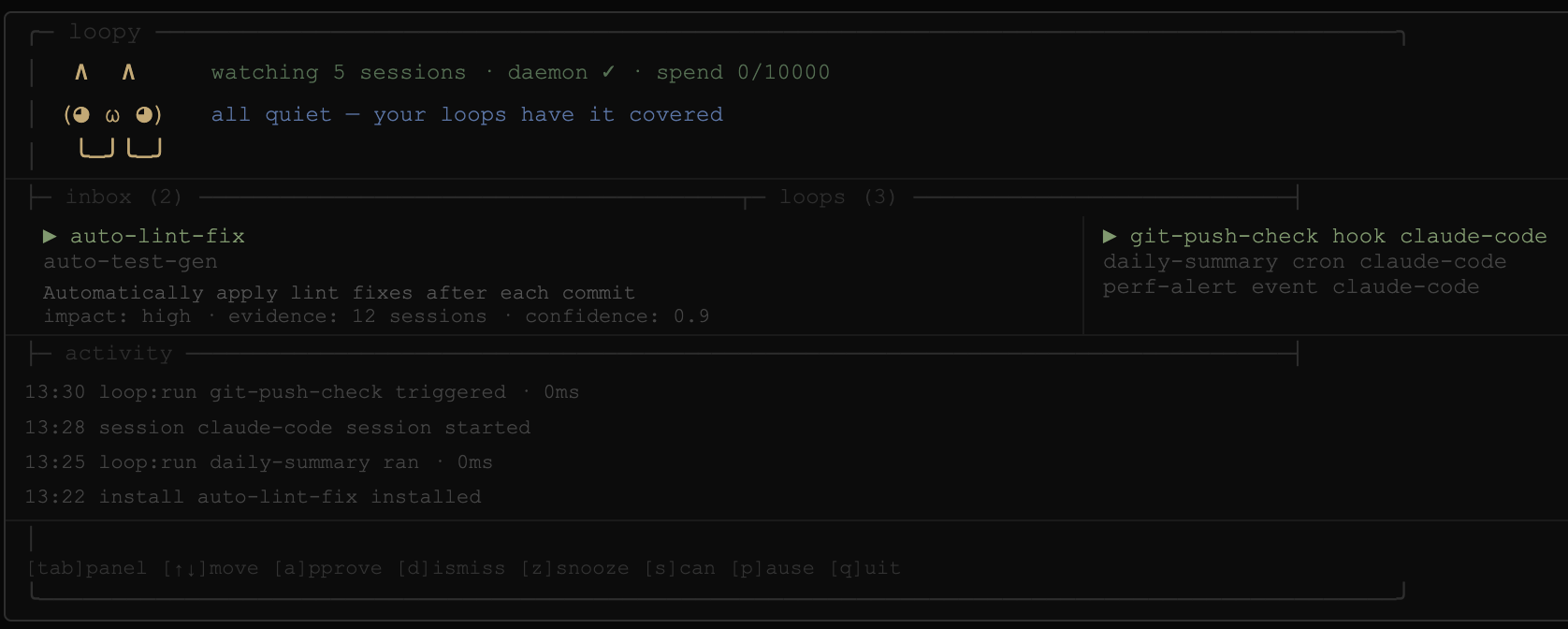
The header shows your agent (loopEng) with live status: sessions watched · daemon state · today's token spend vs cap.
Three panels:
- inbox — pending proposals. Select one to see its summary, estimated impact, evidence count, and confidence score.
- loops — your installed loops, with trigger kind and target tool.
- activity — a scrolling log of everything loopEng has done in the background.
Keys:
| Key | Action |
|---|---|
tab |
Cycle focus: inbox → loops → activity |
↑ / k, ↓ / j |
Move within the focused panel |
a |
Approve the selected proposal (confirm y / n) |
d |
Dismiss the selected proposal (confirm y / n) |
z |
Snooze the selected proposal for 7 days |
x |
Uninstall the selected loop (confirm y / n) |
s |
Trigger a scan now |
p |
Pause / resume the daemon |
q |
Quit |
The dashboard resizes with your terminal. At 60×16 and above it uses the full two-column layout; in tighter panes it switches to a compact one-panel view. In an interactive terminal, it uses a restrained color theme for status, focus, and actions; logs and non-TTY output stay plain, and NO_COLOR=1 disables color.
Commands
| Command | What it does |
|---|---|
loopeng |
Open the full-terminal dashboard |
loopeng review |
Open the dashboard focused on the proposal inbox |
loopeng companion |
Alias for the bare loopeng command |
loopeng setup [--companion <mode>] [--no-daemon] |
Initialize config, trigger hook, and daemon |
loopeng scan |
Analyze local digests and surface new proposals now |
loopeng define <id> [--describe <text>] [--file <path>] |
Define a phased pipeline — from a plain-English description (AI), interactively, or JSON |
loopeng run <id> [--dry-run] [--restart] |
Run or resume a pipeline, driving the agent phase by phase |
loopeng pipelines |
List defined pipelines |
loopeng list |
List installed loops |
loopeng uninstall <id> |
Remove a loop and everything it installed |
loopeng pause / loopeng resume |
Pause / resume the background daemon |
loopeng status |
Show daemon state, today's token spend, and pending proposal count |
loopeng tools |
List the callable MCP tools generated from your workflows |
loopeng tools-register |
Register the loopeng-tools MCP server in Claude Code (~/.claude.json) |
loopeng mcp-register |
Register the loopeng control-surface MCP server in Claude Code |
loopeng forget <id> |
Delete a pipeline |
loopeng mcp-tools |
Run the loopeng-tools MCP server (stdio) |
loopeng mcp |
Run loopEng's control-surface MCP server (stdio) |
loopeng mark |
Drop a session marker (used by the trigger hook) |
loopeng daemon |
Run the watcher in the foreground |
What an approved proposal produces
Each approved proposal becomes a bundle at ~/.loopeng/bundles/<id>/:
loop.md          — operating instructions an agent reads and follows
trigger.json     — schedule, hook, or manual trigger metadata
manifest.json    — evidence, target tool, and every path the install touched
tool.json        — the workflow as a callable MCP tool (best-effort; see below)
state/           — loop-local state (persists across runs)
manifest.json records every path the install created, which is what makes loopeng uninstall <id> exact — it removes only those paths, with no guesswork.
The loop.md is generated by a maker → checker pass: the maker writes six fixed sections (Responsibility, Trigger & cadence, Procedure, Verification, Convergence, Escalation) plus a trigger block, and the checker rejects vague verification, missing caps, or invented tools before the bundle is written.
Pipelines — drive Claude through defined phases
Some work is a recurring sequence: you tell the agent what to build, then "now test", then "refactor", then "open a PR" — each step waiting on the last. A pipeline captures that as phases you define, and loopEng pilots the agent through them one phase at a time, checking a gate before advancing.
The fastest way is to describe it in plain English — loopEng drafts the phases for you (and infers gates from your project's scripts), then you confirm:
loopeng define ship-feature --describe "implement the change, test until green, refactor, open a PR"
You can also define one interactively (loopeng define ship-feature, answering a phase at a time), inspect it (loopeng pipelines ship-feature), preview it (loopeng run ship-feature --dry-run), or hand-write the JSON:
{
  "description": "ship a feature end to end",
  "phases": [
    { "name": "implement", "instruction": "Implement the requested change." },
    { "name": "test",       "instruction": "Run the tests and fix any failures.", "gate": ["npm", "test"], "maxAttempts": 3 },
    { "name": "refactor",   "instruction": "Clean up the implementation; tests must stay green.", "gate": ["npm", "test"] },
    { "name": "pr",         "instruction": "Open a pull request summarizing the change." }
  ]
}
loopeng define ship-feature --file ship.json
loopeng run ship-feature          # runs the agent per phase; advances only when the gate passes
loopeng run ship-feature          # if it stopped, re-running resumes at the stuck phase
loopeng run ship-feature --restart   # start over from phase 1
- A gate is an
argvcommand run withexecFile(no shell); exit 0 advances. On failure the phase re-runs up tomaxAttempts, with the gate's output fed back to the agent so it can fix the issue. - loopEng persists progress between phases, so a stopped or interrupted run resumes where it left off.
- Gates can't be a shell/interpreter (
bash,python, …) — same guard as generated tools.
From workflow to callable MCP tool
A loop.md is prose an agent reads and follows. The next step is a tool an agent calls and runs. On approval, loopEng also tries to synthesize a tool.json — the same workflow as a parameterized sequence of argv commands — and exposes it on the loopeng-tools MCP server.
The synthesis is grounded in what you actually did:
- loopEng resolves the proposal's evidence back into the real command lines from your sessions,
- infers parameters from the tokens that varied across runs (e.g. a branch name),
- and a deterministic gate rejects any step whose command you were never observed running — so a generated tool can't invent
kubectlbecause the model felt like it.
loopeng tools            # list the callable tools loopEng has generated
loopeng tools-register   # register the loopeng-tools server in Claude Code
loopeng mcp-tools        # run the loopeng-tools MCP server (stdio)
Once registered, an agent session can call e.g. deploy_staging(branch="main") and loopEng runs the captured steps.
Safety. Generated tools never run through a shell. Each step is an argv array executed with execFile, and parameter values are substituted as single literal tokens — so a value like main; rm -rf / is passed verbatim as one argument, never interpreted. Each step runs with a timeout (120s) and bounded output. A tool exists only because you approved the proposal it came from.
MCP servers
loopEng ships two MCP servers, both stdio:
loopeng mcp — control surface
Lets an agent drive loopEng itself. Register it with loopeng mcp-register (writes { "mcpServers": { "loopeng": { "command": "loopeng", "args": ["mcp"] } } } into ~/.claude.json), or claude mcp add loopeng -- loopeng mcp.
- Tools:
proposals_list,proposals_get,proposals_approve,proposals_dismiss,proposals_snooze,scan,loops_list,loops_uninstall,events,status,pipelines_list,pipeline_show,pipeline_define,pipeline_run - Resources:
loopeng://proposals/{id},loopeng://events,loopeng://status
loopeng mcp-tools — your workflows as tools
Exposes every installed loop that has a tool.json as a callable tool. When none exist yet, it exposes a single loopeng_tools_help tool that explains how to generate one. loopeng tools-register adds it to ~/.claude.json as:
{ "mcpServers": { "loopeng-tools": { "command": "loopeng", "args": ["mcp-tools"] } } }
Use loopEng from Claude Code
Two ways, depending on whether you or the agent drives it:
As a CLI — run any command from your shell. The loopeng binary is on your PATH, so you can run it anywhere, including straight from the Claude Code prompt with the ! prefix:
! loopeng status
! loopeng scan
! loopeng pipelines
! loopeng run ship --dry-run
! loopeng define ship --describe "implement the change, test until green, open a PR"
(In a dev checkout without a global install, use npm run dev -- <command>.)
As an MCP server — let the Claude Code agent drive loopEng. Register the control surface once:
loopeng mcp-register # or: claude mcp add loopeng -- loopeng mcp
Now, inside a Claude Code conversation, you can just ask — the agent calls loopEng's tools:
- "scan my sessions and list the loop proposals" →
scan,proposals_list - "approve proposal
verify-before-handoff" →proposals_approve - "define a pipeline
shipthat implements, tests, then opens a PR" →pipeline_define - "dry-run the
shippipeline" →pipeline_run(withdryRun)
A real
pipeline_runexecutes one agent run per phase and can take a while; prefer the CLI for long runs, anddryRunto preview from within a conversation.
Privacy & security
Transcripts stay on your machine. Always. loopEng never contacts an external service of its own — the only network egress is whatever your own claude / codex CLI does.
What leaves your machine, and where it goes. During a scan, loopEng builds compact digests of your sessions (commands, messages, errors) and sends them to your configured runner (claude -p by default) so it can propose loops. With scope: "project" only the current project's sessions are included; with scope: "all" (default) every project on the machine is. Set the scope to match how much you want analysed.
Secret redaction (best-effort). Before a digest is sent or written, loopEng redacts:
- Private key blocks (
-----BEGIN … PRIVATE KEY-----) - API keys/tokens with known prefixes (
sk-,ghp_,gho_,ghs_,github_pat_,xoxb-,xapp-, …), AWS keys (AKIA…), Google keys (AIza…), JWTs (eyJ…), andBearertokens key=value/key: valuepairs with a credential-ish key (password,secret,token,api_key, …)- URL credentials (
//user:pass@host) and high-entropy strings
Redaction is pattern-based and not guaranteed — a low-entropy or all-lowercase secret (e.g. a bare hex token) can slip through. Treat digests as sensitive.
On-disk. State under ~/.loopeng (digests and generated loops) is written owner-only (0600 files, 0700 directories). JSON state reads are capped before parsing to avoid loading unexpectedly huge config/registry/proposal files.
Running approved loops is code execution. Approving a proposal can install an automation that runs on a schedule or on Claude Code events:
- Tool specs (
loopeng-tools) execute viaexecFile(no shell); a generated command naming a shell/interpreter (bash,sh,python,node, …) asargv[0]is rejected, and parameter values can't inject extra commands. - Loop bundles run your configured runner with the loop prompt — an autonomous agent with that runner's permissions. Review what you approve; only approve loops whose actions you understand.
Configuration & on-disk layout
Configuration lives at ~/.loopeng/config.json:
{
  "companion": "auto",
  "dailyTokenCap": 100000,
  "pollIntervalMin": 15,
  "runnerCommand": "claude",
  "runnerArgs": ["-p"],
  "runnerTimeoutMs": 120000,
  "claudeProjectsDir": "~/.claude/projects",
  "codexSessionsDir": "~/.codex/sessions",
  "scope": "all",
  "recentWindowHours": 4,
  "scanMaxAttempts": 1,
  "scanMaxDigestChars": 60000,
  "eventsMaxBytes": 524288,
  "eventsKeepLines": 1000,
  "mcpToolStepTimeoutMs": 120000,
  "mcpToolMaxOutputBytes": 262144,
  "dashboardBusyTickMs": 333,
  "dashboardRefreshMs": 5000,
  "watcherMarkerDebounceMs": 2000,
  "pipelineMaxPhases": 30,
  "pipelineMaxInstructionChars": 8000,
  "pipelineMaxGateArgv": 32,
  "pipelineMaxAttempts": 10,
  "pipelineDefaultMaxAttempts": 1,
  "pipelineGateTimeoutMs": 120000,
  "pipelineGateMaxOutputBytes": 1048576
}
- companion —
auto(open a companion window when work is found),manual, oroff - dailyTokenCap — the engine reserves a conservative estimate before each scan and skips once the day's budget is spent
- pollIntervalMin — how often the daemon re-scans for new sessions
- runnerCommand / runnerArgs / runnerTimeoutMs — runner binary, flags, and timeout used for engine scans and Claude Code loop installs. Add model or permission flags here, e.g.
["-p", "--model", "claude-sonnet"]. - claudeProjectsDir / codexSessionsDir — transcript roots.
~is expanded. - scope, recentWindowHours, scanMaxAttempts, scanMaxDigestChars — scan scope, active-session window, retry count, and max digest payload.
- eventsMaxBytes / eventsKeepLines — event log rotation threshold and retained line count.
- mcpToolStepTimeoutMs / mcpToolMaxOutputBytes — timeout and output cap for generated MCP tools.
- dashboardBusyTickMs / dashboardRefreshMs / watcherMarkerDebounceMs — UI refresh and watcher debounce intervals.
- pipelineMaxPhases / pipelineMaxInstructionChars / pipelineMaxGateArgv — validation caps when defining a pipeline.
- pipelineMaxAttempts / pipelineDefaultMaxAttempts — upper bound and default for a phase's retry count.
- pipelineGateTimeoutMs / pipelineGateMaxOutputBytes — per-gate command timeout and output buffer cap.
Environment overrides:
LOOPENG_RUNNER_COMMAND,LOOPENG_RUNNER_ARGS,LOOPENG_RUNNER_TIMEOUT_MSLOOPENG_JSON_READ_MAX_BYTES(default8388608)LOOPENG_CLAUDE_PROJECTS_DIR,LOOPENG_CODEX_SESSIONS_DIR- existing one-off scope overrides:
LOOPENG_SCOPE,LOOPENG_PROJECT
Everything loopEng writes lives under ~/.loopeng/:
~/.loopeng/
├ config.json        — the config above
├ digests/           — one redacted text digest per session
├ proposals/         — one JSON file per proposal
├ bundles/<id>/      — generated bundles (loop.md, trigger.json, manifest.json, tool.json, state/)
├ registry/          — installed.json, dismissed.json
├ markers/           — session-start markers dropped by the trigger hook
├ prompts/fable.md   — the Fable 5 system prompt
└ log/               — events.jsonl, spend.json, watch.json, pattern-memory.txt
/fable — Claude Fable 5 slash command
The installer drops a /fable slash command into ~/.claude/commands/, available in any Claude Code session:
/fable <your prompt>
It routes your prompt through the full Claude Fable 5 system prompt and model, inline, without leaving your session or switching your model. Under the hood it spawns:
claude -p --model claude-fable-5 --system-prompt-file ~/.loopeng/prompts/fable.md
and returns the output inline.
The never-guilt principle
loopEng may suggest automation, but it never shames you for ignoring, snoozing, or dismissing a proposal. A quiet tool beats a nagging one. Your inbox, your call.
Development
git clone https://github.com/issadevs/loopeng.git
cd loopeng
npm install
npm run build
npm link
Scripts:
npm run build       # tsc → dist/
npm run typecheck   # tsc --noEmit
npm test            # vitest run
npm run dev         # tsx src/index.ts
Run the full check the way CI does:
npm run typecheck && npm test
loopEng is early software. It watches Claude Code and Codex sessions on macOS via launchd. Windows/Linux daemon support is on the roadmap.
Установка Loopeng
У этого сервера нет опубликованного пакета — он собирается из исходников. Открой репозиторий и следуй инструкции в README.
▸ github.com/Issadevs/loopengFAQ
Loopeng MCP бесплатный?
Да, Loopeng MCP бесплатный — установка в пару кликов через Unyly без оплаты.
Нужен ли API-ключ для Loopeng?
Нет, Loopeng работает без API-ключей и переменных окружения.
Loopeng — hosted или self-hosted?
Self-hosted: сервер запускается локально на твоей машине командой из раздела установки.
Как установить Loopeng в Claude Desktop, Claude Code или Cursor?
Открой Loopeng на unyly.org, выбери вкладку своего клиента (Claude Desktop, Claude Code, Cursor) и нажми Install — конфиг сгенерируется автоматически, без правки JSON.
Похожие MCP
Fetch
Web content fetching and conversion for efficient LLM usage.
AWS KB Retrieval
Retrieval from AWS Knowledge Base using Bedrock Agent Runtime.
 автор: modelcontextprotocol
Spring AI MCP Server
Provides auto-configuration for setting up an MCP server in Spring Boot applications.
llm-analysis-assistant
A very streamlined mcp client that supports calling and monitoring stdio/sse/streamableHttp, and can also view request responses through the /logs page. It also
 автор: xuzexin-hz
Compare Loopeng with
Не уверен что выбрать?
Найди свой стек за 60 секунд
Автор?
Embed-бейдж для README
Похожее
Все в категории ai