
Loudcheck
БесплатноНе проверенLoudness compliance verdicts against formal broadcast standards (EBU R128, ATSC A/85). Measures audio/video with ffmpeg and returns a pass/fail verdict with exa

Описание
Loudness compliance verdicts against formal broadcast standards (EBU R128, ATSC A/85). Measures audio/video with ffmpeg and returns a pass/fail verdict with exact deltas and remediation parameters.
README
A loudness compliance verdict, not raw meter output. loudcheck measures
a media file with ffmpeg and answers the question that actually matters —
does this file pass the spec? — against formal published standards:
- EBU R 128 (European broadcast: −23.0 LUFS ±0.5 LU, max −1 dBTP)
- ATSC A/85 (US television: −24 LKFS ±2 dB, true peak below −2 dBTP)
- BS.1770 (measure-only: BS.1770 defines no compliance target, so this
mode returns verdict
measuredwith the numbers and no judgment)
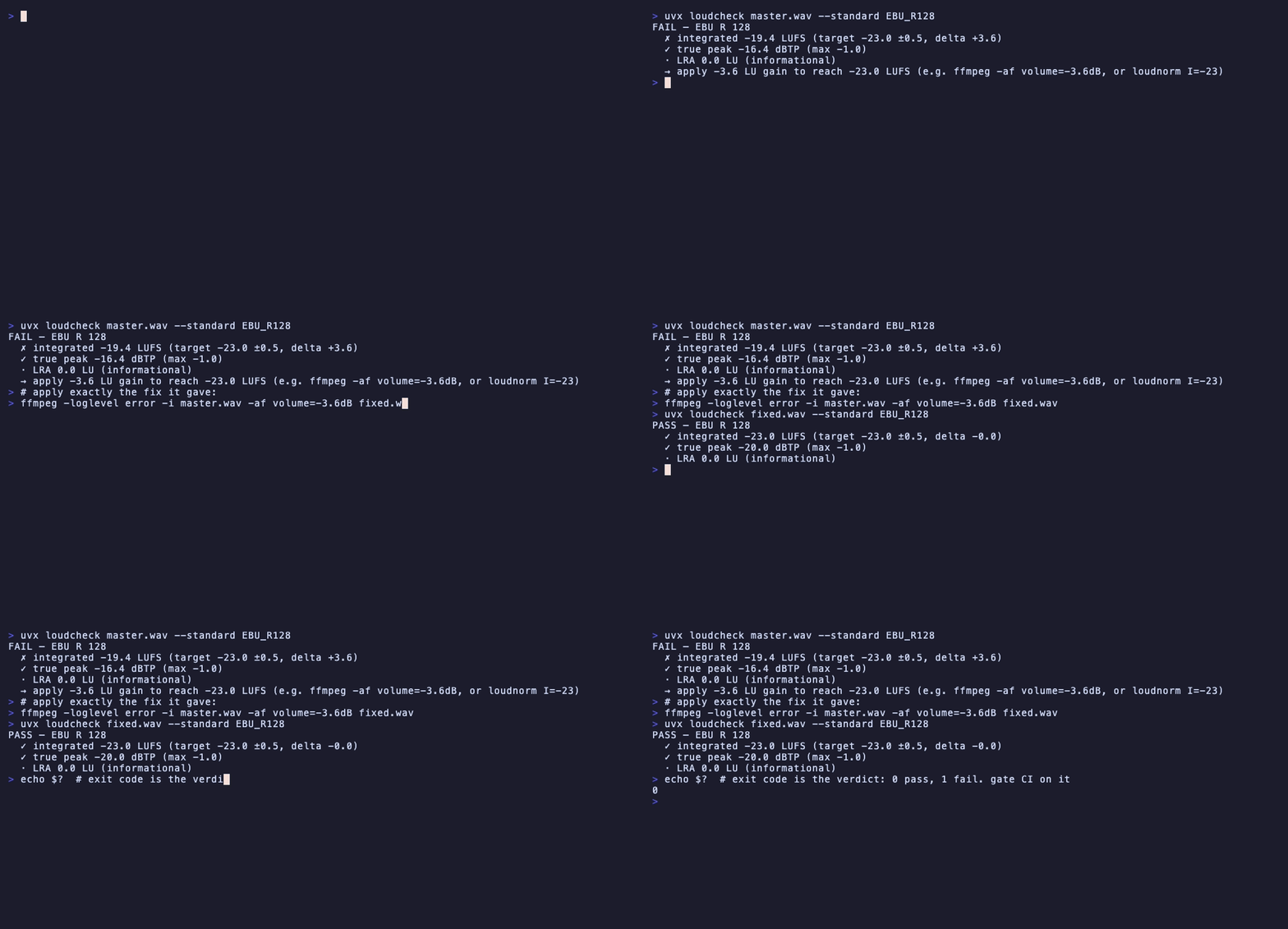
$ loudcheck master.wav --standard EBU_R128
FAIL — EBU R 128
  ✗ integrated -19.4 LUFS (target -23.0 ±0.5, delta +3.6)
  ✓ true peak -16.3 dBTP (max -1.0)
  · LRA 0.0 LU (informational)
  → apply -3.6 LU gain to reach -23.0 LUFS (e.g. ffmpeg -af volume=-3.6dB, or loudnorm I=-23)
Ships as a CLI and an MCP tool over one engine, so agents and humans get the identical verdict.
Why this exists
An agent (or an engineer) can run ffmpeg's ebur128 filter and get numbers.
What it can't get from a shell is the verdict — that requires knowing the
standard's target, tolerance, and gating, and interpreting integrated
loudness vs. LRA vs. true peak against them. Loudness is one of the most
common causes of delivery rejection, and the gap is not measurement — it's
the standards-aware answer. That's the whole tool.
Install
Requires Python 3.10+ and ffmpeg 5.0+ on PATH.
uvx loudcheck file.wav          # zero-install run (requires ffmpeg >= 5.0 on PATH)
pip install loudcheck           # CLI
pip install "loudcheck[mcp]"    # + MCP server
From a clone: pip install -e ".[mcp,dev]".
CLI
loudcheck file.wav                          # EBU R128 by default
loudcheck file.mp4 --standard ATSC_A85      # first audio stream of a video
loudcheck file.wav --json                   # full structured verdict
loudcheck file.wav --standard BS_1770       # measurement only, no gates
loudcheck file.mov --all-streams            # verdict every audio track
loudcheck file.mov --stream 1               # a specific audio track
loudcheck file.wav --detailed               # + max momentary / short-term
loudcheck masters/ --standard EBU_R128      # batch a directory -> table
loudcheck a.wav b.wav c.wav                 # batch multiple files
loudcheck --schema                          # print the tool definition
Batch mode prints one line per file (plus remediation for fails) and a
summary; --json in batch emits an array. Exit code is 1 if any file
fails.
For agents
- Exit codes carry the verdict:
0= pass,1= fail (non-compliant),2= error (missing file, no audio stream, no ffmpeg). Gate a delivery on the exit code alone. --jsonis the full contract: overallverdict, per-metricmeasured/target/tolerance/delta/passwith the spec citation attached to every gated metric,failuresin plain English, andremediationwith the exact correction — a fail 2.3 LU over target tells you to apply −2.3 LU gain and hands you the ffmpeg incantation. This tool never applies the fix (measurement and verdict only); the agent one-shots it withloudnormusing the delta provided.- MCP: register
loudcheck-mcp(stdio; orloudcheck --mcp, orpython -m loudcheck.mcp_server). Zero-install:uvx --from 'loudcheck[mcp]' loudcheck --mcp. Tools:check_loudness(path, standard)→ same JSON as the CLI, andlist_standards()→ the catalog with citations. Verified againstmcp==1.28.1. tool.jsonat the repo root describes the surface machine-readably — or fetch it live from any install withloudcheck --schema(the file ships inside the package; a test keeps the two copies in sync).- ffmpeg version is part of the contract: every verdict includes
measurement_context.ffmpeg_version. Minimum supported: 5.0. Developed and verified against 8.1.
The scope guardrail (read before contributing)
Only formal, stable standards live in this repo; per-platform delivery templates (Netflix, DPP, Apple TV+, Amazon, broadcaster specs) never do. Platform specs change unilaterally and cover far more than loudness — the moment they enter, this stops being a near-zero-maintenance community tool and becomes a yearly-maintenance product. If a PR adds a target that a platform can change on its own, it belongs in a separate template layer built on top of this primitive, not here.
Contributions of additional formal standards (e.g. a plain ITU-R BS.1770 mode) are welcome: a standard is pure data in loudcheck/standards.py — targets, tolerances, and citations. No code changes required.
How it measures
One ffmpeg pass with loudnorm=print_format=json (analysis mode) yields
integrated loudness, loudness range, true peak (oversampled dBTP per
BS.1770), and the gating threshold. The test suite cross-checks loudnorm's
reading against ffmpeg's independent ebur128 implementation — the two must
agree within 1 LU for CI to pass, so an ffmpeg release that changes filter
behavior is caught by the suite, not by users.
Verification corpus
pytest generates calibrated test tones on the fly (no binaries in the
repo): per BS.1770's calibration statement, a mono 997 Hz sine at 0 dBFS
reads −3.01 LKFS, so tones are generated at exact known loudness — compliant,
too loud, too quiet, and true-peak-hot — and every verdict must match its
known expectation.
Out of scope, permanently
Loudness correction (use ffmpeg loudnorm with the delta this tool gives
you) · full-file QC (codec/colour/cadence) · real-time monitoring · GUIs ·
platform delivery templates (see guardrail).
License
MIT
Установка Loudcheck
У этого сервера нет опубликованного пакета — он собирается из исходников. Открой репозиторий и следуй инструкции в README.
▸ github.com/chaoz23/loudcheckFAQ
Loudcheck MCP бесплатный?
Да, Loudcheck MCP бесплатный — установка в пару кликов через Unyly без оплаты.
Нужен ли API-ключ для Loudcheck?
Нет, Loudcheck работает без API-ключей и переменных окружения.
Loudcheck — hosted или self-hosted?
Self-hosted: сервер запускается локально на твоей машине командой из раздела установки.
Как установить Loudcheck в Claude Desktop, Claude Code или Cursor?
Открой Loudcheck на unyly.org, выбери вкладку своего клиента (Claude Desktop, Claude Code, Cursor) и нажми Install — конфиг сгенерируется автоматически, без правки JSON.
Похожие MCP
Omni Video
An MCP server that transforms LLM-enabled IDEs into professional video editors by pre-processing footage into text proxies, generating motion graphics via HTML/
 автор: buildwithtaza
ARA
Generate images, video and audio from any AI agent — one connector.
 автор: ARA
YouTube
Transcripts, channel stats, search
 автор: YouTube
EverArt
AI image generation using various models.
 автор: modelcontextprotocol
Compare Loudcheck with
Не уверен что выбрать?
Найди свой стек за 60 секунд
Автор?
Embed-бейдж для README
Похожее
Все в категории media