
Magic Wand
БесплатноНе проверенEnables AI agents to interactively remove image backgrounds using a Paint.NET-style magic wand tool with live visual feedback and precision helpers.

Описание
Enables AI agents to interactively remove image backgrounds using a Paint.NET-style magic wand tool with live visual feedback and precision helpers.
README
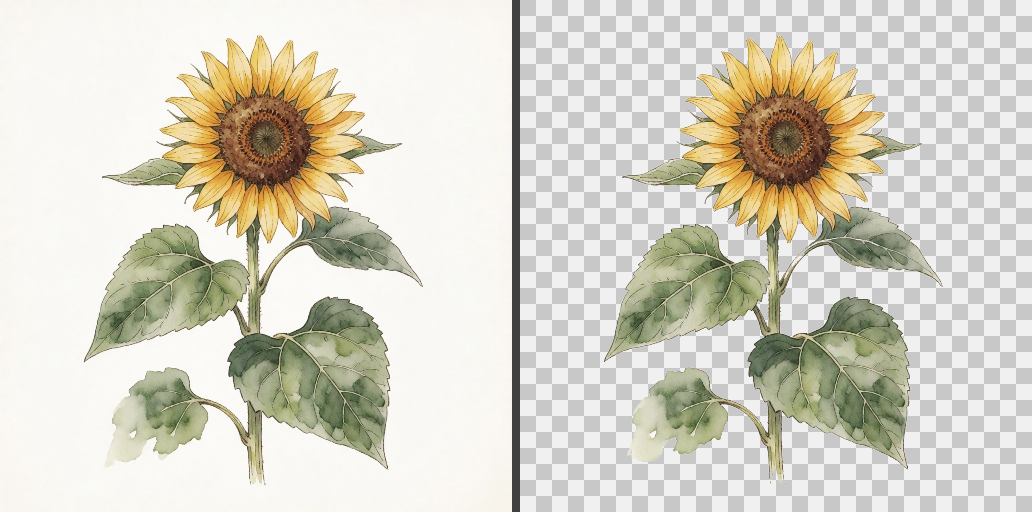
A Paint.NET-style magic wand that an AI can use. Point Claude (or any MCP-capable agent) at an image, and it removes the background the way a careful human would: click, look at the result, adjust tolerance, zoom in, fix mistakes, verify, save — with a live window on your desktop showing every step as it happens. You can grab the mouse and click alongside it.
Why this exists
Fully automatic background removers fail on hard images (white flowers on white paper, thin stems, soft watercolor edges) and give you no way to fix the result. A human with a magic wand tool gets it right because they can see what each click did. This gives an AI agent the same loop: every tool call returns a rendered view of the canvas, so the model inspects its own work before deciding the next step.
Features
- Wand selection — tolerance-based flood fill, contiguous or global, add/subtract ops, rect-scoped clicks, live tolerance re-run
- Multiple canvases — parallel agents each get their own image and their own live viewer window (auto-tiled on screen)
- Vision-first API — every mutation returns the updated view plus a
+/- pxdelta and changed-region bbox - Precision helpers —
probe(is this pixel paper or pale paint?),inspect(pixel-accurate zoom with a coordinate grid and a "matches background" highlight),sweep_paper(grab every trapped background pocket in one call, with size caps and exclusion rects),peel_paper(iteratively remove every leftover a viewer would actually see),unselect_region - Built-in QA —
qa_checkaudits the result against the pristine original: leftover background and possible artwork loss, with per-region visibility verdicts;save_pngre-runs the audit on save - Human-friendly windows — mouse wheel zoom, right-drag pan, manual clicks, slider, undo; everything you do is visible to the agent too
- Undo everything — selections and deletes alike, with labeled history
Install
git clone https://github.com/nathandstory/magic-wand
cd magic-wand
pip install -r requirements.txt
Requires Python 3.10+ with tkinter (included in the standard Windows/macOS Python installers).
Use with Claude Code
claude mcp add magic-wand -- python /path/to/magic-wand/main.py
or add it to your MCP config manually:
"magic-wand": {
  "type": "stdio",
  "command": "python",
  "args": ["/path/to/magic-wand/main.py"]
}
Then ask Claude: "open flower.png with the magic wand and remove the background". The viewer window opens automatically; watch, or intervene with your own clicks (the agent sees your edits on its next look).
Use as a plain GUI app
python main.py image.png
No MCP client required — it's a small standalone wand editor.
Tool reference
| Tool | What it does |
|---|---|
open_image |
load a file onto a named canvas + open its window |
wand |
flood-fill select at (x,y); tolerance, contiguous/global, add/subtract, within rect, region-size cap |
set_tolerance |
re-runs the last click live at a new tolerance (add/subtract included) |
sweep_paper |
select every trapped background-colored pocket ≤ N px, with paint-safety guards |
peel_paper |
post-delete: iteratively remove every leftover a viewer would see |
probe |
color, selection state, and distance-from-background for one pixel |
inspect |
zoomed crop with original-coordinate grid + match highlighting |
grow_selection / invert_selection / clear_selection / unselect_region |
selection algebra |
delete_selection |
selected pixels → transparency (antialiased), then auto-clear |
qa_check |
audit vs the original: leftover background, artwork loss, visibility verdicts |
save_png |
save with transparency (+trim), includes a QA audit |
undo |
undo anything, with a label of what was reverted |
list_canvases / close_canvas / show_window |
canvas management |
How it works
One WandModel per canvas holds the image, selection mask, and history;
the MCP server (FastMCP over stdio) mutates models and returns rendered
views; a Tk viewer polls each model ~12×/s so the window always shows the
truth. The GUI never owns state — agent calls and your manual clicks go
through the same model, which is why you can co-edit with the AI.
Selection semantics follow Paint.NET: tolerance is a normalized RGBA
distance, flood fill is 8-connected, deletes are antialiased with a ~1px
soft edge. The QA layer compares against a pristine copy of the original
and estimates the background color from the image border — see
magicwand/core.py for the details; it's readable.
Tests
python tests/test_core.py        # headless algorithm tests
python tests/drive_mcp.py ...    # end-to-end MCP stdio driver
License
MIT — see LICENSE.
Установка Magic Wand
У этого сервера нет опубликованного пакета — он собирается из исходников. Открой репозиторий и следуй инструкции в README.
▸ github.com/nathandstory/magic-wandFAQ
Magic Wand MCP бесплатный?
Да, Magic Wand MCP бесплатный — установка в пару кликов через Unyly без оплаты.
Нужен ли API-ключ для Magic Wand?
Нет, Magic Wand работает без API-ключей и переменных окружения.
Magic Wand — hosted или self-hosted?
Self-hosted: сервер запускается локально на твоей машине командой из раздела установки.
Как установить Magic Wand в Claude Desktop, Claude Code или Cursor?
Открой Magic Wand на unyly.org, выбери вкладку своего клиента (Claude Desktop, Claude Code, Cursor) и нажми Install — конфиг сгенерируется автоматически, без правки JSON.
Похожие MCP
Omni Video
An MCP server that transforms LLM-enabled IDEs into professional video editors by pre-processing footage into text proxies, generating motion graphics via HTML/
 автор: buildwithtaza
ARA
Generate images, video and audio from any AI agent — one connector.
 автор: ARA
YouTube
Transcripts, channel stats, search
 автор: YouTube
EverArt
AI image generation using various models.
 автор: modelcontextprotocol
Compare Magic Wand with
Не уверен что выбрать?
Найди свой стек за 60 секунд
Автор?
Embed-бейдж для README
Похожее
Все в категории media