
Mailforagents
БесплатноНе проверенEmail inboxes for AI agents over MCP: read, search, reply, send, bulk send and read attachments. Remote server: https://api.mailforagents.io/mcp

Описание
Email inboxes for AI agents over MCP: read, search, reply, send, bulk send and read attachments. Remote server: https://api.mailforagents.io/mcp
README

Email inboxes for AI agents, over MCP
Website · App · Setup guide · Español
mailforagents gives every AI agent its own email inbox. This repository documents the hosted remote MCP server: one URL that Claude, ChatGPT, Cursor, Claude Code and any MCP client can connect to so the agent can read, search, reply, send and bulk send email, and read attachments, from an inbox you choose.
https://api.mailforagents.io/mcp
- Transport: Streamable HTTP (SSE compatible)
- Auth: OAuth 2.1 with dynamic client registration and PKCE. You sign in and pick which inbox the client can use; it never sees the others.
- Alternative: a per-inbox URL with a token, for config files and CI.
- Official MCP Registry: io.mailforagents/mailforagents
This repo contains documentation, the registry manifest (
server.json) and example configs. The server itself is hosted; there's nothing to install.
Quick start
- Create a free inbox at mailforagents.io, for example
[email protected]. - Add the server URL to your client (below).
- Sign in when asked and choose the inbox.
- Ask your agent: "Check my mailbox: how many unread emails do I have and what arrived today?"
Claude (web, desktop, mobile)
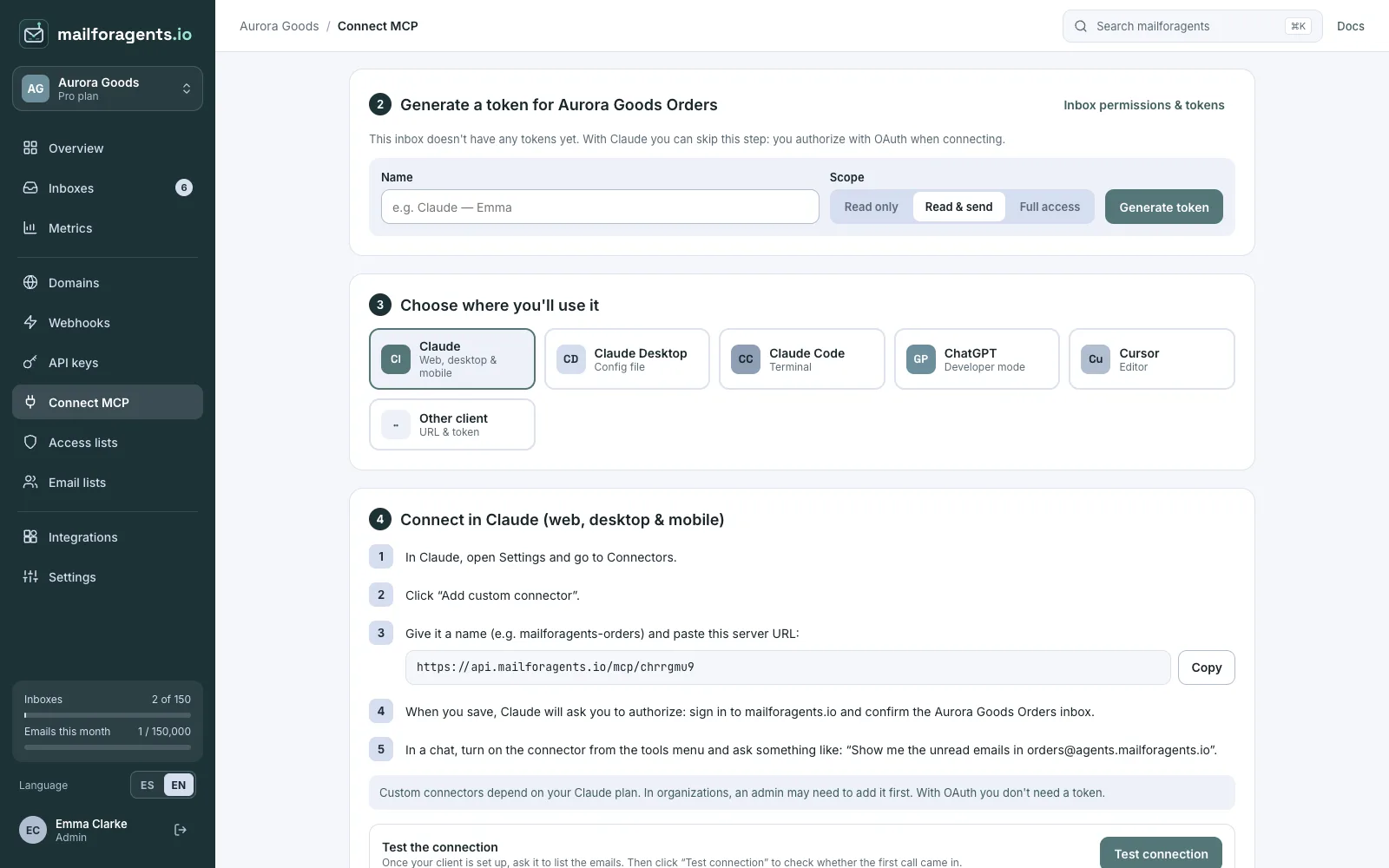
Customize → Connectors → Add → Add custom connector, paste https://api.mailforagents.io/mcp, then Connect and pick your inbox. Custom connectors are available on Free (one), Pro, Max, Team and Enterprise.
Claude Code
claude mcp add --transport http mailforagents https://api.mailforagents.io/mcp --scope user
Then run /mcp inside a session to sign in.
ChatGPT
Plugins → + → Add custom MCP server (earlier flow: Settings → Apps → Create, with developer mode on). Paste https://api.mailforagents.io/mcp, choose OAuth, sign in and pick your inbox. Full MCP with write actions is available on Business and Enterprise/Edu.
Cursor, VS Code and other clients
{
  "mcpServers": {
    "mailforagents": { "url": "https://api.mailforagents.io/mcp" }
  }
}
More examples in examples/: a token-based config and claude_desktop_config.json via mcp-remote.
With a token instead of OAuth
Create a token in the inbox's MCP connection tab (read-only, read & send, or full; with expiry) and use the inbox URL:
URL:    https://api.mailforagents.io/mcp/<inbox id>
Header: Authorization: Bearer mfa_mcp_...
Tools
| Tool | What it does |
|---|---|
get_mailbox |
Address and signature, unread and per-folder counts, mail received today / since a date, latest unread, sends left today and plan usage. |
list_messages |
List a folder (inbox, sent, drafts, scheduled, archive, trash, starred, all), filter by unread, sender or label. |
search_messages |
Full-text search with sender, date range and attachment filters. |
get_thread |
A whole conversation, optionally with quoted text. |
send_message |
Send a new email with cc/bcc and attachments. |
reply |
Reply or reply-all in a thread. |
forward |
Forward a message, with or without its attachments. |
create_draft / update_draft |
Write drafts for a human to review. |
list_attachments |
Files received or uploaded, filtered by sender, type or name. |
get_attachment |
Read PDF, Word, Excel (one CSV per sheet) and PowerPoint as text, or get the file. |
upload_file |
Save a file to the inbox drive. |
move_message / add_label |
Organize: folders and labels. |
massive_send |
One call, many recipients: the same template with {{name}}, {{email}} or custom variables, one separate email per person. |
get_massive_send |
Progress of a bulk send. |
retry_message |
Retry a failed send. |
update_mailbox |
Change the sender display name and the email signature (Markdown). |
Each inbox has permission groups (read, send, drafts, files, folders) to turn tools on or off.
Safety
- One inbox per agent, not your personal mailbox. OAuth grants and tokens are scoped to a single inbox.
- Human approval: when enabled, emails and bulk sends wait until someone approves them in the dashboard.
- Allow and block lists for who the inbox can write to, plus daily send limits.
- Read-only tokens for summaries and triage.
- Email content is third-party data: the server tells the model not to follow instructions found inside emails.
Plans
| Free | Starter | Pro | |
|---|---|---|---|
| Price | $0 | $12/mo | $120/mo |
| Inboxes | 1 | 10 | 150 |
| Emails per month | 3,000 | 10,000 | 150,000 |
| Bulk sending and lists | — | ✓ | ✓ |
| Webhooks | — | ✓ | ✓ |
| Custom domains | — | — | ✓ |
See mailforagents.io for current pricing.
Links
- Setup guide: How to connect your inbox to ChatGPT or Claude
- Bulk email with agents: One call instead of 200
- Registry manifest: server.json
Issues and feature requests are welcome in this repository.
Установка Mailforagents
У этого сервера нет опубликованного пакета — он собирается из исходников. Открой репозиторий и следуй инструкции в README.
▸ github.com/MailFAgents/mailforagents-mcpFAQ
Mailforagents MCP бесплатный?
Да, Mailforagents MCP бесплатный — установка в пару кликов через Unyly без оплаты.
Нужен ли API-ключ для Mailforagents?
Нет, Mailforagents работает без API-ключей и переменных окружения.
Mailforagents — hosted или self-hosted?
Self-hosted: сервер запускается локально на твоей машине командой из раздела установки.
Как установить Mailforagents в Claude Desktop, Claude Code или Cursor?
Открой Mailforagents на unyly.org, выбери вкладку своего клиента (Claude Desktop, Claude Code, Cursor) и нажми Install — конфиг сгенерируется автоматически, без правки JSON.
Похожие MCP
Gmail
Read, send and search emails from Claude
 автор: Google
Slack
Send, search and summarize Slack messages
 автор: Slack
Runbear
No-code MCP client for team chat platforms, such as Slack, Microsoft Teams, and Discord.
Discord Server
A community discord server dedicated to MCP by [Frank Fiegel](https://github.com/punkpeye)
Klavis AI
Open Source MCP Infra. Hosted MCP servers and MCP clients on Slack and Discord.
Work90210/APIFold
Turn any REST API into a hosted MCP server, with ready-made public servers for GitHub, Stripe, Slack, OpenAI, Notion and more.
 автор: Work90210
arikusi/deepseek-mcp-server
DeepSeek AI chat and reasoning with multi-turn sessions, function calling, thinking mode and cost tracking.
 автор: arikusi
hashgraph-online/hashnet-mcp-js
Discover, register and chat with AI agents on the Hashgraph network via the Registry Broker.
 автор: hashgraph-online
profullstack/mcp-server
Developer utilities: SEO optimization, document conversion, domain lookup, email validation, QR codes, weather data, social media posting and security scanning.
 автор: profullstack
WayStation-ai/mcp
Connect MCP hosts to apps such as Notion, Slack, Monday and Airtable.
 автор: waystation-ai
Compare Mailforagents with
Не уверен что выбрать?
Найди свой стек за 60 секунд
Автор?
Embed-бейдж для README
Похожее
Все в категории communication