loading…
/ru
Весь каталог
marketplaceadpros/amazon-ads-mcp-server
БесплатноНе проверенEnables tools to interact with Amazon Advertising, analyzing campaign metrics and configurations.

Описание
Enables tools to interact with Amazon Advertising, analyzing campaign metrics and configurations.
README
Connect to your Amazon Advertising Data by integrating your account with MarketplaceAdPros.
Provides access to:
- Advertising Resources in Sponsored Products, Sponsored Brands and Sponsored Display, like Campaigns, Ad Groups, Keywords, Product Ads, Targeting
- Reports and ability to query them with plain english.
- Marketplace Ad Pros Recommendations, Experiments and more with purchased subscription plan
Also available as a Streamable HTTP MCP Server by connecting to https://app.marketplaceadpros.com/mcp
Installation
To add the amazon-ads-mcp-server to your MCP client of choice, add the following to the server config:
On MacOS: ~/Library/Application Support/Claude/claude_desktop_config.json
On Windows: %APPDATA%/Claude/claude_desktop_config.json
Env Vars
BEARER_TOKEN: The Bearer token you got from MarketplaceAdPros.com
Configuration
You can use it via npx in your Claude Desktop configuration like this:
{
  "mcpServers": {
    "marketplaceadpros": {
      "command": "npx",
      "args": [
        "@marketplaceadpros/amazon-ads-mcp-server"
      ],
      "env": {
        "BEARER_TOKEN": "abcdefghijklmnop"
      }
    }
  }
}
Or, if you clone the repo, you can build and use in your Claude Desktop configuration like this:
{
  "mcpServers": {
    "marketplaceadpros": {
      "command": "node",
      "args": [
        "/path/to/amazon-ads-mcp-server/build/index.js"
      ],
      "env": {
        "BEARER_TOKEN": "abcdefghijklmnop"
      }
    }
  }
}
Or, if your client supports the Streamable HTTP MCP Servers, you can just point to the MCP endpoint at https://app.marketplaceadpros.com/mcp.
{
  "mcpServers": {
    "marketplaceadpros": {
      "type": "streamable-http",
      "url": "https://app.marketplaceadpros.com/mcp"
    }
  }
}
Or, configure in LibreChat like:
  MAP:
    type: streamable-http
    url: https://app.marketplaceadpros.com/mcp
    headers:
      Authorization: "Bearer abcdefghijklmnop"
Development
Install dependencies:
npm install
Build the server:
npm run build
For development with auto-rebuild:
npm run watch
Debugging
Since MCP servers communicate over stdio, debugging can be challenging. We recommend using the MCP Inspector, which is available as a package script:
npm run inspector
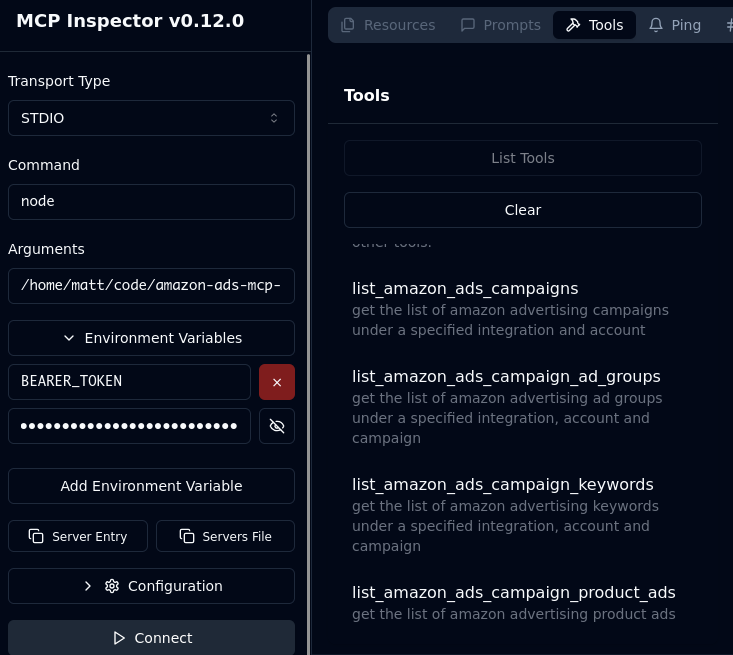
The Inspector will provide a URL to access debugging tools in your browser.
Acknowledgements
- Obviously the modelcontextprotocol and Anthropic teams for the MCP Specification. https://modelcontextprotocol.io/introduction
- MarketplaceAdPros for enabling and sponsoring this project.
Как установить
Выполни в терминале:
claude mcp add marketplaceadpros-amazon-ads-mcp-server -- npx 
