
Maximo Ai Integration
БесплатноНе проверенhe Maximo MCP Server bridges AI agents (Claude, Cursor, Antigravity) with your IBM Maximo environment. It empowers your AI to autonomously discover Object Struc

Описание
he Maximo MCP Server bridges AI agents (Claude, Cursor, Antigravity) with your IBM Maximo environment. It empowers your AI to autonomously discover Object Structures (APIs), inspect schemas, and query live data via OSLC. Instead of hallucinating field names, the AI validates queries instantly and ca
README
🏭 Maximo MCP Server
AI-Powered Development for IBM Maximo
Node.js MCP Maximo License Version
Transform your Maximo development workflow with AI-driven schema discovery, live data querying, and intelligent code generation.
Author: Markus van Kempen
Email: [email protected] | [email protected]
Date: 5 February 2026
🎯 What is This?
The Maximo MCP Server is a Model Context Protocol server that connects AI assistants (like Antigravity, Cursor, or VS Code Copilot) directly to your IBM Maximo environment. Instead of manually copying API documentation, the AI can:
| Capability | Description |
|---|---|
| 🔍 Discover APIs | Find available Object Structures (MXWO, MXASSET, etc.) |
| 📋 Inspect Schemas | Get exact field names, types, and descriptions |
| 📊 Query Live Data | Execute OSLC REST queries and see real results |
| 🎨 Generate UI | Create Carbon Design System tables and dashboards |
| ✅ Validate Instantly | Test queries before generating final code |
📚 Documentation
Core Guides
| Document | Description |
|---|---|
| 📖 Maximo MCP Server Guide | Complete setup, configuration, and tool reference |
| 🔌 Maximo API Interaction Guide | OSLC query syntax, code generation patterns, troubleshooting |
| 🎬 Asset Manager Case Study | Step-by-step walkthrough of building a complete app |
French Translations
| Document | Description |
|---|---|
| 📖 Guide du Serveur MCP Maximo | Version française du guide complet |
| 🔌 Guide d'Interaction API Maximo | Version française du guide API |
Word Documents
All guides are also available in .docx format in the docs/ folder for offline reading and sharing.
⚡ Quick Start
Prerequisites
- Node.js v18 or higher
- Maximo API Key with read access
- AI IDE with MCP support (Antigravity, Cursor, VS Code + Continue)
Installation
Installation
Method 1: Run directly with npx (Recommended)
npx maximo-mcp-server
Method 2: Clone from Source
# Clone the repository
git clone https://github.com/markusvankempen/maximo-mcp-ai-integration-options.git
cd maximo-mcp-ai-integration-options

# Install dependencies
npm install

# Set up environment variables
cp .env.example .env
# Edit .env with your Maximo credentials
Environment Configuration
Edit the .env file with your Maximo credentials:
# .env (never commit this file!)
MAXIMO_URL=https://your-maximo-host.com/maximo/api
MAXIMO_HOST=https://your-maximo-host.com
MAXIMO_API_KEY=your-api-key-here
MAXIMO_OPENAPI_PATH=./maximo_openapi.json
PORT=3002
Download the OpenAPI Schema (Recommended)
The OpenAPI schema file enables offline schema lookups for faster AI responses:
# Download from your Maximo instance
curl -X GET "https://your-maximo-host.com/maximo/oslc/oas/api" \
     -H "apikey:your-api-key-here" \
     -o maximo_openapi.json
Alternatively, download via Swagger UI at: https://your-host/maximo/oslc/oas/api.html (Click "Explore" or "Download")
Method 3: Direct Browser Download (Manual)
If curl fails (e.g., due to SSL/network errors), you can manually download the file:
Open this URL in your browser:
https://[YOUR_MAXIMO_HOST]/maximo/oslc/oas/api(Replace[YOUR_MAXIMO_HOST]with your actual server address)You may be prompted to log in to Maximo.
Once the JSON loads, right-click the page and select "Save Page As...".
Save the file as
maximo_openapi.jsonin your project root folder.
Note: This file is ~12MB and contains all Object Structure definitions for your Maximo instance.
IDE Configuration
Google Antigravity (Manual Setup Required)
⚠️ Note: The Antigravity MCP Store is curated and does not auto-discover servers from the registry. You must add this server manually.
- Open Antigravity
- Click "..." dropdown at the top of the Agent panel
- Select "MCP Servers" → "Manage MCP Servers" → "View raw config"
- Add to your
mcp_config.json:
{
  "mcpServers": {
    "maximo-mcp-server": {
      "command": "npx",
      "args": ["-y", "maximo-mcp-server"],
      "env": {
        "MAXIMO_URL": "https://your-maximo-host/maximo/api",
        "MAXIMO_API_KEY": "your-api-key-here",
        "MAXIMO_HOST": "https://your-maximo-host"
      }
    }
  }
}
- Save and click Refresh
Cursor / Claude Desktop
# Copy the template
cp config/mcp_config.json.example ~/.cursor/mcp.json
# Or for Claude Desktop:
cp config/mcp_config.json.example ~/Library/Application\ Support/Claude/claude_desktop_config.json
Edit with your Maximo credentials:
{
  "mcpServers": {
    "maximo-mcp-server": {
      "command": "npx",
      "args": ["-y", "maximo-mcp-server"],
      "env": {
        "MAXIMO_URL": "https://your-maximo-host/maximo/api",
        "MAXIMO_API_KEY": "your-api-key-here"
      }
    }
  }
}
Verify Connection
In your AI IDE, ask:
"Is the Maximo MCP server connected?"
The AI will call get_instance_details and confirm connectivity.
🎬 Live Demo
Asset Manager Application
We built a complete Maximo Asset Manager web application using only natural language prompts and the MCP server.
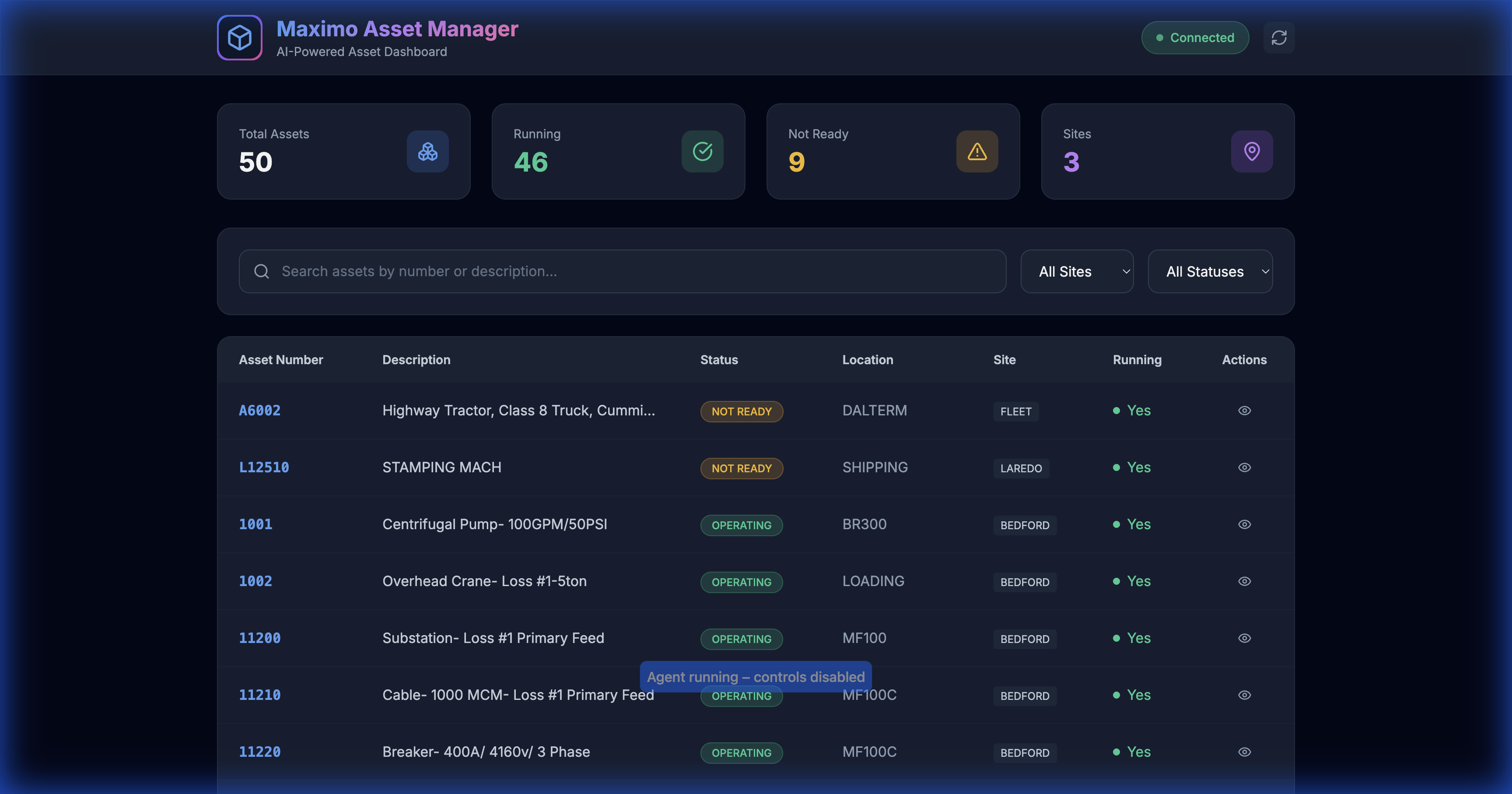
50 assets loaded with real-time filtering and search
Demo Features
| Feature | Screenshot |
|---|---|
| Full Dashboard | 50 assets, 4 stat cards, 3 sites |
| Search Filter | 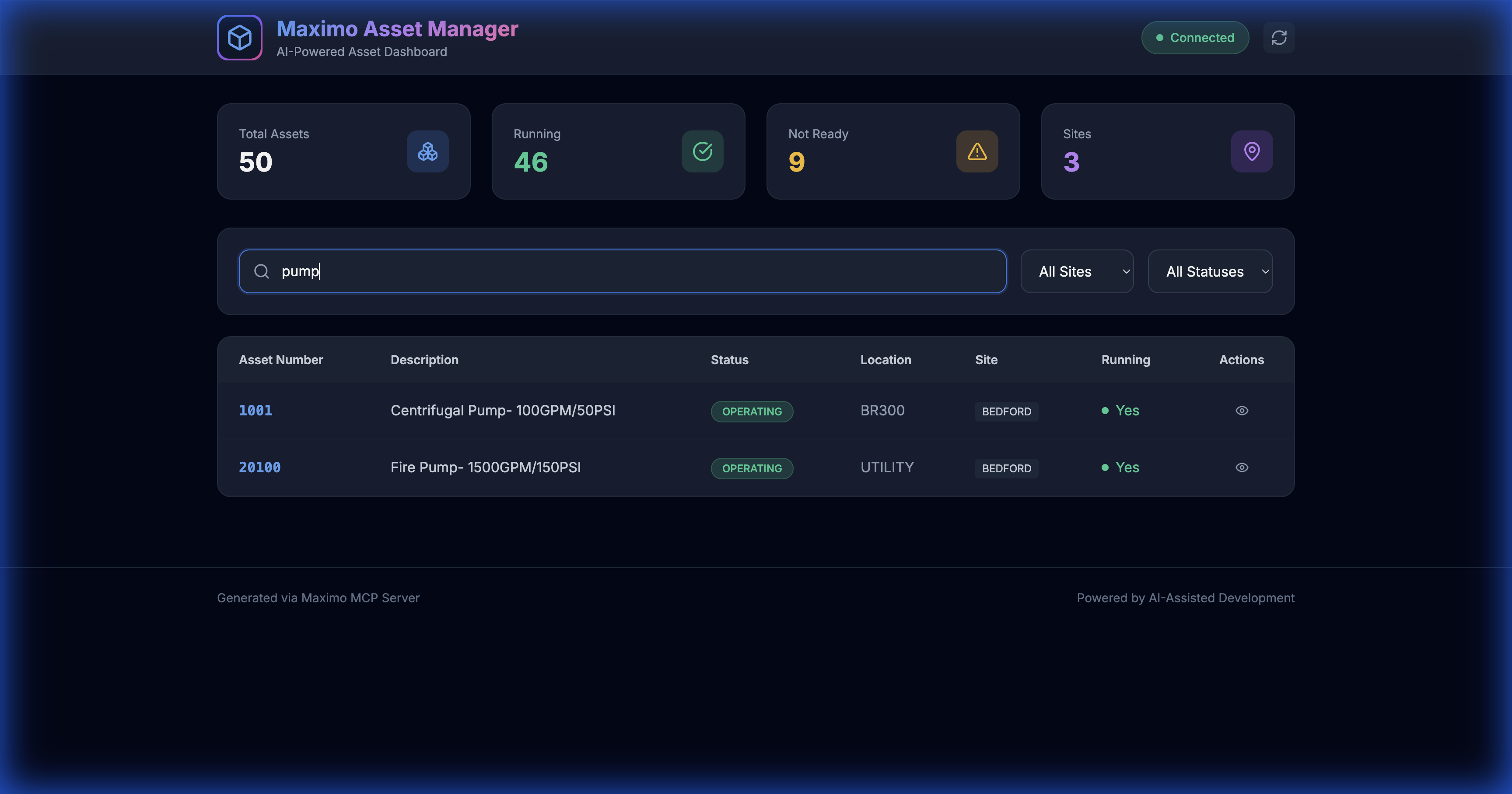 |
| Site Filter | 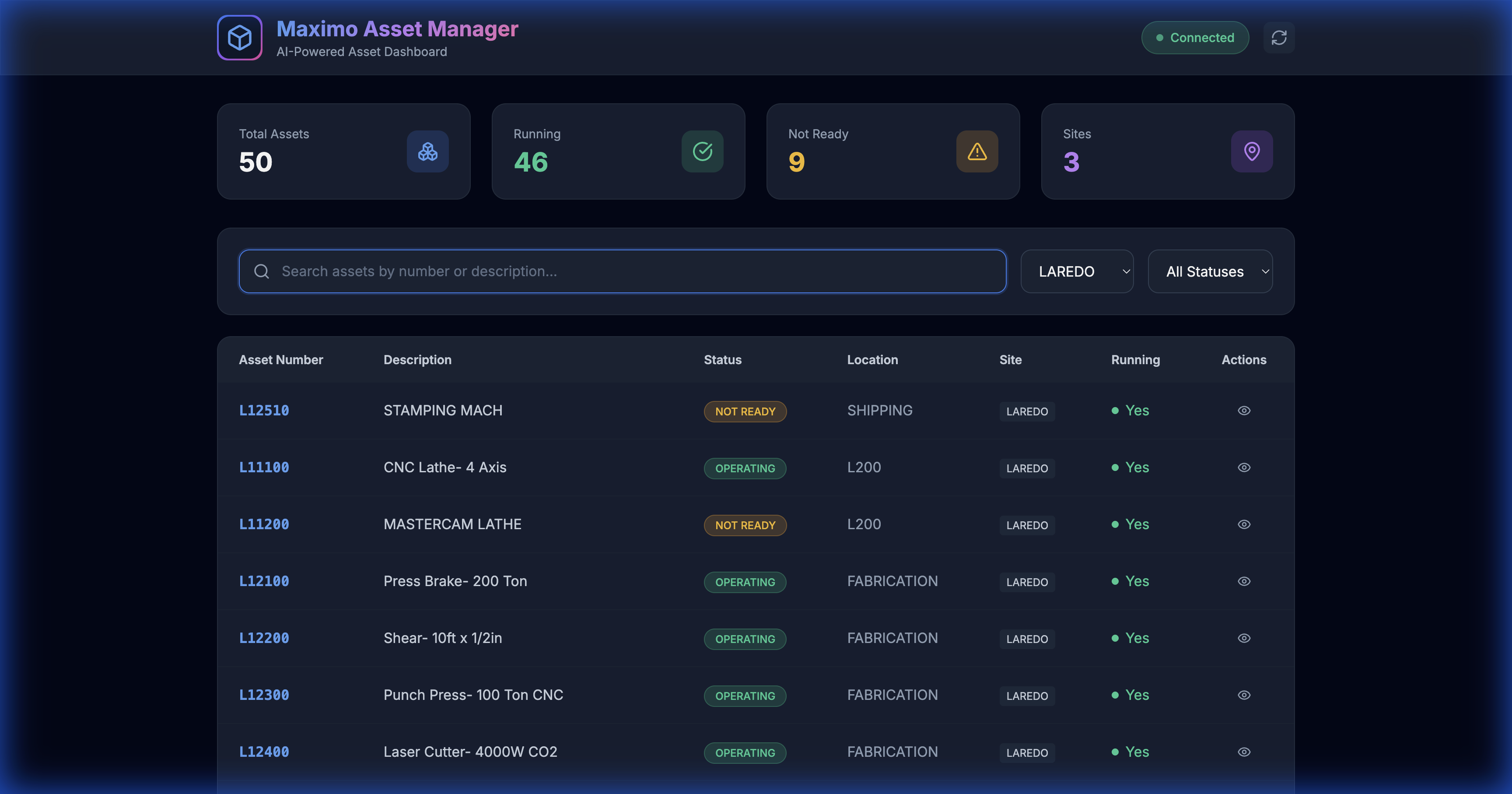 |
🎥 Screen Recording
A complete video demonstration is available: assets_demo_recording.webp
Try It Yourself
# Start the local proxy server
node server.js

# Open in browser
open http://localhost:3002/demos/assets.html
🛠 Available MCP Tools
The server exposes 6 tools to the AI:
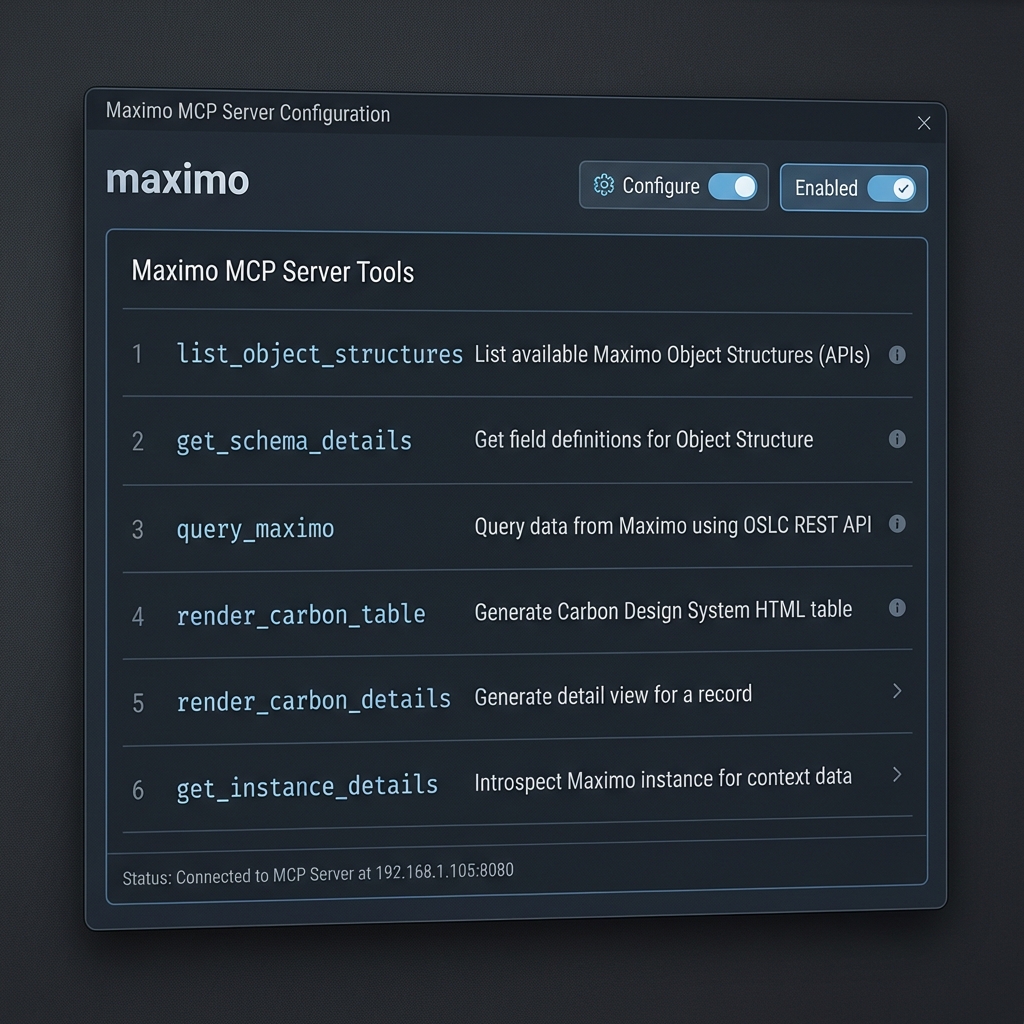
| Tool Name | Description |
|---|---|
list_object_structures |
List available Maximo Object Structures (APIs) |
get_schema_details |
Get field definitions for an Object Structure |
query_maximo |
Execute OSLC REST queries |
render_carbon_table |
Generate Carbon Design HTML tables |
render_carbon_details |
Generate detail view for a record |
get_instance_details |
Check server connectivity |
💡 Use Cases
1. Generate API Calls
"Get me the last 10 approved work orders from BEDFORD site"
The AI calls get_schema_details(MXWO), understands the fields, and generates:
GET /maximo/api/os/mxwo
    ?oslc.where=status="APPR" and siteid="BEDFORD"
    &oslc.select=wonum,description,status,reportdate
    &oslc.orderBy=-reportdate
    &oslc.pageSize=10
    &lean=1
2. Generate Python Scripts
"Write a Python script to export all Priority 1 work orders to CSV"
import requests
import csv

response = requests.get(
    "https://your-host/maximo/api/os/mxwo",
    params={"oslc.where": "wopriority=1", "lean": 1},
    headers={"apikey": "YOUR_KEY"}
)

with open("priority1_workorders.csv", "w") as f:
    writer = csv.DictWriter(f, fieldnames=["wonum", "description"])
    writer.writeheader()
    writer.writerows(response.json()["member"])
3. Generate SQL Queries
"Write SQL to find overdue work orders"
SELECT wonum, description, status, targcompdate
FROM workorder
WHERE status NOT IN ('COMP', 'CLOSE', 'CAN')
  AND targcompdate < CURRENT_DATE;
4. Build Complete Applications
"Create an HTML dashboard to display assets"
Result: A complete web application with:
- Dark theme with glassmorphism
- Search and filter functionality
- Interactive detail panels
- Pre-loaded data from Maximo
See the Asset Manager Case Study for the full walkthrough.
📁 Project Structure
Maximo-MCP/
├── maximo-mcp-server.js       # 🔌 MCP Server implementation
├── server.js                  # 🌐 Local proxy server for CORS
├── package.json               # 📦 Dependencies
├── README.md                  # This file
├── .env.example               # Environment template
├── .gitignore                 # Git ignore rules
│
├── docs/                      # 📚 Documentation
│   ├── Maximo_MCP_Server_Guide.md         # Complete MCP guide
│   ├── Maximo_API_Interaction_Guide.md    # API interaction patterns
│   ├── Asset_Manager_App_Case_Study.md    # Build walkthrough
│   ├── Maximo_MCP_Server_Guide_FR.md      # French translation
│   └── Maximo_API_Interaction_Guide_FR.md # French translation
│
├── demos/                     # 🎨 Demo Applications
│   ├── assets.html                        # Asset Manager app
│   ├── carbon_workorders.html             # Carbon table demo
│   └── index.html                         # API visualization demo
│
├── images/                    # 📸 Screenshots & Recordings
│   ├── assets_demo_recording.webp         # Full demo recording
│   ├── assets_loaded.png                  # Dashboard screenshot
│   ├── pump_search_results.png            # Search demo
│   └── laredo_filtered.png                # Filter demo
│
└── config/                    # ⚙️ Configuration Templates
    └── mcp_config.json.example            # MCP config template
🔒 Security Best Practices
| Practice | Description |
|---|---|
| 🔐 Local Execution | MCP server runs on your machine; API keys never leave your environment |
| 📖 Read-Only Keys | Use limited-permission API keys for development |
| 🔒 Environment Variables | Never hardcode credentials in config files |
| 🌐 HTTPS Only | Always use encrypted connections to Maximo |
🤝 Contributing
Contributions are welcome! Please read our contributing guidelines before submitting PRs.
- Fork the repository
- Create a feature branch (
git checkout -b feature/amazing-feature) - Commit your changes (
git commit -m 'Add amazing feature') - Push to the branch (
git push origin feature/amazing-feature) - Open a Pull Request
📄 License
This project is licensed under the MIT License - see the LICENSE file for details.
🙏 Acknowledgments
- Model Context Protocol for the MCP specification
- IBM Maximo for the enterprise asset management platform
- Carbon Design System for the UI components
from github.com/markusvankempen/maximo-mcp-ai-integration-options
Установить Maximo Ai Integration в Claude Desktop, Claude Code, Cursor
unyly install maximo-mcp-ai-integrationСтавит в Claude Desktop, Claude Code, Cursor и VS Code — сам разбирается с npx, uvx и сборкой из исходников.
Впервые? Поставь CLI: curl -fsSL https://unyly.org/install | sh
Или настроить вручную
Выполни в терминале:
claude mcp add maximo-mcp-ai-integration -- npx -y maximo-mcp-serverПошаговые гайды: как установить Maximo Ai Integration
FAQ
Maximo Ai Integration MCP бесплатный?
Да, Maximo Ai Integration MCP бесплатный — установка в пару кликов через Unyly без оплаты.
Нужен ли API-ключ для Maximo Ai Integration?
Нет, Maximo Ai Integration работает без API-ключей и переменных окружения.
Maximo Ai Integration — hosted или self-hosted?
Self-hosted: сервер запускается локально на твоей машине командой из раздела установки.
Как установить Maximo Ai Integration в Claude Desktop, Claude Code или Cursor?
Открой Maximo Ai Integration на unyly.org, выбери вкладку своего клиента (Claude Desktop, Claude Code, Cursor) и нажми Install — конфиг сгенерируется автоматически, без правки JSON.
Похожие MCP
Fetch
Web content fetching and conversion for efficient LLM usage.
AWS KB Retrieval
Retrieval from AWS Knowledge Base using Bedrock Agent Runtime.
 автор: modelcontextprotocol
Spring AI MCP Server
Provides auto-configuration for setting up an MCP server in Spring Boot applications.
llm-analysis-assistant
A very streamlined mcp client that supports calling and monitoring stdio/sse/streamableHttp, and can also view request responses through the /logs page. It also
 автор: xuzexin-hz
Compare Maximo Ai Integration with
Не уверен что выбрать?
Найди свой стек за 60 секунд
Автор?
Embed-бейдж для README
Похожее
Все в категории ai