loading…
/ru
Весь каталог
Apple Notes
БесплатноНе проверенMCP server for Apple Notes with semantic search (on-device embeddings via all-MiniLM-L6-v2), full-text search, complete CRUD operations, folder management, and

Описание
MCP server for Apple Notes with semantic search (on-device embeddings via all-MiniLM-L6-v2), full-text search, complete CRUD operations, folder management, and fuzzy title matching. 10 tools. Runs fully locally on macOS — no API keys required.
README
Features · Security · Installation · Tools · Verification · Response Shape
MCP Apple Notes
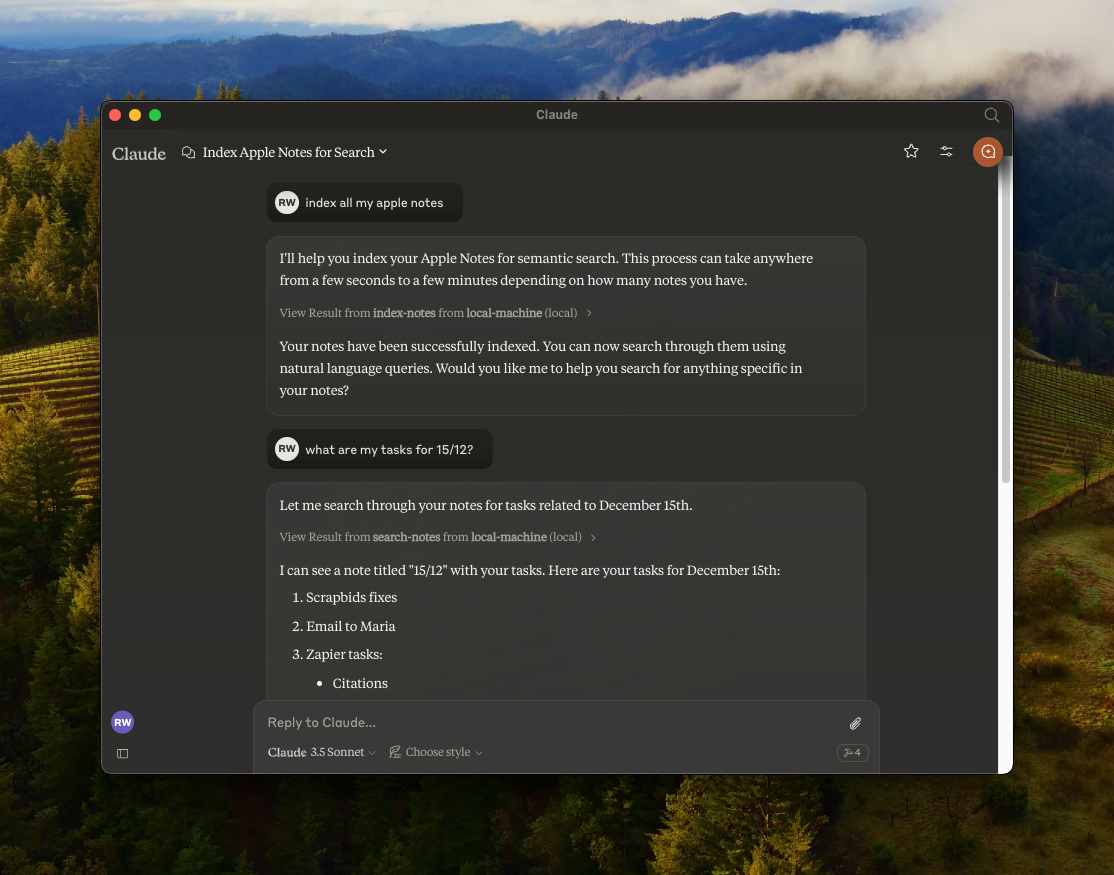
A Model Context Protocol (MCP) server that enables semantic search and RAG (Retrieval Augmented Generation) over your Apple Notes. Works with any MCP-compatible client — Claude Desktop, Cursor, Windsurf, Cline, and others.
Features
- 🔍 Semantic search over Apple Notes using all-MiniLM-L6-v2 on-device embeddings model
- 📝 Full-text search capabilities
- 📂 Folder support — list folders, browse by folder, filter search by folder
- 📊 Vector storage using LanceDB
- 🤖 Works with any MCP-compatible client (Claude, Cursor, Windsurf, Cline, etc.)
- 🍎 Native Apple Notes integration via JXA
- 🔒 Optional read-only mode for safe exploration
- 🏃♂️ Fully local execution — no API keys needed
Security & Transparency
Because this server interacts with your private Apple Notes, it is designed with absolute transparency in mind. It runs 100% locally on your Mac.
- No Cloud, No Telemetry — No API keys, no data leaving your machine.
- Native Apple JXA — Uses Apple's official JavaScript for Automation scripting bridge.
- Embeddings on-device — The all-MiniLM-L6-v2 model runs locally via @huggingface/transformers.
- Verifiable — You are highly encouraged to read every line of code (especially index.ts) before it ever touches your notes.
- GitHub releases include SHA-256 checksums so you can verify downloaded artifacts.
Installation & Setup
Choose the installation method that fits your workflow.
Method 1: Install from source (recommended)
By cloning the repository locally, you can inspect the source code and know exactly what is executing on your machine.
Prerequisites: Node.js (v18+) or Bun
Using Bun?
git clone https://github.com/Dan8Oren/mcp-apple-notes && cd mcp-apple-notes && bun install
{
  "mcpServers": {
    "apple-notes": {
      "command": "bun",
      "args": ["run", "/path/to/mcp-apple-notes/index.ts"]
    }
  }
}
Using NPM:
git clone https://github.com/Dan8Oren/mcp-apple-notes && cd mcp-apple-notes && npm install
Then add the server to your MCP client config. Replace /path/to/mcp-apple-notes with where you cloned the repo:
{
  "mcpServers": {
    "apple-notes": {
      "command": "npx",
      "args": ["tsx", "/path/to/mcp-apple-notes/index.ts"]
    }
  }
}
Tip: Want to try it without risk? Enable read-only mode to block all write operations while you explore.
"env": { "MCP_APPLE_NOTES_READ_ONLY": "1" }
Method 2: Quick start via npx
If you prefer a zero-setup approach and trust the published npm package, you can simply add this directly to your MCP config:
{
  "mcpServers": {
    "apple-notes": {
      "command": "npx",
      "args": ["-y", "@dan8oren/mcp-apple-notes"]
    }
  }
}
After setup, restart your client and ask your AI assistant to "index my notes" to get started.
Per-client instructions
Claude Desktop
- Open Settings → Developer → Edit Config
- Paste your chosen JSON config into
claude_desktop_config.json - Restart Claude Desktop
Logs:
tail -n 50 -f ~/Library/Logs/Claude/mcp-server-apple-notes.log
Claude Code
# npm version:
claude mcp add apple-notes npx -- -y @dan8oren/mcp-apple-notes
# or from source:
claude mcp add apple-notes npx -- tsx /path/to/mcp-apple-notes/index.ts
Cursor
Add the JSON config to ~/.cursor/mcp.json (global) or .cursor/mcp.json in your project root.
Windsurf
Add the JSON config to ~/.windsurf/mcp.json.
Available Tools
| Tool | Description |
|---|---|
index-notes |
Index all notes for semantic search. Run this first |
list-folders |
List all Apple Notes folders with full paths and note counts |
list-notes |
List notes with metadata. Optional path filter and includeContent flag |
search-notes |
Semantic + full-text search with optional path filter and limit |
get-note |
Get full content by noteId or title. Returns candidates on ambiguity |
create-note |
Create a new note with markdown content, optionally in a folder |
edit-note |
Edit title and/or content (markdown) of an existing note |
append-to-note |
Append markdown content to an existing note |
move-note |
Move a note to a different folder |
delete-note |
Delete a note (moves to Recently Deleted) |
Verify Before You Trust
Every Apple Notes operation is a JXA call you can inspect in index.ts. No network requests, no background syncing — just local scripting bridge calls.
Read-only mode
Want a safety net? Enable read-only mode to block all write operations — only search, list, and read tools will be available:
{
  "mcpServers": {
    "apple-notes": {
      "command": "npx",
      "args": ["-y", "@dan8oren/mcp-apple-notes"],
      "env": { "MCP_APPLE_NOTES_READ_ONLY": "1" }
    }
  }
}
When enabled, only these tools are available: index-notes, list-folders, list-notes, search-notes, get-note.
Verbose mode
Enable verbose logging to see every JXA call before it executes (logged to stderr):
CLI flag — add --verbose to your MCP client config args:
{
  "mcpServers": {
    "apple-notes": {
      "command": "npx",
      "args": ["--verbose", "-y", "@dan8oren/mcp-apple-notes"]
    }
  }
}
Environment variable — for clients that support env:
{
  "mcpServers": {
    "apple-notes": {
      "command": "npx",
      "args": ["-y", "@dan8oren/mcp-apple-notes"],
      "env": { "MCP_APPLE_NOTES_VERBOSE": "1" }
    }
  }
}
JXA operations reference
| Operation | Type | What it does |
|---|---|---|
getNotes |
Read | Lists all notes (id, title, folder path) |
getFolders |
Read | Lists all folders with paths and note counts |
getNotesByPath |
Read | Gets notes in a specific folder |
getNoteDetailsById |
Read | Gets full content of one note by ID |
createNote |
Write | Creates a new note with title and content |
appendToNote |
Write | Appends HTML content to an existing note |
editNote |
Write | Updates title and/or content of a note |
moveNote |
Write | Moves a note to a different folder |
deleteNote |
Destructive | Moves a note to Recently Deleted |
All operations go through Apple's JXA scripting bridge (Application('Notes')). No direct file system access, no network calls. The delete operation is non-permanent — notes go to Recently Deleted and can be recovered within 30 days.
Response Shape
Tool responses are JSON objects in a consistent envelope:
- Success:
{ "ok": true, "data": ... } - Error:
{ "ok": false, "error": { "type": "...", "message": "..." } }
Most note-oriented responses now include the stable Apple Notes id so clients can track notes safely across renames and moves.
Community & Support
Bug reports, ideas, questions, and showcases all have a home — please use the channel that fits:
- 🐛 Found a bug? → Open an issue
- 💡 Have a feature idea? → Start a thread in Ideas
- ❓ Need help with setup or integration? → Ask in Q&A
- 🛠 Built something cool with it? → Share in Show and tell
- 📣 Watch for updates → Announcements
PRs are welcome. For non-trivial changes, please open an issue or discussion first so we can align on direction before you invest time.
Acknowledgments
Originally based on RafalWilinski/mcp-apple-notes.
Как установить
Выполни в терминале:
claude mcp add mcp-apple-notes -- npx 
