
Apps Interactive Ui
БесплатноНе проверенA runnable example of building interactive in-chat UI with MCP Apps, demonstrating a pizza builder widget that lets users pick options and place orders through

Описание
A runnable example of building interactive in-chat UI with MCP Apps, demonstrating a pizza builder widget that lets users pick options and place orders through sandboxed HTML interfaces.
README
A runnable example of building interactive in-chat UI with MCP Apps, with docs on the parts that aren't obvious from the spec.
MCP Apps (the io.modelcontextprotocol/ui extension, SEP-1865) lets an MCP server hand the host a sandboxed HTML widget instead of plain text. The model calls one tool and the user gets a real interface: option pickers, live totals, buttons that talk back to the model. This repo is a minimal working example of that pattern.
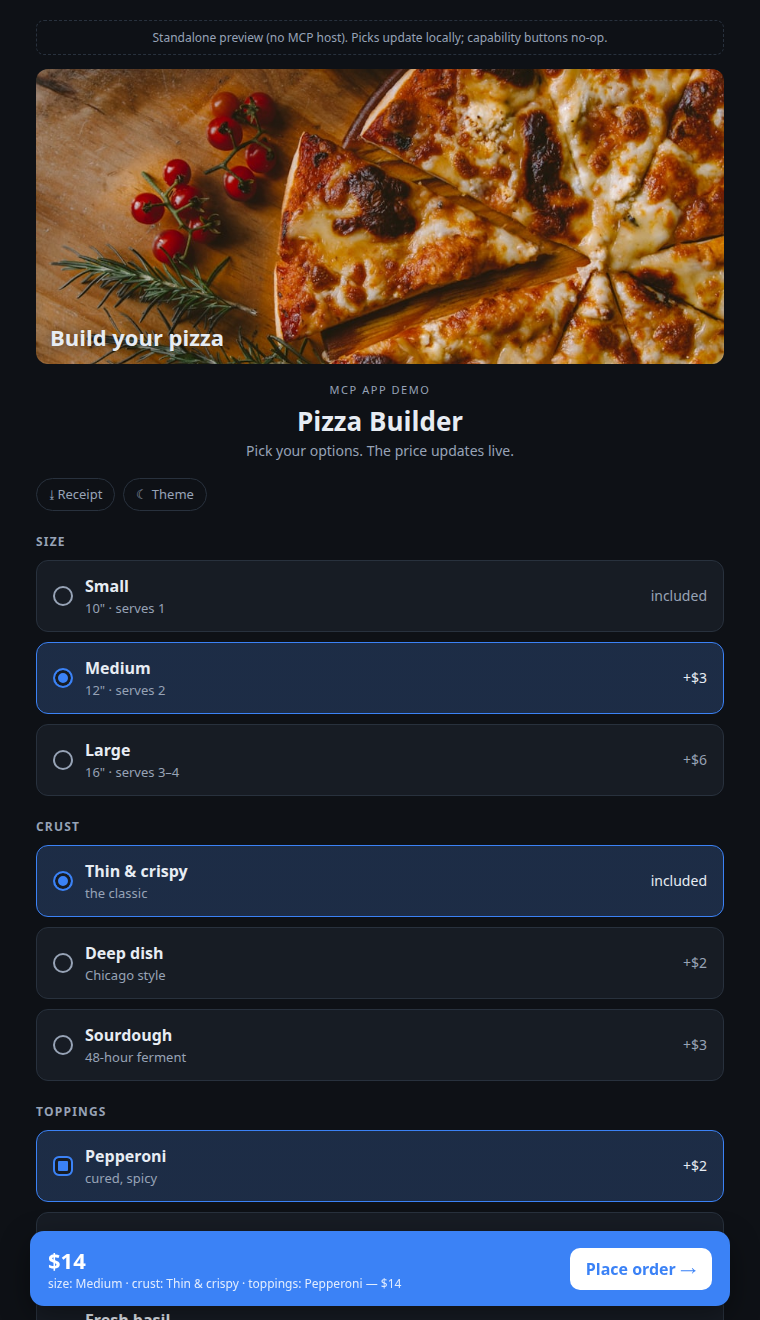
Static screenshot, not a live embed. To run the real thing: build the repo and open dist/builder.html in a browser, or connect the server to a host (see Quickstart).
The example app is a Pizza Builder. Pick size, crust, and toppings, watch the price update live, and hit Place order to hand the choice back to the model. The domain is intentionally simple so the MCP Apps mechanics stay in focus.
Requirements
Node.js 20.11 or newer (the code uses import.meta.dirname, and @modelcontextprotocol/ext-apps requires Node 20+).
What it demonstrates
In a small, commented codebase (~700 lines of TypeScript):
| Capability | How | Where |
|---|---|---|
| Render an interactive widget from a tool call | _meta.ui.resourceUri links a tool to a ui:// resource |
src/server.ts, docs/02 |
| Keep the model's context small | launcher returns a {orderId} ref; the widget fetches the rest via an app-only tool |
docs/06 |
| Let the user pick options without spending tokens | visibility: ["app"] tools the host keeps out of the model's list |
src/server.ts |
| Hand a result back to the model | updateModelContext (stage) then sendMessage (trigger) |
docs/05 |
| Show external images | _meta.ui.csp.resourceDomains |
docs/04 |
| Download a file | app.downloadFile |
src/widget/widget.ts |
| Go fullscreen | app.requestDisplayMode (gated on availableDisplayModes) |
src/widget/widget.ts |
| Match the host's theme and fonts | applyHostStyleVariables / applyHostFonts |
docs/03 |
| See what the host actually granted you | getHostCapabilities() and a capability probe |
docs/07 |
Plus 10 gotchas: URI caching, the silent updateModelContext, the caution banner, the session-locked tool catalog, and more.
Quickstart
git clone https://github.com/iamneilroberts/mcp-apps-interactive-ui
cd mcp-apps-interactive-ui
npm install
npm run build
See the widget immediately, no host required. The build produces a single self-contained dist/builder.html that falls back to mock data when opened directly:
open dist/builder.html      # macOS
xdg-open dist/builder.html  # Linux
Run it as a real MCP server:
npm start            # Streamable HTTP at http://127.0.0.1:3001/mcp
npm run start:stdio  # stdio, for Claude Desktop / MCP Inspector
Connect it to a host:
- Claude Desktop: add to your MCP config, then ask Claude "build me a pizza":
{ "mcpServers": { "pizza": { "command": "node", "args": ["/abs/path/to/mcp-apps-interactive-ui/dist/index.js", "--stdio"] } } } - MCP Inspector:
npx @modelcontextprotocol/inspector node dist/index.js --stdio
How it fits together
flowchart TB
    M["Model (Claude)"]
    H["Host (claude.ai / Desktop)"]
    W["Widget (sandboxed iframe)"]
    S[("Your MCP server: build_pizza, pizza_state, pizza_pick")]

    M <-->|"tool call / result + UI resource"| H
    H <-->|"postMessage / JSON-RPC bridge"| W
    H -->|"app.callServerTool() (proxied by host)"| S
The model launches the widget once. After that the widget talks to your server directly through the host (app.callServerTool), so picking options costs zero model tokens. The widget hands control back to the model only when the user is done. Full walkthrough in docs/01.
Repo layout
src/
  server.ts          the MCP server: 1 launcher tool + 2 app-only tools + 1 UI resource
  data.ts            the toy domain (menu, orders, pricing)
  index.ts           transport wiring (Streamable HTTP + stdio)
  widget/
    widget.ts        the App: render, pick, place-order, download, fullscreen, theme
    widget.html      the shell (CSS + JS get inlined here at build time)
    styles.css
esbuild.mjs          bundles the widget into one self-contained HTML the server serves
test/                unit tests for the pricing/selection logic (node --test via tsx)
docs/                01-08, the deep dives
media/               screenshots
Run the tests with npm test. CI (typecheck, build, test) runs on every push via GitHub Actions.
Docs
- Architecture & lifecycle: the handshake, the bridge, the two-part registration.
- Declaring UI resources:
ui://, the MIME type,_meta.ui.resourceUri, tool visibility. - The host API: every
app.*method, and the capabilities-vs-context distinction. - CSP & imagery: why your image is blocked and how to allow the domains you need.
- Two-way comms:
updateModelContextvssendMessage, the caution banner, no progress tokens. - The token economy: the ref-and-fetch pattern that keeps a large payload out of the model's context.
- Probing host capabilities: how to find out what a host grants, with real Claude Desktop results.
- Gotchas: 10 things to know before shipping.
The capability tables in docs/07 come from running a probe inside a live host. Claude Desktop results are confirmed as of 2026-06-13; some claude.ai web cells are marked pending where they hadn't been captured in-host. Host behavior changes over time, so treat every host-specific claim as "as of that date" and re-probe before relying on a specific cell.
License
MIT.
Установка Apps Interactive Ui
У этого сервера нет опубликованного пакета — он собирается из исходников. Открой репозиторий и следуй инструкции в README.
▸ github.com/iamneilroberts/mcp-apps-interactive-uiFAQ
Apps Interactive Ui MCP бесплатный?
Да, Apps Interactive Ui MCP бесплатный — установка в пару кликов через Unyly без оплаты.
Нужен ли API-ключ для Apps Interactive Ui?
Нет, Apps Interactive Ui работает без API-ключей и переменных окружения.
Apps Interactive Ui — hosted или self-hosted?
Доступен hosted-вариант: Unyly запускает сервер в облаке, локальная установка не обязательна.
Как установить Apps Interactive Ui в Claude Desktop, Claude Code или Cursor?
Открой Apps Interactive Ui на unyly.org, выбери вкладку своего клиента (Claude Desktop, Claude Code, Cursor) и нажми Install — конфиг сгенерируется автоматически, без правки JSON.
Похожие MCP
Gmail
Read, send and search emails from Claude
 автор: Google
Slack
Send, search and summarize Slack messages
 автор: Slack
Runbear
No-code MCP client for team chat platforms, such as Slack, Microsoft Teams, and Discord.
Discord Server
A community discord server dedicated to MCP by [Frank Fiegel](https://github.com/punkpeye)
Compare Apps Interactive Ui with
Не уверен что выбрать?
Найди свой стек за 60 секунд
Автор?
Embed-бейдж для README
Похожее
Все в категории communication