
Filesystem
БесплатноНе проверенEnables natural language filesystem operations (create, list, delete directories/files) via Ollama local LLM and MCP protocol within allowed directories.

Описание
Enables natural language filesystem operations (create, list, delete directories/files) via Ollama local LLM and MCP protocol within allowed directories.
README
A simple Model Context Protocol (MCP) application that provides filesystem operations using Ollama local LLM. This project demonstrates the integration of local AI models with filesystem operations through a client-server architecture.
Architecture
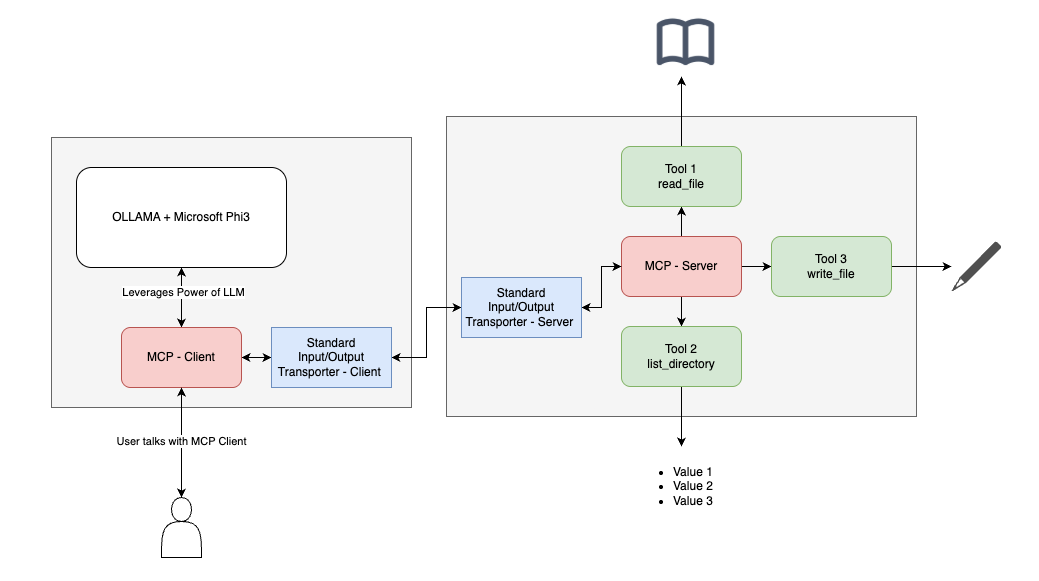
Features
- Client-server architecture using MCP protocol
- Integration with Ollama local LLM (Microsoft Phi-3 3.8b model)
- Directory creation capabilities
- Conversational CLI interface
- Secure file system operations within allowed directories
Prerequisites
- Node.js
- Ollama with Phi-3 3.8b model installed
- Basic understanding of terminal operations
Installation
- Clone the repository
- Install dependencies:
npm install
Configuration
The server accepts allowed directories as command-line arguments. These directories will be the only locations where the application can perform filesystem operations.
Usage
Start the server:
npm start
The client will automatically start the server and connect to Ollama. You can then interact with the system through natural language commands.
Example commands:
- "Create a directory named 'test'"
- "List the files in the current directory"
- "Delete the file 'test.txt'"
Project Structure
client.js: MCP client implementation with Ollama integrationserver.js: MCP server implementation with filesystem operations
Dependencies
- @modelcontextprotocol/sdk : Core MCP SDK
- Ollama : Local AI model for natural language processing
- Microsoft Phi-3 3.8b model : AI model for natural language processing
Установка Filesystem
У этого сервера нет опубликованного пакета — он собирается из исходников. Открой репозиторий и следуй инструкции в README.
▸ github.com/hrushikeshkothem/simple-fs-mcpFAQ
Filesystem MCP бесплатный?
Да, Filesystem MCP бесплатный — установка в пару кликов через Unyly без оплаты.
Нужен ли API-ключ для Filesystem?
Нет, Filesystem работает без API-ключей и переменных окружения.
Filesystem — hosted или self-hosted?
Self-hosted: сервер запускается локально на твоей машине командой из раздела установки.
Как установить Filesystem в Claude Desktop, Claude Code или Cursor?
Открой Filesystem на unyly.org, выбери вкладку своего клиента (Claude Desktop, Claude Code, Cursor) и нажми Install — конфиг сгенерируется автоматически, без правки JSON.
Похожие MCP
Opencode Omniroute Plugin
OpenCode plugin for the OmniRoute AI Gateway. Drives dynamic model discovery, /connect auth flow, and multi-instance OmniRoute providers via the official @openc
 автор: GitHub Actions
Roblox Studio
Enables AI coding tools to control Roblox Studio for workspace exploration, instance manipulation, and script management. It provides tools for playtesting, sce
 автор: paralov
Antigravity Drawio
MCP server that enables AI assistants to create, parse, render, and validate Draw.io diagrams programmatically.
 автор: S-SUJAN-S
Fetch
Web content fetching and conversion for efficient LLM usage.
AWS KB Retrieval
Retrieval from AWS Knowledge Base using Bedrock Agent Runtime.
 автор: modelcontextprotocol
Spring AI MCP Server
Provides auto-configuration for setting up an MCP server in Spring Boot applications.
llm-analysis-assistant
A very streamlined mcp client that supports calling and monitoring stdio/sse/streamableHttp, and can also view request responses through the /logs page. It also
 автор: xuzexin-hz
MCP-Agent
A simple, composable framework to build agents using Model Context Protocol by [LastMile AI](https://www.lastmileai.dev)
 автор: lastmile-ai
Spring AI MCP Client
Provides auto-configuration for MCP client functionality in Spring Boot applications.
mcp.natoma.ai
A Hosted MCP Platform to discover, install, manage and deploy MCP servers by [Natoma Labs](https://www.natoma.ai)
Compare Filesystem with
Не уверен что выбрать?
Найди свой стек за 60 секунд
Автор?
Embed-бейдж для README
Похожее
Все в категории ai