
Financial Data Gateway
БесплатноНе проверенProvides 10 financial data tools (market data, economic indicators, news, insider trades, and calendars) via a single MCP layer, enabling any MCP-compatible LLM

Описание
Provides 10 financial data tools (market data, economic indicators, news, insider trades, and calendars) via a single MCP layer, enabling any MCP-compatible LLM to access diverse financial data through a unified interface.
README
10 financial data tools. 1 universal MCP layer. Any LLM can use it in 60 seconds.




Why This Exists
The biggest bottleneck in enterprise AI adoption isn't model quality — it's data connectivity. Every team building an AI agent today faces the same problem: wiring up data sources one at a time, with brittle custom integrations that break when APIs change. MCP (Model Context Protocol) is Anthropic's answer — a single standard for connecting any data source to any LLM, the same way USB-C standardized device charging. This project demonstrates what that looks like in practice: ten financial data tools across six APIs — market data, economic indicators, sentiment, insider activity, and event calendars — unified behind a single discoverable interface that any MCP-compatible agent can call without writing a line of integration code.
Architecture
graph LR
    subgraph Clients["MCP Clients · stdio"]
        CD[Claude Desktop]
        CA[Custom Agent]
        CR[Cursor IDE]
    end

    TS[MCP Server<br/>server.py]

    subgraph Tools["10 Tool Handlers"]
        TG1["Market Data<br/>stock · crypto · forex"]
        TG2["Economic Intel<br/>indicators · yields · fear&greed"]
        TG3["Market Intel<br/>news · insider trades"]
        TG4["Calendars<br/>economic · IPO"]
    end

    subgraph MW["Middleware Pipeline"]
        CACHE[Cache<br/>TTLCache · 5-min]
        RL[Rate Limiter<br/>per-provider quotas]
        NORM[Validator<br/>Pydantic v2]
        ERR[Error Handler<br/>safe_execute]
    end

    subgraph APIs["External APIs · Free Tier"]
        AV[Alpha Vantage<br/>25 req/day]
        FRED[FRED<br/>120 req/min]
        FX[ExchangeRate API<br/>open endpoint]
        CG[CoinGecko<br/>30 req/min]
        FH[Finnhub<br/>60 req/min]
        SEC[SEC EDGAR<br/>10 req/sec]
        FG[CNN Fear & Greed<br/>public]
    end

    Clients -->|stdio| TS
    TS --> Tools
    Tools -->|"① check"| CACHE
    CACHE -->|"② miss"| RL
    RL -->|"③ fetch"| APIs
    APIs -->|"④ raw"| NORM
    NORM -->|"⑤ write"| CACHE
    RL -.->|rate exceeded| ERR
    NORM -.->|on error| ERR

    style TS fill:#4A90D9,stroke:#2E6BA6,color:#fff
    style CACHE fill:#F5A623,stroke:#D4891A,color:#fff
    style NORM fill:#7B68EE,stroke:#5B48CE,color:#fff
    style RL fill:#E74C3C,stroke:#C0392B,color:#fff
    style ERR fill:#2ECC71,stroke:#27AE60,color:#fff
Every tool call follows the same middleware chain: cache check → rate limit → API call → Pydantic validation → cache write. Errors at any stage return a structured ErrorResponse — the server never crashes.
The 10 Tools
Market Data
| Tool | Source | Example Query |
|---|---|---|
get_stock_quote(symbol) |
Alpha Vantage | "What's NVIDIA's current price?" → symbol="NVDA" |
get_crypto_price(coin_id) |
CoinGecko · no key | "Bitcoin's market cap?" → coin_id="bitcoin" |
get_forex_rate(from_currency, to_currency) |
ExchangeRate-API · no key | "USD to JPY rate?" → from_currency="USD", to_currency="JPY" |
Economic Intelligence
| Tool | Source | Example Query |
|---|---|---|
get_economic_indicator(series_id, limit) |
FRED | "Show me CPI trend" → series_id="CPIAUCSL" |
get_treasury_yields() |
FRED | "Is the yield curve inverted?" → no params |
get_fear_greed_index() |
CNN · no key | "How fearful is the market?" → no params |
Market Intelligence
| Tool | Source | Example Query |
|---|---|---|
get_insider_trades(symbol, limit) |
SEC EDGAR · no key | "Are AAPL insiders buying?" → symbol="AAPL" |
get_market_news(category) |
Finnhub | "Any merger news?" → category="merger" |
Calendars
| Tool | Source | Example Query |
|---|---|---|
get_economic_calendar(from_date, to_date) |
FRED | "What data drops this week?" → defaults to next 7 days |
get_ipo_calendar(from_date, to_date) |
Finnhub | "Any IPOs this month?" → defaults to next 30 days |
Four tools require no API key at all (Forex, Crypto, Insider Trades, Fear & Greed) — run them immediately after cloning.
Quick Start
Step 1 — Clone
git clone https://github.com/ranjittilekar/financial-data-gateway-mcp.git
cd financial-data-gateway-mcp
Step 2 — Install
python -m venv .venv && source .venv/bin/activate   # Windows: .venv\Scripts\activate
pip install -e .
Step 3 — Configure
cp .env.example .env
# Edit .env with your three API keys (Alpha Vantage, FRED, Finnhub — all free, ~60 sec each)
# Also set SEC_EDGAR_USER_AGENT="AppName Your Name [email protected]" (SEC policy, no key needed)
# ExchangeRate-API, CoinGecko, and SEC EDGAR need no API key
Step 4 — Run
# Option A: MCP server (for Claude Desktop / any MCP client)
python run_server.py

# Option B: Standalone demo UI
streamlit run demo/streamlit_app.py
Usage with Claude Desktop
Add this to your Claude Desktop config file:
macOS: ~/Library/Application Support/Claude/claude_desktop_config.json
Windows: %APPDATA%\Claude\claude_desktop_config.json
{
  "mcpServers": {
    "financial-data-gateway": {
      "command": "/absolute/path/to/.venv/bin/python",
      "args": ["run_server.py"],
      "cwd": "/absolute/path/to/ai-pm-01-mcp-financial-gateway",
      "env": {
        "ALPHA_VANTAGE_API_KEY": "your_key",
        "FRED_API_KEY": "your_key",
        "FINNHUB_API_KEY": "your_key",
        "SEC_EDGAR_USER_AGENT": "FinancialDataGateway Your Name [email protected]"
      }
    }
  }
}
Important: Use the absolute path to your virtualenv's Python, not bare
python. Claude Desktop doesn't inherit your shell's PATH.
Example conversation after connecting:
You: Should I invest in NVIDIA? Show me the stock price, recent insider activity, the treasury yield curve, the Fear & Greed Index, and any major economic events this week.
Claude: (calls
get_stock_quote("NVDA"),get_insider_trades("NVDA"),get_treasury_yields(),get_fear_greed_index(),get_economic_calendar(...)simultaneously)NVIDIA (NVDA): Trading at $875.40, up +2.1% today. Insiders have been net sellers — 3 Sale transactions totaling $12.4M in the past 30 days, with no open-market purchases. The yield curve is normal (+0.49% spread), suggesting no near-term recession signal. However, the Fear & Greed Index sits at 19 (Extreme Fear) — market-wide sentiment has deteriorated sharply over the past month from 45 to 19. Upcoming this week: PCE inflation data (Friday, high impact) and jobless claims (Thursday)...
Usage as Standalone (Streamlit Demo)
streamlit run demo/streamlit_app.py
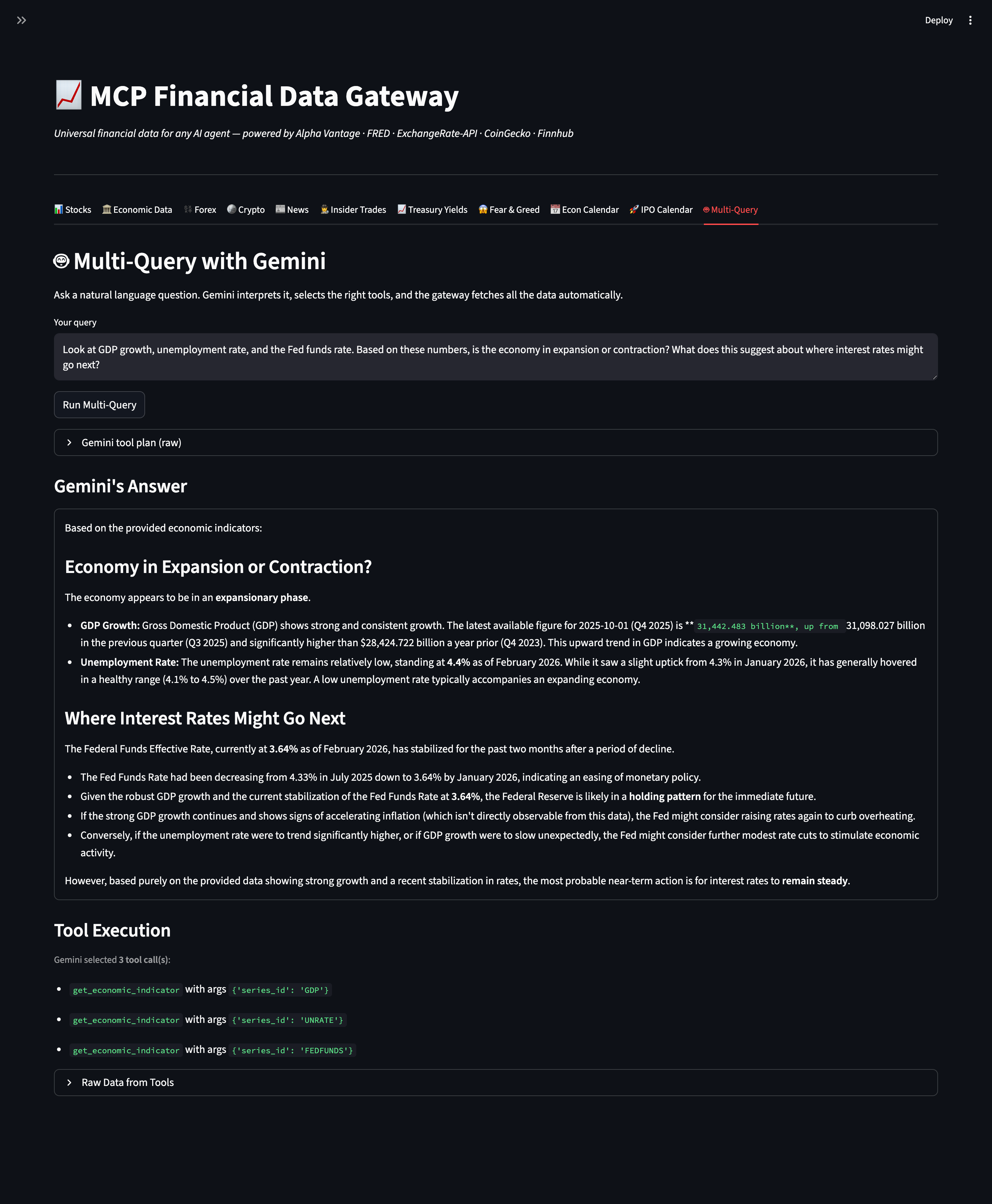
The demo includes 11 tabs:
- Stocks — real-time quote with OHLCV metrics
- Economic Data — FRED time series with line chart
- Forex — live FX rates with inverse calculation
- Crypto — price + market cap + 24h change
- News — latest market headlines by category
- Insider Trades — SEC Form 4 filings as a formatted table
- Treasury Yields — full yield curve + inversion badge (green/red)
- Fear & Greed — color-coded score with all 7 component indicators
- Economic Calendar — upcoming US data releases grouped by impact
- IPO Calendar — upcoming listings with price range and exchange
- Multi-Query — ask a question in plain English; Gemini picks all 10 tools, fetches data, and synthesizes a full answer
Technical Decisions
| Component | Choice | Why |
|---|---|---|
| Transport | stdio (local) | Simplest MCP transport; zero infrastructure to demo. SSE is the upgrade path for multi-client deployments. |
| Caching | cachetools TTLCache, 5-min TTL |
Financial data doesn't need sub-second freshness. 5 minutes cuts API calls dramatically in demo sessions while staying meaningful. |
| Validation | Pydantic v2 models | Validates API responses at the boundary, auto-generates JSON schemas for MCP tool registration — two problems solved by one dependency. |
| Rate limiting | Sliding window, per-provider | Alpha Vantage has both a per-minute (5/min) and daily (25/day) quota. Both are tracked atomically before each call so the daily budget is never silently burned. |
| Error handling | Centralized ErrorHandler middleware |
safe_execute() wraps every tool call; the server returns a structured ErrorResponse and never crashes regardless of what the upstream API does. |
| HTTP client | httpx async |
Non-blocking; the MCP server runs in an asyncio event loop and httpx fits naturally. Treasury yields fetch 8 series concurrently via asyncio.gather. |
| Dependency injection | Middleware instances passed as kwargs | One CacheManager, one RateLimiter — shared state across all tools. No singletons, no globals; easy to swap in test doubles. |
Evals
259 tests, 6 test files, 0 mocks of business logic.
evals/test_middleware.py    50 tests   Unit tests — CacheManager, RateLimiter,
                                       ResponseNormalizer, ErrorHandler
evals/test_tools.py         93 tests   All 10 tool handlers — cache mutation,
                                       from_cache flag, schema roundtrip,
                                       missing key, live API fixtures
evals/test_stock_quotes.py  }
evals/test_economic_data.py }          45 tests   Per-tool integration tests with
evals/test_forex_rates.py   }          live API calls (session-scoped fixtures,
evals/test_crypto_prices.py }          one call shared per test session)
evals/test_market_news.py   }
evals/test_integration.py   22 tests   End-to-end MCP server tests — list_tools,
                                       call_tool, error shape, description quality
Run the suite:
pytest evals/ -v --tb=short
# → ~255 passed, ~4 skipped in ~10s
# Skips are live Alpha Vantage tests when the free daily quota is exhausted —
# handled gracefully with pytest.skip(), not errors.
Invariants enforced by tests:
- Every successful response contains a
_metablock withsource,retrieved_at,from_cache - A second identical call always returns
from_cache: true - Cache hits never mutate the stored object (copy-on-return pattern)
ErrorHandler.safe_execute()never propagates an exception — tested against 6 failure modes- All 10 tool descriptions are ≥ 80 characters with example values (LLM routing quality check)
- Alpha Vantage daily cap fires correctly after minute windows reset (monkeypatched clock test)
- Fear & Greed index returns exactly 7 component indicators
- Treasury yields return exactly 8 maturities with float rates
Lessons Learned
Trade-offs I Made
5-minute cache TTL — I chose 5 minutes as a balance between API quota conservation and data freshness. Stock prices change by the second, but in the context of a demo or a planning conversation, a 5-minute-old quote is nearly always good enough. A production system would make TTL a per-tool configuration: 30 seconds for live prices, 1 hour for FRED economic data, 24 hours for news.
Free tier limits — All five APIs used are free, which creates real constraints: Alpha Vantage's 25 req/day limit means a heavy demo session can exhaust the daily budget in minutes. I handled this by building in both proactive rate limiting (tracks remaining quota before each call) and graceful degradation (returns structured error with retry guidance rather than crashing). The architectural lesson: design around your quota budget as a first-class constraint, not an afterthought.
stdio transport instead of SSE — stdio is the simplest MCP transport and works perfectly for a single local client. SSE (Server-Sent Events) would enable multiple concurrent clients and remote deployments. I chose stdio deliberately to ship faster and demonstrate the core value proposition; the upgrade path is documented.
What I'd Change With More Time
- WebSocket streaming for live price tickers — push updates instead of poll-on-demand
- SSE transport to support multi-client deployments and remote MCP servers
- Historical data endpoints — FRED observations go back decades; surfacing time-range queries would make the economic data tool far more powerful for trend analysis
- Tool composition — a
get_market_summarymeta-tool that calls all 5 in parallel and returns a unified snapshot, useful for "give me a full briefing" queries - Persistent cache (Redis or SQLite) so the TTL budget survives server restarts in long-running deployments
Guardrails I Added
- Sliding window rate limiter with per-provider quotas (not just a token bucket) — catches both per-minute bursts and daily budget exhaustion
- Pydantic validation on every API response — if Alpha Vantage changes a field name, the error surfaces immediately with a clear message instead of silently passing bad data downstream
- Copy-on-return for cache hits —
{**cached, "_meta": {**cached["_meta"], "from_cache": True}}creates a new dict rather than mutating the stored object; discovered this class of bug in testing safe_execute()wrapper —ErrorHandlercatchesRateLimitError,httpx.HTTPError,ValidationError,ValueError, and bareException; the MCP server returns a valid JSON response in every case- Alpha Vantage soft-error detection — the API returns 200 OK with
{"Note": "..."}for per-minute limits and{"Information": "..."}for daily limits; both are detected by key presence and raised asRateLimitErrorbefore Pydantic ever sees the response
Project Structure
ai-pm-01-mcp-financial-gateway/
├── run_server.py                # Entry point: python run_server.py
├── src/
│   ├── server.py                # MCP orchestrator — registers all 10 tools, wires middleware
│   ├── tools/                   # 10 tool handlers (dependency-injected pattern)
│   ├── middleware/              # CacheManager, RateLimiter, ResponseNormalizer, ErrorHandler
│   └── models/schemas.py        # Pydantic v2 models for all 10 tools + ErrorResponse
├── demo/streamlit_app.py        # Standalone demo UI — 11 tabs + Gemini multi-query
├── evals/                       # 259 tests across 6 files
├── docs/
│   ├── SETUP.md                 # Step-by-step setup for Claude Desktop
│   └── lessons-learned.md       # Extended PM reflections
└── claude_desktop_config.json   # Example MCP client config
License
MIT — see LICENSE.
Установка Financial Data Gateway
У этого сервера нет опубликованного пакета — он собирается из исходников. Открой репозиторий и следуй инструкции в README.
▸ github.com/ranjittilekar/financial-data-gateway-mcpFAQ
Financial Data Gateway MCP бесплатный?
Да, Financial Data Gateway MCP бесплатный — установка в пару кликов через Unyly без оплаты.
Нужен ли API-ключ для Financial Data Gateway?
Нет, Financial Data Gateway работает без API-ключей и переменных окружения.
Financial Data Gateway — hosted или self-hosted?
Self-hosted: сервер запускается локально на твоей машине командой из раздела установки.
Как установить Financial Data Gateway в Claude Desktop, Claude Code или Cursor?
Открой Financial Data Gateway на unyly.org, выбери вкладку своего клиента (Claude Desktop, Claude Code, Cursor) и нажми Install — конфиг сгенерируется автоматически, без правки JSON.
Похожие MCP
Fetch
Web content fetching and conversion for efficient LLM usage.
AWS KB Retrieval
Retrieval from AWS Knowledge Base using Bedrock Agent Runtime.
 автор: modelcontextprotocol
Spring AI MCP Server
Provides auto-configuration for setting up an MCP server in Spring Boot applications.
llm-analysis-assistant
A very streamlined mcp client that supports calling and monitoring stdio/sse/streamableHttp, and can also view request responses through the /logs page. It also
 автор: xuzexin-hz
Compare Financial Data Gateway with
Не уверен что выбрать?
Найди свой стек за 60 секунд
Автор?
Embed-бейдж для README
Похожее
Все в категории ai