
Gateway Mcp
БесплатноНе проверенAdmin MCP server that exposes Kubernetes CRD state and live broker status as MCP tools and a browser-renderable UI resource, enabling platform engineers to mana

Описание
Admin MCP server that exposes Kubernetes CRD state and live broker status as MCP tools and a browser-renderable UI resource, enabling platform engineers to manage the mcp-gateway without kubectl.
README
Admin MCP server for the mcp-gateway platform. Exposes Kubernetes CRD state and live broker status as MCP tools and browser-renderable UI widgets — no kubectl required.
Target audience: platform engineers operating a running gateway.
UI Widgets
Four interactive MCP App widgets render as sandboxed iframes in MCP Apps-compatible hosts (Claude, Cursor, VS Code Copilot, ChatGPT, …). See sample-prompts.md for the phrases that open each one.
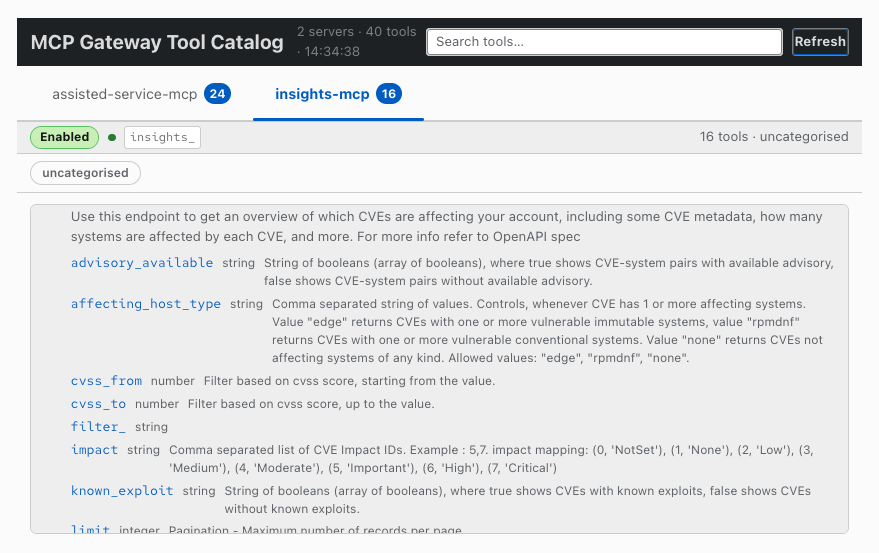
Tool Catalog — ui://mcp-gateway-catalog
Browse all federated tools grouped by server. Click any row to expand the full description and input schema parameters.
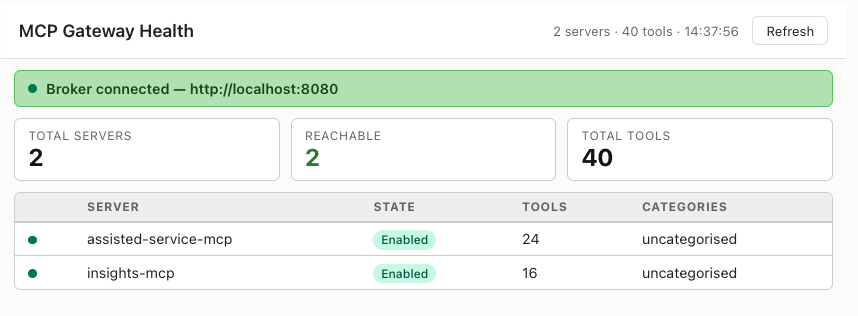
Gateway Health Dashboard — ui://mcp-gateway-health
Live broker status, reachability summary, and per-server tool counts at a glance.
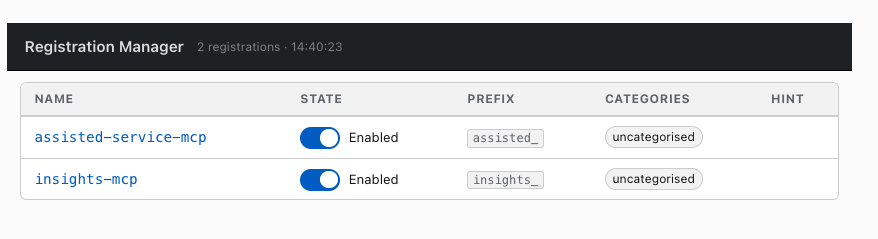
Registration Manager — ui://mcp-gateway-registrations
Table of all MCPServerRegistration CRs with toggle switches to enable or disable each server without kubectl.
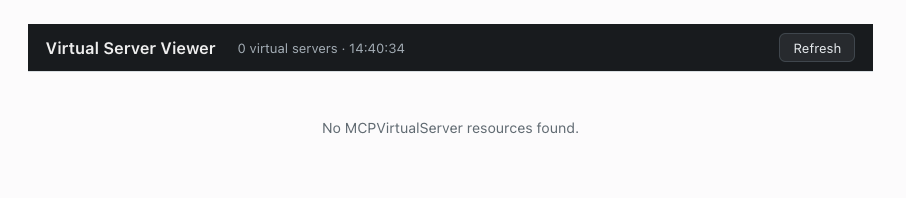
Virtual Server Viewer — ui://mcp-gateway-virtual-servers
Accordion view of MCPVirtualServer CRs showing upstreams, status conditions, and spec fields.
Tools
10 tools — click to expand
| Tool | Access | Description |
|---|---|---|
list_registrations |
📖 read | List all MCPServerRegistration CRs |
get_registration |
📖 read | Get a single registration with status conditions |
update_registration_state |
✏️ write | Enable or disable a registration |
list_virtual_servers |
📖 read | List all MCPVirtualServer CRs |
get_virtual_server |
📖 read | Get a single virtual server |
get_gateway_status |
📖 read | Call the broker /status endpoint |
render_tool_catalog |
📖 read | Open the interactive tool catalog widget |
render_registrations |
✏️ write | Open the registration manager widget (toggle switches mutate state) |
render_gateway_health |
📖 read | Open the gateway health dashboard widget |
render_virtual_servers |
📖 read | Open the virtual server viewer widget |
Requirements
- Python 3.11+
- uv for dependency management
- Kubeconfig pointing to a cluster running
mcp-gatewayCRDs - (Optional) Port-forward to the broker for live status
Quick start
Hosted cluster setup
# Forward the broker port
kubectl port-forward svc/mcp-gateway -n mcp-gateway-system 8080:8080 &

# Install dependencies
uv sync

# Run (stdio — for Claude Desktop / Cursor)
uv run server.py --namespace mcp-servers --broker-url http://localhost:8080

# Run (HTTP — for MCP Inspector)
uv run server.py --transport http --namespace mcp-servers --broker-url http://localhost:8080
| Item | Value |
|---|---|
| Gateway public URL | https://mcp.apps.hosted-services.ai5.appeng.rhecoeng.com |
| CRD namespace | mcp-servers |
| Broker service | svc/mcp-gateway in mcp-gateway-system (port 8080) |
| Registered servers | assisted-service-mcp (24 tools, prefix assisted_), insights-mcp (16 tools, prefix insights_) |
Configuration
| Flag | Env var | Default | Notes |
|---|---|---|---|
--kubeconfig |
KUBECONFIG |
~/.kube/config |
Falls back to in-cluster config |
--namespace |
MCP_ADMIN_NAMESPACE |
mcp-servers |
Namespace where CRDs live |
--broker-url |
MCP_BROKER_URL |
http://localhost:8080 |
Broker /status endpoint |
--transport |
MCP_ADMIN_TRANSPORT |
stdio |
stdio or http |
--addr |
MCP_ADMIN_ADDR |
:8899 |
HTTP bind address |
Client config
Claude Desktop
{
  "mcpServers": {
    "mcp-admin": {
      "command": "uv",
      "args": ["run", "/path/to/mcp-gateway-mcp/server.py",
               "--namespace", "mcp-servers",
               "--broker-url", "http://localhost:8080"]
    }
  }
}
Cursor (~/.cursor/mcp.json)
{
  "mcpServers": {
    "gateway-admin": {
      "command": "uv",
      "args": ["run", "/path/to/mcp-gateway-mcp/server.py",
               "--namespace", "mcp-servers",
               "--broker-url", "http://localhost:8080"]
    }
  }
}
Установка Gateway Mcp
У этого сервера нет опубликованного пакета — он собирается из исходников. Открой репозиторий и следуй инструкции в README.
▸ github.com/dmartinol/mcp-gateway-mcpFAQ
Gateway Mcp MCP бесплатный?
Да, Gateway Mcp MCP бесплатный — установка в пару кликов через Unyly без оплаты.
Нужен ли API-ключ для Gateway Mcp?
Нет, Gateway Mcp работает без API-ключей и переменных окружения.
Gateway Mcp — hosted или self-hosted?
Self-hosted: сервер запускается локально на твоей машине командой из раздела установки.
Как установить Gateway Mcp в Claude Desktop, Claude Code или Cursor?
Открой Gateway Mcp на unyly.org, выбери вкладку своего клиента (Claude Desktop, Claude Code, Cursor) и нажми Install — конфиг сгенерируется автоматически, без правки JSON.
Похожие MCP
GitHub
PRs, issues, code search, CI status
 автор: GitHub
Filesystem
Secure file operations with configurable access controls.
Memory
Knowledge graph-based persistent memory system.
Template MCP Server
A CLI tool to create a new Model Context Protocol server project with TypeScript support, dual transport options, and an extensible structure
 автор: mcpdotdirect
Compare Gateway Mcp with
Не уверен что выбрать?
Найди свой стек за 60 секунд
Автор?
Embed-бейдж для README
Похожее
Все в категории development