
Keyword Search
БесплатноНе проверенA Model Context Protocol server that enables keyword search within files, returning matching lines with line numbers.

Описание
A Model Context Protocol server that enables keyword search within files, returning matching lines with line numbers.
README
A Model Context Protocol (MCP) server that provides keyword search functionality within files
🚀 Installation
Step 1: Clone or Create Project
git clone https://github.com/alfaarghya/mcp-keyword-search
cd mcp-keyword-search
Step 2: Install Dependencies
pnpm install
This will install:
@modelcontextprotocol/sdk- MCP SDK@types/node- TypeScript definitions for Node.jstypescript- TypeScript compiler
🔨 Building the Project
Compile TypeScript to JavaScript:
pnpm run build
This creates a dist/ folder with compiled JavaScript files.
Development Mode (auto-rebuild on changes):
pnpm run dev
🧪 Testing
Using MCP Inspector
The MCP Inspector provides a visual web interface for testing.
Step 1: Start the Inspector
npx @modelcontextprotocol/inspector node dist/index.js
Step 2: Open in Browser
Navigate to the URL shown
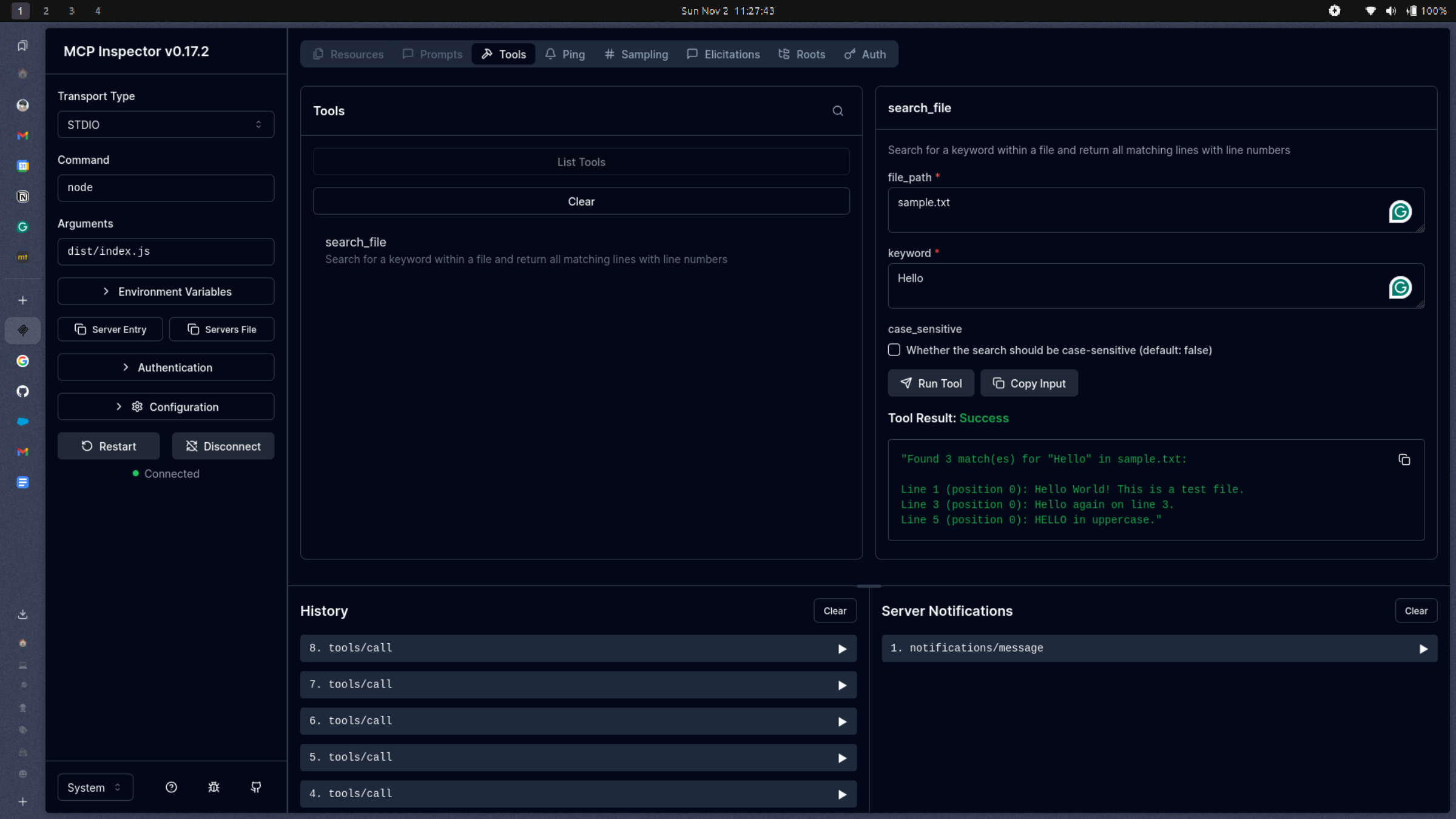
Step 3: Test the Tool
- In the web interface, you'll see "search_file" in the tools list
- Click on it to expand the input form
- Enter the following test data:
{
  "file_path": "./sample.txt",
  "keyword": "Hello",
  "case_sensitive": false
}
- Click "Execute" or "Run Tool"
Expected Output:
Found 3 match(es) for "hello" in ./test.txt:

Line 1 (position 0): Hello World! This is a test file.
Line 3 (position 0): Hello again on line 3.
Line 5 (position 0): HELLO in uppercase.
🔧 API Reference
Server Information
- Name:
file-search-server - Version:
1.0.0 - Protocol: Model Context Protocol (MCP)
- Transport: stdio
Available Tools
search_file
Searches for a keyword within a file.
Input Schema:
{
  file_path: string;      // Required: Path to file
  keyword: string;        // Required: Search keyword
  case_sensitive?: boolean; // Optional: Case sensitivity (default: false)
}
Output:
- List of matching lines with line numbers and positions
- Or error message if file not found or other issues
Установка Keyword Search
У этого сервера нет опубликованного пакета — он собирается из исходников. Открой репозиторий и следуй инструкции в README.
▸ github.com/alfaarghya/mcp-keyword-searchFAQ
Keyword Search MCP бесплатный?
Да, Keyword Search MCP бесплатный — установка в пару кликов через Unyly без оплаты.
Нужен ли API-ключ для Keyword Search?
Нет, Keyword Search работает без API-ключей и переменных окружения.
Keyword Search — hosted или self-hosted?
Self-hosted: сервер запускается локально на твоей машине командой из раздела установки.
Как установить Keyword Search в Claude Desktop, Claude Code или Cursor?
Открой Keyword Search на unyly.org, выбери вкладку своего клиента (Claude Desktop, Claude Code, Cursor) и нажми Install — конфиг сгенерируется автоматически, без правки JSON.
Похожие MCP
GitHub
PRs, issues, code search, CI status
 автор: GitHub
Filesystem
Secure file operations with configurable access controls.
Memory
Knowledge graph-based persistent memory system.
Template MCP Server
A CLI tool to create a new Model Context Protocol server project with TypeScript support, dual transport options, and an extensible structure
 автор: mcpdotdirect
Compare Keyword Search with
Не уверен что выбрать?
Найди свой стек за 60 секунд
Автор?
Embed-бейдж для README
Похожее
Все в категории development