
Labrat
БесплатноНе проверенAn MCP server that enables interaction with CalDAV calendars to manage events and check availability through natural language or voice commands. It provides spe

Описание
An MCP server that enables interaction with CalDAV calendars to manage events and check availability through natural language or voice commands. It provides specific tools for listing, searching, and creating calendar entries using an OpenAI-compatible interface.
README
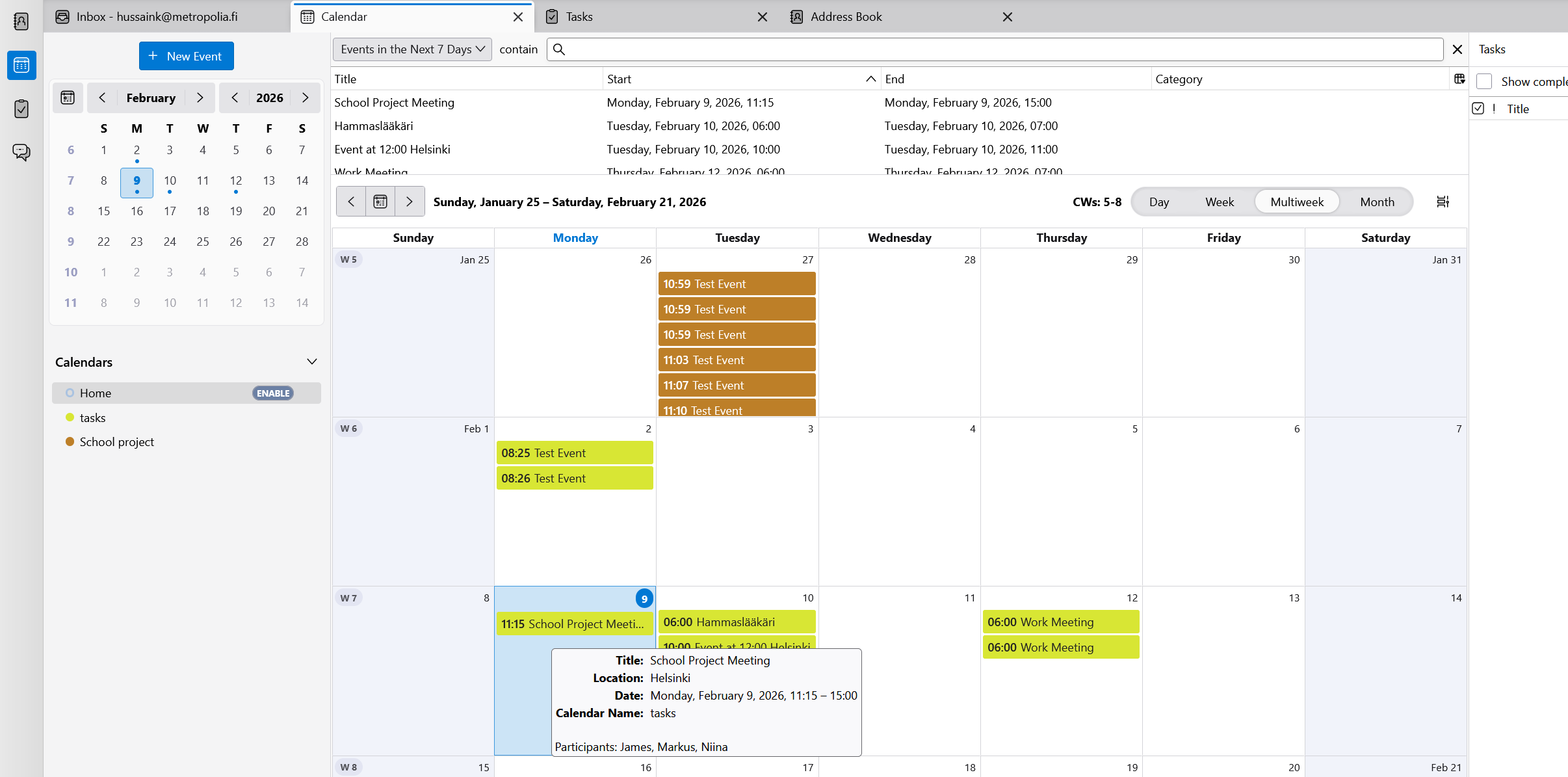
Example
mcp-event added into calender
mcp-labrat
Voice + MCP calendar demo.
This project is a small Express app that:
- Hosts an MCP server (Streamable HTTP transport) that exposes calendar tools backed by a CalDAV server
- Hosts an HTTP “MCP client” endpoint that sends a prompt to an OpenAI-compatible Chat Completions API and lets the model call those MCP tools
- Serves a simple browser UI (in
public/) that records audio, transcribes it (Whisper API), and sends the resulting prompt to the MCP client endpoint
Requirements
- Node.js 18+ (Node 20+ recommended)
- A CalDAV server + credentials (or accept the defaults, but tools won’t be useful)
- An OpenAI-compatible API endpoint for:
- Chat Completions (
/v1/chat/completions) - Audio Transcriptions (
/v1/audio/transcriptions)
- Chat Completions (
In this lab, OPENAI_PROXY_URL typically points to a proxy service (not OpenAI directly). The proxy is responsible for adding any required authentication (e.g. API keys) to outgoing requests.
Because auth is handled by the proxy, the server uses direct HTTP requests (via fetchData) instead of the official OpenAI SDK.
Quick start
Install
npm installCreate
.envcp .env-sample .envThen edit
.envand setOPENAI_PROXY_URLto your proxy/base URL (e.g.http://localhost:1234or your deployed proxy).Run the dev server
npm run devOpen the demo UI
- Visit
http://localhost:3000/ - Click “Start Recording”, speak a command, then click “Stop Recording”
- Click “Send”
- Visit
Environment variables
Create a .env file in the project root.
Server
PORT(optional, default:3000)NODE_ENV(optional, e.g.development)
MCP client + OpenAI-compatible API
MCP_SERVER_URL(required)- Example:
http://localhost:3000/api/v1/mcp - This can point back to the same server instance.
- Example:
OPENAI_PROXY_URL(required)- Base URL of your OpenAI-compatible proxy (the app calls
/v1/chat/completionsand/v1/audio/transcriptionsunder it) - Example:
http://localhost:1234
- Base URL of your OpenAI-compatible proxy (the app calls
OPENAI_MODEL(optional, default:gpt-4o)
Audio transcription (Whisper)
OPENAI_TRANSCRIPTION_MODEL(optional, default:whisper-1)
CalDAV (calendar backing store)
CALDAV_SERVER_URL(optional, default:http://localhost:5232/)CALDAV_USERNAME(optional, default:username)CALDAV_PASSWORD(optional, default:password)
Radicale (dev CalDAV server)
For local development you can run a minimal Radicale CalDAV server with no authentication.
macOS / Linux
- Install Radicale
python3 -m pip install --user radicale
- Create a local config + data folder
mkdir -p radicale-data/collections
cat > radicale.config <<'EOF'
[server]
hosts = 127.0.0.1:5232

[auth]
type = none

[storage]
filesystem_folder = ./radicale-data/collections
EOF
- Run Radicale
radicale --config ./radicale.config
Windows (PowerShell)
- Install Radicale
py -m pip install --user radicale
- Create a local config + data folder
New-Item -ItemType Directory -Force -Path .\radicale-data\collections | Out-Null
@'
[server]
hosts = 127.0.0.1:5232

[auth]
type = none

[storage]
filesystem_folder = ./radicale-data/collections
'@ | Set-Content -Encoding UTF8 .\radicale.config
- Run Radicale
py -m radicale --config .\radicale.config
- Point this app to Radicale
In .env:
CALDAV_SERVER_URL=http://localhost:5232/CALDAV_USERNAME=anything(ignored whenauth=none)CALDAV_PASSWORD=anything(ignored whenauth=none)
Scripts
npm run dev– run server with nodemon + ts-nodenpm run build– compile TypeScript todist/npm start– run the compiled server (dist/index.js)
API
Base path is /api/v1.
Health
GET /api/v1/
Returns a simple JSON message.
MCP server
POST /api/v1/mcp
Implements the MCP Streamable HTTP transport.
MCP client
POST /api/v1/client
Accepts either:
- JSON (text prompt)
curl -sS \
 -H 'Content-Type: application/json' \
 -d '{"prompt":"List my events","timezone":"Europe/Helsinki"}' \
 http://localhost:3000/api/v1/client
multipart/form-data(audio upload)
The field name must be audio.
curl -sS \
 -F '[email protected]' \
 -F 'timezone=Europe/Helsinki' \
 http://localhost:3000/api/v1/client
Response:
{
  "answer": "...",
  "toolCalls": 2
}
MCP tools
The MCP server currently exposes:
listEvents– list events in the primary CalDAV calendargetEventsInTimeSlot– check availability for a time slot (relative date inputs)createEvent– create an event (relative date inputs + title + optional description/location)
The MCP client instructs the model to use tools for all user requests and applies some workflow rules (e.g., check availability before creating events when the user asks “if the time is free”).
Troubleshooting
- Mic permission: The browser will prompt for microphone access the first time. If recording fails, check site permissions.
- CalDAV auth: If the calendar tools always return empty results, verify
CALDAV_*values and that your user has at least one calendar. - Proxy URL:
OPENAI_PROXY_URLmust be the base URL; the app calls/v1/chat/completionsand/v1/audio/transcriptionsunder it. - Uploads cleanup: Uploaded audio is deleted best-effort after transcription; check filesystem permissions if
uploads/grows unexpectedly.
API doc: POST /api/v1/client
Runs a user prompt through the MCP client. The server will call an OpenAI-compatible Chat Completions API, and the model can invoke MCP calendar tools (via the MCP server URL).
Request
Supported content types:
application/json(text prompt)
prompt(string, required) – the user command/questiontimezone(string, optional) – IANA timezone name (defaults to the server’s default timezone). See: List of tz database time zones
JSON request body example:
{
  "prompt": "List my events",
  "timezone": "Europe/Helsinki"
}
Example:
curl -sS \
  -H 'Content-Type: application/json' \
  -d '{"prompt":"List my events","timezone":"Europe/Helsinki"}' \
  http://localhost:3000/api/v1/client
Option 2: multipart/form-data (audio)
audio(file, required) – audio file to transcribe (browser demo sendsaudio/webm)timezone(string, optional) – IANA timezone name
In this mode the server transcribes the audio first and uses the transcription text as the prompt.
Example:
curl -sS \
  -F '[email protected]' \
  -F 'timezone=Europe/Helsinki' \
  http://localhost:3000/api/v1/client
Response
On success (HTTP 200):
{
  "answer": "...",
  "toolCalls": 2
}
answer(string) – final assistant outputtoolCalls(number) – total number of tool calls made during the run
Errors
400– invalid request body (e.g., missingpromptin JSON, invalidtimezone)500– transcription failures, OpenAI/MCP errors, or unexpected server errors
Errors are returned as JSON:
{
  "message": "..."
}
mc
Установка Labrat
У этого сервера нет опубликованного пакета — он собирается из исходников. Открой репозиторий и следуй инструкции в README.
▸ github.com/hussainkazemian/mcpFAQ
Labrat MCP бесплатный?
Да, Labrat MCP бесплатный — установка в пару кликов через Unyly без оплаты.
Нужен ли API-ключ для Labrat?
Нет, Labrat работает без API-ключей и переменных окружения.
Labrat — hosted или self-hosted?
Self-hosted: сервер запускается локально на твоей машине командой из раздела установки.
Как установить Labrat в Claude Desktop, Claude Code или Cursor?
Открой Labrat на unyly.org, выбери вкладку своего клиента (Claude Desktop, Claude Code, Cursor) и нажми Install — конфиг сгенерируется автоматически, без правки JSON.
Похожие MCP
Notion
Read and write pages in your workspace
 автор: Notion
Linear
Issues, cycles, triage — from Claude
 автор: Linear
Google Drive
Search and read your Drive files
 автор: Google
mindsdb/mindsdb
Connect and unify data across various platforms and databases with [MindsDB as a single MCP server](https://docs.mindsdb.com/mcp/overview).
 автор: mindsdb
fulcradynamics/fulcra-context-mcp
MCP server for accessing personal health and biometric data including sleep stages, heart rate, HRV, glucose, workouts, calendar, and location via the Fulcra Li
 автор: fulcradynamics
aymericzip/intlayer
A MCP Server that enhance your IDE with AI-powered assistance for Intlayer i18n / CMS tool: smart CLI access, access to the docs.
 автор: aymericzip
rinadelph/Agent-MCP
A framework for creating multi-agent systems using MCP for coordinated AI collaboration, featuring task management, shared context, and RAG capabilities.
 автор: rinadelph
WhenLabs-org/when
Developer toolkit: auto-detect stack for AI context files, catch port conflicts, validate .env schemas, spot docs drift, audit dependency licenses, and time cod
 автор: WhenLabs-org
Beltran12138/wecom-docs-mcp-server
WeCom (Enterprise WeChat) document operations via MCP: create, read, and edit Docs and Smartsheets (9 tools). Fills the doc-CRUD gap — existing WeCom MCP server
 автор: Beltran12138
madbonez/caldav-mcp
Universal MCP server for CalDAV protocol integration. Works with any CalDAV-compatible calendar server including Yandex Calendar, Google Calendar (via CalDAV),
 автор: madbonez
Compare Labrat with
Не уверен что выбрать?
Найди свой стек за 60 секунд
Автор?
Embed-бейдж для README
Похожее
Все в категории productivity