
Platform Framework
БесплатноНе проверенA framework for building MCP servers with built-in enterprise capabilities such as authentication, authorization, telemetry, audit logging, and data classificat

Описание
A framework for building MCP servers with built-in enterprise capabilities such as authentication, authorization, telemetry, audit logging, and data classification, allowing domain developers to focus on business logic while maintaining governance and compliance.
README
Azure Functions Python 3.11+ MCP Protocol License: MIT
A production-ready template for deploying MCP (Model Context Protocol) servers on Azure Functions, fully compatible with Microsoft Copilot and Copilot Studio.
🎯 Choose Your Path
This repository serves two distinct audiences. Please select your path:
🚀 I want to BUILD an MCP Server (Most Users)
→ USER_GUIDE.md - Complete guide for MCP server developers
You want to create your own MCP server using this framework as a template. You'll focus on implementing your business logic (tools, resources, prompts) while the framework handles all infrastructure concerns.
🏗️ I want to CONTRIBUTE to the Framework (Framework Developers)
→ FRAMEWORK_DOCUMENTATION.md - Internal framework documentation
You want to contribute to, extend, or maintain the MCP Framework itself. You'll work on the core infrastructure, platform services, and connectivity layers.
📚 Documentation Overview
For MCP Server Developers (Users of this Framework)
| Document | Purpose | Audience |
|---|---|---|
| USER_GUIDE.md | Complete guide for building MCP servers | 🎯 MCP Server Developers |
| TEMPLATE_GUIDE.md | Quick start template with examples | 🎯 MCP Server Developers |
deploy/scripts/deploy.sh |
Automated deployment script | 🎯 MCP Server Developers |
src/azure/requirements.txt |
Production dependencies | 🎯 MCP Server Developers |
What you'll implement:
- ✅ Your business tools (functions)
- ✅ Your data resources
- ✅ Your prompt templates for Copilot Studio
- ✅ Your domain-specific configuration
What the framework provides:
- ✅ Authentication & Authorization (Entra ID, JWT, RBAC)
- ✅ Telemetry & Monitoring (Application Insights, OpenTelemetry)
- ✅ Error Handling & Logging
- ✅ Configuration Management (Environment variables, Key Vault)
- ✅ Data Connectivity (Fabric, Warehouse, Lakehouse)
- ✅ Audit Logging (Immutable audit trail)
- ✅ Data Classification & Governance
- ✅ MCP Protocol Compliance (All required endpoints)
For Framework Developers (Contributors)
| Document | Purpose | Audience |
|---|---|---|
| FRAMEWORK_DOCUMENTATION.md | Internal framework architecture & design | 🏗️ Framework Contributors |
docs/architecture/ |
Architecture diagrams and design decisions | 🏗️ Framework Contributors |
docs/modules/ |
Platform service documentation | 🏗️ Framework Contributors |
docs/api-reference/ |
Internal API documentation | 🏗️ Framework Contributors |
platform/ |
Core framework code | 🏗️ Framework Contributors |
What you'll work on:
- 🏗️ Authentication & Authorization infrastructure
- 🏗️ Telemetry and monitoring systems
- 🏗️ Error handling and logging frameworks
- 🏗️ Configuration management systems
- 🏗️ Data connectivity layers (Fabric, Warehouse, Lakehouse)
- 🏗️ Audit logging and data classification
🏗️ Framework Architecture
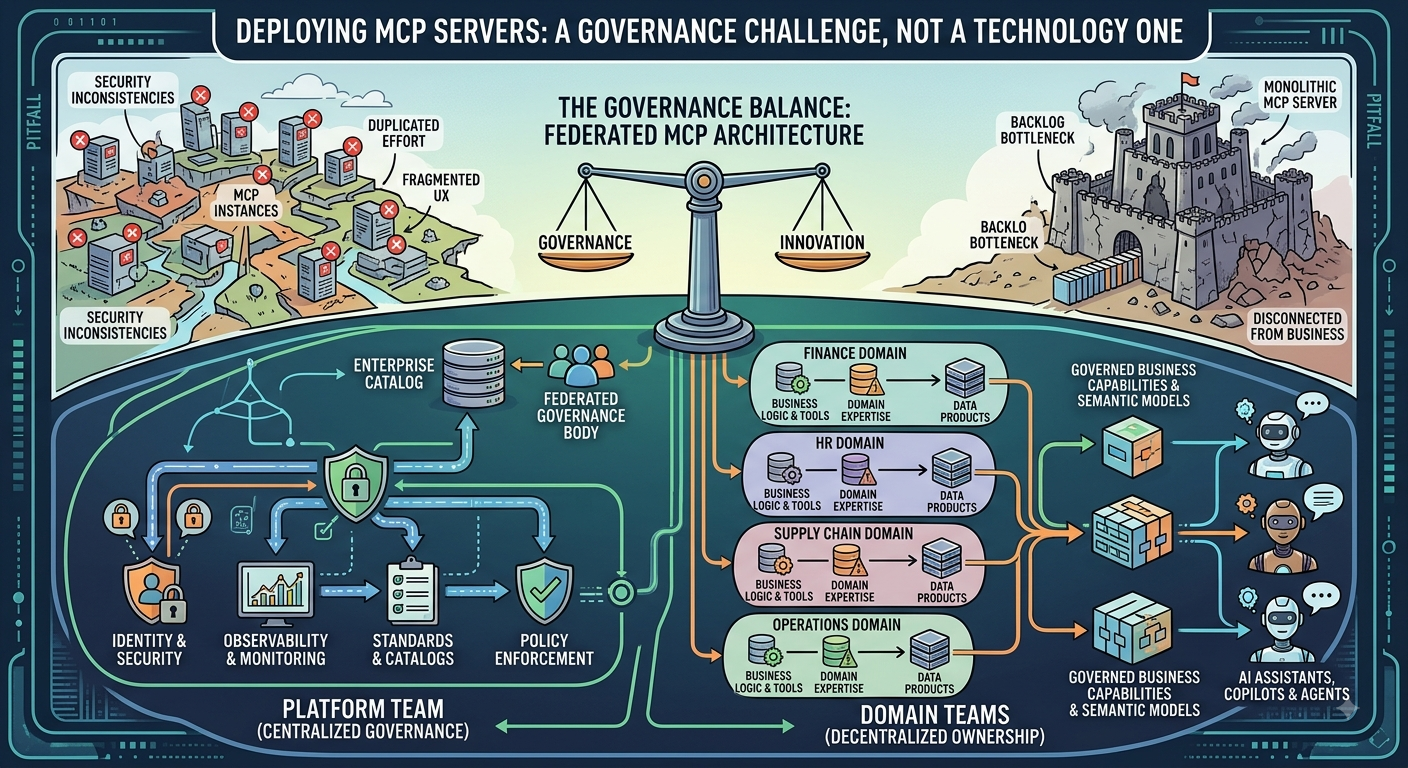
The Big Picture
┌─────────────────────────────────────────────────────────────────────────┐
│                         YOUR MCP SERVER ON AZURE                        │
├─────────────────────────────────────────────────────────────────────────┤
│                                                                         │
│  ┌─────────────────────────────────────────────────────────────────────┐│
│  │                         AZURE FUNCTIONS v4                          ││
│  │  ✅ HTTP Triggers, Function App, Storage, Application Insights      ││
│  └─────────────────────────────────────────────────────────────────────┘│
│                                                                         │
│  ┌─────────────────────────────────────────────────────────────────────┐│
│  │                      MCP FRAMEWORK LAYER                            ││
│  │  🏗️ Framework Contributors work here                                ││
│  │                                                                     ││
│  │  ┌──────────────┐  ┌──────────────┐  ┌──────────────┐               ││
│  │  │ Authentication│  │ Authorization│  │  Telemetry   │              ││
│  │  │  (Entra ID,  │  │   (RBAC,     │  │ (Auto-collect│               ││
│  │  │   JWT, etc.) │  │  Policies)   │  │  tool calls) │               ││
│  │  └──────────────┘  └──────────────┘  └──────────────┘               ││
│  │                                                                     ││
│  │  ┌──────────────┐  ┌──────────────┐  ┌──────────────┐               ││
│  │  │   Audit      │  │   Error      │  │Classification│               ││
│  │  │  (Immutable  │  │  Handling    │  │ (Data        │               ││
│  │  │   logs)      │  │ (Standardized│  │  controls)   │               ││
│  │  └──────────────┘  └──────────────┘  └──────────────┘               ││
│  │                                                                     ││
│  │  ┌─────────────────────────────────────────────────────────────────┐││
│  │  │                    CONNECTIVITY LAYER                           │││
│  │  │  ┌──────────────┐  ┌──────────────┐  ┌──────────────┐           │││
│  │  │  │ Semantic     │  │  Warehouse   │  │  Lakehouse   │           │││
│  │  │  │  Models      │  │  (SQL)       │  │  (Delta)     │           │││
│  │  │  └──────────────┘  └──────────────┘  └──────────────┘           │││
│  │  └─────────────────────────────────────────────────────────────────┘││
│  └─────────────────────────────────────────────────────────────────────┘│
│                                                                         │
│  ┌─────────────────────────────────────────────────────────────────────┐│
│  │                      YOUR DOMAIN LAYER                              ││
│  │  🎯 MCP Server Developers work here                                 ││
│  │                                                                     ││
│  │  ┌──────────────┐  ┌──────────────┐  ┌──────────────┐               ││
│  │  │    Tools     │  │  Resources    │  │   Prompts    │              ││
│  │  │ (Functions)  │  │ (Data Sources)│  │ (Templates)  │              ││
│  │  └──────────────┘  └──────────────┘  └──────────────┘               ││
│  │                                                                     ││
│  │  🎯 Your Business Logic, Domain Models, Ontologies                  ││
│  └─────────────────────────────────────────────────────────────────────┘│
│                                                                         │
└─────────────────────────────────────────────────────────────────────────┘
Clear Separation of Concerns
| Concern | Framework Handles | You Handle |
|---|---|---|
| Authentication | ✅ Entra ID, JWT validation, token management | ❌ |
| Authorization | ✅ RBAC, policy enforcement, permission checks | ❌ |
| Telemetry | ✅ Logging, metrics, tracing, Application Insights | ❌ |
| Error Handling | ✅ Standardized errors, recovery, retry logic | ❌ |
| Configuration | ✅ Environment variables, Key Vault, secrets | ❌ |
| Data Connectivity | ✅ Fabric, Warehouse, Lakehouse connectors | ❌ |
| Audit Logging | ✅ Immutable audit trail, compliance logging | ❌ |
| Data Classification | ✅ Governance controls, sensitivity labels | ❌ |
| MCP Protocol | ✅ All required endpoints, protocol compliance | ❌ |
| Business Logic | ❌ | ✅ Your tools, resources, prompts |
| Domain Models | ❌ | ✅ Your ontologies, schemas |
| Domain Data | ❌ | ✅ Your data sources, connections |
🚀 Quick Start for MCP Server Developers
If you just want to build an MCP server, here's the fastest path:
1. Read the User Guide
→ USER_GUIDE.md - Everything you need to know
2. Follow the Template Guide
→ TEMPLATE_GUIDE.md - Step-by-step examples
3. Key Files to Understand
# Your workspace (create these)
my_domain/
├── tools/              # Your tool implementations
│   └── my_tool.py     # Example: def greet_user(name: str) -> dict
├── resources/          # Your data resource definitions
│   └── my_resource.py # Example: Resource(name="donors", uri="/api/donors")
└── prompts/            # Your Copilot Studio prompt templates
    └── my_prompt.py   # Example: PromptTemplate(name="generate_report", template="...")

# Framework files (don't modify these unless contributing)
platform/
├── registration/       # Tool registration system
│   └── registry.py    # Register your tools here
├── catalog/            # Resource catalog system
│   └── client.py      # Access resources via framework
└── template/           # Prompt template system
    └── generator.py   # Generate prompts via framework

src/azure/
├── function_app.py     # Main entry point (v4)
├── host.json           # Azure Functions config
└── requirements.txt    # Production dependencies
4. Deployment
# Copy environment template
cp .env.example .env

# Edit .env with your configuration
nano .env

# Deploy (uses deploy.sh script)
./deploy/scripts/deploy.sh
🏗️ Quick Start for Framework Contributors
If you want to contribute to the framework itself:
1. Read the Framework Documentation
→ FRAMEWORK_DOCUMENTATION.md - Everything about the framework
2. Understand the Architecture
3. Key Areas to Contribute
platform/
├── auth/              # Authentication services (Entra ID, JWT)
├── authorization/     # Authorization services (RBAC, policies)
├── telemetry/         # Monitoring and observability
├── audit/             # Audit logging
├── errors/            # Error handling
├── config/            # Configuration management
├── classification/    # Data governance
└── connectivity/      # Data source connectors (Fabric, Warehouse, Lakehouse)

docs/
├── architecture/      # Architecture documentation
├── modules/          # Module documentation
├── api-reference/     # Internal API docs
└── best-practices/    # Development guidelines
📁 Repository Structure
mcp-framework/
├── README.md                          # This file - Choose your path
├── USER_GUIDE.md                      # 🎯 For MCP Server Developers
├── FRAMEWORK_DOCUMENTATION.md         # 🏗️ For Framework Contributors
├── TEMPLATE_GUIDE.md                  # Quick start template
├── .env.example                       # Environment variables template
├── .funcignore                        # Deployment ignore patterns
├── .gitignore                         # Git ignore patterns
├── local.settings.json.example        # Local development config
├── pyproject.toml                     # Python project configuration
│
├── deploy/                            # Deployment scripts
│   └── scripts/
│       └── deploy.sh                  # Automated deployment
│
├── src/                               # Azure Functions v4
│   └── azure/
│       ├── function_app.py           # Main entry point
│       ├── host.json                 # Azure Functions config
│       └── requirements.txt          # Production dependencies
│
├── platform/                          # 🏗️ Framework Core (Contributors)
│   ├── auth/                          # Authentication services
│   ├── authorization/                 # Authorization services
│   ├── telemetry/                     # Telemetry and monitoring
│   ├── audit/                         # Audit logging
│   ├── errors/                        # Error handling
│   ├── config/                        # Configuration management
│   ├── classification/                # Data classification
│   ├── connectivity/                  # Data connectivity
│   ├── catalog/                       # Resource catalog
│   ├── registration/                  # Tool registration
│   └── template/                      # Prompt templates
│
├── tools/                             # Example tools (for users)
│   ├── __init__.py
│   └── example_tool.py                # Example implementations
│
├── docs/                              # 🏗️ Framework Documentation
│   ├── architecture/                  # Architecture docs
│   ├── modules/                       # Module documentation
│   ├── api-reference/                 # API reference
│   ├── best-practices/                # Best practices
│   ├── deployment/                    # Deployment guides
│   └── examples/                      # Usage examples
│
└── my_domain/                         # 🎯 YOUR CODE (create this!)
    ├── tools/                         # Your tool implementations
    ├── resources/                     # Your resource definitions
    └── prompts/                        # Your prompt templates
🎯 Which Path Are You On?
If you're building an MCP Server:
✅ I want to create my own MCP server
✅ I want to implement business tools and logic
✅ I want to deploy to Azure Functions
✅ I want to integrate with Copilot and Copilot Studio

→ START HERE: [USER_GUIDE.md](USER_GUIDE.md)
If you're contributing to the Framework:
✅ I want to improve the framework infrastructure
✅ I want to add new platform services
✅ I want to fix bugs in the framework
✅ I want to extend framework capabilities

→ START HERE: [FRAMEWORK_DOCUMENTATION.md](FRAMEWORK_DOCUMENTATION.md)
📞 Getting Help
For MCP Server Developers
- 📖 USER_GUIDE.md - Complete user guide
- 📖 TEMPLATE_GUIDE.md - Quick start template
- 📖 FABRIC_INTEGRATION_GUIDE.md - Connect to Fabric Semantic Models
- 💬 Open an issue with your question
For Framework Contributors
- 📖 FRAMEWORK_DOCUMENTATION.md - Internal documentation
- 📖 CONTRIBUTING.md - Contribution guidelines
- 💬 Open an issue or pull request
🤝 Contributing
We welcome contributions! Please see:
- FRAMEWORK_DOCUMENTATION.md for framework contributions
- USER_GUIDE.md for using the framework
📄 License
This project is licensed under the MIT License - see the LICENSE file for details.
Built with ❤️ for MCP Server Developers and Framework Contributors
Need help? Check the appropriate guide for your use case!
Установка Platform Framework
У этого сервера нет опубликованного пакета — он собирается из исходников. Открой репозиторий и следуй инструкции в README.
▸ github.com/Edouard-Legoupil/mcp-platform-frameworkFAQ
Platform Framework MCP бесплатный?
Да, Platform Framework MCP бесплатный — установка в пару кликов через Unyly без оплаты.
Нужен ли API-ключ для Platform Framework?
Нет, Platform Framework работает без API-ключей и переменных окружения.
Platform Framework — hosted или self-hosted?
Доступен hosted-вариант: Unyly запускает сервер в облаке, локальная установка не обязательна.
Как установить Platform Framework в Claude Desktop, Claude Code или Cursor?
Открой Platform Framework на unyly.org, выбери вкладку своего клиента (Claude Desktop, Claude Code, Cursor) и нажми Install — конфиг сгенерируется автоматически, без правки JSON.
Похожие MCP
GitHub
PRs, issues, code search, CI status
 автор: GitHub
Filesystem
Secure file operations with configurable access controls.
Memory
Knowledge graph-based persistent memory system.
Template MCP Server
A CLI tool to create a new Model Context Protocol server project with TypeScript support, dual transport options, and an extensible structure
 автор: mcpdotdirect
Amap Maps Mcp Server
MCP server for using the AMap Maps API
 автор: duxiaohui
Supabase
Database, auth and storage
 автор: Supabase
Everything
Reference / test server with prompts, resources, and tools.
Git
Tools to read, search, and manipulate Git repositories.
Sequential Thinking
Dynamic and reflective problem-solving through thought sequences.
Time
Time and timezone conversion capabilities.
Compare Platform Framework with
Не уверен что выбрать?
Найди свой стек за 60 секунд
Автор?
Embed-бейдж для README
Похожее
Все в категории development