
RAG Agent
БесплатноНе проверенEnables hybrid search over policies using Reciprocal Rank Fusion and provides grounded, context-aware answers via a LangGraph agent with COSTAR prompting.

Описание
Enables hybrid search over policies using Reciprocal Rank Fusion and provides grounded, context-aware answers via a LangGraph agent with COSTAR prompting.
README
Production-ready RAG system combining LangGraph agent with Model Context Protocol (MCP) integration. Features hybrid search using Reciprocal Rank Fusion (RRF) via MongoDB vector and full-text searches, grounded responses using COSTAR prompting, and automated RAGAS-based evaluation for building reliable, context-aware AI agents.
Overview
The MCP RAG Agent is a sophisticated question-answering system that:
- Uses hybrid search to find relevant documents from a policy corpus
- Employs a LangGraph agent to reason about and retrieve information
- Integrates via the Model Context Protocol (MCP) for modular, reusable components
- Ensures grounded responses using the COSTAR prompting framework
- Stores and retrieves documents using MongoDB Atlas Vector Search
- Provides comprehensive evaluation tools using RAGAS metrics
Key Features
- MCP Integration: Standardized protocol for tool exposure and agent communication
- Hybrid Search: Combines vector similarity and keyword search using Reciprocal Rank Fusion (RRF)
- Semantic Search: Vector-based document retrieval using OpenAI embeddings
- Text Search: Full-text keyword search with stemming and relevance scoring
- MongoDB Atlas: Scalable vector storage with efficient similarity search
- Grounded Responses: Strict context-based answering with no hallucinations
- COSTAR Prompting: Structured prompt design for consistent, high-quality outputs
- LangGraph Agent: Reasoning and acting cycles for intelligent tool usage
- Automated Evaluation: RAGAS-based metrics for answer quality assessment
Architecture
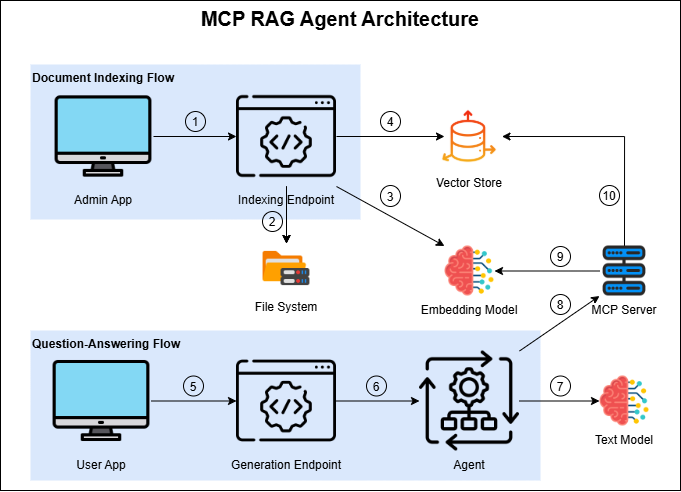
The system architecture diagram illustrates two main workflows:
Document Indexing Flow (Setup Phase): Documents are processed, embedded using OpenAI, and stored in MongoDB Atlas Vector Search with appropriate indexing for efficient retrieval.
Question-Answering Flow (Runtime): User queries trigger the LangGraph ReAct agent, which uses MCP tools to search relevant documents via semantic search, then formulates grounded responses based on retrieved context.
Additionally, the system includes a third workflow not shown in the diagram:
- Evaluation Flow (Quality Assurance): The system generates answers for predefined test questions and evaluates them using RAGAS metrics (relevancy, similarity, correctness) to ensure response quality and accuracy.
Project Structure
mcp-rag-agent/
├── data/
│   ├── ingested_documents/         # Source documents (policies)
│   │   └── policies/
│   │       ├── 1 - Remote Working.txt
│   │       ├── 2 - Expenses.txt
│   │       ├── 3 - Annual Leave.txt
│   │       ├── 4 - IT Security.txt
│   │       └── 5 - Sustainability.txt
│   └── evaluation_documents/       # Test cases for evaluation
│       └── expected_behaviour.xlsx
├── evaluation/                     # Automated testing and metrics
│   ├── main.py                     # Main evaluation orchestration script
│   ├── answer_generator.py         # Generates answers using the agent
│   ├── metrics_evaluator.py        # Evaluates answers using RAGAS metrics
│   ├── metrics.py                  # RAGAS metrics wrapper and definitions
│   ├── results/                    # Evaluation output (CSV files)
│   └── README.md                   # Evaluation module documentation
├── src/mcp_rag_agent/
│   ├── agent/                      # LangChain agent implementation
│   │   ├── create_agent.py         # Agent creation and configuration
│   │   ├── prompts/                # COSTAR-based system prompts
│   │   │   ├── __init__.py         # Prompts module exports
│   │   │   └── system_prompt.py    # System prompt definitions
│   │   ├── utils/                  # Agent utility functions
│   │   │   ├── mcp_rag_agent_creator.py  # MCP-enabled agent factory
│   │   │   └── rag_agent_creator.py      # Base RAG agent factory
│   │   └── README.md               # Agent module documentation
│   ├── embeddings/                 # Document processing and indexing
│   │   ├── embedding_generator.py  # OpenAI embeddings generation
│   │   ├── index_documents.py      # Document indexing pipeline
│   │   ├── semantic_search.py      # Vector similarity search
│   │   ├── hybrid_search.py        # Hybrid search combining vector + text
│   │   └── README.md               # Embeddings module documentation
│   ├── mcp_server/                 # MCP server implementation
│   │   ├── server.py               # FastMCP server with tools
│   │   ├── tools.py                # MCP tool implementations
│   │   └── README.md               # MCP server documentation
│   ├── mongodb/                    # Database client
│   │   ├── client.py               # MongoDB wrapper with vector search
│   │   └── README.md               # MongoDB module documentation
│   └── core/                       # Configuration and utilities
│       ├── config.py               # Environment-based configuration
│       └── log_setup.py            # Logging configuration
├── tests/                          # Tests
│   └── unit_tests                  # Unit tests
├── .env.example                    # Example environment configuration
├── .gitignore                      # Git ignore patterns
├── requirements.txt                # Production dependencies
├── requirements_dev.txt            # Development dependencies
├── setup.py                        # Package installation configuration
├── start.cmd                       # Windows startup script
└── README.md                       # This file
Quick Start
Prerequisites
- Python 3.8+
- MongoDB Atlas account (for vector search)
- OpenAI API key
Installation
- Clone the repository:
git clone <repository-url>
cd mcp-rag-agent
- Run the
startfile:
# Windows:
start.cmd

# Linux/macOS:
chmod +x start.sh
./start.sh
This script will automatically:
- Install and upgrade pip
- Create and activate a virtual environment
- Install all development dependencies
- Install the package in editable mode
- Configure environment variables:
cp .env.example .env
# Edit .env with your settings
Setup Workflow
- Index documents:
python -m mcp_rag_agent.embeddings.index_documents
This will:
- Read documents from
data/ingested_documents/ - Generate embeddings using OpenAI
- Store vectors in MongoDB Atlas
- Create vector search index
- Test the MCP server (optional - requires Node.js):
mcp dev src/mcp_rag_agent/mcp_server/server.py
This opens a UI to test the search_documents tool and other resources.
- Run the agent:
python -m mcp_rag_agent.agent.create_agent
This runs a demo query showing the agent in action.
- Evaluate performance (optional):
python evaluation/main.py
Runs automated evaluation using RAGAS metrics.
Usage Examples
Basic Agent Query
import asyncio
from mcp_rag_agent.agent.create_agent import create_mcp_rag_agent
from mcp_rag_agent.agent.prompts import system_prompt
from mcp_rag_agent.core.config import config

async def main():
    # Create agent
    agent = await create_mcp_rag_agent(
        system_prompt=system_prompt,
        config=config
    )

    # Query the agent
    result = await agent.ainvoke({
        "messages": [{
            "role": "user",
            "content": "What is the remote working policy?"
        }]
    })

    # Get the answer
    answer = result["messages"][-1].content
    print(answer)

asyncio.run(main())
Direct Semantic Search
import asyncio
from mcp_rag_agent.mongodb.client import MongoDBClient
from mcp_rag_agent.embeddings.embedding_generator import EmbeddingGenerator
from mcp_rag_agent.embeddings.semantic_search import SemanticSearch
from mcp_rag_agent.core.config import config

async def main():
    # Setup
    mongo_client = MongoDBClient(config.db_url, config.db_name)
    mongo_client.connect()

    embedder = EmbeddingGenerator(
        api_key=config.model_api_key,
        model=config.embedding_model
    )

    search = SemanticSearch(mongo_client, embedder)

    # Search
    results = await search.search(
        query="annual leave entitlement",
        limit=3
    )

    for doc in results:
        print(f"File: {doc['file_name']}")
        print(f"Score: {doc['score']:.3f}")
        print(f"Content: {doc['content'][:200]}...\n")

    mongo_client.disconnect()

asyncio.run(main())
Hybrid Search (Recommended)
import asyncio
from mcp_rag_agent.mongodb.client import MongoDBClient
from mcp_rag_agent.embeddings.embedding_generator import EmbeddingGenerator
from mcp_rag_agent.embeddings.hybrid_search import HybridSearch
from mcp_rag_agent.core.config import config

async def main():
    # Setup
    mongo_client = MongoDBClient(config.db_url, config.db_name)
    mongo_client.connect()

    embedder = EmbeddingGenerator(
        api_key=config.model_api_key,
        model=config.embedding_model
    )

    hybrid = HybridSearch(
        mongo_client=mongo_client,
        embedding_generator=embedder,
        default_collection=config.db_vector_collection
    )

    # Perform hybrid search (combines semantic + keyword matching)
    results = await hybrid.search(
        query="What are the sustainability initiatives?",
        limit=5,
        semantic_weight=0.7  # 70% semantic, 30% keyword (default)
    )

    for doc in results:
        print(f"RRF Score: {doc['rrf_score']:.4f}")
        print(f"Vector Rank: {doc['vector_rank']}, Text Rank: {doc['text_rank']}")
        print(f"Content: {doc['content'][:200]}...\n")

    mongo_client.disconnect()

asyncio.run(main())
Indexing New Documents
import asyncio
from mcp_rag_agent.embeddings.index_documents import index_documents
from mcp_rag_agent.core.config import config

async def main():
    await index_documents(
        directory_path="data/ingested_documents",
        config=config
    )

asyncio.run(main())
Module Documentation
Each module has detailed documentation:
- Agent: LangGraph ReAct agent with MCP integration
- MCP Server: FastMCP server providing RAG tools
- MongoDB: Database client with vector, text, and hybrid search capabilities
- See SEARCH_GUIDE.md for detailed comparison of search methods
- Embeddings: Document indexing, semantic search, and hybrid search
- Evaluation: Automated testing with RAGAS metrics
Configuration
Configuration is managed through two layers:
- Environment Variables (
.env): Most settings are configured via environment variables, although only the external dependencies are included in the.env.samplefile. - Code Configuration (
src/mcp_rag_agent/core/config.py): Some advanced settings are configured directly in theConfigclass, such as text generation parameters (temperature,...)
Note: To modify these settings, edit src/mcp_rag_agent/core/config.py directly. The Config class loads environment variables and provides default values for all configuration parameters.
Key Technologies
- LangChain: Agent framework and orchestration
- Model Context Protocol (MCP): Standardized tool integration
- FastMCP: MCP server implementation
- MongoDB Atlas: Vector storage and search
- OpenAI: LLM and embedding models
- RAGAS: RAG evaluation framework
Development
Running Tests
pytest tests/
Code Structure
- Follow Python best practices and PEP 8
- Use type hints for all functions
- Add docstrings to public APIs
- Keep modules focused and cohesive
Adding New Features
New MCP Tool:
- Add
@mcp.tool()decorated function inserver.py - Document in MCP server README
- Test with
mcp dev
- Add
New Document Type:
- Update
index_documents.pyto handle new format - Ensure metadata is preserved
- Re-index documents
- Update
New Metric:
- Add to
evaluation/metrics.py - Update evaluator to compute and save metric
- Document in evaluation README
- Add to
Evaluation
The project includes comprehensive evaluation tools using RAGAS:
python evaluation/evaluator.py
Metrics computed:
Results are saved to evaluation/results/ with timestamps.
Troubleshooting
Common Issues
MongoDB connection fails:
- Verify MongoDB Atlas cluster is running
- Check IP whitelist in Atlas
- Validate connection URI in
.env
MCP server won't start:
- Ensure MongoDB is connected
- Check OpenAI API key is valid
- Verify all dependencies are installed
No search results:
- Run
index_documents.pyto populate database - Check vector index exists in MongoDB Atlas
- Verify embedding dimensions match
Agent doesn't call tools:
- Check MCP server is accessible
- Review system prompt encourages tool usage
- Increase model temperature if needed
Evaluation errors:
- Ensure
expected_behaviour.xlsxexists - Check OpenAI API quota
- Verify evaluation model is accessible
Performance Considerations
- Indexing: ~1-2 seconds per document (depends on document size)
- Query: ~2-5 seconds per query (embedding + search + generation)
- Vector Search: Sub-second for collections up to 100K documents
- Batch Operations: Use
insert_documents()for bulk indexing
Best Practices
- Prompt Engineering: Use COSTAR framework for all prompts
- Error Handling: Always handle connection failures gracefully
- Logging: Use structured logging for debugging
- Testing: Run evaluation after significant changes
- Vector Index: Create during setup, not runtime
- Connection Pooling: Reuse MongoDB client instances
- API Rate Limits: Implement exponential backoff for OpenAI calls
Security
- Never commit
.envfile to version control - Rotate API keys regularly
- Use MongoDB Atlas IP whitelisting
- Implement rate limiting for production deployments
- Sanitize user inputs before processing
Contributing
- Fork the repository
- Create a feature branch
- Make your changes
- Add tests for new functionality
- Update documentation
- Submit a pull request
License
MIT
Установка RAG Agent
У этого сервера нет опубликованного пакета — он собирается из исходников. Открой репозиторий и следуй инструкции в README.
▸ github.com/luisrodriguesphd/mcp-rag-agentFAQ
RAG Agent MCP бесплатный?
Да, RAG Agent MCP бесплатный — установка в пару кликов через Unyly без оплаты.
Нужен ли API-ключ для RAG Agent?
Нет, RAG Agent работает без API-ключей и переменных окружения.
RAG Agent — hosted или self-hosted?
Доступен hosted-вариант: Unyly запускает сервер в облаке, локальная установка не обязательна.
Как установить RAG Agent в Claude Desktop, Claude Code или Cursor?
Открой RAG Agent на unyly.org, выбери вкладку своего клиента (Claude Desktop, Claude Code, Cursor) и нажми Install — конфиг сгенерируется автоматически, без правки JSON.
Похожие MCP
Fetch
Web content fetching and conversion for efficient LLM usage.
AWS KB Retrieval
Retrieval from AWS Knowledge Base using Bedrock Agent Runtime.
 автор: modelcontextprotocol
Spring AI MCP Server
Provides auto-configuration for setting up an MCP server in Spring Boot applications.
llm-analysis-assistant
A very streamlined mcp client that supports calling and monitoring stdio/sse/streamableHttp, and can also view request responses through the /logs page. It also
 автор: xuzexin-hz
Compare RAG Agent with
Не уверен что выбрать?
Найди свой стек за 60 секунд
Автор?
Embed-бейдж для README
Похожее
Все в категории ai