
Server For Power BI
БесплатноНе проверенEnables exploring Microsoft Fabric / Power BI workspaces and semantic models, and executing ad-hoc DAX queries.

Описание
Enables exploring Microsoft Fabric / Power BI workspaces and semantic models, and executing ad-hoc DAX queries.
README
CodeQL Ask DeepWiki MIT License
Model Context Protocol (MCP) server for exploring Microsoft Fabric / Power BI workspaces and semantic models, and for executing ad‑hoc DAX queries.
🔐 OAuth/Entra ID support. Integrates with LibreChat and other OAuth-enabled clients, with a choice of On-Behalf-Of or custody authentication.
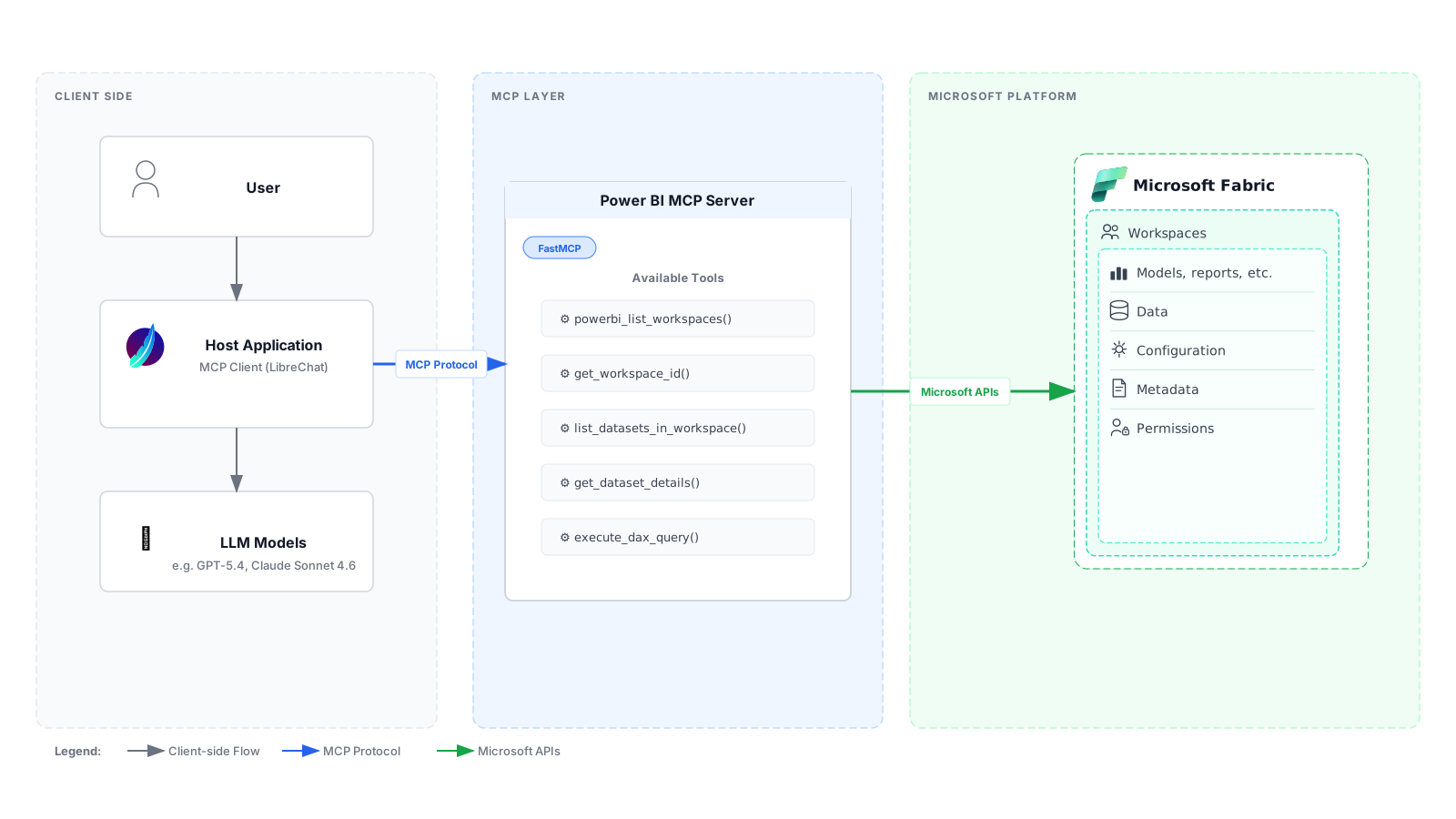
Architecture Overview
Features
| Tool | Purpose |
|---|---|
powerbi_list_workspaces() |
List workspaces the signed-in user can access. |
get_workspace_id(workspace_name) |
Get the workspace ID for a given workspace name. |
list_datasets_in_workspace(workspace_id) |
Enumerate datasets in a workspace. |
get_dataset_details(workspace_id, dataset_id) |
Retrieve dataset (semantic model) metadata and structure via DAX introspection |
execute_dax_query(workspace_id, dataset_id, dax_query) |
Run a DAX query against a dataset using the Execute Queries API. |
Transport Modes
🌐 HTTP Transport with OAuth (Recommended for Production)
- Full Entra ID/Azure AD authentication
- JWT token validation with JWKS
- On-Behalf-Of or custody authentication for Power BI access
- Role and scope-based authorization
- Claims challenge support for conditional access
- Perfect for LibreChat integration
💻 STDIO Transport (Local Development)
- Simple bearer token authentication
- Direct Power BI API access
- Suitable for local testing with MCP clients
Requirements
- Python 3.12+
- uv (fast Python package/project manager)
- For HTTP mode: Azure AD app registrations with OAuth configured
- For STDIO mode: Power BI access token
Development
Code Quality Tools
This project uses Ruff for linting and formatting, ty for type checking, and pytest for tests.
Install development dependencies:
uv sync --locked --extra dev
Run the checks CI runs:
uv run ruff check .
uv run ruff format --check .
uv run ty check
uv run pytest
Dependencies
uv.lock is tracked. It names the exact version of everything that goes into a
release, so a build from a given commit installs what that commit was tested
with — the container build and CI both use it, and both fail rather than
re-resolve if it has drifted from pyproject.toml.
Upgrading is therefore a deliberate commit:
uv lock --upgrade      # or: uv lock --upgrade-package <name>
uv sync --extra dev
Then run the checks above before committing the new uv.lock. ty and ruff
are pinned exactly in pyproject.toml because both are pre-1.0 and change what
they accept between releases; moving either should be its own change, with
whatever code it newly objects to fixed alongside.
Quick Start
HTTP Mode with OAuth (LibreChat)
- Install dependencies:
uv sync
- Configure environment (copy .env.example):
# Azure AD Configuration
PORT=3001
TENANT_ID=your-tenant-id
AUDIENCE=your-api-app-id

# Authentication mode: obo or custody
AUTH_MODE=obo
ENTRA_CLIENT_ID=your-client-id
ENTRA_CLIENT_SECRET=your-client-secret

# Authorization
REQUIRED_SCOPES=mcp.access
REQUIRED_ROLES=mcp.user

# Logging
LOG_LEVEL=info
- Run the server:
python -m mcp_for_powerbi.server_http
Server starts on http://localhost:3001/mcp
STDIO Mode (Local Development)
Note: STDIO mode now requires OAuth integration. The server expects the Authorization header to be passed via the MCP client.
Run the server:
uv run mcp-for-powerbi
Authentication
OAuth with Entra ID
Both HTTP and STDIO modes use Entra ID OAuth2 with:
- JWT Validation: Verifies token signature, audience, issuer
- Authorization: Validates roles and scopes
Authentication modes
AUTH_MODE selects how the server obtains a token for the Power BI API. The
server will not choose for you: an unrecognised mode, or one whose prerequisites
are missing, stops it at startup.
| Mode | How the Power BI token is obtained | Holds credentials? |
|---|---|---|
obo |
On-Behalf-Of exchange of the caller's token | No |
custody |
The server brokers the user's sign-in and keeps the refresh token | Yes, encrypted |
Both use ENTRA_CLIENT_ID / ENTRA_CLIENT_SECRET, and both present Power BI a
token issued to this server's own registration. Neither accepts a token that
Entra issued for a different resource, which the MCP authorization spec
prohibits.
Which to choose. obo is simpler and stores nothing long-lived; prefer it
where it works. Its limitation is structural: the exchange happens server-side,
so a conditional access policy that applies to the Power BI API but not to the
app the user signed in to fails with AADSTS50158, and the challenge arrives
somewhere the user cannot answer it.
custody exists for that case. The Power BI token comes from an authorization
code redeemed with the user's browser in the loop, so conditional access is
satisfied at sign-in. The cost is that the server holds a refresh token per
user: encrypted at rest, but durable access to Power BI as that user, so treat
the host accordingly.
Custody mode
The MCP client runs an OAuth flow against this server, which runs its own against Entra. Two relationships, and no token crosses a boundary it was not issued for.
client ──/authorize──▶ server ──▶ Entra ──▶ server /callback
client ◀── our code ── server        (Entra's tokens stop here)
client ──/token─────▶ server ── our access + refresh token ──▶ client
Configure PUBLIC_URL, CUSTODY_REDIRECT_URIS and SESSION_ENCRYPTION_KEY
(see .env.example), and add PUBLIC_URL/callback as a redirect
URI on the app registration.
PKCE with S256 is required of clients, redirect URIs are matched exactly,
authorization codes are single use with a 60 second life, and access and refresh
tokens are rotated together so a replayed one is refused. Only digests of the
tokens are stored, so the store never holds a usable credential. Dynamic client
registration is not supported; clients are configured.
When a stored refresh token stops working — revoked, expired, or a policy re-evaluation demanding interaction — the session is dropped and the client receives a 401, prompting a fresh sign-in.
Sharing an app registration. ENTRA_CLIENT_ID may be the same registration
your MCP client already uses, which avoids requesting a new one. Note that Entra
sign-in logs then cannot distinguish the two, and rotating the secret affects
both. Pointing ENTRA_CLIENT_ID at a dedicated registration later is a config
change.
Discovery
Both modes serve RFC 9728 protected
resource metadata at /.well-known/oauth-protected-resource, naming this server
as the authorization server under custody and the Entra tenant under obo, so
a client can discover where to authenticate instead of being configured with it.
Custody also serves RFC 8414 metadata
at /.well-known/oauth-authorization-server. Every 401 carries a
WWW-Authenticate header pointing at the resource metadata.
Client Integration Examples
LibreChat (HTTP with OAuth)
The client points at whoever issues the tokens, which differs by mode.
AUTH_MODE=obo — the client authenticates against Entra:
mcpServers:
  mcp-server-for-powerbi:
    type: streamable-http
    url: http://localhost:3001/mcp
    requiresOAuth: true
    oauth:
      authorization_url: https://login.microsoftonline.com/<tenant-id>/oauth2/v2.0/authorize
      token_url: https://login.microsoftonline.com/<tenant-id>/oauth2/v2.0/token
      client_id: <client-id>
      client_secret: <client-secret>
      scope: "api://<api-app-id>/mcp.access openid profile offline_access"
      redirect_uri: http://localhost:3080/api/mcp/mcp-server-for-powerbi/oauth/callback
AUTH_MODE=custody — the client authenticates against this server, which
holds the Entra credentials, so no client secret is configured here:
mcpServers:
  mcp-server-for-powerbi:
    type: streamable-http
    url: http://localhost:3001/mcp
    requiresOAuth: true
    oauth:
      authorization_url: https://powerbi-mcp.example.com/authorize
      token_url: https://powerbi-mcp.example.com/token
      client_id: librechat
      scope: "powerbi.read"
      redirect_uri: http://localhost:3080/api/mcp/mcp-server-for-powerbi/oauth/callback
The redirect_uri must appear in CUSTODY_REDIRECT_URIS, and
authorization_url must be reachable from the user's browser — set PUBLIC_URL
to the external address if the server sits behind an ingress.
Cherry Studio (STDIO)
{
  "mcpServers": {
    "mcp-for-powerbi": {
      "name": "mcp-for-powerbi",
      "type": "stdio",
      "isActive": true,
      "registryUrl": "",
      "command": "uv",
      "args": [
        "run",
        "--directory",
        "<your_directory>/mcp-server-for-powerbi",
        "mcp-for-powerbi"
      ]
    }
  }
}
Note: MCP client must pass OAuth token via Authorization header.
## Docker Deployment to Azure

- Login to Azure CLI and ACR

```bash
az login
az acr login --name <acr-name>
- Build the Docker image
docker build -t <acr-name>.azurecr.io/mcp-server-for-powerbi .
- Run the image locally for testing
docker run -it --rm -p 8080:8080 \
  -e TENANT_ID=<tenant-id> \
  -e AUDIENCE=<api-app-id> \
  -e AUTH_MODE=obo \
  -e ENTRA_CLIENT_ID=<client-id> \
  -e ENTRA_CLIENT_SECRET=<client-secret> \
  <acr-name>.azurecr.io/mcp-server-for-powerbi
- Push the image to ACR
docker push <acr-name>.azurecr.io/mcp-server-for-powerbi
Error Handling & Troubleshooting
The server raises structured MCP tool errors with detailed suggestions:
Missing Authorization– OAuth token not provided in Authorization header.TokenExpired– obtain a fresh token (user tokens are short‑lived).Unauthorized(401) – token is invalid or lacks required permissions.Forbidden(403) – user lacks permission to the workspace or dataset.NotFound(404) – invalidworkspace_idordataset_id.BadRequest(400) – invalid parameters or DAX syntax errors.TooManyRequests(429) – rate limit exceeded (120 requests per minute).Timeout– network / API slowness (default timeout 30s).
Each error includes:
- Error code and message from the Power BI API
- Context-aware suggestions to help resolve the issue
- Parameter validation for workspace_id and dataset_id (UUID format)
- DAX-specific error analysis with syntax and semantic suggestions
Acknowledgments
This project is built on FastMCP v2 and draws inspiration from the following repositories:
- Inspired by an internal project
- fabric-toolbox/SemanticModelMCPServer
Their approaches to semantic model surfacing and Power BI integration helped shape the tool design here.
Contributors
License
This project is licensed under the MIT License. See the LICENSE file for details.
Disclaimer
This project is an independent, open‑source MCP server for Microsoft Power BI. It is not affiliated with, endorsed by, or sponsored by Microsoft. “Power BI” is a trademark of Microsoft Corporation.
Установить Server For Power BI в Claude Desktop, Claude Code, Cursor
unyly install mcp-server-for-power-biСтавит в Claude Desktop, Claude Code, Cursor и VS Code — сам разбирается с npx, uvx и сборкой из исходников.
Впервые? Поставь CLI: curl -fsSL https://unyly.org/install | sh
Или настроить вручную
Выполни в терминале:
claude mcp add mcp-server-for-power-bi -- uvx --from git+https://github.com/Mitsubishi-Fuso/mcp-server-for-powerbi mcp-server-for-powerbiПошаговые гайды: как установить Server For Power BI
FAQ
Server For Power BI MCP бесплатный?
Да, Server For Power BI MCP бесплатный — установка в пару кликов через Unyly без оплаты.
Нужен ли API-ключ для Server For Power BI?
Нет, Server For Power BI работает без API-ключей и переменных окружения.
Server For Power BI — hosted или self-hosted?
Self-hosted: сервер запускается локально на твоей машине командой из раздела установки.
Как установить Server For Power BI в Claude Desktop, Claude Code или Cursor?
Открой Server For Power BI на unyly.org, выбери вкладку своего клиента (Claude Desktop, Claude Code, Cursor) и нажми Install — конфиг сгенерируется автоматически, без правки JSON.
Похожие MCP
GitHub
PRs, issues, code search, CI status
 автор: GitHub
Filesystem
Secure file operations with configurable access controls.
Memory
Knowledge graph-based persistent memory system.

Unyly Deploy
Deploy sites and MCP servers to Unyly straight from your AI agent
 автор: Unyly
Amap Maps Mcp Server
MCP server for using the AMap Maps API
 автор: duxiaohui
PayMCP
Lightweight payments layer for MCP servers: turn tools into paid endpoints with a two-line decorator. [PyPI](https://pypi.org/project/paymcp/) · [npm](https://w
 автор: blustAI
Template MCP Server
A CLI tool to create a new Model Context Protocol server project with TypeScript support, dual transport options, and an extensible structure
 автор: mcpdotdirect
Supabase
Database, auth and storage
 автор: Supabase
Everything
Reference / test server with prompts, resources, and tools.
Git
Tools to read, search, and manipulate Git repositories.
Compare Server For Power BI with
Не уверен что выбрать?
Найди свой стек за 60 секунд
Автор?
Embed-бейдж для README
Похожее
Все в категории development